

Shopify Development: A Beginner’s Guide to Stores That Actually Perform
Explore our complete guide to Shopify development, covering custom theme building, store performance, mobile responsiveness, security, and everything else beginners need to launch a store that truly delivers results.
The digital marketplace isn’t just the future; it’s happening right now and growing faster than ever. Whether you’re a first-time entrepreneur with a product you believe in or an established brand looking to strengthen your online presence, e-commerce is where the real action is. And if you spent any time exploring that space, chances are you have already come across Shopify.
But here’s what people don’t realize when they are deep into it. There’s a big difference between setting up a basic Shopify store or building one that performs. Simply uploading products and picking a theme won’t be cut anymore.
Shopify development is very important for making sure that people who shop have good experience, on your website.
What is Shopify Development?
Shopify Development means creating, tailoring and improving a store on Shopify. This process is great for a business because it means the business gets a store that’s just right for the business.
The goal is to make your store feel like it was built for your business, not just another template. When customers sense that your store is authentic, it builds trust in your store. That is exactly what sets up your store apart from the other stores that are competing in the same market.
When developers start working, they think about the store from two angles. They look at the frontend, which is what customers see and use, and the backend, which is where everything is taken care of. The backend is where a lot of things happen, like logic and processing and managing inventory, and also connecting with services.
What is a Shopify Developer?

A Shopify developer is someone who builds and customizes online stores on the Shopify platform. But they are not just your average web developer- they know all the ins and outs that how Shopify works from its coding language (called Liquid) to its apps and theme structure. That knowledge lets them create stores that look and function way beyond what you’d get from just dragging and dropping things around.
So, What Do Shopify Developers Actually Work on Every day:
- Making the Store Look Like Your Brand: A good Shopify developer won’t choose a ready-made theme to work on, instead of this they’ll get into the code and make sure everything reflects your brand’s personality.
- Building custom features: Sometimes Shopify built-in tools just don’t cut it. Developers can build custom apps to add things like advanced search filter, loyalty programs, subscription options or connections to your existing business software like CRM.
- Setting Up the Store the Right Way: There’s a lot that goes into a proper store setup- payment options, shipping rules, product organization, SEO basics and analytics. A solid Shopify store setup from the start saves a lot of painful fixes later.
- Writing the Actual Code: By using Liquid with HTML, CSS and JavaScript, developers can build things like interactive product pages, personalized content, and even high-performance storefronts for larger brands.
- Keeping Things Running Smoothly: Launching the store is just beginning, developers also handle bug fixing, keep everything compatible as Shopify updates and make sure the store stays fast and secure over time.
Importance of Shopify Development
Shopify’s default features are a solid start point, but as your business grows, you’ll quickly run into limitations that only a proper custom developer can fix. Here why it matters:
- Unique Branding: A skilled Shopify developer builds a storefront that looks and feels completely yours, not like the hundreds of other stores using the same theme.
- Enhanced Functionality: Not every business fits into Shopify’s features. Whether you need a custom B2B system, a product configurator or advanced integrations, custom development makes it possible.
- Better performance: Speed directly impact conversions. Clean, optimized code means faster load times, lower bounce rate and better google rankings, all of which show up directly in your sales number.
- Scalability: A properly built store grows with your business, whether that means more traffic, new sales channels or international expansion
- Competitive Advantage: A thoughtfully developed store will consistently outperform one left on default setting and that gap only gets wider the longer both store runs.
Important Aspects for Shopify Development
Related walkthrough
Outright Store Introduction and Products


- Performance optimization: Every necessary expects and extra kilobytes slows your store down, and a slow store costs you sales.
- Security: Handles customer data, API keys and third-party app permissions carefully, because one breach can permanently damage customer trust.
- Accessibility: Building a store that works well for everyone, including users with disabilities isn’t just the right thing to do; it also improves your SEO and conversion rate at the same time.
- Mobile responsiveness: More than 60% of e-commerce traffic comes from mobile. If your store doesn’t perform well on a phone, you’re leaving money on the table.
- Version Control: Always use git, work on new features in separate branches and never push untested code to live store, because one careless update can break things for real customers in real time.
A Step-by-Step Approach to Building a Custom Shopify Theme
Building a custom Shopify Theme is a serious project, but it follows a clear and logical process from start to finish:
- Set Up Your Development Environment: Install Shopify CLI and connect to a development store so you have a safe sandbox to build and test everything without touching your live store.
- Start with a base theme: Shopify’s Dawn theme is a modern, performant starting point. Clone it and build on top of it rather than starting from a blank file.
- Build your Liquid templates: Create or modify the template files for your homepage, product pages, collection pages, cart and any other store areas your store needs.
- Adding sections and blocks: Build flexible, reusable sections that let merchants customize page layouts on their own without ever needing to touch the code.
- Style and enhance with CSS and JavaScript: Apply your brand’s visual identity through CSS and then add interactivity and dynamic behaviour through JavaScript where it genuinely improves the experience.
- Test thoroughly: Test across every major browser and device, check your performance metrics, fix any accessibility issues and QA every single page before going live.
- Deploy and Monitor: Push your theme live, watch performance closely in first few days, and have a roll back plan ready just in case something unexpected come up.
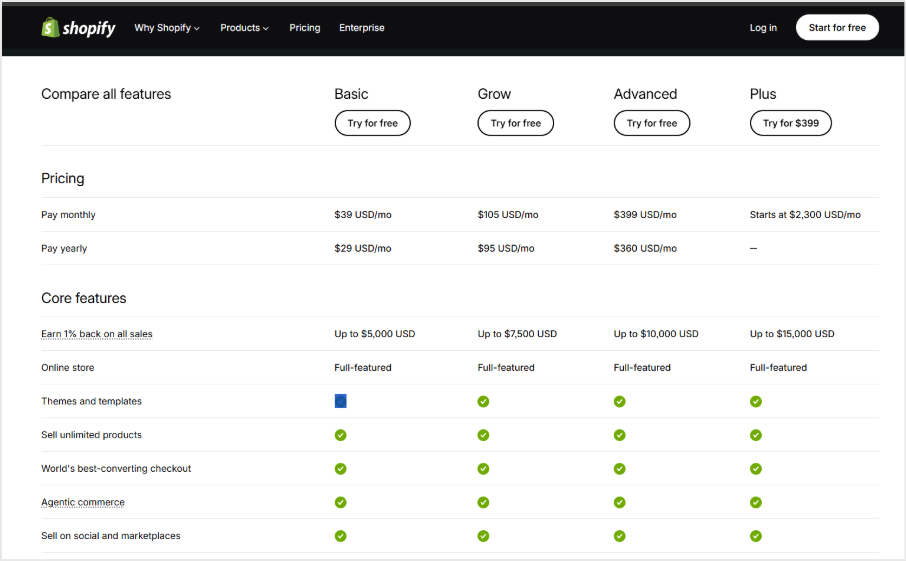
Shopify Development Costing:
Conclusion:
To build a Shopify store that performs, you need to plan, write clean code, and understand what your business needs now and, in the future, as it scales. Fast loading teams and smooth checkouts, mobile friendly design and brand experience that feels intentional; it doesn’t happen by accident.
Whether you are starting from scratch or ready to take your existing store to the next level, the principles in this guide are your roadmap.
What really matters is that a great Shopify store is designed well and purpose built, and that difference shows up right away in your traffic, conversations and long-term growth.
FAQs About Shopify Development
Q. Do I need a developer to start a Shopify store?
Not at all. Shopify’s tools are beginner-friendly enough that you can set up a basic store on your own. However, if you want a store that truly reflects your brand and converts visitors, a developer can really help.
Q. How long does it take to build a custom Shopify store?
A simple custom theme can take about two to four weeks. A fully custom store with advanced features may take anywhere from two to six months. It all depends on how complex your requirements are.
Q. What is Liquid and do I need to learn it?
Liquid is Shopify’s templating language used to create dynamic, customizable store pages. If coding isn’t your strength, a Shopify developer can manage it. However, knowing the basics gives you more control over your store.
Q. What is the difference between a Shopify theme and a custom Shopify build?
The theme is a ready-made template you install and configure through the dashboard. A custom build is coded specifically for your store. The difference lies in how unique, flexible, and high performing your store can be.
Q. Is Shopify good for enterprise-level businesses?
Yes, especially through Shopify Plus, which is designed for high-volume stores with complex operations. It offers deeper customization, higher API limits, and dedicated support that growing businesses really need.

