
Progressive Web Apps Explained: Features, Benefits, and Examples
Explore progressive web apps, their key features, business benefits, real-world examples, and differences from native apps to make an informed choice with care.
Imagine a customer browsing your online store on a mobile phone. They find a product they like, but their internet connection becomes unstable during checkout. Instead of losing their progress completely, they can still access certain previously loaded features and continue where the application allows. This is one of the experiences that well-designed progressive web apps can provide.
Businesses increasingly need digital platforms that are accessible, responsive, and convenient across different devices. However, developing and maintaining separate applications for every operating system can require additional time and resources. Progressive web apps offer another approach by combining familiar web technologies with selected capabilities commonly associated with mobile applications.
But what exactly makes a PWA different from an ordinary website? How does it work, and when should a business consider developing one?
What Are Progressive Web Apps?
Progressive web apps (PWAs) are web applications built using standard web technologies such as HTML, CSS, and JavaScript. They provide an app-like experience through features such as installation, offline access, background functionality, and device integration where supported.
Unlike conventional mobile applications, users generally do not need to visit an app store to access a PWA. They can open it through a browser using a URL and install it on compatible devices when the browser and operating system support installation.
Understanding PWA Meaning
The PWA meaning becomes easier to understand when you break down the word progressive.
It describes an application that improves its functionality according to the capabilities of the user’s browser and device. Someone using a modern browser may receive additional features, while another visitor using a less capable browser can still access the essential website experience.
This approach is called progressive enhancement. Instead of making advanced technology a requirement for basic functionality, developers build a reliable foundation and add supported features on top of it.
How Does a Progressive Web Application Work?
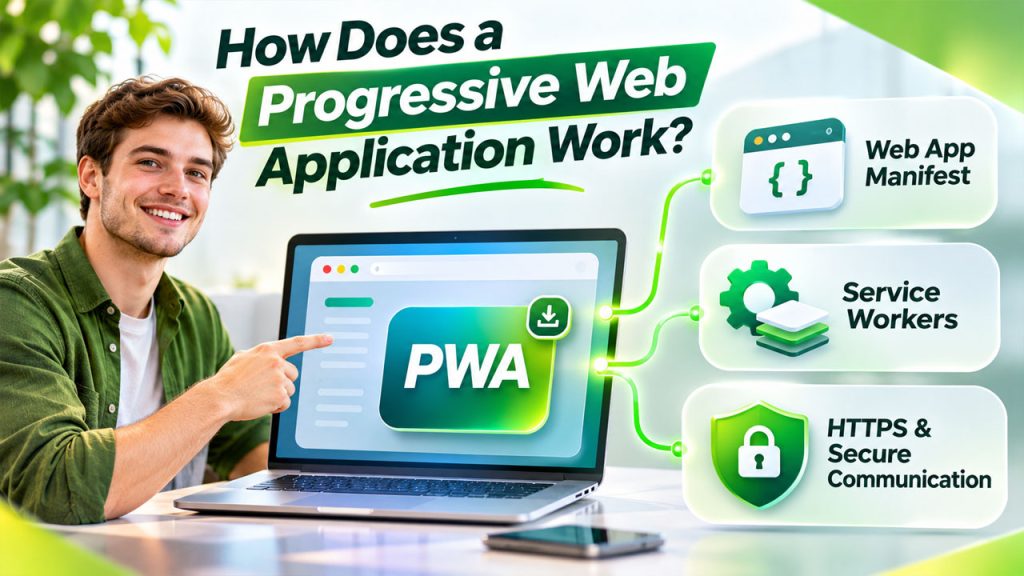
A PWA works through several web technologies that coordinate to deliver an application-like experience.
The browser loads the application just like a regular website. Additional components then manage installation information, offline resources, and background activities.
Three important components make this possible:
1. Web App Manifest
A web app manifest is a JSON file that tells compatible browsers how the application should appear when installed.
It can contain information such as:
- Application name and short name.
- App icons and their sizes.
- Theme and background colours.
- Starting URL.
- Display mode, such as standalone.
These settings help the application appear more like an installed app instead of an ordinary browser tab.
2. Service Workers
A service worker is a JavaScript file that runs separately from the main page and can intercept network requests.
It helps developers implement features such as:
- Caching important resources.
- Displaying offline fallback pages.
- Managing selected background tasks.
- Supporting push notifications where available.
For example, an online learning platform could cache previously accessed lessons so that students can revisit selected materials without a continuous internet connection.
However, offline functionality depends on what developers choose to cache and how the application handles unavailable data.
3. HTTPS and Secure Communication
HTTPS protects information exchanged between the browser and the application server through encryption.
Secure delivery is particularly important when applications handle customer accounts, personal information, or transactions. Developers should also implement authentication, authorization, secure APIs, and appropriate data protection measures.
A PWA is not automatically secure simply because it uses modern web technology. Security must be considered throughout development.
Progressive Web Application Benefits for Businesses
The progressive web application benefits extend beyond installation. They can influence how customers access services and how businesses manage their digital platforms.
Here are some practical advantages:
1. Wider Accessibility Across Devices
A single web-based application can serve users across different operating systems and screen sizes, subject to browser compatibility.
Businesses do not necessarily need separate front-end applications for every platform. This can simplify distribution and reduce the need to maintain multiple versions of the same user experience.
2. Better Experience With Unstable Connectivity
Internet connectivity is not equally reliable everywhere. Customers in remote locations or areas with inconsistent mobile networks may struggle with applications that depend entirely on live server requests.
Progressive web apps can use caching to make selected pages and resources available when connectivity is interrupted.
For example, a field-service employee could reopen previously loaded job details while travelling through an area with limited network coverage.
3. Installation Without Traditional App Store Distribution
Users can access a PWA through a website and install it when supported by their browser and operating system.
This removes the requirement for a traditional app-store download in many situations. Businesses can also share an application through a simple URL, making access straightforward.
4. Potentially Lower Development and Maintenance Complexity
A shared web codebase can reduce duplication when compared with maintaining completely separate applications for multiple platforms.
However, development costs depend on application complexity, integrations, testing requirements, and the features being implemented. A sophisticated PWA still requires careful engineering and ongoing maintenance.
5. Faster Access to Updated Content
Because the application is connected to web infrastructure, businesses can deploy updates through their website rather than relying entirely on users downloading a new app-store release.
Service workers and caching strategies must be configured carefully to prevent users from receiving outdated resources or inconsistent application versions.
PWA vs Native App: Which One Should You Choose?
Choosing between a PWA and a native application depends on your business requirements, target audience, and expected device functionality.
Although both can deliver app-like experiences, their development approaches differ.
| Comparison Factor | Progressive Web App | Native App |
| Development | Built with web technologies | Built using platform-specific technologies |
| Accessibility | Usually accessed through a browser URL | Typically distributed through app stores |
| Installation | Supported browser-based installation | Traditional app installation |
| Updates | Deployed through web infrastructure | Usually distributed through app updates |
| Offline access | Supported through caching and selected features | Can support extensive offline functionality |
| Device integration | Depends on available browser APIs | Generally offers broader platform access |
| Maintenance | Can share a web codebase | May require separate platform-specific development |
| Best suited for | Content platforms, portals, retail, and web-based services | Complex applications requiring deep device integration |
When Should You Select a PWA?
Related walkthrough
This AI Creates Apps and Websites for You | Stitch AI + ChatGPT Guide

A PWA can be a practical choice when:
- Your audience primarily accesses services through browsers.
- You want a shareable application accessible through a URL.
- Your platform needs selected offline capabilities.
- You want to maintain a common application experience across devices.
- Your requirements can be supported by available browser APIs.
When Is a Native Application Better?
A native application may be more appropriate when your product depends heavily on advanced device capabilities, extensive background processing, specialized hardware integration, or platform-specific functionality.
The PWA vs native app decision should therefore be based on functionality rather than development trends. Some businesses may even benefit from offering both approaches.
PWA Examples: Where Businesses Can Use Them
The best way to understand the practical value of progressive web apps is to examine the types of applications that can benefit from this technology.
Here are four useful PWA examples:
1. Online Shopping Platforms
An e-commerce business can build an installable shopping experience with product browsing, saved resources, and selected offline functionality. Customers can access the platform through their browser without necessarily installing a conventional mobile application.
2. Online Learning Platforms
Educational platforms can cache previously accessed lessons, reading materials, and other learning resources. This can help students revisit selected content when their internet connection is unavailable.
3. News and Content Platforms
Publishers can use caching to make selected articles available after an initial visit. Background updates may also help refresh certain content when supported by the browser.
4. Business Management Portals
Companies can develop web-based portals for employees, customers, or partners. Depending on the requirements, these platforms may support dashboards, forms, account access, and selected offline workflows.
These examples illustrate possible implementations rather than guaranteeing that every feature will work identically across browsers.
Challenges to Consider Before Building a PWA
Despite their advantages, progressive web apps are not the right solution for every business.
Consider these limitations before investing in development:
Browser Compatibility
Not every browser supports every PWA feature. Installation and device integration can differ across platforms.
Limited Device Capabilities
Some advanced hardware and operating system features may be unavailable or restricted through browser APIs.
Offline Data Management
Developers must determine which resources can be cached, how updates are handled, and how conflicting data is synchronized.
Security Responsibilities
Authentication, data storage, API protection, and permission management require proper implementation.
User Awareness
Some customers may not recognize that a website can be installed as an application.
These challenges can be addressed through compatibility testing, careful architecture, and realistic feature planning.
Practical Tips for Developing a Successful PWA
Before starting development, businesses should establish what the application needs to accomplish.
Use the following considerations to guide the project:
Start with Essential Functionality
Identify the main tasks users should complete, such as placing orders, accessing accounts, or submitting requests.
Design for Mobile Screens
Create responsive layouts that remain usable across different screen sizes and input methods.
Choose an Appropriate Caching Strategy
Decide which resources should use cache-first, network-first, or another suitable approach.
Plan for Unreliable Connectivity
Provide clear offline messages and avoid presenting outdated information as current.
Test across Browsers and Devices
Check installation, navigation, forms, notifications, and other features on supported platforms.
Monitor Performance and Security
Review loading behaviour, application errors, permissions, and data protection regularly.
Businesses planning a tailored solution can explore custom web application development to understand how application architecture, integrations, and functionality can be designed around specific operational needs.
Conclusion
Progressive web apps provide an alternative way to deliver application-like experiences through the web. Their combination of browser accessibility, installation support, caching, and selected device capabilities makes them useful for many business scenarios.
However, selecting the right technology requires more than comparing features. Businesses should consider their users, application complexity, connectivity requirements, security responsibilities, and long-term maintenance needs.
A PWA can be an effective choice for organizations that want an accessible, web-based application without automatically committing to separate native applications for every platform. The most suitable solution is the one that supports real user requirements while remaining practical to develop and maintain.
OutRight Systems helps businesses explore customized software and web application solutions based on their technical and operational requirements. If you are considering a new application, discuss your project with the OutRight Systems team to evaluate an appropriate development approach.
Frequently Asked Questions
PWA stands for Progressive Web Application. It is a web-based application that uses modern browser technologies to provide selected features commonly associated with installed mobile applications.
They can provide offline access to previously cached resources and selected functionality. However, features that require live server data, such as real-time inventory or account updates, generally need an internet connection.
Neither option is universally better. PWAs are useful for browser accessibility and shared web experiences, while native applications can be preferable when deeper operating system integration or specialized device capabilities are required.
Yes. Compatible browsers and operating systems allow users to install supported PWAs on mobile devices. The installation process and available features vary by platform.
There is no fixed development price. Costs depend on the application's functionality, design complexity, integrations, security requirements, offline capabilities, and ongoing maintenance needs.