
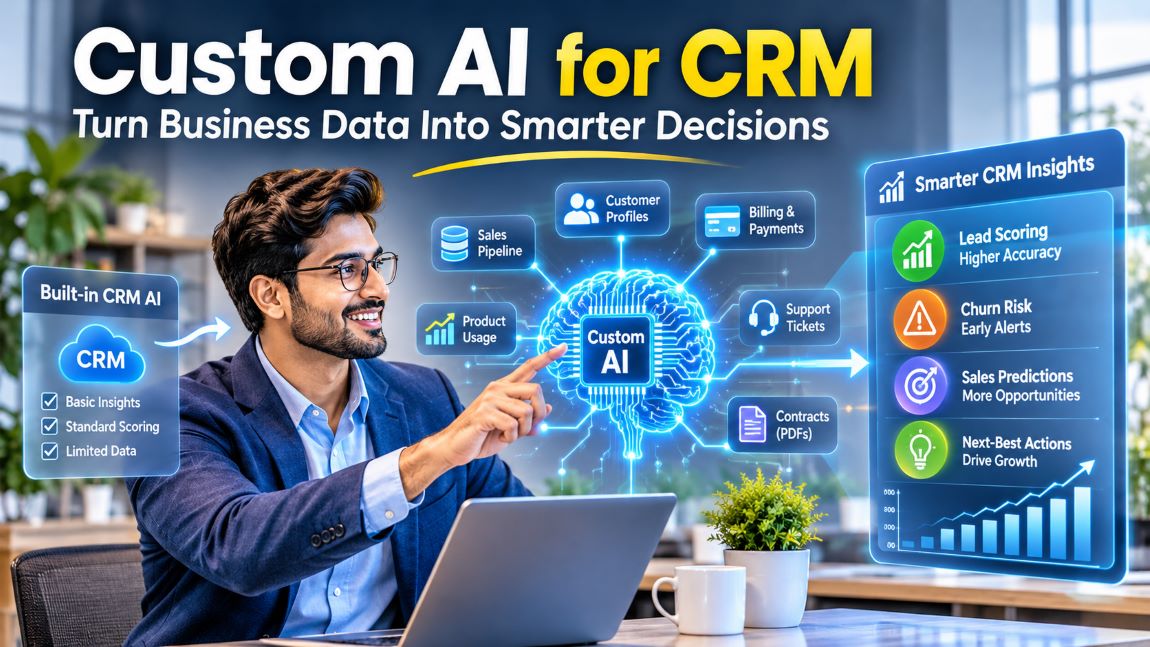
Custom AI for CRM Data: When Built-In AI Features Stop Being Enough
Discover how Custom AI for CRM improves predictions, automation, and business decisions.
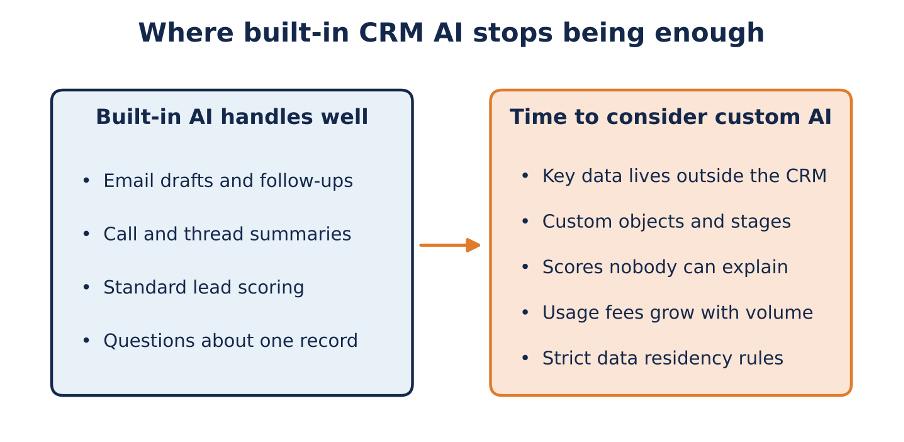
Generic writing and scoring tasks stay with the CRM’s own AI, while company-specific decisions are where custom models start to pay off.
Almost every major CRM now ships with AI included in some form. Salesforce has Einstein and Agentforce, HubSpot has Breeze, SugarCRM has SugarPredict and Zoho has Zia. For day-to-day work these assistants are genuinely useful: they summarize long email threads, draft follow-ups, suggest a next step on a deal and score inbound leads. If your sales process is fairly standard and most of your customer data is already stored in the CRM, the built-in tools are usually the cheapest place to start.
Problems appear once the questions become specific to your business. Suppose you want to know which accounts are likely to cancel after a price increase. A vendor’s scoring model looks at the fields it was designed for, while the signals that predict cancellation in your company may be stored in a support desk, a billing system or a folder of signed contracts. At that point companies start looking at custom AI built on top of their CRM data. Some build it with an internal data team, and others bring in an outside partner such as the Anadea team, which develops AI software that connects to the systems a business already runs. The sections below explain how to tell when the built-in features have stopped paying off and what a custom build usually involves.
How Is AI Used in CRM Platforms Today?
Inside most CRMs, AI shows up as three kinds of features. Generative help comes first: email drafts, call summaries and record updates written from meeting notes. Next is predictive scoring for leads and opportunities. Newest of all are assistants and agents that answer questions about records and perform simple actions on them.
Because the vendor trained and tuned these features for its own data model, they work out of the box. They respect the permissions you already configured, they need no extra infrastructure and they get updated without any effort on your side. For a sales team of twenty people with reasonably clean data, that package often covers what the team needs, and paying for custom development would be hard to justify.
So which CRM has the best AI? The honest answer depends less on the vendor than on where your data lives and how unusual your process is.
When Do Built-In CRM AI Features Stop Being Enough?
Built-in features usually stop being enough in five situations, and the most common one is that the data you need is stored outside the CRM. Built-in AI works with the records stored in the platform’s own objects, and some vendor features keep their data apart even from the CRM itself. Einstein Activity Capture is a good example: according to Salesforce Ben, the emails and events it captures are stored on AWS servers outside the core Salesforce database, they can’t be used in standard Salesforce reports, and they are kept for six months by default (24 months on paid versions). If your best predictors are product usage logs, support ticket history or contract terms in PDF files, a native model has no access to them.
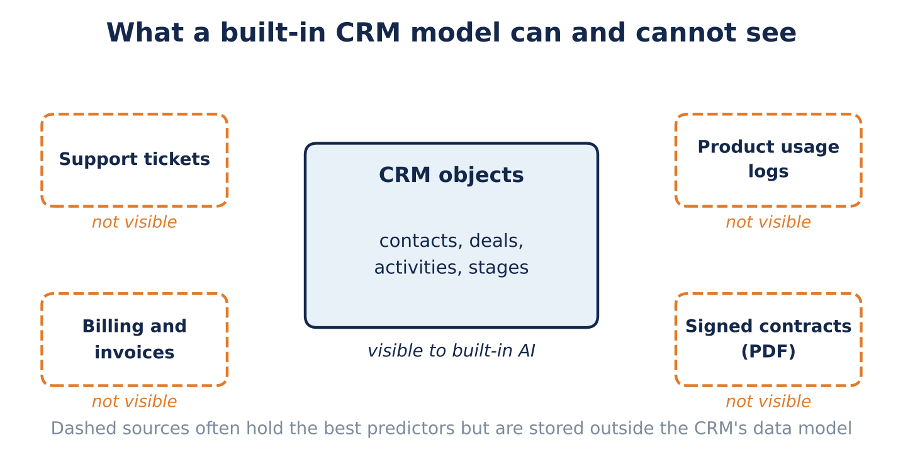
Built-in models work with the CRM’s own objects, while many churn and upsell signals are kept in other systems.
The second situation is a process that doesn’t match the standard funnel. Insurance renewals, field service contracts and B2B sales through several levels of distributors often run on custom objects and custom stages. However, generic models assume a lead becomes an opportunity and the opportunity closes as won or lost. When your business tracks five other states that matter more, the scores drift away from reality, and reps quietly stop looking at them.
The third is trust. A lead score of 87 with no explanation gives a sales manager nothing to act on, and most built-in tools don’t let you retrain the model on your own definition of a qualified lead. Once the team has seen a few high-scoring leads go nowhere, the score loses its value regardless of how accurate it is on average.
The last two concern cost and compliance:
● Usage-based pricing. Several vendors now charge per conversation, per agent action or through a pool of AI credits. At low volume that model is convenient. With thousands of automated actions a month, the bill can grow faster than the cost of running a model you control, so the numbers deserve a check before you scale.
● Data control. Healthcare, finance and companies working under GDPR often need to know exactly where customer data is processed, which model processes it and how long prompts and outputs are logged. A packaged feature may not give you that level of detail or the option to choose a region.
How Does Built-In CRM AI Compare to Custom AI?
Related walkthrough
Chapter 2: Advanced CRM Training – Builder, Studio, and Relationships
Built-in AI wins on setup time and price at low volume, while custom AI wins on data coverage and control. The table below shows the differences in more detail.
| Criterion | Built-in CRM AI | Custom AI on CRM data |
| Data it can use | Records stored in the CRM’s own objects | CRM records plus billing, support, product usage and documents |
| Time to first results | Days, often a setting to switch on | Usually two to four months, including discovery and a pilot |
| Control over the model | The vendor decides features, training data and update schedule | You choose the model, retrain it on your own history and can inspect how it scores |
| Cost pattern | Included in the license or billed per action, conversation or credit | Upfront build cost plus hosting, with a low cost per prediction at high volume |
| Best fit | Standard sales processes and generic writing tasks | Decisions that depend on company-specific data or strict compliance rules |
What Does Custom AI Built on CRM Data Look Like?
In most projects, custom AI is a separate system that reads data from the CRM, runs its own models and writes the results back into the CRM. A well-defined CRM implementation plan helps businesses prepare for these integrations by outlining technical requirements, data migration, and system dependencies. People often ask “Can I build my own CRM with AI?”, and for most companies the answer is that they don’t need to, because replacing a working CRM is expensive and rarely necessary, so the CRM stays the system of record.
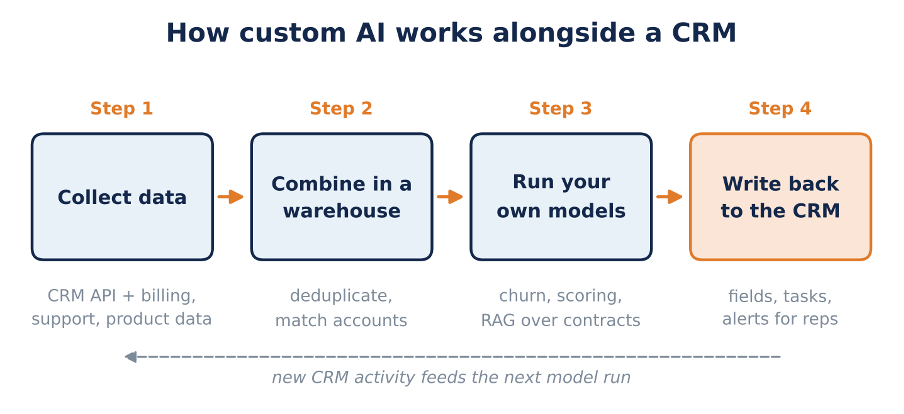
A custom setup keeps the CRM as the system of record and returns predictions to the screens reps already use.
Such a system usually has three parts. An integration service pulls records from the CRM through its API and combines them with data from other systems, such as billing, support or product analytics, in a warehouse. On that combined data the team trains its models, for example a churn model based on your own won and lost history, a lead-scoring model that uses your definition of a good customer or a language model that searches contracts and support tickets through retrieval-augmented generation (RAG). Finally, the results go back into CRM fields, tasks or alerts, so reps see a churn risk or a suggested action in the screens they already use every day.
How much work the integration takes depends on the CRM you run. Salesforce and HubSpot have mature APIs but enforce rate limits that the sync jobs have to respect. SugarCRM supports custom modules and a REST API, and SuiteCRM, being open source, gives you direct access to the database, which makes integration simpler and puts more of the responsibility for security on your team.
Typical projects that justify the effort include:
● Churn or renewal-risk prediction combining CRM activity with product usage and support history.
● A deal-desk assistant. Before a quote goes out, it compares the proposed discount with contract rules and approval limits.
● Account research briefs prepared by an agent from CRM history, the prospect’s website and public filings.
● Duplicate detection across CRM, ERP and marketing tools, which improves every other model trained on the same records.
Is AI replacing CRM, then? Judging by these projects, it isn’t. The CRM remains the place where customer records live, while AI changes how people find and act on that information.
How Do You Start a Custom CRM AI Project Without Overbuilding?
Start with one decision your team makes often and makes poorly today, for example which renewals need attention this month or which inbound leads deserve a call from a senior rep. Besides, a narrow question gives you a clear way to measure success and keeps the first project small.
Then audit the data. Custom AI can’t fix duplicate accounts, empty industry fields or deals closed without a reason code, and a model trained on that data will repeat its gaps. Many projects spend their first weeks on cleanup, and that time pays off later.
Before you replace anything, run the custom model next to the built-in feature for a quarter. If the vendor’s score predicts outcomes almost as well, keep the vendor’s score and spend the budget elsewhere. A typical timeline runs two to four weeks of discovery, four to eight weeks of data engineering and a pilot, and then a gradual rollout to the full team once the results hold up.
Conclusion: Should You Keep Built-In CRM AI or Build Your Own?
For most teams, built-in CRM AI covers the generic work well, and for many companies it will stay the right choice for drafting emails, summarizing calls and basic scoring. Custom AI becomes worth considering when a decision you care about depends on data the CRM can’t see, a process the vendor’s model doesn’t understand or rules about data handling that a packaged feature can’t meet.
A simple test can help you decide. If someone on your team exports CRM data into a spreadsheet every week to answer the same question, that question is a good candidate for your first custom model.