
From Product Photos to AI Product Video Ads: An AI Workflow for Small Teams
Create AI product video ads from product photos using storyboards, shot planning & AI video tools to develop engaging concepts with consistent product details.
A small marketing team has one approved product photo and needs an ad concept that does more than put the product in motion. Give each shot a job. A reveal helps viewers recognize the product. A use scene puts it in a familiar setting. A close-up gives them time to see a detail they might miss in the wider shots.
Creating AI product video ads from existing product photography gives small marketing teams a practical way to explore different advertising concepts without starting every scene from scratch. By combining an approved product image with planned shots, camera movements, and scene transitions, teams can develop short video concepts that communicate product features more clearly.
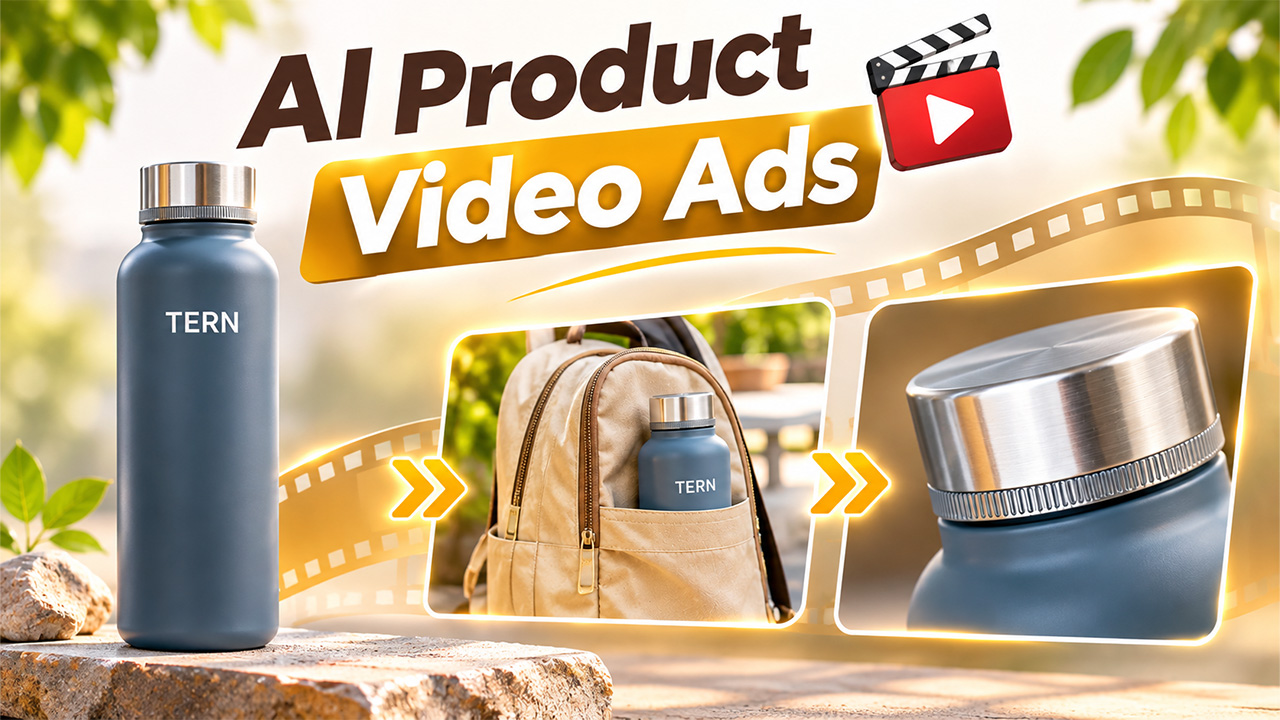
We used one image of TERN, a fictional commuter bottle, to develop a short concept. The slate-blue body, brushed silver cap and small ivory wordmark gave us specific details to compare across the cuts.
Plan Your AI Product Video Ads Shot by Shot
Write the question the viewer should be able to answer after each shot. For the reveal, it is what the bottle looks like. For the use scene, it is how the bottle fits into a commute. For the close-up, it is what makes the cap recognizable. Each answer gives the reviewer a way to judge the sequence. A clear product video storytelling sequence helps creators organize shots, maintain visual continuity, and communicate the intended message.
The quality of the reference image can influence the final AI product video ads, so select a photograph with clear product edges, recognizable branding, and enough surrounding space to support the planned camera movement.
| Planned time | Shot and action | What to check |
| 0:00-0:04 | Reveal. Push in slowly on the upright bottle on limestone. | The cap and base stay in frame. The TERN wordmark remains clear. |
| 0:04-0:08 | Use scene. Slide the camera slightly across a canvas bag with the bottle already in an exterior pocket. | The bottle stays seated. The pocket rim leaves the shoulder and wordmark visible. |
| 0:08-0:12 | Detail. Cut to a close-up of the closed silver cap and upper shoulder. | The knurled band and the seam under the cap are easy to see. |
Give viewers enough time to recognize the bottle before the first cut. The middle shot starts with the bottle already seated in the bag. This keeps the idea readable as soon as the scene opens and gives the frame a clear pocket edge to show where the bottle sits.
Build an AI Product Video Ad Workflow Around Your Storyboard

Choose a clear photo that shows the cap, shoulder and base in one frame. The TERN reference puts the ivory wordmark just below the shoulder and leaves room around the bottle for a slight push. The narrow band of ridges at the base of the cap is visible in the still, so we had a specific detail to compare with the close-up.
A structured workflow makes AI product video ads easier to plan, generate, and review. Start by defining the sequence, assigning a purpose to each shot, and deciding where the transitions should happen before generating individual scenes.
The product reference for TERN, a fictional commuter bottle with a slate-blue body, a brushed silver cap and an ivory wordmark.
Before generating a use scene, decide which details can sit behind the bag’s pocket rim. Here, the lower body can disappear while the shoulder, cap and wordmark still identify the bottle. The same rule helps with the final shot. The close-up can leave the wordmark outside the frame because the cap has its own recognizable shape and texture.
Plan the cuts before generating the shots
Related walkthrough
How to Create AI UGC Ads Using Google Flow Agent | Complete Beginner Guide

Use Astorie’s product video tool as a starting point for a photo-led concept. Describe the features that should carry across the ad, then give each shot its own framing and movement. Mark where each scene should cut. A direct cut from the limestone surface to the bench makes the change in setting clear.
Generate the shots separately when the team expects to revise one scene on its own. Put the approved clips in storyboard order on a timeline and connect them with straight cuts. An editor can then replace the pocket shot or adjust the length of the close-up while keeping the approved reveal.
For the TERN concept, we used a single timed prompt and the product photo as the reference. We asked for cuts at four and eight seconds. The roughly 12-second result cut at about 4.17 and 8.25 seconds. That was close enough to judge the flow of the three shots. A deliverable with fixed timing would still need a check against the planned cut points.
Review the product at each cut
Before approving AI product video ads, compare each generated shot with the original product reference. Check the product silhouette, logo placement, color, packaging details, and recognizable features across every scene. Even a visually appealing clip may need revision if the generated product differs from the approved reference.
In the opening shot, the cap and base stayed visible, and the ivory TERN lettering was readable. After the first cut, the bottle appeared in the bag’s front pocket. We had asked for a side pocket. The front placement still conveyed how the bottle could be carried, and the shoulder and wordmark stayed above the pocket rim. A brief that called for a specific bag compartment would require a revised take.
The final shot moved close enough to show the fine ridges and the seam under the cap. Compare that frame with the original photo for the cap shape and finish. In the wide shot, compare the overall silhouette and the spelling of the wordmark. Checking a different detail at each scale makes the review more useful than looking for the same features in every frame. Using AI product video generation techniques can help maintain product appearance and visual consistency across different shots.
Decide what is ready to share
Ask someone to watch the sequence without the storyboard. See whether they can describe the bottle, where it sits in the commute scene and what the close-up draws their attention to. If they miss the middle idea, look at the first frame after the cut. A readable bag and pocket help the use scene make sense immediately.
Share the concept with the source image and a specific note about any change from the brief. For TERN, the pocket placement is worth recording because it affects how closely the shot matches the plan. If the concept goes into a campaign, add the approved message and call to action after the product and timing checks pass.