

7 Best Mobile App Development Tips for Successful Apps
Mobile app development tips with practical guidance on key features, benefits, and challenges. Discover useful tips to compare options and make informed decisions
Building an app is one thing; building one people keep on their phone is a different challenge entirely. With millions of apps competing for the same limited attention span, good mobile app development tips aren’t just nice extras; they’re often the difference between a product that finds real users and one that quietly disappears a few weeks after launch.
Fortunately for you, most of the things that separate an unsuccessful mobile app from a successful one are not magical or special in any sense. These things include making the right decisions regarding who the product is designed for, what problem the app solves, and other aspects, including keeping the initial design and usage process straightforward.
In this blog, we’ll walk through what actually moves the needle, from the planning stage all the way through launch and beyond, so you’re not just building an app; you’re building one that lasts.
Why a Strategy Matters Before You Start Building
It’s tempting to jump straight into features once you have an idea you’re excited about, but that instinct is exactly what trips up most first-time app builders.
The apps that turn out to be successful are built with a strategy serving as the backbone of the entire process, meaning that right from the start, the app creator needs to clarify three main aspects: target audience, problem to be solved by the app, and a way of measuring the effectiveness of the solution.
Neglecting strategy at the beginning leads to the wrong set of features being built and a solution to a problem that may not even exist. The faster your idea comes to fruition, the quicker you find out that your app is failing.
Mobile App Development Tips: Quick Glance
| Tip | Why It Matters |
| Know your audience | Build for a specific person with a specific frustration, not a broad demographic |
| Keep your MVP lean | One sharp core feature beats five half-finished ones |
| Choose the right tech stack | Native for performance, cross-platform for speed and budget |
| Design for simplicity | If it needs a tutorial, it’s a design problem |
| Build security in from day one | Retrofitting costs more than designing it in |
| Test thoroughly before launch | Real devices, not just emulators |
| Plan for updates and feedback | Launch is the start, not the finish line |
Mobile App Development Tips
Related walkthrough
How to Create Gmail API App in the Google Developer Console


Strategy sets the direction, but these mobile app development tips determine whether your app is built well and used once it’s live.
Tip 1: Know Your Audience
Every good app decision traces back to one question: who is this actually for? Not a broad demographic, but a specific person with a specific frustration they feel often enough to want it solved. Spend real time here before writing a single line of code, look at what similar apps get criticized for in their reviews, talk to a handful of people who’d actually use what you’re building, and pay attention to the workarounds they’re already using to cope without you. An app built around a clearly defined user beats one built around a vague idea of “busy professionals” almost every time.
Tip 2: Keep Your MVP Lean
While it might be enticing to include all the features you have come up with when you launch your product for the first time, doing so is always counterproductive. Not only do each of those features add to development time and complexity, but they also increase the number of things that could confuse a user the first time they try out your app and see what it really offers. Successful launches have been able to demonstrate how well their core feature works at solving a particular problem.
Tip 3: Choose the right Tech Stack
How you build your app is just as important as the app itself. Native development using Swift on IOS and Kotlin on Android offers the highest performance with full hardware access, although there will be two distinct code bases to maintain. Cross-platform solutions like React Native or Flutter provide solutions for one-time development on two platforms; however, there is some sacrifice made in native performance in order to achieve that convenience. There is not necessarily one solution that is always “correct”. It all depends on budget, time frame, and whether your application utilizes any platform-specific functions.
Related blog: What Is the Best Software for Mobile App Development? Top 5 Tools
Tip 4: Design for Simplicity
The fact that a user requires an instructional session on how to navigate your application suggests that you have an issue with your design, not your users. Great designs help people understand what to do intuitively, with straightforward navigation, intuitive actions, and the first-time experience leading to getting some actual benefit from using the application after a couple of clicks instead of five screen transitions. It is here where the basic principles of UX design play their greatest role as well, such as intelligent design and visual hierarchy, along with proper interfaces taking into account how people interfaces taking into account how people use their devices in real life.
Tip 5: Build security in from day one
Securing an app is not an afterthought process to do just before going live, but something that should be thought of from day one of creating it. For instance, ensure that all sensitive information in your app is encrypted during transmission as well as storage, use proper authentication mechanisms, handle sessions, and apply best practices such as certificate pinning when dealing with APIs. Another reason this is important is when there are any forms of personal, financial, health, or login information used in your application, as compromising your application leads not only to huge costs to secure it but also to losing the trust needed to have your application downloaded.
Tip 6: Test thoroughly before you launch
No app should go live without being tested across real devices, not just emulators, since screen sizes, operating system versions, and hardware quirks all behave differently in the real world than they do in a simulator. This is where thorough mobile app testing actually earns its place in the process, catching crashes, slow load times, and broken flows before your users do instead of after. Bugs are one of the fastest ways to lose a new user; most people won’t give a glitchy app a second chance; they’ll just delete it and move on. Budgeting real time for testing, not just squeezing it in the final week before launch, consistently separates apps that hold up from ones that don’t.
Tip 7: Plan for Updates and User Feedback
The launch is not the end of the process but rather the beginning of a much longer dialogue with your users. Those apps that can retain their users do so by continuing to communicate with them after launch, by figuring out where they abandon the app, what they wish it did, and what’s silently driving them crazy even if they don’t tell you so explicitly. Continual updating, bug fixes, improvements to flows, and the addition of features requested by your users let them know that you are still actively developing the app, caring for it, and improving it even after it has been launched into the app store. Ignoring this phase is the quickest way to see a successful launch slowly lose its users.
Common Mistakes to Avoid
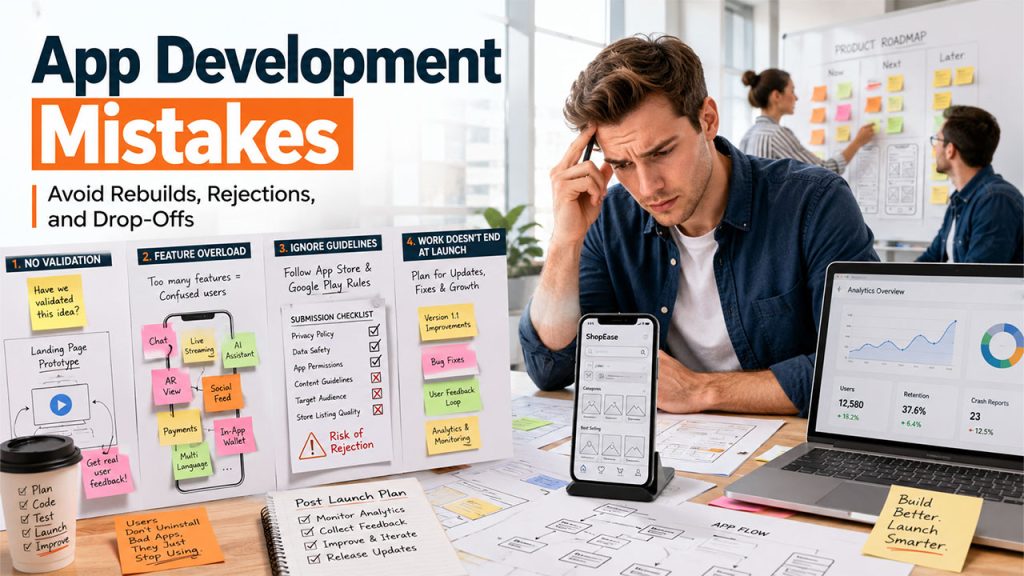
However, even with all of these tips taken into consideration, there are some typical mistakes that could make otherwise perfect applications fail.
The most popular one is not doing any validation whatsoever and just building a whole application on top of an idea that hasn’t been checked yet. Making a landing page or running a test of a prototype on a certain number of people might save you months of useless development if this idea is not validated. The next mistake that leads to failure is trying to include every cool idea that you hear during meetings into your application and adding unnecessary features that reduce the core functionality of your product.
Not following any guidelines of platforms on which you plan to publish is something that always comes as a surprise to most of the people. However, there are certain rules that both the App Store and Google Play have, and finding out about a problem in the last moments after developing your application wastes your time. The last mistake that you should take into account is thinking that developing an application is the end of the work.
Conclusion
Building a successful app was never really about having the flashiest features or the biggest budget; it’s about making the right decisions early and staying consistent with them. Solid mobile app development tips like knowing your audience, keeping your first version lean, and designing around simplicity aren’t glamorous, but they’re what actually separates apps people keep using from ones that quietly fade after a few weeks.
Those applications that succeed don’t try to accomplish everything right away, and this is the main difference between unsuccessful apps and the rest. Successful applications solve only one specific problem for their users and do it well; they are thoroughly tested before their launch and are improved constantly.
Whether you’re building your first app or your fifth, the fundamentals covered here hold up. Get the foundation right, and everything else becomes a lot easier to build on.
Read also: IoT App Development: Complete Guide to Building Connected Apps (2026)
Frequently Asked Questions
Start with a clear target audience and a minimum viable product (MVP). All other mobile app development best practices, technical stack, UI design, security, etc., will come into play after you’ve already validated that your app solves an actual problem.
Depending on its complexity, it may range anywhere from a couple of months for an MVP to six months or more for a fully featured mobile application.
A native app runs faster and provides access to device capabilities but is more expensive to maintain due to two different code bases. Cross-platform frameworks are more affordable and allow saving time and money.
The price tag depends on the complexity of the project, the chosen platform, and the level of design, but an MVP costs considerably less than a fully featured app.
In most cases, failure results from a lack of validation, the creation of something people didn’t ask for, or feature creep that hides the value of an application behind all these additional features.

