
How Adjustable Ergonomic Keyboards Enhance Typing Efficiency at Work
Improve comfort and productivity with adjustable ergonomic keyboards. Learn how better typing posture enhances efficiency and reduces wrist strain at work.
Have you ever noticed your typing slowing down by mid-afternoon even though you started the day sharp? Do you find yourself making more errors toward the end of a long session, hitting the wrong keys, missing letters, having to backspace constantly? Or maybe your hands feel stiff and heavy after a few hours at the keyboard, making every keystroke feel like more effort than it should?
These aren’t just signs of tiredness. They’re signs that your keyboard isn’t working with your body — and that gap between tool and typist is costing you efficiency every single day. Adjustable ergonomic keyboards are designed to close that gap.
Here’s exactly how they make you a faster, more accurate, and more consistent typist at work.
1. Neutral Wrist Position Means Faster, Cleaner Typing
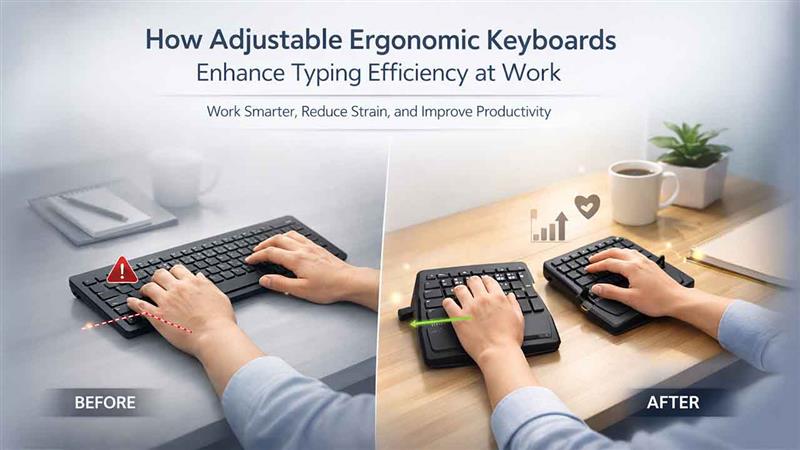
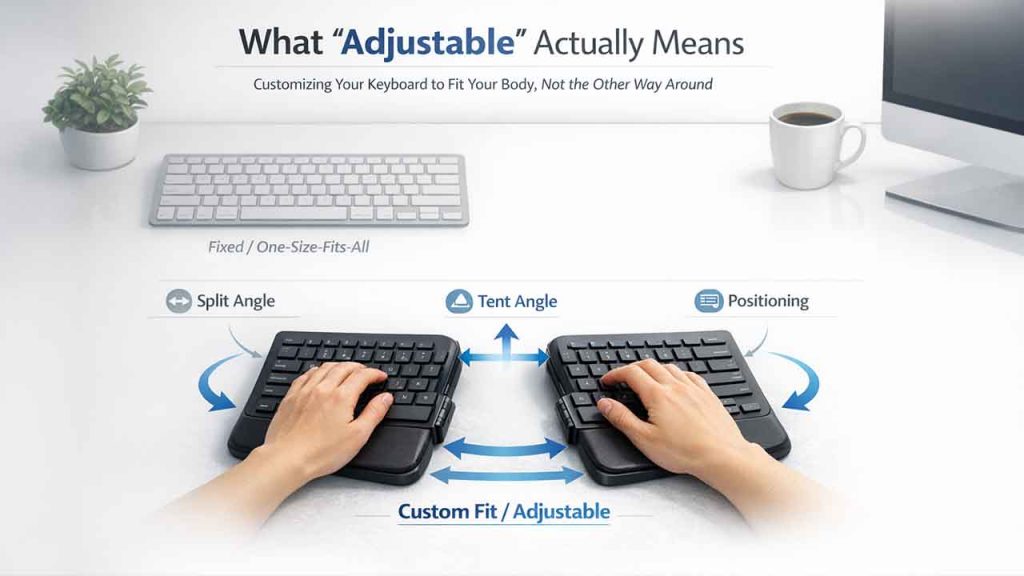
When your wrists are bent at an unnatural angle, which is what most flat keyboards demand, your fingers don’t move as freely or as accurately as they should. Awkward wrist positioning restricts finger movement, slows response time between keystrokes, and forces your hands to work harder than necessary for every single key press. The adjustable ergonomic keyboards from Goldtouch allow you to set both the horizontal split and vertical tent angle to match your natural hand position.
When your wrists are neutral and your fingers are aligned properly over the keys, movement becomes more fluid, keystrokes become more accurate, and your overall typing speed improves, not because you’re trying harder, but because the physical barrier has been removed.
2. You Make Fewer Typing Errors Throughout the Day
Typing errors are rarely random. They increase when fingers are stretching to reach keys from an awkward position, when tension in the hands is causing stiffness, or when fatigue is setting in because the body is working harder than it needs to. All three of these causes trace back to poor keyboard positioning. An adjustable ergonomic keyboard addresses all of them simultaneously.
When the keyboard is set to your specific anatomy, your fingers land where they’re supposed to, consistently and accurately. According to OSHA, musculoskeletal strain from poor workstation setup is one of the leading causes of reduced work performance — and keyboard positioning is a central part of that equation. Fewer positional errors mean a cleaner, faster typing output with less time spent correcting mistakes.
3. Your Typing Speed Stays Consistent All Day
Most people type fast in the morning. By mid-afternoon, speed and accuracy both drop — not because concentration has wandered, but because physical fatigue has been quietly accumulating in the hands, wrists, and forearms since the first keystroke of the day. With a properly adjusted ergonomic keyboard, that physical fatigue builds up far more slowly:
- Your fingers travel a more natural path to each key, reducing unnecessary micro-movements
- Your wrists stay relaxed rather than tensed, which preserves dexterity across longer sessions
- Your forearms don’t fatigue as quickly because rotation and strain are minimised
- Typing speed in the afternoon stays much closer to your morning pace
The result is more consistent output across the full working day — which is what typing efficiency actually means in practice.
4. Less Physical Effort Per Keystroke Adds Up Significantly
Related walkthrough
How to Create AI UGC Ads Using Google Flow Agent | Complete Beginner Guide

On a flat keyboard, reaching certain keys requires your wrists to bend, your fingers to stretch, and your forearms to compensate with every keystroke. Multiply that across thousands of keystrokes per hour and the cumulative physical effort is significant. An adjustable keyboard reduces the effort required per keystroke by positioning the keys closer to where your fingers naturally rest.
Goldtouch keyboards are built around this principle — the split angle and tent angle adjustments bring the keyboard to your hands rather than forcing your hands to reach the keyboard. Over the course of a full working day, less effort per keystroke means less fatigue, more speed, and more accuracy — all three of which directly determine how efficiently you type.
Reducing physical strain directly supports sharper focus and better problem-solving at the workplace, especially during high-pressure decision-making hours.
5. Typing Rhythm Improves With Better Hand Alignment
Experienced typists know that efficiency isn’t just about speed — it’s about rhythm. Consistent, flowing keystrokes with minimal interruption is what fast, accurate typing actually looks like. Poor hand alignment disrupts that rhythm constantly. When your hands are positioned at an unnatural angle, certain keys require deliberate repositioning rather than natural movement. That interrupts flow, creates micro-pauses, and breaks the rhythm that makes typing feel effortless.
A properly adjusted ergonomic keyboard aligns your hands so that movement between keys follows your natural reach patterns. Goldtouch’s adjustability allows every user to find the specific angle where their typing flows most naturally — and that improvement in rhythm has a direct, measurable impact on both speed and accuracy.
6. Long Typing Sessions Stay Productive, Not Just Bearable
For writers, developers, data entry professionals, and anyone else whose work involves extended periods of intensive typing, the difference between a standard keyboard and an adjustable ergonomic one becomes most apparent during long sessions. On a flat keyboard, the quality and speed of typing typically deteriorates noticeably after the first hour or two.
On a properly adjusted ergonomic keyboard, that deterioration is significantly reduced because the physical demands of typing are lower from the start. The session that used to feel draining midway through becomes one you can sustain at a high level for much longer — which is the most direct measure of genuine typing efficiency that exists.
Final Thoughts
Your typing efficiency isn’t just about how much you practice or how fast your fingers move. It’s about whether your keyboard is actually built for the way your hands work. A tool that fights your natural position will always limit your output, no matter how experienced you are.
An adjustable ergonomic keyboard removes that limitation quietly and consistently, session after session. Faster keystrokes, fewer errors, and sustained performance across a full working day, that’s what the right keyboard actually delivers.
Article rating
Was this article useful?
0.0 out of 5 from 0 ratings

