

How to Delete an Instagram Account: A Quick Guide
Learn how to delete an Instagram account permanently and also discover the alternative of deleting the account.
Want to quit social media? Learn how to delete an Instagram account in a few easy-to-follow steps.
In the current digital world, social media platforms play a major role in everyone’s daily life. According to DataReportal, about 5.79 billion social media users were identified, among which the Meta platforms, like Facebook and Instagram, lead, with 56.3% and 54.6% of users, respectively.
Among all the social media platforms, Instagram remains the most popular application, mainly for its photo, video, reels, and story-sharing features. Instagram also offers a global reach to users, along with high user engagement, making it ideal for both personal and business growth. As social media continues to evolve rapidly, understanding current social media trends can help users make better decisions about their digital presence.
However, not every user wants to stay connected and chooses to take a break. Users generally decide to delete Instagram mainly to reduce social media addiction, reduce anxiety, or for other privacy reasons.
Why People Delete Their Instagram
There are various key factors leading users to delete their Instagram accounts. While Instagram is among the most popular social media platforms, it is not beneficial for all types of users.
Some of the major reasons for deleting an Instagram account are as follows
1. Reducing Social Media Addiction
Instagram, like all other social media platforms, is designed to keep users engaged, leading to severe social media addictions. Deleting an Instagram account helps users regain control over their time and reduces screen addiction.
2. Improving Productivity
Students, professionals, and entrepreneurs mainly delete Instagram to improve their focus and productivity. The constant notifications and endless scrolling lead to distractions, especially during work or study hours.
3. Security and Hacking Issues
Users also delete their Instagram accounts after experiencing hacking attempts, spam messages, suspicious activities, and fake profiles. The security concern can also motivate users to permanently delete the platform entirely.
4. Business or Brand Shift
Content creators, influencers, or businesses generally choose to delete Instagram to move to some other social media platform that better suits their audience and goals.
5. Privacy Concern
The privacy concern is among the major factors for users to delete an Instagram account. Social media platforms collect a large amount of user data, which includes browsing habits, location information, interactions, and interests, leading to growing online privacy concerns.
To better understand how online data exposure works and how users can protect themselves, it is important to learn about social engineering cyber threats and prevention techniques.
Difference Between Deleting and Deactivating Instagram
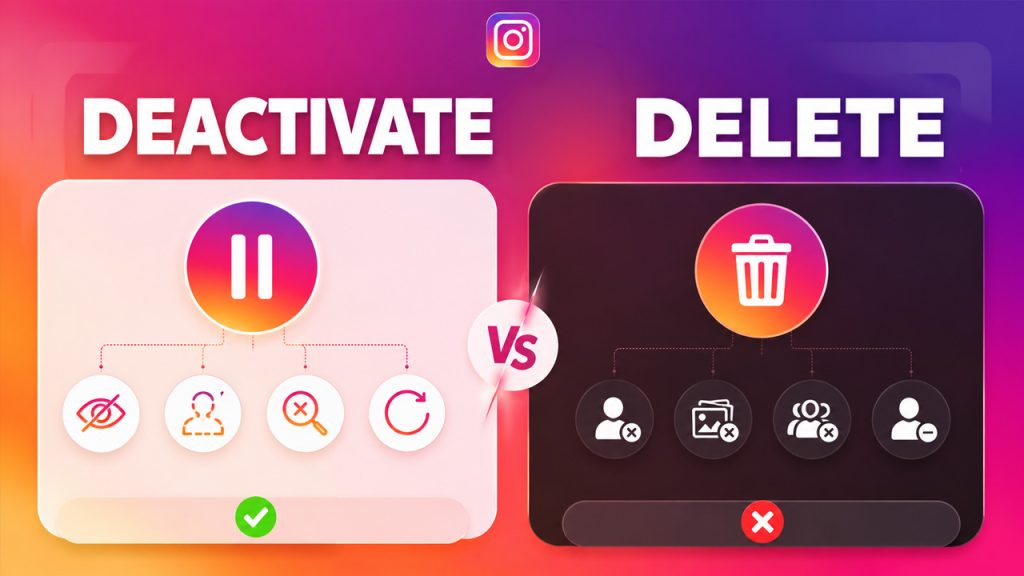
Before permanently deleting an Instagram account, it is essential to understand the difference between deleting and deactivating the Instagram account. Many users get confused between the two. Choosing the right option mainly depends on whether the user wants to take a temporary break from the platform or wants to quit it permanently.
Temporary Deactivation
Temporary deactivation of the Instagram account is ideal for users looking to take a break from social media, without permanently losing their content. When the user temporarily deactivates the account:
- The profile becomes hidden.
- All the comments, photos, likes, and followers disappear temporarily.
- The account cannot be searched.
- The user can reactivate the account simply by logging in at any time.
Permanent Deletion
The permanent deletion of an Instagram account is ideal for users who are certain they no longer want their presence on the platform. When the accounts get permanently deleted:
- The profile is permanently removed.
- All the photos, videos, comments, likes, and followers are erased.
- The username becomes unavailable.
- The user cannot recover the account after a certain deletion period.
Key Considerations Before Deleting Instagram
Before deleting the Instagram account, users need to keep a few key considerations in mind and also follow a few steps.
Some of these key considerations include:
Download Instagram Data
Instagram allows users to download a copy of their data, which includes photos, videos, messages, comments, and profile information.
To download the data, the user can:
Open Instagram Settings > Go to “Your Activity” > Select “Download Your Information” > Enter email address > Wait for the download link.
Removed Linked Account
Before deleting the Instagram account, it is essential to unlink all the accounts connected to the profile, like Facebook, Threads, and business tools, to avoid future login or access issues.
Inform the following
If the user uses Instagram for business, networking, or content creation, it is important to notify the followers before deleting the account.
How to Delete an Instagram Account on Mobile
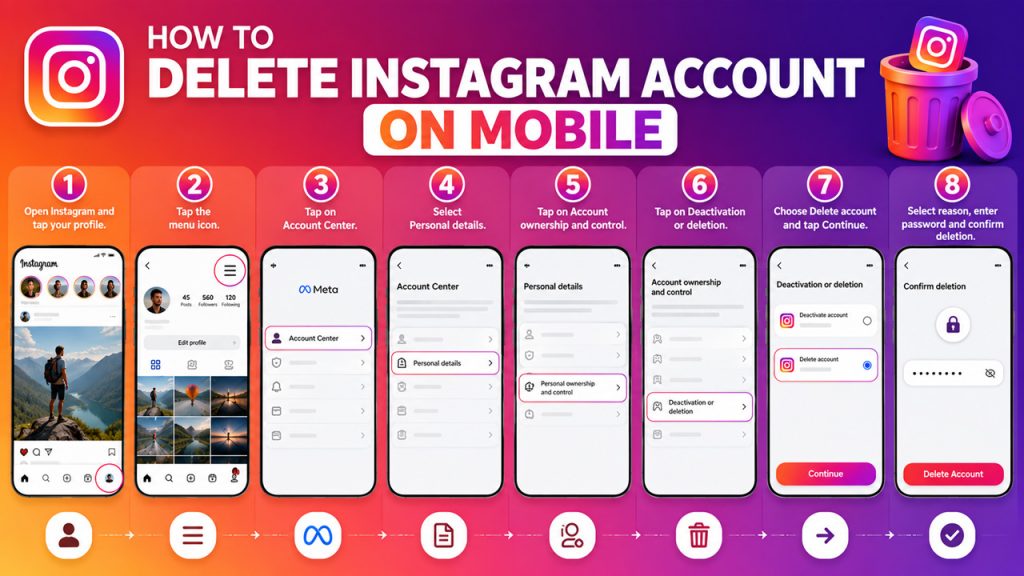
The process of permanently deleting an Instagram account on mobile devices is as follows:
- Step 1: Open the Instagram application and tap on the profile picture, located in the bottom right corner.
- Step 2: Tap on the “Menu” icon (three horizontal lines).
- Step 3: Tap on “Account Center” and select “Personal details”.
- Step 4: Tap on “Account ownership and control”.
- Step 5: Tap on “Deactivation or deletion”.
- Step 6: Select the Instagram account you want to delete and choose “Delete account,” and then tap on “Continue”.
- Step 7: Select the reason for deleting and tap on “Continue”.
- Step 8: Re-enter the profile password, tap on “Continue,” and select “Delete Account” to confirm deletion.
How to Delete an Instagram Account on Desktop
To permanently delete an Instagram account on a desktop, you can follow the step-by-step guide.
- Step 1: Open the web browser and log in to the Instagram account you want to delete.
- Step 2: Click on the “More” menu (three lines), located in the bottom-left corner, and select “Settings”.
- Step 3: Click on “Accounts Center” in the left sidebar to open the “Meta Settings”.
- Step 4: Click on “Personal Details”, located under “Account Settings”.
- Step 5: Select “Account ownership and Control”.
- Step 6: Click on “Deactivation or delete” and choose the account you want to remove.
- Step 7: Select “Delete Account” and click on “Continue”.
- Step 8: Provide a reason for deletion if prompted.
- Step 9: Re-enter your account password, click on “Delete account”, and confirm the process.
How Long Does It Take to Delete an Instagram Account
Related walkthrough
Higgsfield AI Is NOW Inside Blender! 🤯 | See the Before & After

Instagram usually offers a grace period of around 30 days before permanently deleting the account. During the grace period, the account remains hidden, and the user can recover it by logging back in.
After the grace period ends, all the data pr the profile gets permanently erased, and recovery of the account becomes impossible.
How To Recover a Deleted Instagram Account
The process of recovering a deleted Instagram account mainly depends on how far the deletion process has gone. Instagram offers a grace period of about 30 days before permanently deleting all the data related to the profile. During the grace period, the user can restore their access and prevent the account from being deleted.
However, once the grace period ends, the account is permanently deleted, and recovery is no longer possible.
To recover an Instagram account during the deletion grace period, follow these steps:
- Step 1: Open the Instagram app or on the desktop.
- Step 2: Log in using the same credentials.
- Step 3: After logging in, the user will receive a message saying “your account is scheduled for deletion”.
- Step 4: Tap on “Keep Account” or simply continue to log in.
Alternatives to Deleting an Instagram Account
Completely deleting the Instagram account is considered a huge step, especially as it permanently removes all the data, including photos, followers, and activity related to the account. The user can also choose an alternative to deleting the Instagram account if they just want a break from social media.
Some of the popular alternatives to deleting an Instagram account are as follows:
Temporarily Deactivating the Account
- Deactivating is the closest alternative to deleting. This is especially helpful to the user looking for a break but is unsure about permanently quitting.
- By deactivating the account, the profile disappears from search, and photos, likes, and comments remain hidden.
Uninstalling the App
Uninstalling the Instagram application reduces habit-based scrolling and also removes constant temptations. It also lets the user return to the platform simply by reinstalling the application.
Set Screen Time Limits
The user can set smartphone screen control, as most smartphones allow the user to control the duration of app usage. It limits scrolling time, improves focus, and builds healthier digital habits.
Conclusion
Deleting the Instagram account is a huge decision, which is based on the goals, habits, and digital comfort level of the user. While permanently deleting an Instagram account offers a complete break from the platform, it also removes all the data, including photos, videos, and comments related to the account.
The process of deleting an Instagram account is easy. The user can delete their Instagram account easily using a mobile device or on a desktop.
Although the user can choose an alternative to deleting the Instagram account, like temporarily deactivating the account, uninstalling the application, or setting up screen time on the device.
FAQs About How to Delete an Instagram Account
Q. What is the deletion period on Instagram?
The general grace period or deletion period for deleting an Instagram account is about 30 days.
Q. Does Instagram automatically delete inactive accounts?
Instagram may automatically delete or remove inactive accounts after an extended period of inactivity. However, the timeframe of automatically deletion is not fixed.
Q. Does deleting an Instagram account also delete messages?
No, deleting an Instagram account does not delete messages. The messages may still remain visible in the inbox of the recipient, even after account deletion.
Q. Do I need my account password to delete my Instagram account?
Yes, you will require a password verification before allowing deletion of the Instagram account for security reasons.
Q. How can I download my Instagram data before deleting the account?
To download the Instagram data before deleting it, go to Settings > Your Activity > Download Your Information and request a copy of the data.

