

Client Management Interface: Complete Guide, Features & Benefits (2026)
Learn what a client management interface is, how it works, and why businesses use it to centralize client information, improve collaboration, and deliver a better client experience.
Suppose your client asked you about the progress of his project. Now, you have to dig through your inbox to find the latest update, check out the spreadsheet for the budget, open a project tool to see what has been delivered, and what’s left. You took fifteen minutes to reply to a question that should have taken ten seconds. Now, imagine the same situation with 10 clients and it becomes really annoying. It becomes the quiet tax your team pays every single day, just for information that should’ve been sitting in one place to begin with.
This is exactly the gap a client management interface is built to close. By the end of this guide, you’ll understand what it actually is, how it’s different from a regular CRM, and how to choose one that fits the way your business really works.
What Is a Client Management Interface?
A client management interface is a single, centralized place where a business can see everything that matters about an existing client relationship such as active projects, communication history, contact details, budgets, invoices, and outstanding tasks without jumping between four or five different apps just to piece things together to get the full picture.
However, most people confuse this with a sales tool. Well, it isn’t. It doesn’t care about leads or prospects. Rather, it cares about people who already work with you and aims to improve their experience. A client management interface exists to answer questions like these:
- What is actually happening with this client right now?
- Who’s the main point of contact, and who else is involved on their side?
- How much of the budget has been used, and how much is left?
- What did we agree to in our last few conversations?
- Is anything overdue, stuck, or quietly at risk?
You can think of it as an operational memory of business client relationships. This memory lives in one shared, structured place instead of someone’s dm, notes, or head. Any team member can open it whenever they need to look up something quickly.
Key Components of a Client Management Interface

A good client management consists of a number of small features that work together in the background. Here’s what usually makes up the system:
Centralized Client Information: The system keeps records of every contact detail, notes from previous conversations, meetings, and a running history of everything that has happened so far with that client. The client data is organized and structured rather than scattered across sticky notes and inboxes.
When that same centralizing logic gets applied to internal know-how instead of client records, it’s usually called a knowledge management system.
Track Projects and Deliverables with Ease: You get a clear and comprehensive view of what is currently being worked on for that client, what’s already finished, what remains and where each piece actually stands. It tracks projects at every step to keep you informed and updated.
Monitor Budgets and Client Financials: Moreover, it also keeps every visible record of budget and finances like how much a client has been billed, how much they have paid yet, what they still owe you, and how the numbers are changing. You don’t have to pull a manual report every time someone asks you.
Organized Communication History: All conversations you ever had with a client whether in past or present are kept together and made easy to search, so nothing important gets buried in someone’s personal inbox. Emails, chats, calls, or meeting notes; everything is recorded.
Automate Task and Follow-Up Reminders: Even the best teams can sometimes forget tasks like replying to clients or follow-ups when they are dealing with dozens of clients at once. A good system nudges people before they let something slip by.
Team Collaboration Tools: It offers shared visibility to account managers, project lead, and support rep alike. They no longer have to work with different versions of the truth. It improves consistency and maintains uniformity.
These cannot work individually. What makes a client management interface useful is that they all sit in one place instead of six.
Client Management Interface vs Traditional CRM: Key Differences
Businesses often think that they don’t need both. However, in reality, most growing teams eventually do. The CRM scores the client. The client management interface is what holds that client and keeps that relationship alive and organized once they’re actually working together.
| Aspect | Traditional CRM | Client Management Interface |
| Main focus | Leads, deals, and sales pipeline | Active clients and ongoing delivery |
| Key questions it answers | “Will this lead convert?” | “What’s happening with this client right now?” |
| Best used by | Sales teams | Account managers, delivery teams, client-facing staff |
| Stage of relationship | Pre-sale, prospect to close | Post-sale, ongoing engagement |
| Tracks | Deal stage, forecasted revenue, lead source | Projects, budgets, communication, follow-ups |
| Financial visibility | Forecasted or expected revenue | Actual budget used vs. remaining |
| Reporting focus | Sales performance, conversion rates | Delivery status, client health, profitability |
| Team collaboration | Sales reps and sales managers | Cross-functional: delivery, support, finance |
| Value drops off when | The deal closes | Never, it keeps working through the relationship |
| Ideal for | Businesses focused on growing pipeline | Businesses managing multiple ongoing client relationships |
| Common blind spot | No visibility once a deal is won | No visibility into pre-sale pipeline |
Top Benefits of a Client Management Interface
Related walkthrough
How to Register an Application & Create Client ID & Tenant ID with Microsoft Azure


Beyond organizing client information, the right interface helps teams work faster, collaborate better, and strengthen long-term client relationships.
- Save Time by Accessing Client Information Instantly: You don’t have to waste time piecing together information from three different tools before a meeting. Everything that is relevant to a client and their project sits on one screen. So, prep time before meetings drops significantly and can be spent on more meaningful tasks.
- Prevent Missed Follow-Ups and Important Tasks: Follow-ups, deadlines, and small commitments are far less likely to get forgotten when they’re tracked in a shared system instead of someone’s memory or a sticky note.
- Smooth Client Handoffs Between Team Members: When someone goes on leave or leaves the company, the next person doesn’t have to start from scratch or left guessing. They can read the client’s history and pick up right where things are left off.
- More Personalized Client Experience: Clients are far more likely to trust you and your services if they don’t have to repeat themselves again and again. When your team can reference past conversations accurately, it shows that they are attentive and value the relationship.
- Faster Decisions with Real-Time Client Insights: Managers can see budget health and project status without having to wait for someone to compile a report, so problems get caught while there’s still time to fix them.
- Strong Collaboration Across Your Entire Team: Everyone, from account managers to support staff, works off the same information instead of five slightly different versions of it, so nothing gets lost between departments.
None of these benefits are too flashy. They’re quiet, everyday improvements. But add them up over a few months, and the difference in how a team operates becomes obvious.
How to Implement a Client Management Interface Successfully
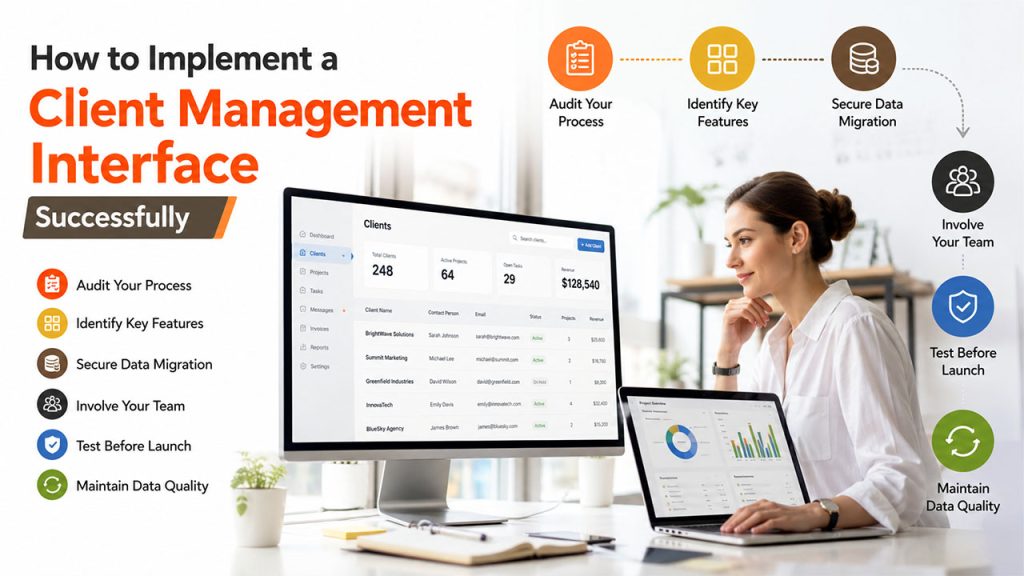
A structured implementation process helps your team adopt the system quickly while avoiding common setup mistakes.
- Audit Your Existing Client Management Process: Assess thoroughly where your client information lives currently, where you face the problem of duplicate entries and what are the gaps you find.
- Identify the Features Your Business Actually Needs: Different businesses need different features. You must decide what is important for your business whether it is tracking budget, communication history, project visibility, or mix of all three.
- Plan a Secure and Accurate Data Migration: Moving years of client history from old spreadsheets and tools into a new system is where mistakes happen if it’s rushed. Map it out carefully before you start migrating your data.
- Involve Your Team Early in the Process: Ask your team what they need to make their work easier because if a system is not used by the staff, it becomes useless and sits idle in a corner. Involve them before making a decision since they’ll be using the system.
- Test the System Before Full Deployment: Run it alongside your old process for a short period, just to catch anything that’s missing or misconfigured.
- Maintain Clean and Accurate Client Data Over Time: Once it’s live, schedule regular reviews to keep information accurate and updated. A client management interface is only as good as the data sitting inside it.
How to Choose the Right Client Management Interface for Your Industry
There’s no single “best” client management interface here. The right choice depends heavily on the kind of work you do.
- Choose a Simple, Scalable Solution for Small Businesses: Start with a simple client interface that is easy to adopt and flexible enough. Don’t go for the one loaded with features that you won’t be needing for another two years.
- Prioritize Compliance for Professional Service Firms (law, accounting, healthcare-adjacent): Compliance and documentation hold an important place in this industry. So, pick the one with a strong record-keeping feature along with control over exactly where your data is hosted.
- Look for Inventory Integration for Retail Businesses: Inventory and order history probably matter more to you than project timelines, so look for an interface that connects to that side of your operations.
Field service businesses face a similar decision, which is why pairing the right CRM and operations software matters just as much as picking the interface itself.
- Select a Platform That Integrates with Your Existing Tools: Always check if the system integrates well with your existing tool stack or not. An interface that doesn’t talk to your invoicing tool or project software just becomes one more disconnected system. This is exactly the problem you were trying to solve in the first place.
Conclusion
A client management interface doesn’t aim to replace your CRM. Rather, it gives your team one honest, organized, and reliable place to save answers for every question that every client eventually asks: “Where do things stand with us?” Things go wrong when that answer takes fifteen minutes instead of ten seconds. Clients start doubting your capabilities and team efficiency. For businesses that deal with more than a handful of active clients, that’s not a small thing. It’s often the difference between a team that feels in control and one that’s constantly catching up.
Frequently Asked Questions (FAQs)
Is a client management interface the same as a CRM?
No. A CRM manages leads and sales pipelines, while a client management interface manages relationships with clients you already have.
Do small businesses really need one?
Once you’re juggling more than a handful of active clients across scattered tools, yes, it starts saving real time.
Can a project management tool double as a client management interface?
Sometimes, but most lack the financial visibility and centralized client history a dedicated interface provides.
How long does implementation usually take?
It varies by business size, but a careful rollout with proper data migration typically takes a few weeks, not months.
What’s the biggest sign a business needs one?
If answering a simple client question takes checking three or more separate tools, that’s the clearest sign.