

Best CRM and Operations Software Combos for Field Service Teams
Discover the best CRM and operations software combinations for field service teams: simple pairings that reduce admin work, speed up jobs, and keep customers happy.
Here is a situation you have probably been in before. A customer calls to check on their appointment. You search three different systems to find the answer. Meanwhile, your tech is on the job, waiting for job details that nobody passed along.
That is not a people problem. That is a systems gap.
Most field service businesses end up running two separate systems, one to manage the customer side and one to manage the job. The problem is not using two tools. The problem is when those two tools do not connect with each other.
Get the pairing right, and your dispatcher knows what sales said they would do. Your tech arrives ready. Your customer gets a smooth ride from first call to final invoice. That is what this guide is about.
What CRM Does vs What Operations Software Does
These two tools serve different purposes. Confusing the two is how businesses waste money.
CRM (Customer Relationship Management) is the customer-facing system. It manages leads, tracks conversations, stores customer details, and helps you win and keep business. It is your sales tool.
Operations software (FSM) is the behind-the-scenes system. It handles scheduling, dispatching, work orders, time tracking, invoicing, and job wrap-up. This is where the actual work lives.
A CRM tells you who the customer is and what they need. Your field service management (FSM) tool tells you when the job is, who is on it, and whether it got done right.
Neither takes over for the other. The best teams use both and connect them so data only gets entered once.
The 4 Most Practical CRM + Operations Combos for Field Service Teams
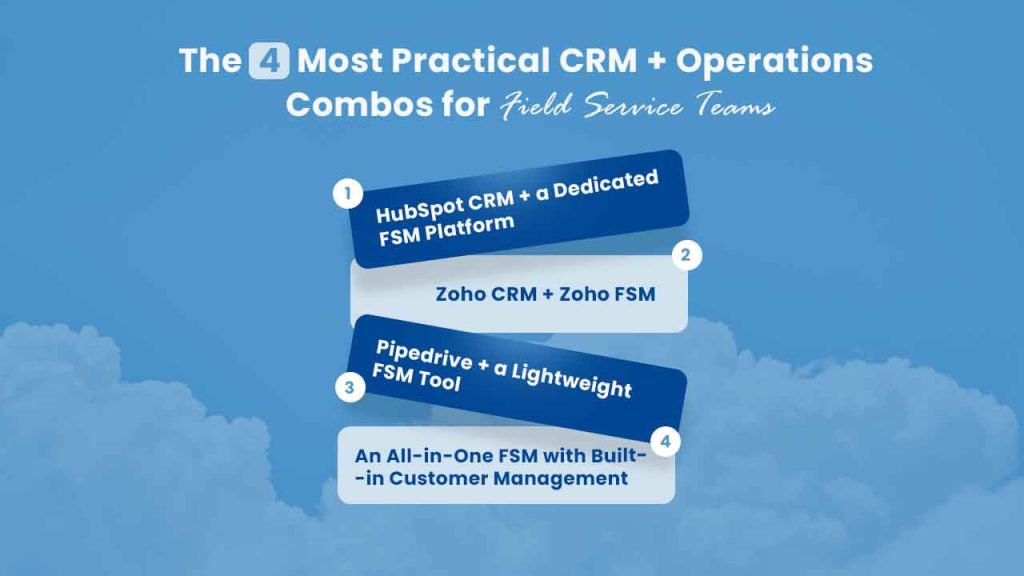
Not every pairing works for every team. Here are four that work well in practice.
1. HubSpot CRM + a Dedicated FSM Platform
HubSpot is popular for a reason. It is easy to use, the free plan is generous, and the follow-up tools are solid for service businesses that are still building their follow-up process and want to Automate Email Follow-Ups efficiently.
What it does well: lead capture from your website, automated email messages, deal tracking, and contact management. If your team is handling estimates, follow-ups, and membership renewals, HubSpot handles that smoothly.
What it does not do: schedule jobs, dispatch workers, or manage work orders. You need a proper FSM tool alongside it.
This combo works best for HVAC, plumbing, and electrical companies that are growing fast and want to build a clear sales workflow without giving up their operations workflow. Check out this breakdown of job scheduling software options to understand what the FSM side of this setup needs to cover.
2. Zoho CRM + Zoho FSM
If you want everything under one roof, Zoho makes a strong case. Their CRM and FSM tools share the same customer database. When a lead converts to a customer, that record flows directly into the operations side; no re-entry is required.
The downside? Zoho is more complicated to set up than most small business owners expect. It works best for businesses that have someone willing to configure it properly. Out of the box, it requires more work.
This combo works best for property management companies and multi-service contractors who handle large customer databases and want a single vendor to work with.
3. Pipedrive + a Lightweight FSM Tool
Pipedrive is built around deal stages; it is clean, visual, and designed to help sales-focused teams track what stage every deal is in. For field service companies that do commercial quotes or larger contracts, it is a smart choice on the CRM side.
The catch: Pipedrive is not built for operations. It has no scheduling or dispatch features. You need to pair it with an FSM tool that handles the job side of the business.
This combo works best for traffic control companies, commercial cleaning businesses, and electrical contractors who have a real sales process for winning bigger contracts before ever dispatching a crew.
4. An All-in-One FSM with Built-in Customer Management
This is where a lot of smaller field service businesses land, and for good reason. If you are under 15 techs and your sales process is mostly repeat business and referrals, a separate CRM might be overkill.
Modern FSM tools have grown past basic scheduling. Many now include customer records, communication logs, quote tracking, and automated reminders all the things a service business needs to manage relationships as it grows. Tools like Field Promax handle work orders, customer records, invoicing, and QuickBooks sync in one place so you are not maintaining separate systems for the same data. For growing teams, this is often the most straightforward choice.
This combo works best for HVAC, pest control, plumbing, and janitorial companies with steady recurring customers who want simplicity over complexity.
What Breaks When Your CRM and Operations Software Do Not Connect
Related walkthrough
The Future of CRM is Here | OutRightCRM
Here is the real cost of a bad pairing or no pairing at all.
Double data entry. Customer information gets entered into the CRM, then re-entered into the job management system. Every re-entry is a chance for mistakes.
Blind dispatching. Your dispatcher sends a tech without knowing what the sales team said, what the customer’s service record is, or what equipment is on site.
Slow invoicing. The job gets done, but billing is delayed because information has to be moved by hand between systems. Cash flow takes the hit.
Broken follow-up. No one sent the review request or the maintenance reminder because the trigger lives in the CRM, but the job data lives in the FSM, and no one connected the two.
None of these are big disasters. They are quiet losses. And they add up. Tracking field employee hours and time-on-job data only helps you if that data connects to your customer record so you know how long every job type actually takes and what it costs.
How to Check Any CRM + FSM Pairing Before You Commit

Before you sign up for anything, run your options through these questions.
1. Does the integration exist natively or only through Zapier?
Native integrations are faster and more reliable. Zapier-dependent connections add a failure point and a monthly cost.
2. Which system owns the customer record?
Pick one as the main record. Having two systems each acting as the main one leads to sync errors and stale data.
3. What does your team actually use?
The best software is the one your techs actually open every day. A complex system that sits unused solves nothing.
4. What accounting software do you use?
QuickBooks is the most common for small businesses in the US and Canada. Make sure your FSM has a clean, two-way QuickBooks sync before anything else.
5. Where does your customer base come from?
Referrals and repeat business? An all-in-one FSM probably covers you. Active inbound leads and commercial quotes? You likely need a real CRM alongside it.
The best field service software tools for contractors will have clear answers to all five of these questions before you even ask them.
A Simple Guide for Choosing the Right Combo for Your Business Size
Forget the feature lists for a second. Think about where your business actually is.
- Solo operator to 3 techs: You do not need a separate CRM. An FSM tool with built-in customer management handles everything. Keep it simple.
- 4 to 15 techs: This is where an all-in-one FSM with strong customer management proves its worth. You might add a simple CRM if you are actively going after new commercial contracts.
- 15+ techs or multiple locations: You likely need separate tools for both. The challenge of managing relationships across a larger team makes sense of having a proper CRM sitting alongside your FSM.
Here is the thing most software guides will not tell you: the most advanced setup is not the best setup. The best setup is the one your whole team uses, consistently, without trouble.
Start there. Add complexity only when you have outgrown what you have.
The Right Tools Make the Whole Job Easier
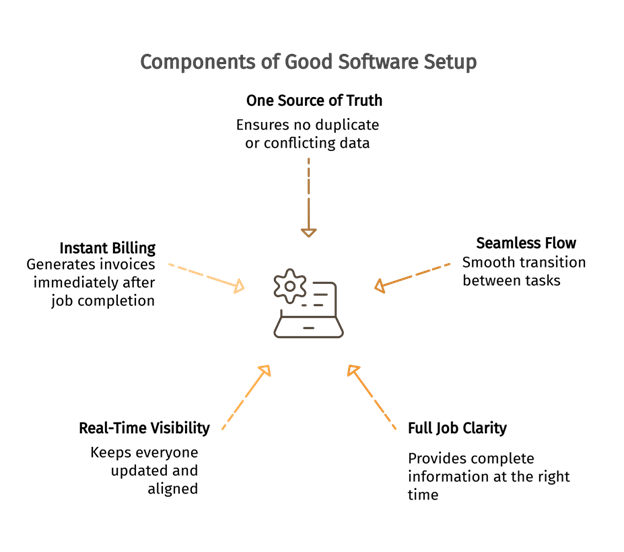
Running a field service business is already hard enough. Your software should remove problems, not create new ones.
A CRM and an FSM serve different purposes; one manages relationships, and one runs operations. When you pick the right pair and connect them properly, the whole business runs better. Dispatchers know what was promised. Techs arrive ready. Customers stay happy. Invoices go out the same day.
That is not a technology dream. That is just what good software setup looks like in practice.
Pick the pairing that fits where you are and where some vendor’s pricing page says you should be.
Related blog: CRM Software Integrated with QuickBooks: A Complete Guide for Growing Businesses
Frequently Asked Questions
Q1. Do field service businesses really need both a CRM and an FSM?
Not always. Smaller businesses with mostly repeat customers can often get by with an FSM tool that includes built-in customer management. Businesses going after new leads or commercial contracts typically benefit from pairing a dedicated CRM with their FSM tool.
Q2. What is the most important integration to look for in a CRM + FSM setup?
A clean, two-way sync with your accounting software, especially QuickBooks, is a must for most US and Canadian field service businesses. After that, look for how customer records move between the two systems when a lead converts to a booked job.
Q3. Can I use Zapier to connect a CRM and an FSM that do not have a native integration?
You can, but it adds a layer of risk and a recurring cost. Zapier-connected workflows can break when either tool updates its API. If a native integration exists, use it. If it does not, treat the lack of a native connection as a red flag before committing.
Q4. How do I know when my field service business has outgrown an all-in-one tool?
Common signs: your sales team needs deal tracking that your FSM does not provide, you are entering customer data in two places because the sync is unreliable, or your marketing team cannot access the customer data they need without asking operations for a manual export. Any of those are signals it is time to look at a dedicated CRM.

