

Editpad for Smarter Writing: A Guide to Its Key Features
Discover Editpad's top AI writing tools, including the paraphraser, summarizer, AI humanizer, grammar checker, plagiarism checker, and email writer. Learn how beginners can use Editpad to write, edit, and improve content efficiently.
The internet is filled with a range of all-in-one writing platforms, and Editpad is one of the popular options. It offers a wide suite of advanced AI-powered writing tools that help you simplify workflow without compromising quality.
However, as a beginner, you might wonder what each tool offered by Editpad does and which ones can assist you with your writing tasks. That’s why we have crafted this beginner’s guide in which we will introduce you to Editpad and its key tools.
Editpad – Overview
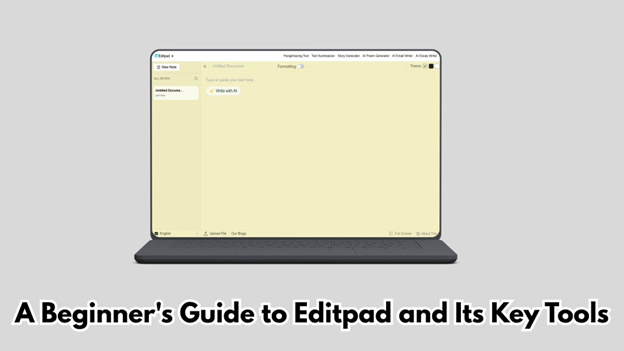
As mentioned earlier, Editpad is a versatile writing platform offering a range of tools that can assist you in paraphrasing, summarizing, humanizing, and proofreading content. It is also capable of generating content, i.e., emails, descriptions, and more.
The platform is available in both free and premium plans. Additionally, multilingual support makes Editpad a suitable option for audiences globally.
How Beginners Can Use Editpad and Its Writing Tools
Related walkthrough
My Digital Journey: From Sending Emails to Mastering ChatGPT

The usage process is very simple and straightforward. Not a single tool offered by Editpad asks the user to first sign up or register. Instead, most require just a three-step procedure to get the job done.
- Enter your text/prompt
- Click the button to start
- Review the output results
Key Writing Tools Offered by Editpad
Below, we have discussed some of the popular writing tools offered by Editpad.
1. Paraphraser
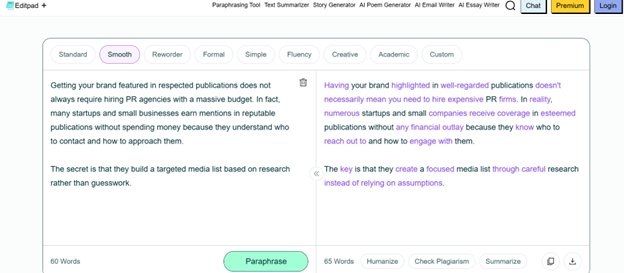
One of the most widely known tools of Editpad is the paraphraser. It effectively restates the given content in a unique and fresh way while keeping the original meaning intact.
During the paraphrasing process, it makes a number of changes to the original content, including word replacement, sentence structure modification, and removal of filler words. A screenshot is attached below as a reference.
When it comes to features, Editpad Paraphraser has a lot to offer. For example, it offers a range of writing modes that will tailor your content tone to a specific style.
The tool allows you to further rephrase the output. This means if you are not satisfied with a specific sentence in the output, click on it, and a drop-down menu will appear showing suggestions to choose from.
How can it assist you?
Editpad paraphrasing tool can help quickly refine write-up quality in terms of word choice and sentence structuring. It aims to rephrase content in a unique, engaging, and fluent manner while preserving the main context.
If you have ended up creating a dull version of an email, product description, social media post, or any other text, there is no need to make manual edits. Just pass your content through this tool to get an improved version in seconds and save valuable time.
Pros:
- Simple to use
- Helps refine content quality
- Adjust tone
- Support for multiple languages
Cons:
- Only 4 modes are available for free
2. Text Summarizer
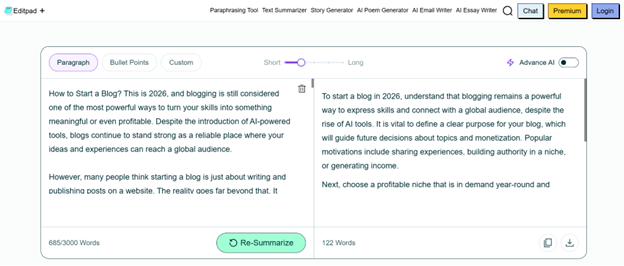
Editpad text summarizer is specifically designed to assist users in condensing lengthy text into precise and concise summaries. It aims to only extract important points from the given text while ignoring other details.
The good thing about this tool is that it works on an abstractive summarization approach. It will not only focus on condensing the entered text but also enhance the word choice and sentence structuring on its own.
So, the output summary will most likely contain new words and phrases that weren’t used in the source text.
The best feature is that this text summarizer allows you to control the output summary length using the length adjuster.
How can it assist you?
Editpad summarizing can prove useful in multiple ways. For instance, it can help you summarize lengthy research material into a concise summary that you can quickly review to understand the main information, eliminating the need to read the entire text from start to end.
Additionally, it also helps in creating executive summaries, abstracts, and conclusions from lengthy text in just a few clicks. You can use it to remove fluff, repetitive information, or filler words from blogs, essays, product descriptions, and other content.
Pros:
- Condense text without changing meaning and compromising quality
- Adjust length as per your specific needs
- Summarize text in different languages
- 3,000-word limit
Cons:
- Advanced AI mode is paid
3. AI Humanizer
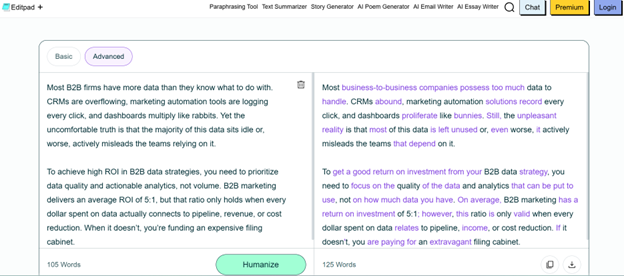
AI Humanizer by Editpad helps users rewrite AI-generated content to make it sound more natural and human-like. It aims to break the pattern of AI by eliminating robotic words, simplifying complex sentence structures, and adjusting the overall tone/style.
Moreover, it offers two modes: Basic and Advanced (both are free). Each mode follows a completely different humanization approach. This means if you humanize the same content with them, the outputs will be different (but have the same context/meaning).
Editpad humanizer also allows you to further rephrase sentences in the output. It is capable of humanizing content in a range of languages, including English, Spanish, French, and others, demonstrating its versatility across different languages.
How can it assist you?
Using Editpad AI humanizer will eliminate the need for you to manually convert AI-generated text into natural and human-written content quickly. Whether it’s an AI-generated campaign message, product description, blog post, or landing page content, the tool can help add a touch of creativity and human nuance.
The tool can help improve the flow, tone, and readability of AI-generated content. However, the output should still be reviewed and edited to ensure that it is accurate, appropriate, and aligned with your intended voice.
Pros:
- Multiple humanization modes
- Support for different languages
- Option to further rephrase
Cons:
- 400-word limit for free users
4. Grammar Checker
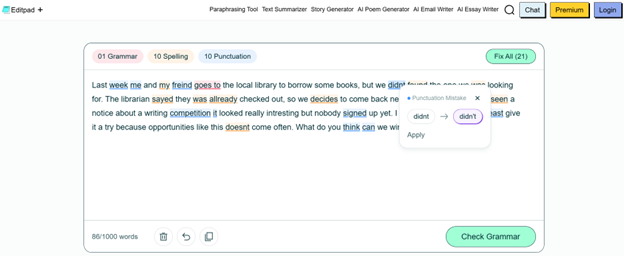
Editpad offers a freemium AI-powered grammar checker. It effectively proofreads the text for any grammar, spelling, or punctuation errors. If any are found, the tool will highlight them using different colors (grammar in red, spelling in yellow, and punctuation in blue).
The tool also assists in quickly fixing the identified mistakes. All you need to do is click on the mistake, and a menu will appear showcasing the suggestion.
Additionally, you can use the “Fix All” option as well to correct all the mistakes in one go. In the free version, Editpad AI grammar checker allows you to proofread up to 1,000 words, which is more than enough… right?
Lastly, this tool can scan text for errors in four languages, including English, Italian, Portuguese, and Spanish.
How can it assist you?
Proofreading your content for mistakes is not only time-consuming but also an error-prone task. Your eyes might miss some typos, resulting in later disappointments and frustrations. Thankfully, this won’t be the case if you use this AI grammar checker.
It can help identify and correct many grammar, spelling, and punctuation issues in just a few clicks. Consistently using this tool for proofreading can also contribute to increasing grammar knowledge, which will ultimately boost your writing skills in the long run.
Pros:
- Quick and accurate
- Helps detect and fix all types of grammar errors
- Option to correct all errors at once
- 1,000-word limit
Cons:
AI suggestions may still require manual review for context and accuracy
5. Plagiarism Checker
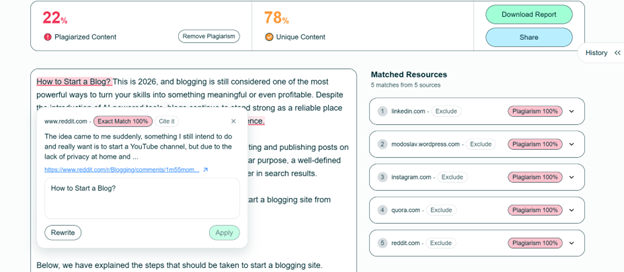
Editpad plagiarism checker will help you ensure whether the content is original or not. It effectively compares the entered text with millions of already published internet resources to find similar sentences or paragraphs.
If any match is found, the tool will highlight it along with the original matched source. So that you can quickly review and take necessary steps to remove plagiarism.
Moreover, this plagiarism checker also provides a percentage of both unique and plagiarized content. This way, it becomes easier to determine the overall content originality.
Just like other writing tools offered by Editpad, this one also has a free version and the ability to check plagiarism in multiple languages.
For maximum flexibility, it even provides the option to download or share the plagiarism scan report.
Whether you are a student, professional writer, or researcher, the Editpad plagiarism checker can help you verify the originality of your content. It highlights duplication along with the matched source so that the person can make necessary changes.
How can it assist you?
Moreover, using this tool will help you ensure content credibility and support academic integrity.
Pros:
- Helps identify matching or highly similar content from existing online sources
- Percentage of both unique and duplicate content
- Highlights original sources
- Download and share plagiarism scan report
Cons:
- 300-word limit for free users
6. AI Email Writer
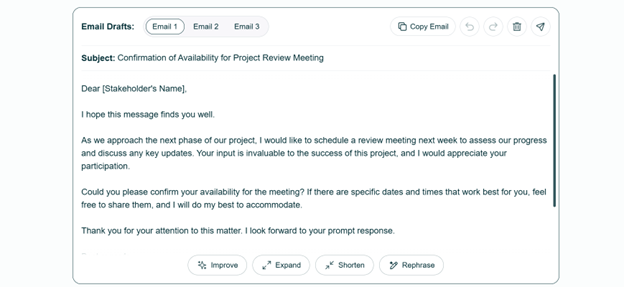
Last but not least, Editpad also offers a specialized AI email writer that helps write unique, accurate, and engaging emails as per given details. It is a prompt-based tool, which means you will have to provide instructions about the email, and then it will generate a draft accordingly.
By using this AI email writer, you can either compose an email from scratch or generate a contextually relevant reply to an existing email. The tool creates up to 3 email versions for a single input, giving users the choice to go with any version.
Additionally, this tool supports email generation of different types such as Follow-up, outreach, reminder, and others. It also provides users with the option to select the email tone as per their specific needs.
If you are struggling to get started with email writing, then this tool will help you brainstorm ideas. For business professionals and marketers, it can speed up the email-drafting process and reduce the time required to create an initial draft.
How can it assist you?
The tool has also made email personalization a lot easier. You can provide specific details, i.e., name, job title, and scenario, to the tool, and it will generate a well-written draft accordingly within seconds.
Pros:
- Free to use
- Create emails of different types and tones
- Get three email versions against a single input
- Seamless personalization
Cons:
- None
Conclusion
Editpad brings a wide range of writing tools under a single platform. You can write, edit, and proofread content for refinement. However, for beginners, the large number of tools may seem overwhelming at first glance.

