

How to Connect Your Solar Software Tools Without Rebuilding Your Stack
Learn how to connect solar software tools across CRM, design, scheduling, and field crews, so project data moves between systems without double entry.
Most solar companies don’t have a software problem. They have a connection problem. A typical shop runs a CRM for sales, a design tool for system layouts, a scheduling system for crews, an accounting platform for invoicing, and a monitoring portal for live sites. Each tool does its job well, and the gaps between them are where projects stall. This guide covers why those gaps form, which data actually needs to sync, and how to connect your solar software tools in a way that holds up as volume grows.
Why Do Solar Software Tools Stay Disconnected?
Connecting tools rarely feels urgent until the manual workarounds start costing crews time in the field. Teams looking for a fix often begin by comparing solar project management software, and options like Scoop work differently by connecting the systems a company already runs instead of replacing them. The distinction matters, because the goal isn’t one more tool to log into. It’s fewer places where a job can stall.
Solar stacks grow one purchase at a time. A sales bottleneck brings in a CRM, a permitting backlog brings in a document tool, a scheduling headache brings in a dispatch app. Every tool solves the problem it was bought for, and nobody owns the space between them. Integration is treated as an IT project instead of an operational requirement, so it stays on the backlog while the team fills the gaps manually.
What Breaks When Job Data Sits in Separate Tools?
When project data is scattered across multiple tools, the same information gets keyed in 3 or 4 times: once at the sale, once at design, once at scheduling, and once at invoicing. Each re-entry is a chance for a wrong address, an outdated scope, or a missing permit condition to reach the field.
The damage shows up downstream. Crews arrive with the wrong equipment list, office staff chase photos that live in someone’s phone, and invoices wait on documentation nobody can find. None of that is a tool failure. It’s the cost of moving data by hand.
Which Handoffs Fail First as Install Volume Grows?
Handoffs fail in the order they compound. Sales to design breaks first, because assumptions made to close a deal rarely survive a site assessment. Design to permitting follows, since revised layouts need to reach the permit package before submission.
Install to service is the handoff most companies underestimate. When as-built details, commissioning notes, and warranty documentation don’t transfer, service teams troubleshoot blind and repeat truck rolls become routine.
Which Tools Belong in a Connected Solar Stack?
Related walkthrough
GuestPostMailer Dashboard Overview | AI-Powered Guest Posting u0026 CRM Automation Tool

A connected stack isn’t a bigger stack. It’s a defined one, where every system has a clear job and no two systems compete for the same responsibility. For businesses evaluating broader energy software solutions, it’s also important to consider how different systems exchange data across sales, operations, field execution, and reporting.
What Does Each System Actually Own?
Before connecting anything, write down what each platform owns as the source of truth:
- CRM: customer records, deal stages, contract terms
- Design and proposal tools: system layouts, production estimates, equipment selection
- Permitting and document tools: submissions, approvals, inspection records
- Field execution software: schedules, assignments, checklists, field photos, job status
- Accounting or ERP: invoicing, payables, financial reporting
- Monitoring platforms: site performance data and alerts
Once ownership is written down, integration stops being a debate about which tool wins and becomes a question of which direction data should flow.
Where Do Overlapping Tools Create Duplicate Work?
Overlap is the quiet tax on a growing solar business. Two platforms with a calendar means two schedules, and the one crews actually check is rarely the one the office updates. Two platforms with a task list means status updates split between them, so leadership never sees a full picture in either.
The fix is boring and effective. Pick one owner per function, turn the duplicate feature off, and route the data from the owner to anyone who needs to read it.
How Do You Connect Your Solar Software Tools Step by Step?
Connecting tools works best as a sequence: map the workflow, choose the connection method, then define the fields that move.
Mapping Your Workflow From Sale to Service
Start with the job, not the software. Write out every stage a project passes through, from signed contract to final invoice and ongoing service. Next to each stage, note who does the work, which tool they open, and what has to exist before the next stage can start.
This map exposes the real integration list. Anywhere a person retypes, re-uploads, or messages someone to confirm a status, you’ve found a connection worth building.
How Do You Choose Between Native Integrations, APIs, and Middleware?

There are 3 practical ways to connect solar software tools, and the right one depends on how much logic the connection needs to carry.
- Native integrations: prebuilt connections between 2 platforms. Fastest to deploy, limited to what the vendor supports.
- APIs: direct, custom connections. Flexible and precise, but they need development time and ongoing maintenance.
- Middleware and automation platforms: rule-based connectors that sit between systems. Good for simple triggers, harder to govern once the rule count climbs.
Native first, API where the workflow is critical, middleware for the edges. That order keeps maintenance manageable.
Which Data Fields Should Actually Sync?
Syncing everything is how integrations become unreliable. Limit the flow to fields that change a decision downstream: customer and site details, scope and equipment, project stage, scheduled dates, assigned crew, completion status, and the documentation required to invoice.
Leave internal notes, drafts, and tool-specific metadata where they are. A narrow sync that people trust beats a wide sync that people second-guess.
Why Does Your Stack Need a Common Execution Layer?
Point-to-point connections solve pairs of problems. They don’t give you a place where work actually runs, which is why growing teams eventually look for a layer that sits across the stack instead of between 2 corners of it.
What Is the All-in-One Pitfall?
Vendors promise to cover every requirement in one platform, and the pitch is appealing when your stack feels messy. In practice, a single platform is rarely best in class at sales, design, field execution, and accounting at the same time.
The tradeoff surfaces later as rigidity, vendor lock-in, and the cost of keeping a platform aligned with a business that keeps changing. Growing solar companies generally do better with a small set of specialized tools plus a reliable way to run workflows across them.
How Does an Execution Layer Keep Best-in-Class Tools Working Together?
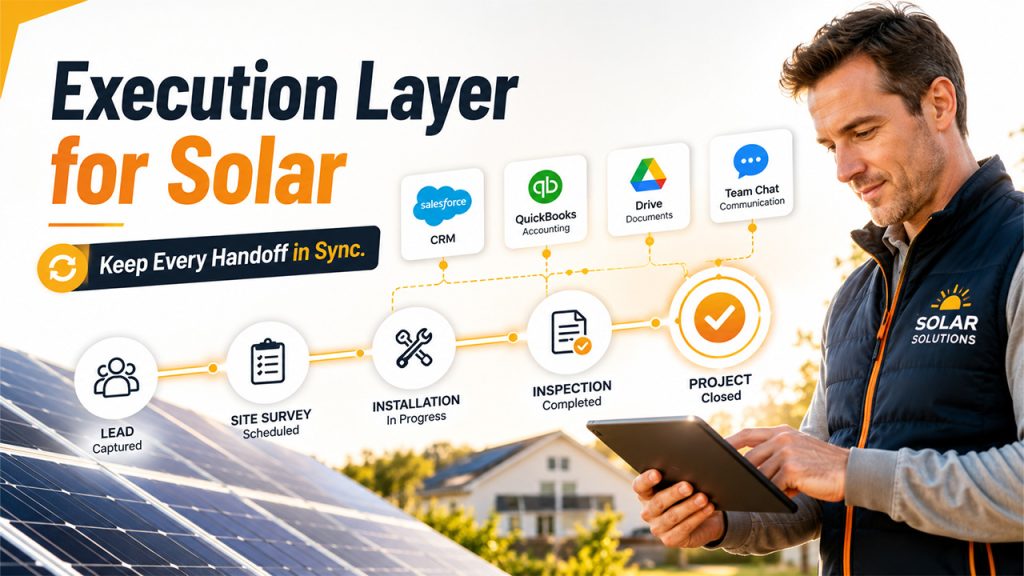
An execution layer is where the workflow lives: the steps, the ownership, the field documentation, and the status that every other system reads from. It doesn’t replace your CRM or your accounting platform. It makes sure work moves between them in a repeatable order.
Some platforms deliver category features and also act as this connective layer. Scoop, for example, is used as a Central Operations Hub for solar teams, connecting existing systems, crews, and field execution data into one operational layer so handoffs don’t depend on someone remembering to forward an update.
How Do You Keep Integrations Reliable Over Time?
An integration is not a project you finish. It’s a dependency you maintain, and it breaks quietly whenever a vendor updates an API or a team renames a field.
Who Should Own Each Connection?
Every connection needs a named owner inside the company, even when a vendor or consultant built it. The owner knows what the connection does, which fields it touches, and who to call when it stops.
Document each one in a single place: source system, destination system, direction, fields, trigger, and owner. That document is what turns a broken sync from a mystery into a 10 minute fix.
How Do You Catch a Broken Sync Before Your Crews Do?
Build a simple check into the workflow rather than waiting for a complaint from the field. A weekly reconciliation of new jobs, scheduled work, and completed jobs across systems will surface most failures within days.
Also watch for the human tell. When someone starts keeping a spreadsheet on the side, an integration has stopped being trusted, and that spreadsheet will become the real source of truth if nobody intervenes.
What to Remember Before Connecting Your Solar Software Tools
Connecting solar software tools is an operations exercise before it’s a technical one. Map the workflow, assign one owner per function, sync only the fields that drive decisions, and give every connection a person responsible for it.
Teams that treat integration this way spend less time reconciling data and more time installing and servicing systems, which is the only work that actually moves revenue.
Frequently Asked Questions
Start with native integrations between the 2 systems that create the most manual work, usually the CRM and whichever platform runs field execution. Native connections deploy quickly and require no development resources, which makes them the right first move before you invest in custom work.
Not for most connections. Native integrations and automation platforms cover common workflows without code, and a developer becomes useful when a critical workflow needs custom logic, field mapping, or error handling that off-the-shelf connectors can't provide.
There's no fixed number, but each tool should own a distinct function with no overlap. When 2 platforms handle the same job, the duplication costs more than the second tool saves, so consolidation usually starts there.
Connections tied to the replaced platform have to be rebuilt, which is why the documentation of fields and triggers matters so much. Running workflows through a common execution layer limits the blast radius, since you swap one tool instead of rebuilding how the whole team works.

