
What Is CRM Hosting? Types, Comparison & How to Choose the Right Solution
Compare cloud-based, on-premises, and hybrid CRM hosting options. Choose the right solution for your business as per scalability, security, cost, and customization requirements.
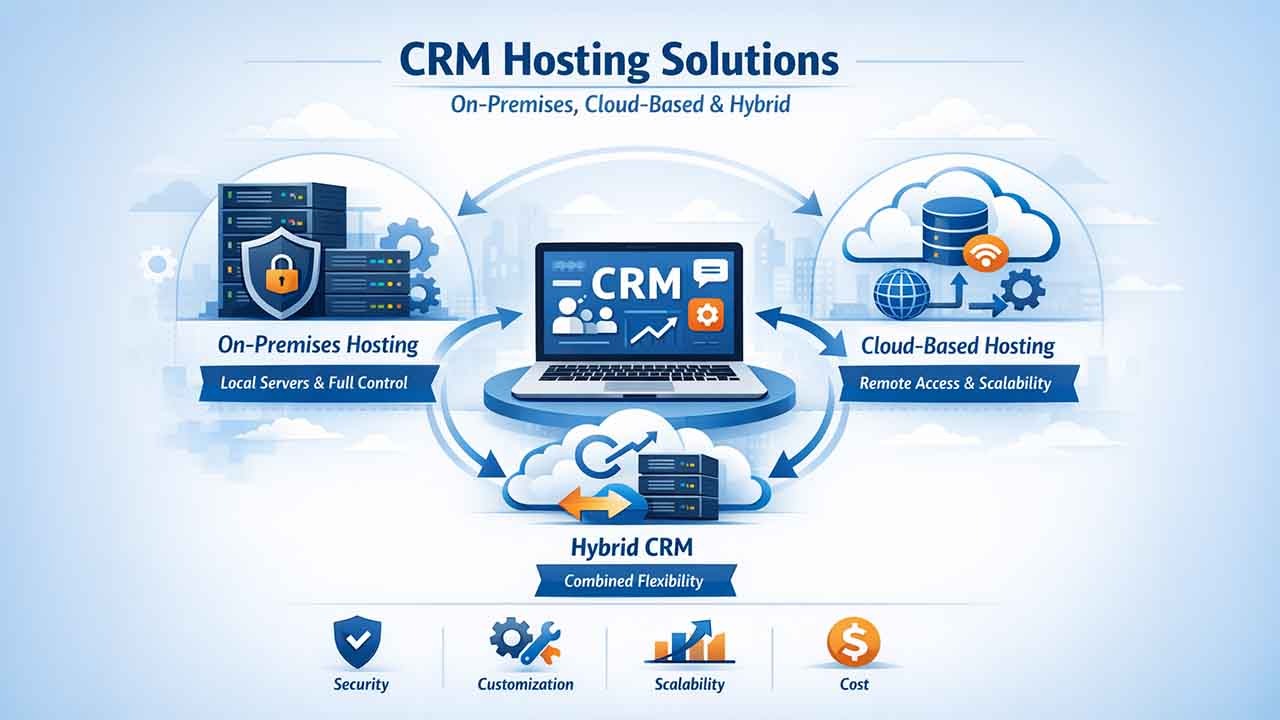
Customer relationship management platforms have evolved from straightforward on-device platforms that enable businesses to centralize pipelines, contacts, transactions, communication history, and workflow history. This shift has led to the emergence of an important concept known as CRM Hosting. It entails the method and location by which a CRM system works, resides, and is used by users within an enterprise. The hosting environment has a real impact on compliance, performance, scalability, cost, access controls, maintenance, and lasting digital strategy. Numerous businesses compare self-hosted and CRM-hosted solutions as they focus on balancing operational convenience and custom control.
In recent times, advanced collaboration platforms have also begun to provide CRM-based capabilities within centralized environments that combine documents, messaging, workflow, email, automation, project management, and data systems. But what does all of this mean for your business? Let us dig deep into the world of CRM Hosting-
What Is CRM Hosting?
CRM hosting can be defined as the method employed by your company for implementing and handling business CRM software and data. In simple terms, it just deals with where your CRM data will reside and how the users will access it. Furthermore, it also impacts personalization, cost structure, flexibility, scalability, compliance, and security.
What Are the Three Main Kinds of CRM Hosting?
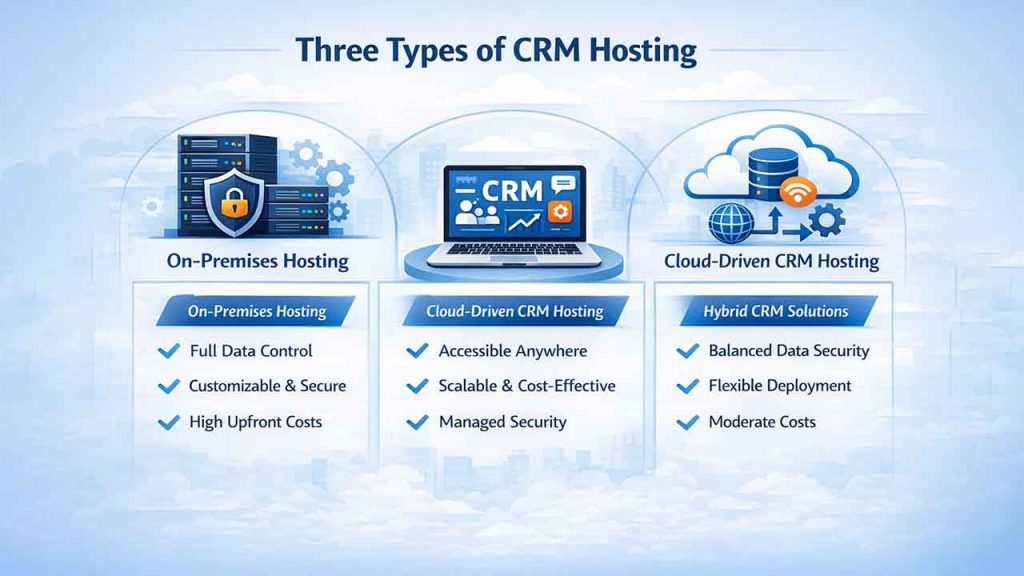
The three key options for CRM Hosting include on-premises, cloud-based, and hybrid. Let us find out the three types of CRM Hosting and what the main differences are between them:
1. On-premise Hosting:
On-premises hosting implements the CRM software on the local services of your company. This method provides your business with complete control over customization and data, ascertaining strict compliance with security policies and internal policies.
It needs substantial investment upfront in maintenance and hardware. You will require an IT team and a large-scale server infrastructure to handle it, ensure updates, and ascertain overall data security.
Generally, you would need a lot of time to set up Hosted CRMs and have greater overhead expenses. They are mainly relevant for businesses with industry-specific objectives or rigorous data security needs.
2. Cloud-driven CRM Hosting:
Cloud Hosting CRM can be defined as a web-based solution that is accessible from any location with a stable internet connection. A third-party company server manages dedicated server infrastructure and maintenance so that you can pay more attention to the customers.
Its simple scalability and reduced upfront expenses allow you to modify your subscription to include more storage, features, and bandwidth. You can also benefit from smooth benefits, remote accessibility, and daily backups, making it simpler for distributed teams.
With cloud-driven CRM hosting, you depend on the data security center of your vendor and privacy measures, which are adequate for most businesses. However, choose the right cloud-based CRM hosting services
3. Hybrid CRM Solutions
In Hybrid CRM hosting, you combine the features of cloud-based and on-premises models, providing a flexible way to handle CRM applications. Organizations can store confidential data on internal servers while utilizing cloud capabilities for remote access and scalability.
It is a crucial approach for businesses that require security but also desire cloud convenience. It balances security and cost-efficiency but increases the complexity of the IT teams incorporating the two systems.
Cloud-based Vs On-premise Hosting
Related walkthrough
What is CRM? CRM Explained in 1 Minutes | Boost Sales & Manage Customers Better
Here is how on-premises and cloud-based CRM systems differ:
| Cloud-based CRM | On-premises CRM | |
|---|---|---|
| Cost | Utilizes a subscription model with less upfront expenses and recurring charges | Needs a greater level of initial investment in software and hardware, along with consistent maintenance expenses |
| Personalization | Personalization is limited, including custom fields, drag-and-drop dashboards, pipelines and dashboards | Ensures vast personalization capabilities at the programming level so that businesses can also personalize the look and feel of the CRM |
| Security | The responsibility of security rests with solution providers, generally providing powerful measures but needs greater trust in practices | Businesses internally handle security, allowing them to execute powerful protocols |
| Data Privacy | Externally store data, implying that you have confidence in the compliance practices and data privacy policies | Provides comprehensive control over customer data, allowing more strict measures of privacy |
| Implementation | Deployment is quick, streamlining the process through smooth integration with other cloud services and predefined steps | Implementation can be slightly time-taking, involving complex system integration and hardware setup |
| Integrations | Delivers smooth integration with a broad range of cloud apps and quick accessibility to third-party platforms | Can integrate with the available third-party applications and internal platforms but generally needs customized development |
| Upgrades | Automatically manages updates, making sure that the system always operates with the latest version with a guarantee of maximum uptime. | Needs manual upgrades, which can impact disruptions and can be slightly time-taking |
| Support | Provides complete support through website builders and web hosting providers, simplifying the burden on internal teams | Depends greatly on the in-house IT support, requiring internal resources for troubleshooting and system maintenance |
| Scalability | Scalability is smooth. It allows businesses to decrease or increase resources without logistical or financial challenges | Existing hardware can restrict scalability and can lead to costly modifications as business requirements evolve |
Selecting the Right CRM Hosting Provider
Selecting the top-performance CRM hosting services implies balancing factors such as customization potential, pricing, security, and scalability. Follow the six best practices to make sure that you are choosing the right CRM solution.
Comprehending Your Business Requirements:
Begin by comprehending your needs. Every business has unique requirements depending on industry, size, customer base, and growth trajectory. Understanding these requirements will make sure that your CRM aligns with long-term performance goals.
A few questions you can ask yourself involve the following:
- What are the main functionalities you require from a CRM? Recognize the vital CRM characteristics providing support to your business processes, such as customer service automation, lead automation, sales monitoring, and analytics.
- Are there any particular industry regulations you need to adhere to? Define any industry-specific compliance needs, such as GDPR rules that support your CRM choice.
- How many users will access the CRM? Find out who will use the CRM within your enterprise. List out the departments, such as customer service, sales, and marketing teams. Consider the distinct requirements with respect to important features and access levels.
Begin by getting input from your teams to comprehend daily challenges and what CRM characteristics could be valuable. Define your priorities and keep note of any characteristics that can inflate your expenses and complicate your system.
Assess Your Budget Constraints:
Budget plays a big role in deciding whether cloud-based or on-premises CRM is a viable option for your business. Here is how you can assess your budget:
- Perform TCO Analysis: TCO stands for total cost of ownership. Look beyond the initial price tag to compare CRM training expenses, hardware expenses, additional licenses, subscription charges, and other expenses associated with upgrades or integrations.
- Strategize for Variable Expenses: Forecast the growth and budget of your company for future requirements. Cloud solutions can make scaling a lot simpler since you only must pay for what you require. This higher scalability helps evolving businesses.
- Compare Cost-Benefit Ratios: Analyze different CRM systems, focusing on their costs and advantages. Cloud-based solutions are a feasible option for startups and growing businesses as it reduces initial costs.
Assessing budget and pricing differences will allow you to find a CRM tool that resonates with your budget needs and ensures a good ROI.
Evaluate Integration Needs and Personalization
CRM customization and integration with other platforms can improve its effectiveness. Here is how you can define your requirements in such areas:
1. How much do you have to personalize your CRM to make it tailored to your business processes?
Closely analyze your pipelines and processes and see whether they are unique enough to need custom CRM features, or standard features will be sufficient. Numerous cloud-based solutions offer sufficient customization features for a wide range of companies. For example, link-building agencies and guest posting businesses prefer a unique solution, GuestPostCRM, that can be customized to suit your existing workflows.
2. Do you need the CRM to align with your existing software?
Recognize vital solutions such as marketing automation, enterprise resource planning (ERP), or accounting software. Decide whether you want to connect them with your CRM or keep them as individual systems.
3. Will you require additional third-party software?
One of the main features of a CRM is API integration support. Select a system that aligns with your required apps or has vast API support.
Emphasize Privacy and Security
With privacy concerns and data breaches on the rise, comprehending data privacy and cybersecurity ensures that your data remains compliant and secure.
First of all, consider what your priorities are in security. You will require more robust security policies if you are in an industry such as healthcare that handles patient data. On-premises hosting with dedicated CRM for healthcare is likely your most feasible option.
However, you can proceed with cloud-powered solutions that will be sufficient if your company requires robust backups to ensure customer data protection to meet GDPA and CCPA guidelines.
Check the track record of your CRM provider in handling data privacy and check whether they meet your industry-specific compliance standards:
- For an on-premises solution, check your encryption, firewalls, and conduct security audits to ensure that you meet compliance standards.
- For cloud-driven solutions, check the security certifications of the provider (e.g., SSL certificates) as well as data protection history and encryption standards.
Consider Flexibility and Scalability
Selecting a CRM to scale with your organization makes sure that the system supports your business without costs or disruptions. To make the right choice, you must answer the following questions:
- What is the expected growth rate of the company over the next few years?
- Consider the workforce, customer base, and operations that will impact your CRM processes.
- Can you predict changes in your workflow and how your teams will use the CRM?
- Consider mobile access, remote teams, and scaling requirements that impact how your users can interact with the CRM platform
What are the Future Plans of the CRM provider?
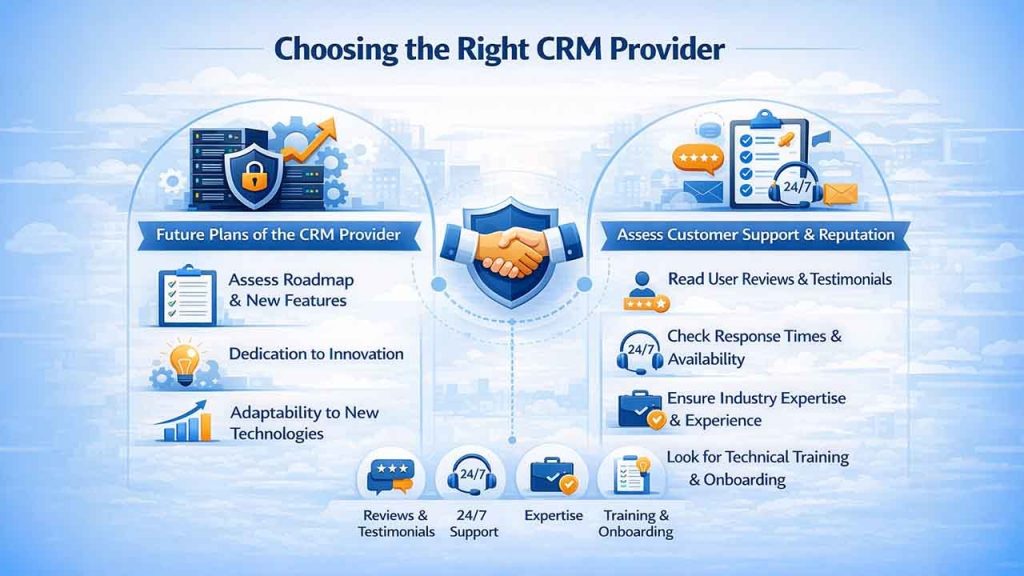
Assess the roadmap of every provider and their dedication to innovation. Choosing a provider that adapts to technology changes and consistently releases new features can help make your investment future-proof.
Assess the Customer Support and Provider’s Reputation
Selecting a CRM provider is as significant as choosing the right type of CRM hosting. Reliable customer support enhances your user experience and helps you to maximize the effectiveness of your CRM platform.
Go through user reviews and testimonials to assess the satisfaction level of the customers. Explore reviews that talk about responsiveness to problems. If the provider has a forum for customer support, check how long it takes to deal with common complaints.
Next, you should assess the service range of the provider. Understand the accessibility and scope of the support, including response times, availability, and expertise of the support team.
Before selecting the right CRM platform, you need to check:
- Industry-specific experience, making sure they understand challenges and needs.
- Diverse options for support, including phone, live chat, and email.
- Broad knowledge bases and complete training programs.
- Personalized onboarding options that can help you utilize the new CRM platform easily.
- 24/7 availability or responsive support that is very close to around-the-clock availability.
Assessing support offering and reputation will allow you to establish a partnership with a CRM provider that is responsive, reliable, and aligned with your long-term objectives.
Conclusion
Selecting the best CRM hosting solution needs a close assessment of your budget constraints, business needs, and growth trajectory. Irrespective of whether you choose cloud-driven flexibility, on-premises control, or a hybrid approach, the decision must align with your security requirements, customization goals, and security objectives. By comprehensively assessing the capabilities of integration, vendor reputation, and support quality, you can execute a CRM platform that improves your customer relationships, simplifies processes, and adjusts to changing business landscapes. The best choice in hosting converts your CRM from straightforward data into a strategic assessment that powers sustainable growth.

