
How AI and Automation Are Transforming Bookkeeping for Small Businesses
Explore AI bookkeeping for small businesses to automate transactions, simplify reporting, and improve financial accuracy.
Bookkeeping has traditionally required significant manual effort. Small business owners and finance teams often spend hours recording transactions, categorizing expenses, reconciling bank statements, tracking invoices, and preparing financial reports. As transaction volumes increase, maintaining accurate financial records becomes increasingly difficult without dedicated resources.
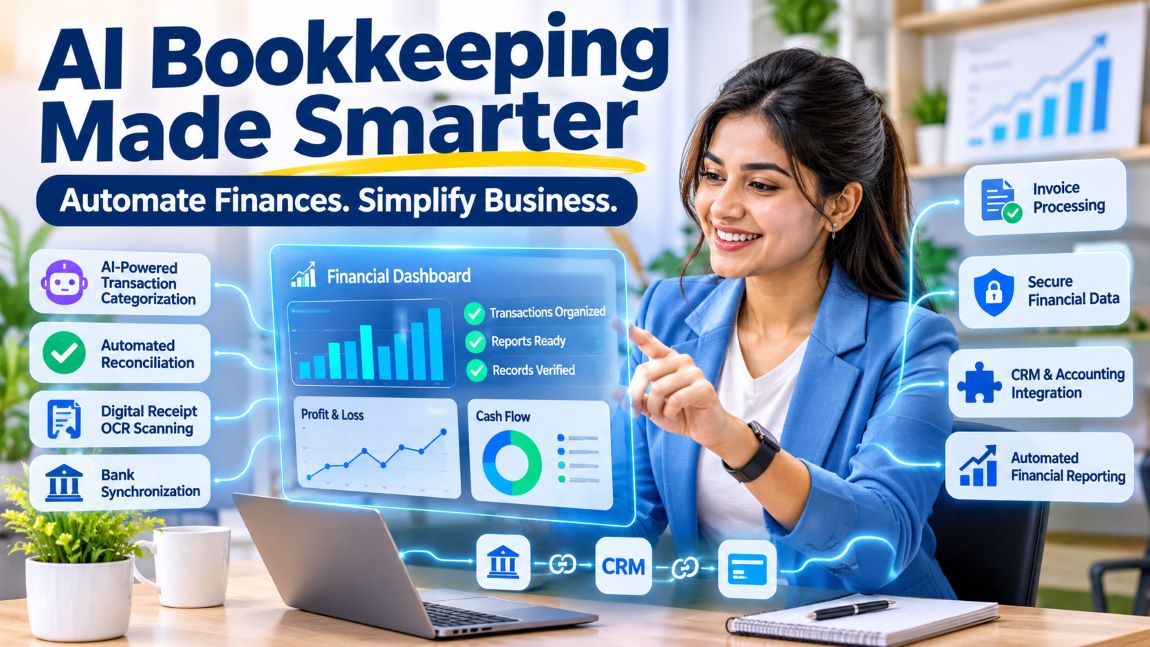
Artificial intelligence (AI) and automation are changing this process. Modern bookkeeping platforms can connect directly with financial accounts, automatically categorize transactions, identify discrepancies, and generate financial reports. These capabilities reduce repetitive administrative work while helping businesses maintain better visibility into their financial position.
However, automation does not eliminate the need for financial oversight. Business owners still need to review unusual transactions, verify financial information, and ensure that their records accurately reflect business activities.
How Is AI Changing Traditional Bookkeeping Processes?
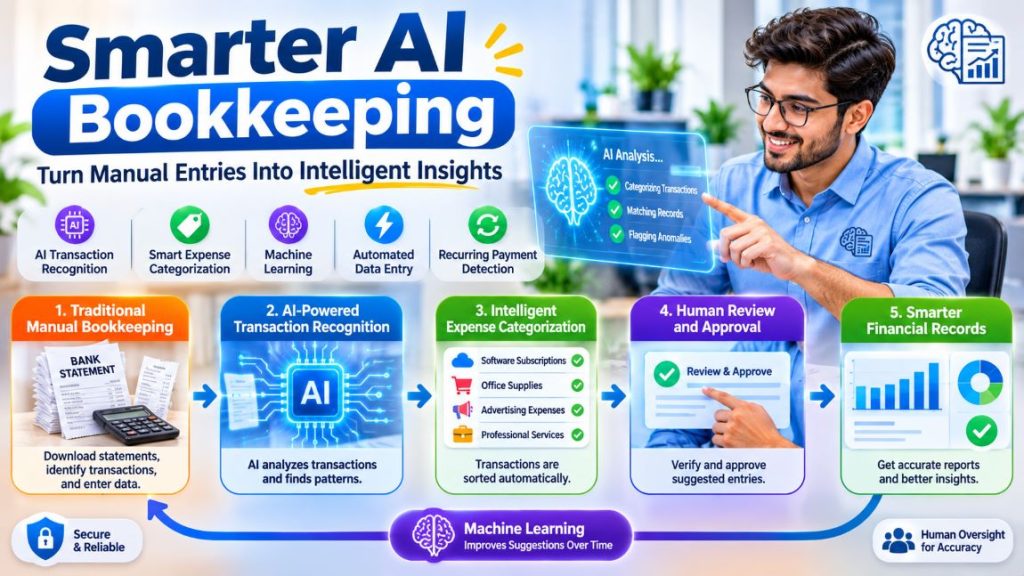
Traditional bookkeeping relies heavily on manual data entry and repetitive administrative tasks. A bookkeeper may need to download bank statements, identify individual transactions, assign expense categories, and enter the information into accounting software.
AI-powered bookkeeping systems streamline several of these activities by analyzing transaction descriptions, recognizing recurring payment patterns, and applying predefined accounting rules.
For example, when a business makes recurring payments to a cloud hosting provider, an automated system can recognize the merchant and suggest the appropriate software or hosting expense category. Instead of manually classifying every transaction, the bookkeeper can review the suggested classification and approve it.
Some modern platforms also use machine learning to improve transaction recognition over time. As users correct classifications, the system can use those corrections to make more relevant suggestions for similar transactions.
The result is a bookkeeping workflow that requires less repetitive data entry while preserving human review for financial decisions that need additional attention.
What Bookkeeping Tasks Can Businesses Automate?
Automation is most useful when applied to repetitive processes that follow predictable patterns. Several core bookkeeping activities can now be partially or substantially automated. Businesses looking to implement these processes can also explore our guide to automated bookkeeping, which explains how to streamline transaction categorization, receipt processing, bank reconciliation, and financial recordkeeping while maintaining accuracy.
1. Automated Transaction Categorization
Transaction categorization determines how individual financial activities are recorded in the general ledger.
AI-enabled accounting systems analyze transaction descriptions, merchant information, amounts, and previous classifications to suggest appropriate expense or income categories.
For example, transactions involving office supplies, software subscriptions, advertising platforms, and professional services can be identified and assigned to corresponding accounts.
However, automated suggestions should not always be accepted without review. An unusual transaction or payment with limited descriptive information may require manual verification to avoid inaccurate financial reporting.
2. Bank Synchronization and Transaction Imports
Modern bookkeeping platforms can connect to supported financial institutions through secure integrations or financial data providers.
These connections allow transaction information to flow into accounting software without repeatedly downloading and uploading bank statements.
Depending on the integration, synchronization can provide:
- Updated transaction information from connected accounts.
- Reduced manual data entry.
- Better visibility into incoming and outgoing payments.
- Easier identification of duplicate transactions.
- More consistent financial recordkeeping.
Business owners should still verify that imported transactions match their actual bank activity, particularly when dealing with multiple accounts or currencies.
3. Automated Bank Reconciliation
Bank reconciliation involves comparing accounting records with bank statements to identify differences between recorded and actual financial activity.
Automation can match transactions using information such as payment amounts, dates, reference numbers, and merchant details.
When the system identifies a likely match, it can automatically suggest reconciliation. Transactions that do not match require additional investigation.
This process helps businesses identify missing entries, duplicate records, incorrect amounts, and potentially unauthorized transactions.
Human oversight remains important because a matching transaction does not necessarily mean that the underlying accounting treatment is correct.
4. Expense Tracking and Receipt Processing
Expense management is another area where AI can reduce administrative work.
Some platforms use optical character recognition (OCR) to extract information from digital receipts and invoices. The extracted information may include:
- Vendor or merchant name.
- Transaction date.
- Total payment amount.
- Tax amount.
- Invoice number.
- Individual expense details.
The system can then connect the extracted information with existing financial records.
For businesses managing multiple employees, contractors, or departments, these capabilities can make expense documentation more consistent and easier to review.
5. Automated Financial Reporting
Financial reporting traditionally requires accountants or bookkeepers to collect transaction data, organize account balances, and prepare reports.
Modern accounting platforms can generate reports directly from recorded financial information.
Common examples include:
- Profit and loss statements.
- Balance sheets.
- Cash flow statements.
- Accounts receivable reports.
- Accounts payable reports.
- Expense summaries.
Automated reporting allows business owners to review financial performance without waiting for every report to be manually prepared.
However, the usefulness of these reports depends on the accuracy and completeness of the underlying bookkeeping records.
How Do Integrated Bookkeeping Platforms Improve Financial Visibility?
Bookkeeping rarely operates independently of other business activities. Financial information is generated through bank accounts, payment processors, invoicing systems, payroll platforms, and expense management applications.
When these systems operate separately, businesses may need to transfer information manually between platforms. This creates additional administrative work and increases the possibility of inconsistent records.
Integrated bookkeeping platforms help connect these financial processes.
For example, an online business may receive customer payments through a payment processor, issue invoices through billing software, and record transactions in an accounting platform.
With appropriate integrations, transaction information can flow between these systems, reducing repeated data entry and improving financial visibility.
Before connecting different platforms, businesses should evaluate:
- Whether the integration supports the required transaction data.
- Whether information synchronizes automatically or requires manual updates.
- Whether duplicate transactions can be identified.
- What permissions does the integration receive?
- Whether sensitive financial information is protected.
- How can access be revoked when a service provider or employee leaves?
Integrations should provide only the permissions necessary for their intended purpose. A bookkeeping connection that only needs transaction information should not automatically receive unnecessary payment or administrative privileges.
What Are the Security Risks of Automating Bookkeeping?
Related walkthrough
Luma Dream Machine is the Best Ai Video Generator !

Although automation improves efficiency, connecting multiple financial systems introduces additional security considerations.
Every integration, connected account, and third-party application may create another point of access to sensitive business information.
Small businesses should establish clear controls before implementing automated bookkeeping workflows.
Use Role-Based Access Controls
Not everyone involved in financial management needs administrative access.
Business owners should provide employees and external bookkeepers with permissions that match their responsibilities.
For example, a bookkeeper responsible for reconciling transactions may need access to bank transaction information and accounting software without permission to initiate wire transfers, add payment recipients, or change account credentials.
Named user accounts also make it easier to identify who accessed or modified financial records.
Enable Multi-Factor Authentication
Multi-factor authentication (MFA) adds another verification step when users access financial systems.
Even if a password is compromised, an additional authentication requirement can make unauthorized access more difficult.
Businesses should enable MFA wherever supported, particularly for banking, accounting, payroll, and payment processing platforms.
Review Connected Applications Regularly
Automated integrations can remain active even after a business changes its bookkeeping provider or removes an employee.
Business owners should maintain an inventory of connected applications, review their permissions periodically, and revoke integrations that are no longer required.
This is especially important when accounting software connects with payment processors, customer relationship management systems, or external data services.
Protect Financial Documents
Invoices, receipts, bank statements, and payroll records can contain sensitive business and personal information.
Businesses should use secure document storage, restrict access to authorized users, and avoid sharing financial records through unsecured communication channels.
These practices help reduce unnecessary exposure while supporting more organized financial operations.
Why Does Human Oversight Still Matter in AI-Powered Bookkeeping?
AI can identify patterns, categorize transactions, and automate routine accounting activities. However, it does not independently understand every business transaction or its financial implications.
For example, a payment to a software provider might represent an ordinary operating expense, an annual subscription, or a capitalizable software development cost, depending on the circumstances and applicable accounting rules.
An automated system may recognize the merchant but still require a qualified professional to determine the appropriate treatment.
Human oversight is particularly important for:
- Reviewing unusual or high-value transactions.
- Investigating discrepancies during reconciliation.
- Checking expense classifications.
- Reviewing payroll and tax-related records.
- Correcting duplicate or incomplete entries.
- Preparing financial information for tax reporting.
Businesses should treat AI-generated classifications and reports as tools that support financial professionals rather than replacements for professional judgment.
How Should Small Businesses Choose an Automated Bookkeeping Solution?
The right bookkeeping platform depends on business size, transaction volume, operational complexity, and reporting requirements.
Before selecting a solution, business owners should evaluate several factors.
Integration capabilities: Check whether the platform connects with existing bank accounts, payment processors, invoicing systems, and payroll applications.
Automation features: Review whether it supports transaction categorization, receipt processing, bank reconciliation, and automated reporting.
Security controls: Look for MFA, role-based permissions, encryption, and clear procedures for managing connected users and applications.
Reporting capabilities: Ensure the platform can generate the financial reports needed to monitor business performance and support accounting activities.
Scalability: Consider whether the software can accommodate additional accounts, employees, transaction volumes, and reporting requirements as the business grows.
Professional support: Automation can reduce manual work, but access to experienced bookkeeping professionals remains valuable when transactions require interpretation, adjustments, or additional review.
For businesses that prefer professional assistance rather than managing every financial process internally, outsourcing bookkeeping can provide access to bookkeeping support while allowing owners to focus on their core operations.
Conclusion: Combining Automation With Professional Financial Management
AI and automation are making bookkeeping more efficient by reducing repetitive tasks, improving transaction visibility, and simplifying financial reporting.
From automated transaction categorization to bank synchronization and reconciliation, these technologies help small businesses maintain more organized financial records without relying entirely on manual processes.
However, successful implementation requires more than selecting accounting software. Businesses must also establish appropriate access controls, protect sensitive financial information, review automated results, and maintain accurate supporting documentation.
The most effective approach combines technology with human oversight. Automation handles repetitive administrative activities, while business owners and qualified financial professionals remain responsible for reviewing records, resolving discrepancies, and making informed financial decisions.