

The corporate world is currently obsessed with the idea that clicking a "Generate" button solves our communication crises, yet most boardrooms are still drowning in mediocre, automated clutter. It's quite
The corporate world is currently obsessed with the idea that clicking a "Generate" button solves our communication crises, yet most boardrooms are still drowning in mediocre, automated clutter. It's quite a paradox. While traditional slide deck creation often consumed hours of valuable time, leaving many of us bleary-eyed at 2 AM, AI-Powered slide design promise to revolutionize the process. Artificial intelligence is fundamentally transforming how professionals design, structure, and deliver impactful presentations. But here is the thing: the tools are getting smarter, but the presenters aren't necessarily getting better. Now there are a massive influx of "perfect" slides that say absolutely nothing.
It's just noise.
When you look at the evolution of these tools, the shift from overhead projectors to AI-powered platforms represents one of the most significant jumps in business communication technology we've ever seen. Early software like PowerPoint revolutionized information sharing, sure, but the manual labor remained gruelling. Now, there are systems that analyze content and suggest layouts in seconds. However, the sheer speed of these systems is creating a "quality trap" where the look is prioritized over the logic.
The Cognitive Engine: What's Actually Under the Hood?
Understanding the mechanics of modern design assistants requires looking past the marketing gloss and into the actual tech stack. These modern platforms leverage several sophisticated technologies working in concert to deliver results that, frankly, can be a bit hit-or-miss depending on your input. Natural language processing algorithms analyze your text to understand context, which is meant to ensure that visual elements reinforce your core messages. In theory, this prevents the classic "distracting clipart" blunder. Computer vision systems then evaluate design principles like balance, contrast, and hierarchy to create layouts automatically.
What's particularly striking is how machine learning models, trained on millions of professional presentations, now predict which design elements will resonate with specific audiences. These systems consider industry norms and cultural preferences to deliver tailored recommendations. Albeit sophisticated, there's a persistent risk that these models default to a "global average" of design. If a system is trained on millions of slides, it might just produce the most average slide possible. To appreciate the complexity here, one must realize that a layout that works for a Silicon Valley pitch might be a total disaster for a manufacturing floor in Germany.
Breaking Down the Automation of "The Boring Stuff"
One of the most powerful AI capabilities is automated content organization, which is a godsend for anyone who hates deciding where a bullet point should live. Instead of manually agonizing over slide breaks, algorithms identify natural hierarchies and relationships between your ideas. This intelligent structuring ensures a logical flow while maintaining optimal information density. The technology can even recognize when you're building toward a conclusion and apply the right visual framework. For truly dense topics, the AI might suggest splitting content across multiple slides to prevent the dreaded "wall of text" that kills audience engagement.
Then there's the visual side. AI-powered design engines evaluate content to suggest layouts that maximize impact. These consider text volume, image dimensions, and data visualization needs. The systems also analyze brand guidelines to maintain consistency. Color palette suggestions align with your brand while ensuring enough contrast for readability. Font pairings are selected based on proven design principles, which pretty much eliminates the guesswork from typography.
Finding the perfect images used to be the biggest time-sink. Now, AI tools integrate with image libraries and use semantic understanding—not just keywords to find visuals that actually align with the message. Beyond selection, the AI handles the "grunt work" like cropping, resizing, and background removal. It's an elegant solution to a very old problem.
Data Visualization: Where Accuracy Meets Aesthetics
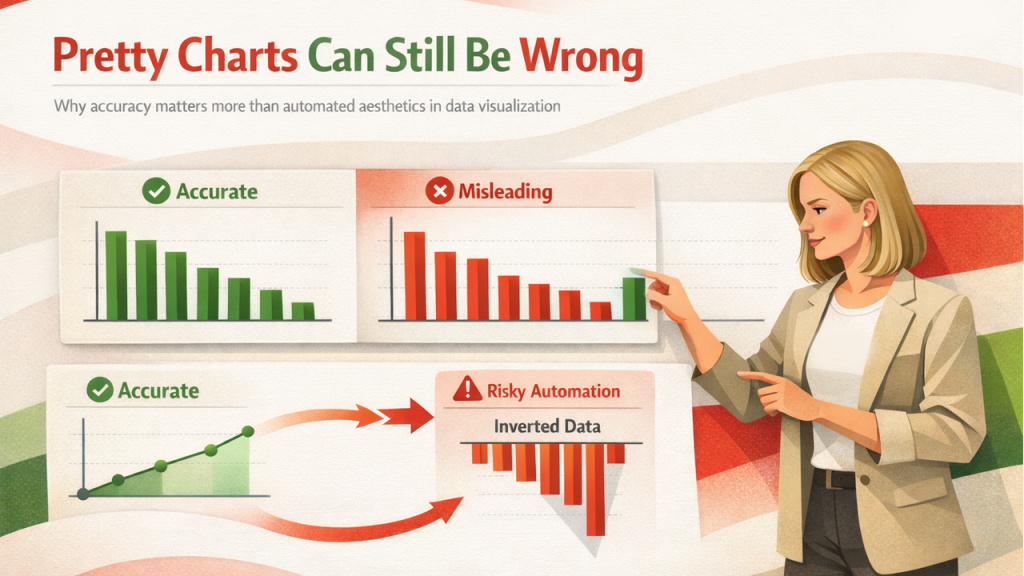
Presenting data effectively requires choosing the right chart type and configuring scales correctly. AI systems can now analyze datasets to recommend optimal visualization methods, whether that's a simple bar chart or something more specialized like a Sankey diagram. These tools format everything—legends, axis labels, data points—for maximum readability. For complex sets, AI can even suggest breaking data across multiple visuals or using animated transitions to reveal insights progressively.
I've seen people use this to great effect, but I've also seen it go horribly wrong when the human doesn't check the math. Or rather, when they trust the "pretty chart" more than the raw numbers. Subjectively, the jury is still out on whether fully automated data storytelling is ready for high-stakes financial reporting. Mistakes were made in early 2025 when a major retail chain's AI-generated quarterly report accidentally inverted a growth trend because the "smart" layout preferred a specific visual balance over the actual X-axis chronology.
The Professional Template Hybrid
While AI offers tremendous capabilities, combining these tools with professional templates creates a powerful synergy. High-quality templates provide the structural foundation that AI then customizes. These libraries offer thousands of pre-designed slides for every scenario, from marketing strategies to project proposals. This methodology delivers both the efficiency of automation and the polish of professional design expertise. It's essentially "battle-tested" design meeting real-time adaptation.
This is where presentation templates become a strategic shortcut—platforms like Slideuplift provide battle-tested structures that AI can intelligently customize, and when combined with slideuplift’s professionally designed libraries, automation finally starts serving clarity instead of noise.
Strategic Implementation: Picking Your Poison
The landscape is crowded with options, each with distinct strengths. Some platforms excel at generating a "first draft" from a single prompt, which is great for overcoming the blank-page syndrome. Others focus on design enhancement, taking your existing mess and turning it into something readable through intelligent formatting. For business-specific needs, specialized tools like Marketing Report PowerPoint Generators streamline the creation of data-heavy performance decks. Your choice depends on the "pain points" of your workflow.
Many organizations use AI for rapid prototyping—generating multiple design variations quickly to explore different approaches before refining the strongest option manually. Others use it for bulk updating, which is vital when brand guidelines change and you need to fix 500 decks overnight. The reality is that brand consistency remains critical for organizational identity. Advanced platforms allow you to lock in color palettes, fonts, and logos so the AI doesn't go rogue.
Real-Time Feedback and AI-Powered Slide Design Accessibility
Now tools offer real-time feedback during the creation process. They flag issues like text-heavy slides or poor contrast before you even finish the thought. Some even provide "readability scores" based on text complexity and visual clarity. This helps you optimize content for specific audience knowledge levels, ensuring every AI-Powered slide design meets professional standards.
Furthermore, AI is making accessibility non-negotiable. Automated alternative text for images helps visually impaired individuals. Contrast analyzers verify readability for those with color vision deficiencies. Caption generation systems can even transcribe speaker notes for the hearing-impaired. It's not just about being inclusive; these features generally improve clarity for everyone.
The Localization Challenge
For global teams, AI translation is a massive help. Modern neural systems are accurate, though human review is still non-negotiable for nuanced stuff. AI can adapt layouts automatically when translating between languages with different text lengths like moving from English to German, where words tend to expand significantly. Advanced platforms even adjust cultural design elements, recognizing that color symbolism and visual metaphors differ across regions. This is a pivotal capability for global brand management.
Measuring What Actually Matters
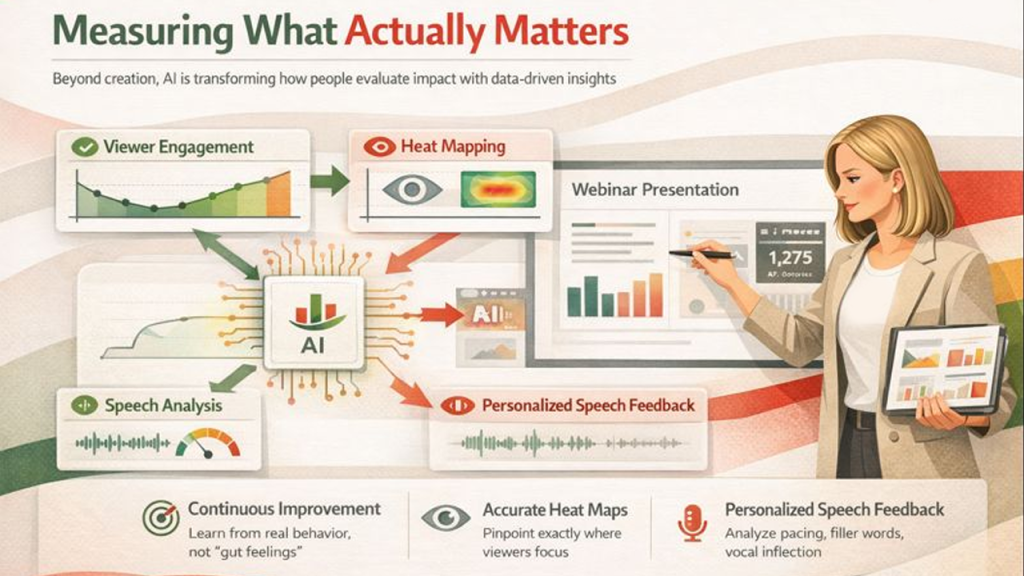
Beyond creation, AI is transforming how people evaluate impact. Analytics platforms track viewer engagement, showing which slides capture attention and where people disengage. Heat mapping shows exactly where viewers focus their eyes. This data enables continuous improvement based on actual behavior rather than just "gut feelings". For webinars, AI can even analyze your verbal delivery—tracking pacing, filler words, and vocal inflection.
The Future: Immersive and Adaptive
The evolution is only accelerating. Generative AI is moving toward creating custom, photorealistic images and graphics from scratch, which will eventually kill the stock photo industry. There are also interactive presentations that adapt in real-time based on audience questions. Imagine a deck that automatically adds more detail if it detects the audience is confused. VR and AR integration will eventually turn slides into three-dimensional experiences.
The Human Verdict: Balance or Bust
Despite all this, sophisticated design cannot compensate for weak content. AI excels at technical tasks, but human judgment remains essential for strategic decisions about tone and nuance. You must start with clear objectives. Define what you want the audience to do before you touch the AI. This clarity ensures the visual appeal has a strategic purpose.
One major risk is "over-automation" leading to generic, formulaic presentations. These often lack the "soul" or organizational personality that makes a message memorable. To combat this, you should use AI for the foundation but add custom elements that reflect your unique perspective.
The goal isn't to create presentations faster; it's to create them better. Use the time saved through automation for deeper research or rehearsal. Moving forward, the most effective approach will always be the one that strategically combines AI efficiency with human insight. Every AI-Powered slide design should enhance your message, not replace your thinking. Don't let the machine replace your expertise; let it amplify it.
The future of design isn't about choosing between a human and a computer. It's about figuring out how to stop the computer from making you look like a robot.
Respond to this article with emojis