





Amazon Vine is basically a review program that has existed since 2007, where reviewers participate on an invitation-only basis. Vine Voices are reviewers hand-picked by Amazon who get products at
Amazon Vine is basically a review program that has existed since 2007, where reviewers participate on an invitation-only basis. Vine Voices are reviewers hand-picked by Amazon who get products at no cost in return for honest reviews. The Amazon Vine Login utilizes simple Amazon credentials, but the portal is accessible to invited members only. In 2026, the program covers 12 countries, including India, the United States, Mexico, Japan, Spain, Brazil, Italy, France, the United Kingdom, Canada, Australia, and Germany. The sellers can sign up for 200 ASINs at a time, with every product suitable for up to 30 vine reviews.
Key Statistics of Amazon Vine Login
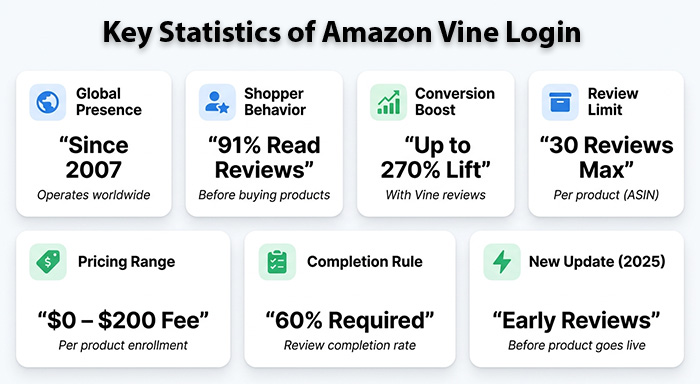
- Active since 2007, Amazon Vine operates across multiple countries on different continents.
- Around 91% of people who do digital shopping read at least one review before they purchase a product.
- Conversion rates of Vine Review listing go up to 270% than ones who are without any reviews.
- Sellers can simultaneously sign up for ASINs with a limit of 30 reviews per product.
- Fees for vine enrollment exist in the range of $0-200 per each product.
- Vine Voices must achieve a 60% review completion rate to remain in the program (increased from 50% in January 2024).
- In July 2025, Vine Voices can post their reviews before their product listing is live.
How does the Amazon Vine Login Operate?
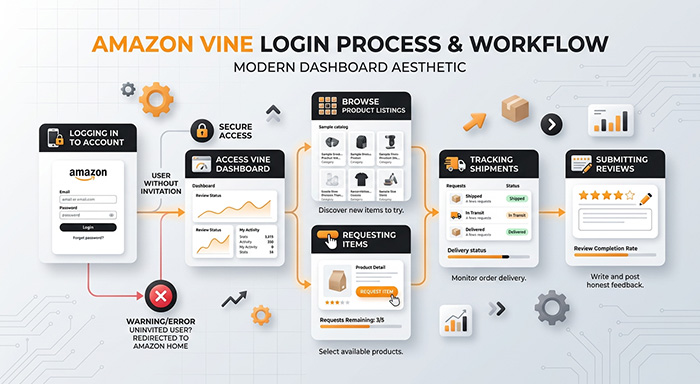
The Amazon Vine Login provides accessibility to a tailored dashboard. Members can request items, browse listed products, monitor shipments, and track deadlines for review submission. Accounts without an active invitation are likely to be redirected or see an error page.
- You can easily enroll by following a simple process. Just go to the main website of Amazon.
- Provide your email and password.
- Open the Vine portal via a dedicated URL or direct invitation link.
- First-time users need to read and accept the terms of the program covering tax obligations and review expectations.
- You can then load the dashboard with request caps, product listings, and submission tracking.
Pro Tip: Mobile users can run into layout issues. Using a desktop version is a smooth experience for drafting reviews or reading terms. Launching an incognito window or clearing your browser cache generally resolves issues related to authentication on any platform.
Amazon Vine Login Membership Tiers
In 2023, Amazon revealed membership levels for Vine Voices. Members in the gold tier get access to larger daily request caps and higher-value items. The Review Insightfulness Score, revealed in June 2025, is also factored into tier assessments as well.
| Tier | Requirements | Daily Request Cap |
| Silver | Invitation Received | Up to 3 times (Below $100) |
| Gold | 80+ reviews, 90% completion rate | Maximum 8 times (any price) |
Who Is Qualified for Amazon Vine Login Access?
Amazon chooses reviews as per the internal algorithm. The criteria involve balanced and consistent ratings, a neat purchase history, and long-term activity on the platform. High volume alone will not earn you an invitation.
No format application is present. Invitations come through email after an algorithmic screening of Amazon. Consistent shopping and posting detailed feedback consistently can enhance your possibilities, but nothing is ever guaranteed. Amazon also considers other factors, such as “helpful votes” from other customers, when choosing candidates.
Amazon Vine Review Insightful Score
In June 2025, Amazon revealed the Review Insightful Score. It utilizes four tiers: Fair, Poor, Good, and Excellent. Members with evaluations were given a score based on this scoring system starting from 1st September 2025. Ensuring an excellent score throughout this period of evaluation is the coveted target for gold-tier retention.
Amazon Vine Seller Fees and Enrollment
Sellers require a Brand Registry enrollment and a Professional Selling Account. Products must be shipped through FBA, listed as a “New” item, carry descriptions and images, and hold fewer than 30 present reviews. Hazardous or adult goods are excluded.
Amazon reorganized vine pricing on 19th October 2023. The previous flat fee was around $200, along with a three-tier system. New brand registry seller also gets a vine credit of $200 and can sign up to two products for free. However, this is subject to Amazon’s rules and regulations and can be subject to change over time.
| United Enrolled | Fee Per Parent ASIN | Max Reviews |
| 1-2 | $0 | 2 |
| 3-10 | $75 | 10 |
| 11-30 | $200 | 30 |
Seven days after you publish your first Vine review, the fee is charged. If no review shows up within 3 months of enrollment, sellers pay no price. Every ASIN can be signed up once in its lifetime. You do not have the option to re-enroll for more reviews later.
Amazon Vine Login Dashboard Section
The Vine dashboard has three key areas. “Available for You” provides you with requestable products. “Your Vine Item” shows shipping progress, ordered goods, and due dates. The “Reviews” tab manages submission, draft creation, and approval status.
“Missing” or “Late” submissions can minimize your trigger removal or request limit from the program. Amazon utilizes AI-based tracking to highlight suspicious patterns across different accounts of reviewers.
Read More: How AI Works?
Cost Considerations and Amazon Vine Tax
Joining costs almost nothing for reviewers. Products are extremely free of charge. However, members cannot resell the items, and reviews are necessary for each claimed product. Amazon provides 1099-NEC forms to Vine reviewers who get products that cost around $600 or more during the year. The taxable value is equal to the list price of the product during Vine enrollment time, irrespective of the actual value of the market. Find all the tax details within your dashboard before accepting top-value items.
What You Can Do Once Your Amazon Vine Login Fails?
The majority of problems related to accessibility can be traced to the 5 issues as explained in the table. In the table, we see the most important issues and how you can resolve each one:
| Issue | Fix |
| Unrecognized Email Address | Carefully check spelling or use an alternate email address which you may have used. |
| Incorrect Password | Utilize the “Forgot Your Password?” right below the sign-in fields to get a reset code by SMS or email |
| Two-step Verification Stuck | Get a new code via your authenticator app or linked phone number |
| Vine dashboard not being visible | Your account might not have yet received an active invitation. Log in with the exact same account on which you have received the invitation. |
| Locked accounts due to repeated attempts | Vine dashboard is not visible |
Key Tips for a Seamless Vine Login Experience
- Bookmark the Seller Central Advertising tab or vine.amazon.com so you can directly reach it every time.
- Store credentials for your Amazon account in a password manager to prevent reset cycles.
- Allow two-factor authentication. It includes an additional layer and expedites recovery should your account ever get compromised.
- Check the dashboard of Seller Central at least once every week to catch new opportunities for enrollment and incoming notifications early.
- Utilize the desktop version when you are going through enrollment terms or reading product details. Mobile layouts can misrender specific elements of the dashboard.
Linking these habits to browser-driven productivity tools makes it simpler to structure account tasks without hopping between multiple apps. Furthermore, sellers handling numerous ASINs or managing Vine deadlines along with other processes can benefit from automating daily routine processes.
Conclusion
Amazon Vine Login works as the gateway to one of the most reliable review ecosystems of e-commerce. Irrespective of whether you are a seller focusing on early review visibility or a Vine Voice handling your dashboard, comprehending the process of login, tier needs, tax implications, and the troubleshooting process ensures that your account remains in a good position. With flexible features such as Review Insightful Score and updated tiers of membership, remaining up to date with changes in the program makes sure that you can leverage the complete advantages of Vine membership offers.
To enhance the impact of such reviews, numerous sellers combine their Vine strategy with robust performance marketing tools that aid in tracking campaign Return on Investment, tracking ad spend, and measuring how initial reviews translate into precise conversations.
FAQs About Amazon Vine Login
Q. How can I accept the Amazon Vine Login page?
A- Use your standard credentials to sign in to Amazon. After that, access your invitation link and open the Vine portal. Keep in mind that participation is invitation-based only.
Q. Can you apply to become an Amazon Vine Voice?
A- No, actually, Amazon automatically chooses Vince Voice as per helpfulness notes, review history, and purchasing activity. There is no formal process of application.
Q. What is the cost of Amazon Vine for sellers?
A- The cost varies in the range of $0/1-2 units to $200/11-30 units per parent ASIN. Fees are charged seven days after you publish your first review.
Q. Are Amazon Vine products taxable income?
A- Yes, Amazon issues 1099-NEC forms to reviewers who get $600+ in products per year. The taxable value is as per the list price at the time of enrollment.
Q. What happens if I do not submit my Vine review on time?
A- Late submissions can minimize your request cap daily or can result in program removal. It is important for members to at least ensure a completion rate of 60%.
Respond to this article with emojis