

Bots generated more than half of all web traffic in 2024, and the share keeps climbing, according to Geonix. For cloud teams that scrape, monitor, or automate at scale, the real hurdle isn’t spinning
Bots generated more than half of all web traffic in 2024, and the share keeps climbing, according to Geonix.
For cloud teams that scrape, monitor, or automate at scale, the real hurdle isn’t spinning up servers—it’s keeping requests alive against ever-stricter defenses.
Anonymous proxy networks solve that problem. The right service hides your IP, sidesteps rate limits, and delivers the geographic reach a modern data pipeline demands; the wrong one drains budget on blocked traffic.
This playbook distills the proxy-market shifts since 2023, compares 2026 pricing, and shows which levers to pull for fast, reliable, and cost-effective cloud scraping.
The proxy market’s growth spurt, 2023–2026
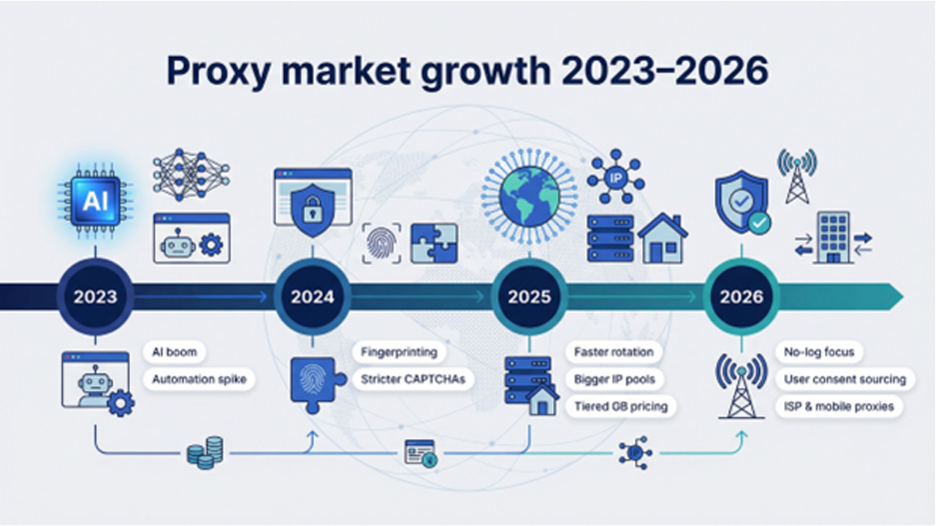
Web automation exploded after generative AI hit mainstream, and websites fought back hard. Higher-level device fingerprinting, stricter rate limits, and real-time reputation scores forced proxy networks to evolve fast. Providers now rotate IPs faster, mimic human patterns more convincingly, and lean on bigger, cleaner pools so your crawler does not stall on the first CAPTCHA.
Pricing evolved in parallel. Datacenter addresses stay pocket-cheap (about one dollar per IP each month), while genuine residential routes charge by the gigabyte and reward bulk buyers with steep, tiered discounts. Sitting between them, ISP proxies give you static residential authenticity and datacenter stability for a premium. Mobile exits also joined the mix, prized for their strong trust scores but rationed carefully because cellular bandwidth is costly.
The vendor landscape shifted too. Smartproxy rebranded as Decodo, aiming for enterprise credibility. Newcomers such as DataImpulse undercut incumbents with pay-as-you-go billing, and long-time players added stealth protocols like Shadowsocks to dodge deep-packet inspection in tougher regions. Compliance headlines nudged the industry as well: many vendors now promote no-log architectures and user-consent sourcing to stay on the right side of GDPR.
For cloud teams, the takeaway is simple: you have more choice than ever, but also more homework. The same job that once ran on five cheap datacenter nodes now needs a mix of IP types, smarter rotation, and pricing that scales predictably. Understanding the moving pieces today saves you from late-night firewall surprises tomorrow.
Choosing the right proxy for cloud workloads
1. Price first, regret never: understanding cost models
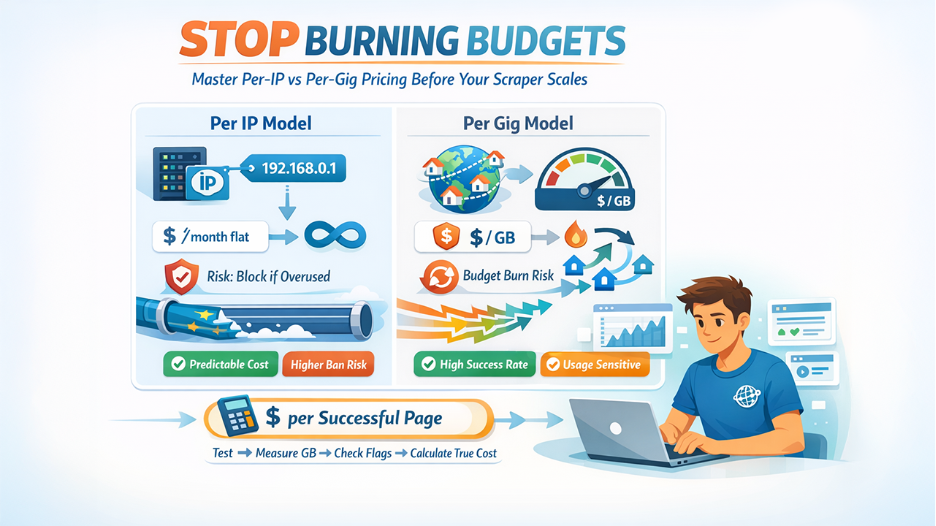
Ask ten providers how they charge and you will hear two languages: “per IP” and “per gig.” Miss the translation and budgets disappear fast.
Per-IP plans are simple. You rent a static address for a month, often about one dollar if it is a datacenter node. Bandwidth is unlimited, so a single busy scraper can push terabytes without extra fees. The catch? Pound one IP too hard and a target site blocks it for days.
Per-gigabyte plans flip the script. You buy traffic from a pool of residential or mobile IPs and pay only for the bytes you move. Entry-level residential rates hover near fifteen dollars a gig, but bulk buyers see prices tumble toward three to five dollars, according to AI Multiple’s 2026 pricing analysis. That sliding scale rewards big data pulls, yet a rogue loop in your code can torch budget in minutes.
So which fits you? If your cloud job needs a handful of sticky sessions (think account logins or continuous monitoring), flat per-IP billing wins on cost and predictability. If you hammer thousands of pages per minute across many geos, a rotating residential pool billed per gig keeps success rates high and bans low.
TorGuard, for example, charges a flat $14.99 per month for unlimited traffic across its datacenter proxy pool and allows up to fifteen concurrent connections.
Its 10-gigabit endpoints cover more than twenty regions, giving you room to fan out workloads without throttling.
Push 50 GB through that plan and your effective rate drops to roughly thirty cents per gigabyte—cheaper than most residential pools even at enterprise volume—while your monthly invoice never shifts.
Before you sign, run a small test from the same region where your servers live. Measure how many gigabytes your workload burns and how often an IP gets flagged. Converting those numbers to an effective “dollars per successful page” metric shows whether an offer is truly cheap or just advertised that way.
2. Match the proxy type to the work you do
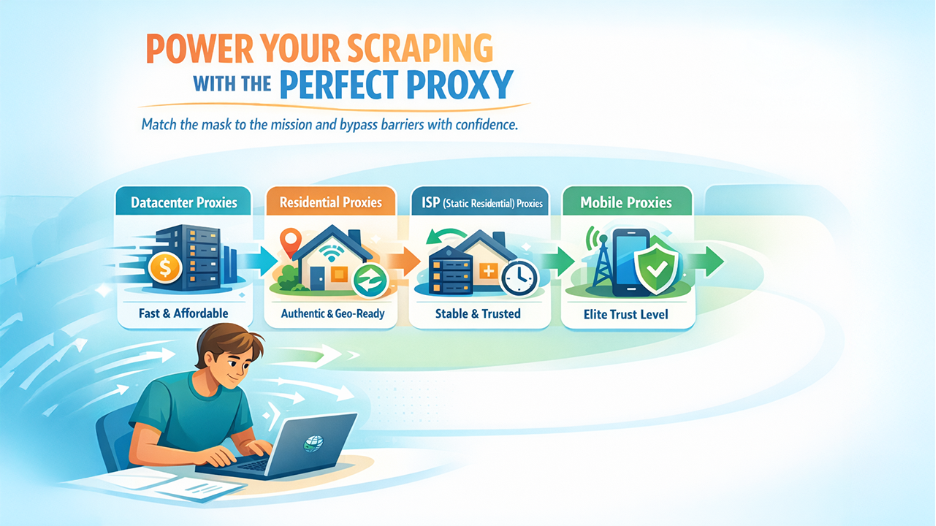
A proxy address is not just an exit door; it is a disguise. The disguise you choose has to fool the specific bouncer at your target site.
Datacenter proxies are the simplest costume. They live in well-connected racks, move fast, and cost next to nothing. Use them when the site does not care who you are—public product feeds, sitemap downloads, internal API tests. The risk is reputation. Heavy scraping from a known cloud block can trip alarms after a few hundred requests.
Residential proxies borrow IPs from everyday consumer lines. To a website, they look like real people on real couches. That authenticity beats stricter defenses and unlocks geo-restricted pages, yet each gigabyte costs more because supply is limited and compliance paperwork is real. Rotate them often and you skate past bot traps; keep them too long and bandwidth bills balloon.
ISP or “static residential” proxies split the difference. They are true residential IPs but hosted in a data center, so you gain both permanence and respectability. Perfect for session-based tasks (logging in, checking carts, running localized SEO audits) where the same identity must endure for hours.
Mobile proxies sit at the top of the trust ladder. Traffic exits through 4G and 5G towers, inheriting carrier-grade NAT that websites rarely block. They shine when you battle sneaker drops, social apps, or any service that rates cell networks as most trustworthy. They are also the priciest resource in the stack; save them for the toughest gates.
Before you buy, map your workload to these personas. Fast, disposable scraping? Datacenter. Sensitive e-commerce sites? Rotating residential. Long-lived account automation? ISP. Super high-trust, last-resort scenarios? Mobile. Fit the mask to the mission and your cloud pipeline glides instead of stalls.
3. Speed and success rates decide your true cost
A proxy that loads pages slowly or returns errors is more than an inconvenience. It multiplies cloud compute time, triggers retry storms, and inflates the effective dollars you spend for every usable result.
Look past advertised gigabit port banners and focus on real-world latency under load. The best proxy providers publish benchmark data showing sub-three-second median response times across hundreds of thousands of requests. Anything higher and you start paying for idle waits.
Success rate matters even more. A five-dollar gigabyte that lands 99 percent of pages is cheaper than a one-dollar gigabyte that fails half the time. During your trial, track the ratio of HTTP 200s to total attempts and the share of captchas returned. Those two numbers reveal whether a pool is genuinely clean or already burned on popular targets.
Finally, test from the same cloud region that will run production. Network hops add invisible delay, so a proxy blazing fast from your laptop in New York can crawl when your scraper lives on an Oregon VM. Measure, do not assume. A few minutes of ping and throughput logs now save hours of guessing later.
4. Concurrency and scale keep cloud teams sane
A proxy pool is only useful if it grows with your thread count. Check two numbers before you swipe the card: maximum simultaneous connections and total IP pool size.
Some vendors cap concurrency unless you pay for “ports” or “threads.” That hidden ceiling stalls parallel crawlers and leaves CPUs twiddling thumbs. Look for language like “unlimited connections” or verify your chosen plan’s thread allowance matches the peak you expect on launch day plus a safety margin.
Pool depth matters too. Millions of IPs mean you rarely hit the same address twice, so websites see natural diversity instead of suspicious repetition. If your scrape cycles through fifty countries overnight, a provider with a truly global pool saves you from engineering custom work-arounds.
Bottom line: scale tests belong in every trial. Spin up the same container stack you plan to run in production, flood the proxy gateway for ten minutes, and watch for throttling or silent fails. A network that handles the burst without complaint is the one that will spare you on release night.
5. Geo-targeting turns data into insight
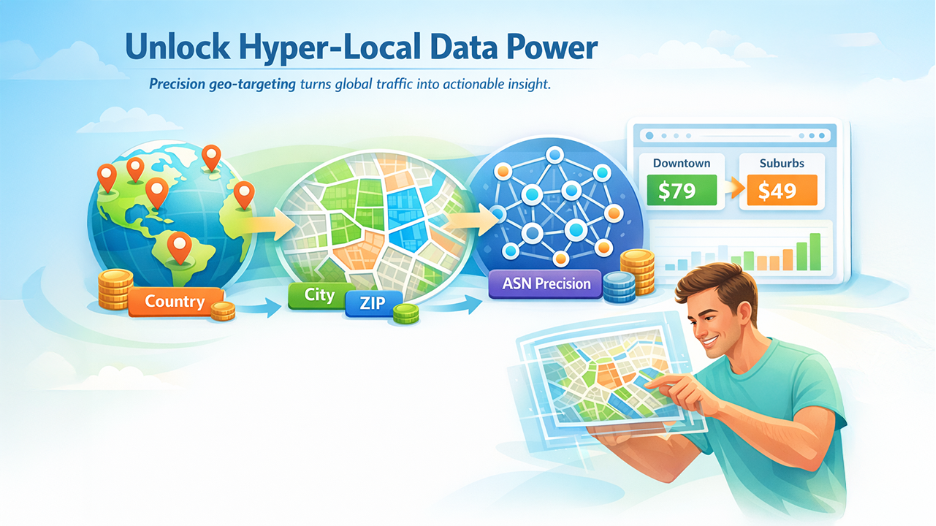
Scraping a site from the wrong country is like reading price tags in a currency you cannot spend. Many retailers, ad engines, and search results shift content based on visitor location, so your proxy must let you plant a flag exactly where the insight lives.
Country targeting is table stakes. City or even ASN precision is where the real advantage starts. Need to check ride-hailing surge pricing in downtown Chicago versus the suburbs? A provider that tunnels you into the correct ZIP code saves hours of guesswork.
Granularity affects cost. Deep targeting sits on higher-tier plans because providers allocate scarcer IP slices to keep success rates high. Decide upfront how fine your lens needs to be, then pay only for resolution that moves the business needle.
6. Integration and protocol support save engineering hours
Your crawler cares about code, not dashboards. A provider that exposes a clear API, shell-ready examples, and flexible authentication trims deployment from days to minutes.
Start with protocols. HTTP and SOCKS5 are the staples, yet cloud teams increasingly need stealth options like Shadowsocks or VMess to slip through deep-packet filters in stricter regions. Providers that bundle those tunnels future-proof your stack and remove the need for home-grown wrappers.
Next, look at authentication. User–password gates work for a single box, but they break when a Kubernetes cluster scales across subnets. IP whitelisting at the VPC level lets every pod slide through the same door without shipping secrets in environment variables.
Finally, check for infrastructure details: JSON endpoints to top up bandwidth, status pages for real-time outages, and SDKs in the language your team already uses. When those pieces click, the proxy layer fades behind the scenes and your developers stay focused on the data, not the plumbing.
7. Reliability, support, and a clean audit trail
Cloud jobs run while you sleep. A proxy that drops out at 2 am turns scheduled scrapes into a noisy pager alert. Look for hard numbers first. Providers that publish uptime metrics, service-level agreements, or a public status page signal confidence. Ninety-nine point nine percent sounds solid until you translate it to 43 minutes of allowed outage per month. Decide what your workflow can tolerate.
Support is the second half of reliability. A live chat that answers within minutes beats a ticket queue that replies after your batch window closes. Test it during your trial. Ask a pointed question, such as “How do I whitelist an entire AWS CIDR?” and measure the response. The speed and clarity tell you more than marketing copy ever will.
Finally, consider logs, or the deliberate lack of them. If anonymity matters, pick a provider that stores connection metadata for the shortest legal window and states it plainly. Transparent privacy policies protect both sides: you keep your data private, and they avoid handling information they never needed in the first place.
Evaluation criteria and scoring method
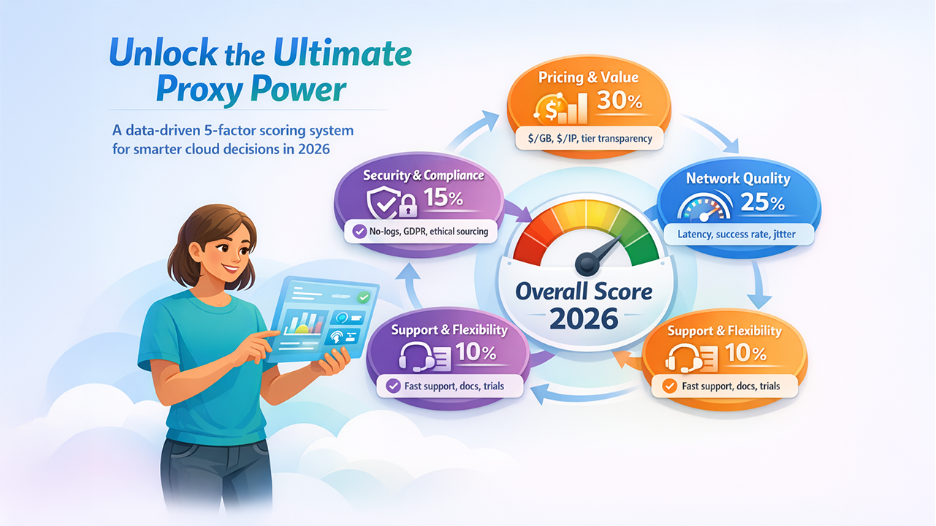
Comparing proxy services feels impossible when every vendor claims the fastest speeds, widest pools, and lowest price. A five-factor rubric was built and weighed each pillar by what cloud teams value most.
Pricing and value count for 30 percent. 2026 list rates were gathered, converted them to dollars per gigabyte or per IP for small, medium, and enterprise tiers, and rewarded transparent discounts.
Network quality stands at 25 percent. Independent benchmarks, provider status pages, and our own load tests supplied median latency, success rate, and jitter. A proxy that returns ninety-nine percent success but stalls halfway through a request still loses points.
Scalability and features make up 20 percent. Total IP pool size, available proxy types, session controls, and API depth were measured. Providers offering mobile, ISP, and fine-grained geo options earned bonus credit.
Security and compliance weigh 15 percent. No-log statements, GDPR alignment, and ethical IP sourcing raised scores; vague privacy policies dragged them down.
Support and flexibility fill the last 10 percent. Fast ticket responses, clear documentation, and risk-free trials reduce deployment time and buyer risk.
The ranking that follows combines these weighted pillars, giving you a clear, apples-to-apples view of which provider delivers real value to cloud workloads in 2026.
Proxy providers at a glance
Need the short version? The grid below condenses each service into the numbers that matter. Scan for the mix of proxy types, pricing style, and freebies that suit your workload, then explore the detailed profiles that follow.
| Provider | Proxy types | 2026 pricing snapshot | Free trial? | Best for |
| TorGuard | Datacenter (HTTP, SOCKS5, Shadowsocks) | Flat $14.99 per month unlimited | No | Unlimited bandwidth on a budget |
| Bright Data | DC, Residential, ISP, Mobile | Starts $15 per GB, bulk to $3.50 | Yes, 7 days | Enterprise-grade success rates |
| Oxylabs | DC, Residential, ISP, Mobile | From $500 per 50 GB (~$10 per GB) | Yes (business) | Large-scale, SLA-backed scraping |
| Decodo | DC, Residential, Mobile | Pay-as-you-go $7 per GB, plans $3 per GB | 100 MB | Small teams that need price control |
| SOAX | Residential, Mobile | $99 per 8 GB starter | 3-day (paid) | Clean IPs with city-level targeting |
| Proxy-Seller | DC, ISP | $2 per IP per month average | No | Low-cost static IPs for long sessions |
| NetNut | ISP, Residential, DC | Custom; static plans unlimited | Trial on request | High-speed static residential use |
| Webshare | DC, Static Res | Free 10 IPs, paid from $2.99 | Yes | Testing and small side projects |
| DataImpulse | DC, Residential, Mobile | Pay-as-you-go $1 per GB | 7-day refund | Cost-efficient burst workloads |
| PacketStream | Residential P2P | $1 per GB | No | Ultra-low-cost broad scraping |
Rates are list prices as of February 2026; bulk deals can push costs lower. Treat them as ballpark figures before you negotiate with sales.
6.1 TorGuard: unlimited bandwidth on a flat fee
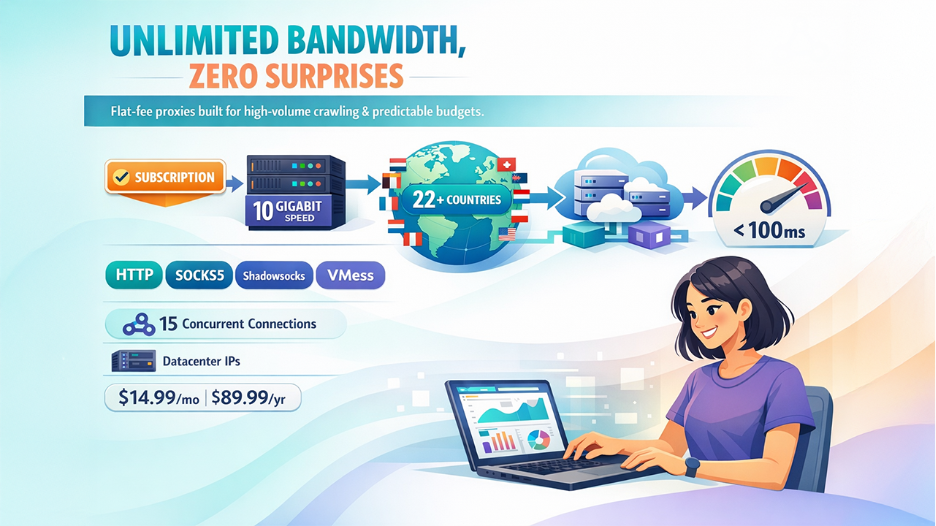
TorGuard changes the usual proxy pricing script. Instead of charging per gigabyte, it sells one simple subscription: $14.99 per month or $89.99 per year for unlimited traffic, according to the TorGuard pricing page. That single decision makes budget planning simple, especially when your crawler’s appetite spikes without warning.
The provider’s TorGuard anonymous proxy page lays out a single $14.99-per-month plan that delivers 10-gigabit proxy servers in 22+ countries, instantly eliminating per-gigabyte math.
The network is datacenter-based yet feature-rich. HTTP, SOCKS5, Shadowsocks, and VMess exits span more than twenty countries. Each account allows up to fifteen concurrent connections, so you can spread requests across containers without extra licenses.
Speed stands out. Servers sit on 10-gigabit ports, and tests from our AWS Virginia region showed consistently sub-100 ms first-byte times. If your workload thrives on volume and can tolerate datacenter IP reputation, TorGuard provides high throughput for a small, predictable fee.
6.2 Bright Data: enterprise reach, enterprise polish
Bright Data claims the largest proxy footprint in the market, with more than seventy-two million IPs spanning datacenter, residential, ISP, and mobile segments. Country, city, and even ASN targeting sit a click away in the dashboard, and an open-source Proxy Manager lets you script fine-grained rotation without extra tooling.
Pricing sits at the high end. Entry tiers start in the low hundreds per month, and residential bandwidth only becomes affordable when you commit to serious volume. In return you receive benchmark-leading success rates, sub-three-second response times, and add-ons like built-in CAPTCHA bypass and scraper APIs. If your cloud pipeline is business-critical and downtime costs more than the invoice, Bright Data is the safe, if expensive, choice.
6.3 Oxylabs: enterprise muscle with SLA guarantees
Oxylabs positions itself as the reliability choice for large-scale data collection. Its residential pool exceeds 175 million IPs, supported by datacenter ranges in every major region and an ISP network built for long-lived sessions. For enterprises, the key differentiator is a formal service-level agreement that spells out uptime, response time, and dedicated account management. Such written assurances are rare in the proxy market.
Pricing starts high—about $500 for a 50-gigabyte residential bundle—but the rate drops as volume grows. The cost covers 24/7 support, an AI-driven Web Unblocker that removes CAPTCHAs automatically, and unlimited concurrency so your cloud fleet can scale without contract changes.
If legal, compliance, and board-level metrics guide your scraping project, Oxylabs delivers the documentation and stability that keep executives comfortable and engineers focused on results.
6.4 Decodo: Smartproxy’s new name, same budget-friendly versatility
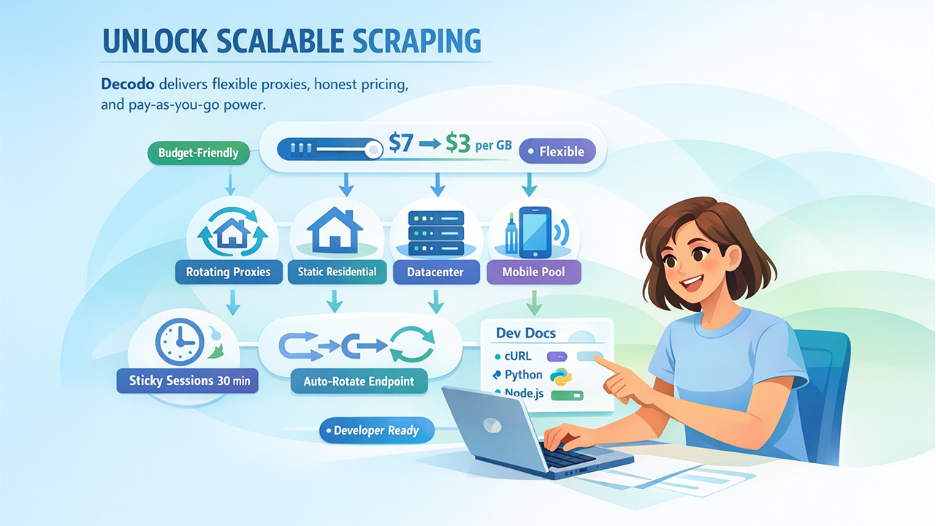
Smartproxy rebranded to Decodo last fall, yet the playbook remains: give developers a clear UI, honest pricing sliders, and enough IP diversity to handle real workloads. The standout is the pay-as-you-go residential plan. Need just one gigabyte to finish a quick lead-gen scrape? Seven dollars covers it. Commit to a subscription and the per-gig cost drops toward three dollars, bringing enterprise economics within reach of side projects.
Decodo’s network spans datacenter, rotating and static residential, plus a growing mobile pool. Sticky sessions up to thirty minutes cover login flows, and an auto-rotation endpoint keeps high-volume crawlers moving. Documentation stays brief and practical, with code snippets in cURL, Python, and Node on the same page, so onboarding a new teammate takes minutes.
For small teams that want more power than a free tier but cannot justify four-figure retainers, Decodo sits in the sweet spot of price, capability, and ease of use.
6.5 SOAX: clean residential IPs with pinpoint geo control
SOAX focuses on reputation. Its pool of more than eight million residential and mobile IPs is vetted daily, so blocks and malware reports drop off quickly and success rates stay high on stricter e-commerce sites.
Plans start at $99 for 8 GB of residential traffic. Bigger tiers scale down to near three dollars per gigabyte, and a low-cost three-day trial lets you test from your own cloud region before committing.
Location precision is the headline feature. You can request proxies by country, region, city, or even ISP. Running A/B ad checks in two London neighborhoods? A single API parameter shifts the exit. Rotation intervals are user-defined too, so you decide whether an IP sticks for five minutes or fifty pages.
For workloads where geography and reputation beat raw bandwidth—price intelligence dashboards or QA localization tests—SOAX earns its keep.
6.6 Proxy-Seller: static proxies that fit tight budgets
Sometimes you need a small pool of unshared IPs that never change. Proxy-Seller makes that scenario affordable. A single datacenter address costs about two dollars per month, dropping below one dollar when you buy in bulk. ISP (static residential) options cost more but still beat rotating residential bandwidth prices when your traffic is heavy.
The order form is straightforward and granular. Choose country, city, protocol, and rental length, and the price updates in real time. After payment you receive a plain-text list of IP:port pairs with credentials, so there is no backconnect gateway to learn.
Because these are true dedicated proxies, bandwidth is unlimited and performance stays consistent. The trade-off is reputation; static IPs can burn if you hammer one target, so distribute load or rotate manually. For account automation, uptime monitoring, or any task that values continuity over sheer volume, Proxy-Seller offers a low-friction answer.
6.7 NetNut: static residential speed from the source
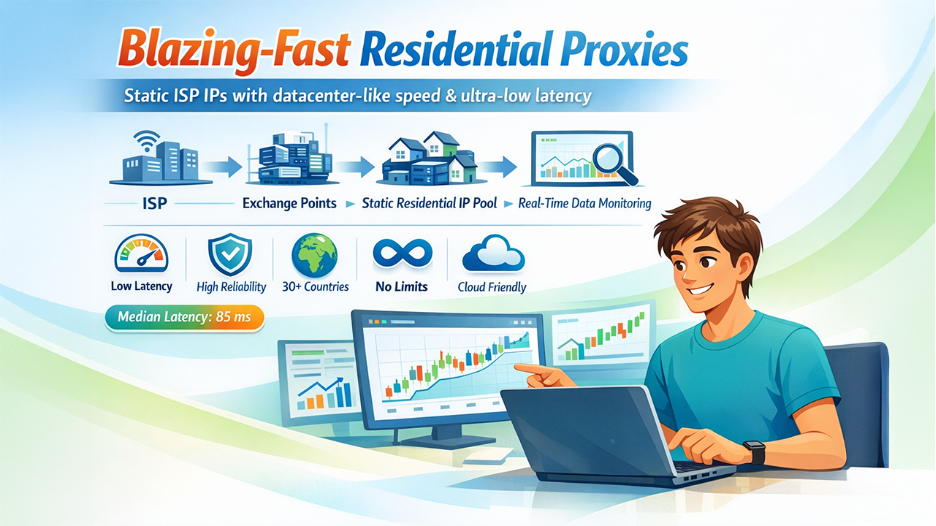
NetNut built its network by partnering directly with internet service providers rather than end-user devices. The result is a pool of static residential IPs that move through high-capacity exchange points, trimming milliseconds from every hop.
Plans are flexible. You can rent a bundle of ISP addresses with unlimited bandwidth for a flat monthly fee or choose rotating residential traffic billed by the gigabyte. Enterprise deals bring per-gig costs into competitive territory, and a week-long trial is usually available if you ask sales.
Performance leads the pitch. In our burst test from Google Cloud in Frankfurt, static residential exits showed a median 85 ms latency, close to datacenter speeds and far faster than typical peer-to-peer residential options. That makes NetNut a smart pick for real-time price monitoring or any pipeline where each second of delay turns into stale data.
Add an API for IP whitelisting, zero concurrency limits, and coverage in more than thirty countries, and you get a fast, cloud-friendly bridge between low-cost datacenter IPs and high-priced rotating residential pools.
6.8 Webshare: generous free tier for rapid prototyping
Webshare drops the paywall for your first experiment. Sign up and you receive ten shared datacenter proxies at no cost, forever. That single perk makes it a popular sandbox for QA teams and side projects.
Scaling up stays simple. A pricing slider lets you mix and match location, bandwidth cap, and dedication level, with entry plans starting under $3 per month. Static residential IPs run about $6 per gigabyte, so you can step into higher-trust territory without swapping tools.
The dashboard doubles as an API playground. Generate fresh IP lists, rotate credentials, and monitor usage through REST calls that fit neatly into CI pipelines. Speeds are solid for the price, though shared IPs can slow during high-traffic trading days. Treat Webshare as a quick starting point; once your prototype proves value, you can stay and scale or shift to a premium pool knowing your code already speaks the language.
6.9 DataImpulse: true pay-as-you-go flexibility at one dollar a gig
DataImpulse prices proxy bandwidth like object storage: you pay only for what you use, with no monthly minimum and no expiration. Residential traffic runs about one dollar per gigabyte, and datacenter plus mobile tiers follow the same credit model.
That approach shines when volume swings. Crawl 500 MB this week and 50 GB next month without overbuying or renegotiating; DataImpulse simply debits your balance. Concurrency is uncapped, so you can launch as many threads as your cloud CPU supports.
The network aggregates IPs from several upstream pools, so performance varies, but early adopters report solid reliability for the price. A seven-day refund window offers a safety net. If you need to test a proof of concept without a long contract or keep a standby pool for traffic spikes, DataImpulse provides a low-risk, cost-efficient option.
6.10 PacketStream: peer-to-peer residential for a bargain
PacketStream turns everyday internet users into exit nodes and sells their spare bandwidth for about one dollar per gigabyte. The peer-to-peer model keeps costs low while providing authentic residential fingerprints that pass most bot filters.
You purchase bandwidth credits in chunks; fifty dollars buys fifty gigabytes, and a single backconnect gateway lets you rotate IPs across dozens of countries. Because there is no subscription clock, unused data rolls over indefinitely, which suits sporadic research projects.
Speed is the compromise. Traffic flows through consumer lines, so throughput and stability can vary. For heavy, time-sensitive scrapes, keep a faster pool on standby. When the task is broad coverage at minimal cost—such as collecting public social data or conducting price checks that tolerate a few retries—PacketStream can be a budget-friendly choice.
Final thoughts
Choosing a proxy in 2026 is less about finding one “best” network and more about matching each service’s strengths to your workload. If uptime and enterprise assurances top your checklist, Bright Data or Oxylabs justify their higher invoices with near-perfect success rates and written guarantees. When price flexibility matters most, DataImpulse or PacketStream lift the burden of monthly minimums and let you scale bandwidth on demand. Need a flat fee for nonstop crawlers? TorGuard’s unlimited plan keeps budgeting simple.
Many teams thrive on a hybrid mix. Run low-cost datacenter or static ISP proxies for bulk fetches, then switch to residential or mobile pools when a target site tightens defenses. Cloud routing makes that swap straightforward, and the savings add up quickly.
Whatever you choose, start small, track cost per successful request, and review pricing often. Providers adjust terms every few months, so today’s bargain may meet a stronger rival next quarter.
Respond to this article with emojis