

Top Automation Tools Businesses Use to Manage Remote Teams Efficiently
Discover the top automation tools businesses use to manage remote teams efficiently, improve collaboration, automate workflows, and streamline payroll in 2026.
Over the last decade and especially the last 3 to 5 years, there has been a definite and permanent change to how we work.
The rise of remote work and distributed teams has become a standard practice; it’s simply a trend.
Companies aren’t limited by zip codes; they can find the perfect talent in London just as easily as in Lima.
But this freedom brings challenges in managing productivity, communication, and costs across locations.
It’s tough to keep everyone on the same page when they’re scattered across different time zones and cultures.
This is exactly where automation tools help streamline workflows, reduce manual work, and improve efficiency.
By letting software handle the repetitive “busy work,” your team can actually focus on the big ideas.
Let’s dive into a discussion of the most effective tools for 2026 and handling global payrolls.
Why Automation Is Essential for Remote Teams?
When you work from an office, it is easy to observe the workflow around you.
With remote work, however, you often have to wing it. What keeps remote teams “teaming” is automation.
Reduces repetitive tasks and human error:
We all make mistakes when we’re bored. Automating data entry or payroll calculations means things get done right the first time.
Improves communication and collaboration:
Automated pings and notifications ensure that no one is left out of the loop, even if they’re sleeping while the rest of the team is online.
Helps scale operations without increasing workload:
Good systems mean you can hire your 10th or 100th employee without needing a whole new department of admins to handle them.
Supports better tracking and decision-making:
It is much easier to see where to invest when you have data at your fingertips.
Categories of Automation Tools for Remote Teams

There are no miracle apps for remote teams, however, by building a stack of specialized tools that work well together, you could see miracles.
Here is a winning recipe:
Communication:
For the daily back-and-forth.
Project Management:
To keep track of who is doing what.
Time Tracking:
To understand where the day actually goes.
HR & Payroll:
For the legal and financial heavy lifting.
Documentation:
To build a company “brain” that anyone can access.
Using a combination of tools is the secret.
You stop wasting time hunting for lost links or forgotten deadlines when your chat app “talks” to your project management app.
Top Automation Tools for Managing Remote Teams
Related walkthrough
GuestPostMailer Dashboard Overview | AI-Powered Guest Posting u0026 CRM Automation Tool

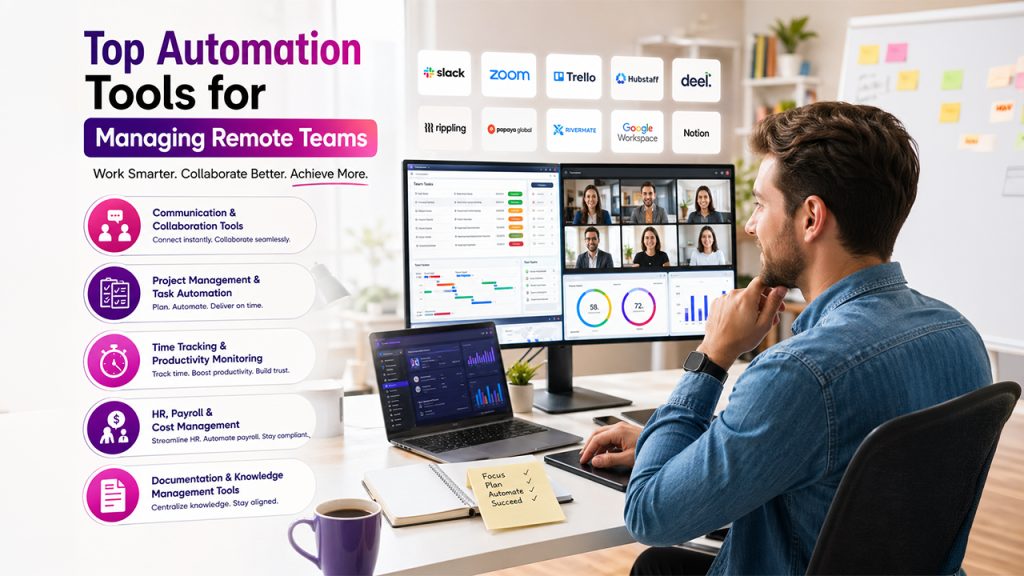
1. Communication & Collaboration Tools
Good communication is the key to success with remote work.
We have virtual offices because of tools like Slack, Microsoft Teams, and Zoom.
Features:
You get instant messaging for quick questions, video calls for the deep stuff, and a place to drop files without clogging up email.
Automation use:
The real power comes from chatbots and workflow notifications.
You can set a bot to ask for “daily stand-ups” or sync your calendar, so your status automatically changes to “Busy” when you’re in a meeting.
2. Project Management & Task Automation
If there is no central hub, keeping a project on track across time zones can be a nightmare.
The go-to choices are Trello, Asana, and ClickUp.
Features:
They let you assign tasks visually, set triggers for the next steps, and keep a close eye on deadlines.
Automation use:
You can set up recurring tasks so you never forget the monthly newsletter.
Plus, automated status updates can trigger an alert for the next person in line as soon as a task is marked “Done.”
3. Time Tracking & Productivity Monitoring
Data backs up remote work, but trust is also an important component.
What gives a clear picture of how work gets done are tools like Hubstaff and Time Doctor and Time Champ.
Features:
These apps track time, monitor activity levels, and generate reports on where the hours are going.
Benefits for remote teams:
It provides transparency for everyone involved. It’s also great for spotting burnout early—if someone is consistently overworking, the data will show it.
4. HR, Payroll, and Cost Management Tools
Compliance becomes a quagmire when hiring someone from another country.
What has definitely made the process much less terrifying is Rippling, Deel, and Papaya Global.
Features:
They handle the automation of payroll, onboarding new hires, and staying on the right side of local labor laws.
Practical tip:
Before you send out an offer letter, use an employee cost calculator to see what the actual “all-in” price is, including local taxes and benefits.
As your team grows, it’s a good idea to explore Papaya Global alternatives to see which platform fits your specific vibe.
You might also find that some rippling alternatives offer better pricing or simpler integrations for smaller teams.
Rivermate offers a streamlined EOR experience that takes the complexity out of global hiring for those wanting a more hands-on, supportive partner.
5. Documentation & Knowledge Management Tools
Precise documentation is very important, as we all know.
Platforms that act as the “Source of Truth” are Google Workspace, Confluence, and Notion.
Features:
These are for storing SOPs, meeting notes, and shared documents that everyone can edit in real-time.
Automation use:
Use templates so every project starts with the same checklist.
You can also automate your workflow documentation so that archives stay organized without anyone having to manually move files.
How to Choose the Right Automation Tools?
Don’t just buy every tool you see. That’s a fast track to “tool fatigue.” Instead, think about:
Team size:
What works for five people might be a disaster for fifty.
Budget:
Some tools get very expensive as you add more seats.
Integrations:
If the tools don’t talk to each other, they aren’t saving you time.
Ease of use:
If it’s too hard to learn, people will just go back to using spreadsheets and email.
Avoid tool overload and rather focus on an essential stack.
Rather use 3 great tools than a multitude of tools that work poorly. Prioritize using apps that work well together.
Common Mistakes to Avoid
Look out for the following with automation:
Too many tools, no connection:
If your data is trapped in five different places, you haven’t solved anything.
Skipping the training:
Just because a tool is “easy” doesn’t mean your team knows how you want them to use it.
Automating the “human” stuff:
Don’t replace a necessary conversation with a bot. Use automation for the boring stuff so you have more time for real talk.
Set it and forget it:
Tools change, and teams grow. Audit your tech stack twice a year to make sure you’re still getting your money’s worth.
Conclusion
Automation gives you time to focus on building your business and managing remote teams efficiently.
The right mix of software makes communication, productivity, and scaling a whole lot easier.
Just remember to test and refine your tool stack as you go.
The right combination of tools and smart processes will help you build a winning team.
Key takeaway: The right stack depends on how and where your people actually work. Chat apps and project boards cover desk teams, but anyone running shift-based or on-site staff also needs a way to manage shifts and staff from anywhere, so a manager can adjust a rota, approve a swap, or see who is on shift from wherever they happen to be.

