
How to Connect Retail POS Data With Your CRM
Discover how cloud POS integration connects retail sales data with CRM systems, streamlines customer records, improves synchronization, and supports smarter retail operations.
Cloud POS systems can help retailers connect in-store transactions with their customer relationship management (CRM) platforms, creating a more complete view of each customer’s shopping experience. A customer buys a jacket in store, returns it a week later and then receives an email recommending the same jacket. To them, the message feels careless. To the retailer, it may point to a gap between the point of sale (POS) and customer relationship management (CRM) systems.
Connecting the two can give staff a clearer picture of each customer’s experience. The challenge is deciding which information to share, how to match it, and also importantly, when to trust it.
What a Connected Customer Record Can Do
A POS records what happens at checkout, while a CRM helps a business manage customer relationships. Connecting them can show a more complete purchase history without asking staff to search two systems.
With that context, teams are able to more easily answer questions, recognize a repeat shopper, or avoid sending an offer for a product already returned. It can also save a small team a significant deal of time that would have otherwise been spent correcting records.
Choose the Events Worth Sharing
Think of the CRM as a customer’s receipt drawer; it needs more than the first receipt to tell the full story. Exchanges and returns matter too, and the role of retail software in modern transactions is to capture those changes as they happen.
Start by identifying the events that will make a customer record more useful:
- Completed sales with item and purchase details
- Returns and exchanges linked to original purchases
- Loyalty enrollment and points changes
Agree on what each event means before building the connection. A canceled order, for example, should not look like a completed sale.
Map Retail POS Data to CRM Records
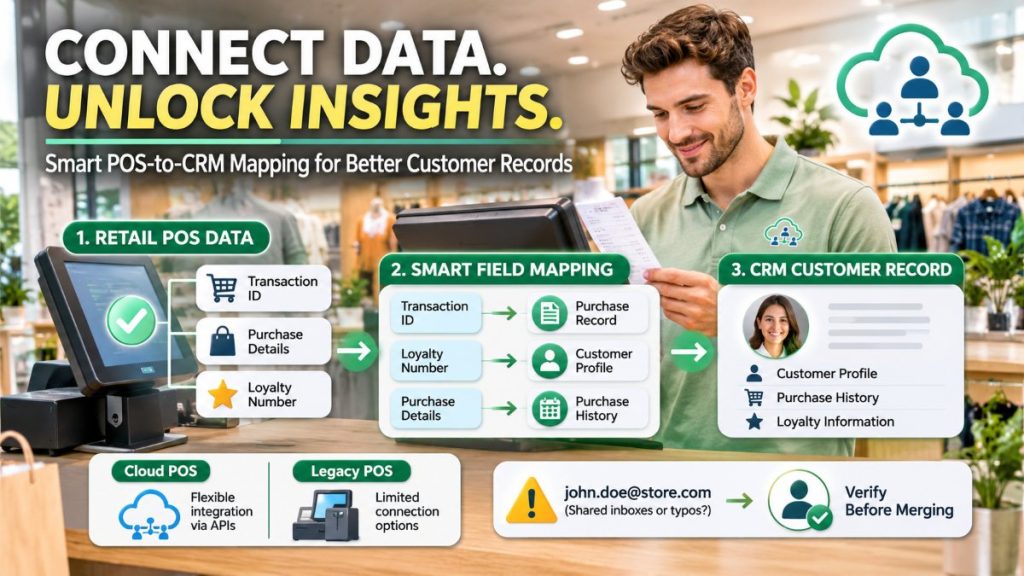
Field mapping is the process of deciding where each POS detail belongs in the CRM. A transaction ID might go into a purchase record, while a loyalty number connects that purchase to a customer profile. It is paramount to choose the right POS architecture before settling those mappings.
A retailer considering moving to cloud POS may have different connection options than one keeping an older system, so the same mapping plan may not suit both. Planet’s cloud vs. legacy POS comparison notes that cloud POS systems often support API integrations, giving retailers more flexibility when connecting software.
Always use a stable customer ID where possible. Email addresses can help with matching, but shared inboxes and typos mean they deserve a review before records are merged.
Decide How Quickly Data Should Arrive
Depending on your business and how busy the day is, POS terminals might process tens to hundreds of transactions each hour. Not every update needs to appear instantly. A nightly sync might be enough for a weekly sales report, while a loyalty balance shown at checkout may need a faster update.
The right timing depends on what customers and staff expect to do with the information. According to research by Deloitte, only 35% of surveyed retail executives believe their sales and marketing teams have the information and tools required to personalize customer experience.
For a retailer, a reliable customer history is one place to start closing that gap.
Catch Duplicates and Missing Updates
Related walkthrough
SuiteCRM AI-Powered Mailchimp Integration (Lite) | Real-Time Two-Way Sync & Campaign Tracking

A shopper may give one email address online and another in store. If the systems create two profiles, staff can miss part of that person’s history.
It thus becomes important to set rules for spotting likely duplicates, but leave uncertain matches for a dedicated staff member to check. Also review failed updates and sync delays so a returned item does not stay marked as a purchase indefinitely.
Give AI a Useful Supporting Role
There’s no doubt about it, artificial intelligence now fits in just about any process where data is involved. AI can help teams spot unusual records or suggest possible matches for review. It might flag two profiles with similar contact details, for example, rather than leaving staff to find them one by one.
Keep a person in charge of the final decision when a match is uncertain. A mistaken merge can be harder to fix than a duplicate that waits for review.
Protect the Data Customers Share
Think of customer data like a spare key: giving every employee a copy makes the shop easier to enter, but harder to keep secure. Staff should have access to the information they need for their work, not automatically to every customer detail.
Guidance from the Federal Trade Commission on digital security highlights practices such as limiting access and deciding how long to retain data. Review those choices as the integration grows, especially when new tools or team members are added.
Weigh Legacy and Cloud POS Options
An existing POS may already support a useful connection, but an older system could require custom work or slower batch updates. A cloud POS may offer different integration options, though the retailer still needs to check what data it can send and receive.
Before scoping the project, ask both POS and CRM providers about available connections, costs and support. Test a small set of sales, returns and loyalty events first, then check the results with the people who will use them – your frontline staff.
Build a Customer History Worth Trusting
A useful connection starts with a clear purpose, not the largest possible data transfer. Good matching and timely updates help staff act on the record with confidence.
Review errors regularly and give customers the care their information deserves. Keep the process manageable for the team maintaining it. If this piece was helpful, explore more guides on CRM, retail transactions and data on the blog.