

Hunting for a commercial mortgage in 2024 means recalibrating fast. After 11 Fed hikes, most loans clear between 6 percent and 9 percent—far from yesterday’s fours and fives. Bigger payments
Hunting for a commercial mortgage in 2024 means recalibrating fast. After 11 Fed hikes, most loans clear between 6 percent and 9 percent—far from yesterday’s fours and fives. Bigger payments squeeze debt-service coverage, and lenders parse every decimal of NOI. Before you even request a term sheet, you need a quick, reality-checked answer on whether the deal still works. The right calculator provides that clarity—if it’s built for today’s SOFR world, not dusty LIBOR defaults. Five free tools were stress-tested to see which ones earn a permanent bookmark.
Criteria to rank the calculators

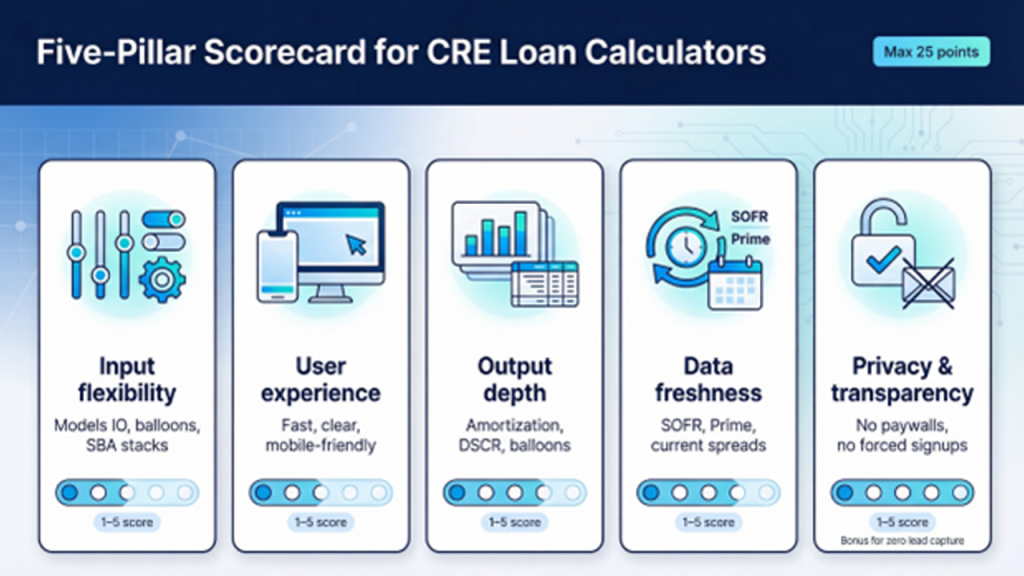
Great tools answer the same questions you face at the closing table. To sort out the standouts from the so-so, a five-pillar scorecard was built and graded for each calculator on a 1-to-5 scale.
- Input flexibility. Can the tool handle interest-only periods, balloon terms, or an SBA two-loan stack? More options earned higher scores.
- User experience. Speed and clarity matter. Calculators that load quickly, explain every field, and work as well on a phone in a parking lot as on a dual monitor at the office were favored. Their performance often reflects advances in Rapid Web Application Development Tools, which enable fintech platforms to deploy faster, more responsive interfaces.
- Output depth. A lone monthly payment is not enough. The focus was on amortization tables, DSCR readouts, and clear balloon figures, so you see the loan’s full life cycle.
- Data freshness. Inputs must reflect today’s SOFR, Prime, and prevailing spreads, not stale LIBOR presets.
- Privacy and transparency. No paywalls, no forced email capture—just click “Calculate” and get results.
The five pillars were summed up for a maximum of 25 points. The next section shows how each calculator has scored.
Calculator 1: Lendio – quick estimates and pre-qualification
Open the Lendio commercial mortgage calculator and two numbers appear side by side: your projected monthly payment and a “You may qualify for” loan range.
That split-screen result frames both affordability and approval odds in a single glance.
Instead of dropping you into a blank amortization grid, it asks the same questions a banker will soon fire at you: loan amount, term, annual revenue, last month’s deposits, and your credit tier.

Lendio commercial mortgage calculator split-screen results screenshot
Enter the numbers and two answers land side by side.
On the left, the plain-vanilla payment—principal, interest, and total cost over the term.
On the right, a “You may qualify for…” range that shows whether the loan size in your head aligns with what your business can support.
That second figure blends Lendio’s marketplace data with your inputs, so you see potential approval odds before spending time on a full application. For first-time borrowers—or owners who only glance at P&Ls quarterly—that quick reality check is invaluable.
The interface stays friendly: large sliders, plain-English tooltips, no jargon.
It loads cleanly on a phone, so you can sanity-check a warehouse purchase while standing in the loading bay.
Trade-offs exist.
You cannot model an interest-only period or a five-year balloon, and the tool skips a printable amortization table.
When speed and eligibility insight outrank structural nuance, though, Lendio is the calculator that was open first.
Bottom line: use it at the very start of your search.
If its qualifying range covers your target price, move on to a deeper tool for fine-tuning.
If not, adjust expectations—or line up more equity—before you invest time with lenders.
Calculator 2: CommLoan – scenario depth for power users
CommLoan’s interface feels like a mini underwriting desk tucked into a web page.
Set purchase price, LTV, amortization, maturity, and any interest-only period, and the numbers recalculate in real time.
Add one more line—first-year NOI—and the tool returns a live DSCR so you instantly see whether the deal clears a 1.25 hurdle.
That single field shifts the calculator from a basic payment tool to a forward-looking financing model.
If DSCR drops below 1.25, the screen flashes the warning before a banker does.
Adjust NOI, term, or loan size and watch the ratio respond.
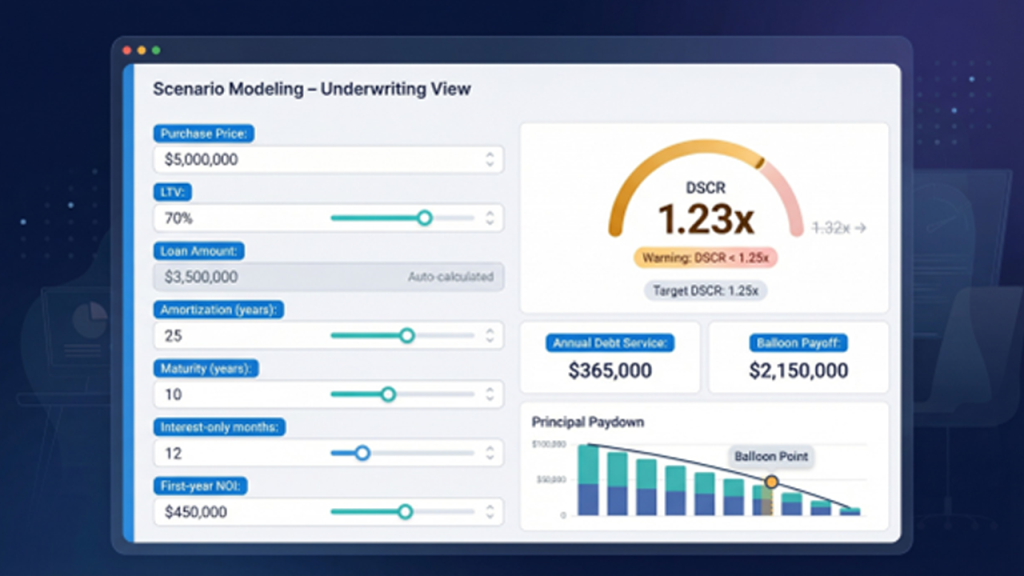
CommLoan also displays balloon payoff, annual debt service, and a clear chart of principal paydown.
Click once and a full amortization table appears, giving you both the big picture and the line-by-line detail without opening Excel.
The trade-off for this depth is complexity.
New users may pause at fields like “interest-only months” or the difference between amortization and maturity.
Mobile works, yet the grid feels tight on a five-inch screen.
For investors modeling bridge loans, refinance exits, or sensitivity scenarios, CommLoan is a top choice.
Run it after Lendio gives you the green light, and you can fine-tune structure with the same levers a credit officer will use later.
Calculator 3: MortgageCalculator.org – detailed amortization workhorse
MortgageCalculator.org takes a different approach.
Instead of sleek graphics, it offers every input you might need and a printable amortization table that runs from month one to final payoff.
Enter property price, down payment, interest rate, term, and a longer amortization. The tool returns three key figures you cannot ignore: monthly principal-and-interest, an interest-only comparison, and the exact balloon due at maturity.
Scroll a bit further and you see cumulative interest, projected equity build (if you add appreciation), and a button that produces a full schedule.
Need the remaining balance in month 43? One glance gives the answer.
The depth of inputs—fees, appreciation, refinance payoff—can feel heavy at first, yet that detail lets you stress-test a buy-and-hold plan or time a cash-out refi to the month.
The site shows a few ads and the design looks old-school, but the math checks out.
Use this calculator when you need the long view: how the loan performs year after year and what the balloon check will be before you sign a term sheet.
Calculator 4: Commercial Real Estate.loans – fast answers with market context
Sometimes you just want the monthly payment and a quick check on today’s rates.
CommercialRealEstate.loans delivers in four fields: loan amount, rate, term, and amortization. It pairs the output with live commentary on where the market sits.
Enter a seven-percent quote and the page adds context, noting that most fixed CRE loans track about three points above the Fed funds rate.
Key the numbers far off the norm and the sidebar flags the gap, steering you back to reality.
The calculator shows two figures: your all-in principal-and-interest payment and the interest-only equivalent.
If amortization outruns term, it adds the balloon payoff.
Select “Create Schedule” to generate the full table, while the default view stays clean.
Minimal inputs mean you cannot model closing costs, DSCR, or equity, but that restraint is intentional.
The tool serves owners who need a payment check before an offer deadline, not a deep capital-markets model.
Newcomers also gain from the surrounding article.
It explains SOFR, Prime, and why lenders tightened spreads after LIBOR’s sunset, so you leave with both a payment figure and a clearer grasp of the forces behind it.
Calculator 5: PropertyMetrics – maximum-loan sizing in one click
Where most tools start with a loan amount, PropertyMetrics asks the question lenders care about first: how much debt will this property support?
Enter three underwriting levers: NOI, cap rate, and the lender’s limits for loan-to-value, DSCR, and debt yield.
Press Calculate and the tool returns three loan figures—one for each test—then highlights the lowest.
That number is your ceiling.
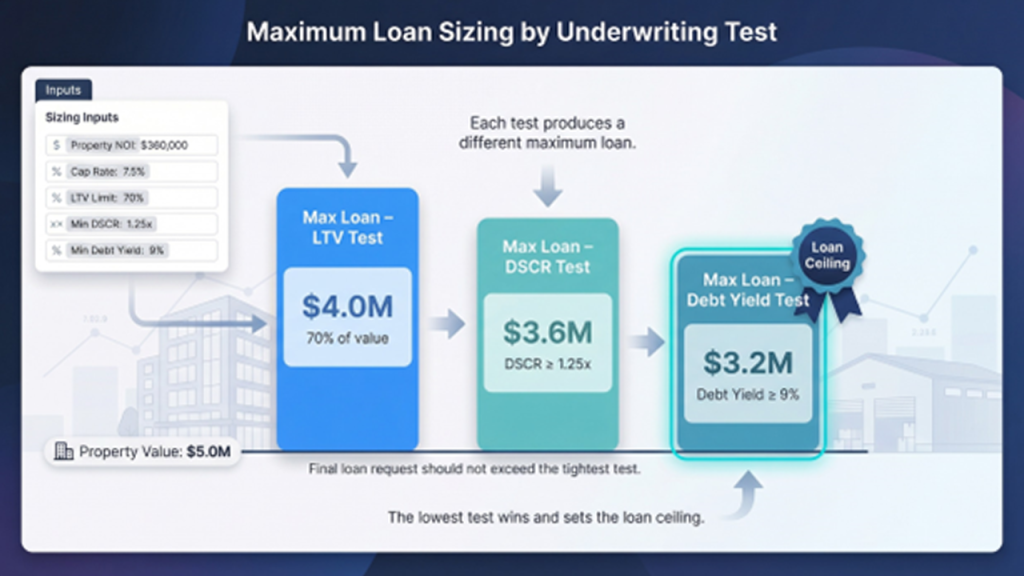
The value lies in transparency.
If debt yield caps you at sixty-two percent LTV, you spot the gap in seconds and can raise equity before a bank points it out weeks later.
No monthly payment appears here; that is intentional.
This tool is for sizing, not budgeting.
Once you know the max loan, move to CommLoan or MortgageCalculator.org to price the payment.
Inputs feel technical—cap rates, debt-yield floors—but a serious buyer should have those figures from a broker opinion or appraisal.
Because the interface updates live, you can run sensitivities on the fly: bump NOI ten percent, tighten the cap, and watch the supportable loan climb.
It is solid practice for offer negotiations.
Use PropertyMetrics late in the process, when numbers are firm, and you need confidence your deal clears every underwriting gate.
It is the closest thing to having a credit committee spreadsheet, minus the meeting.
How the five tools stack up
Here are the scores from our five-pillar rubric into a side-by-side view.
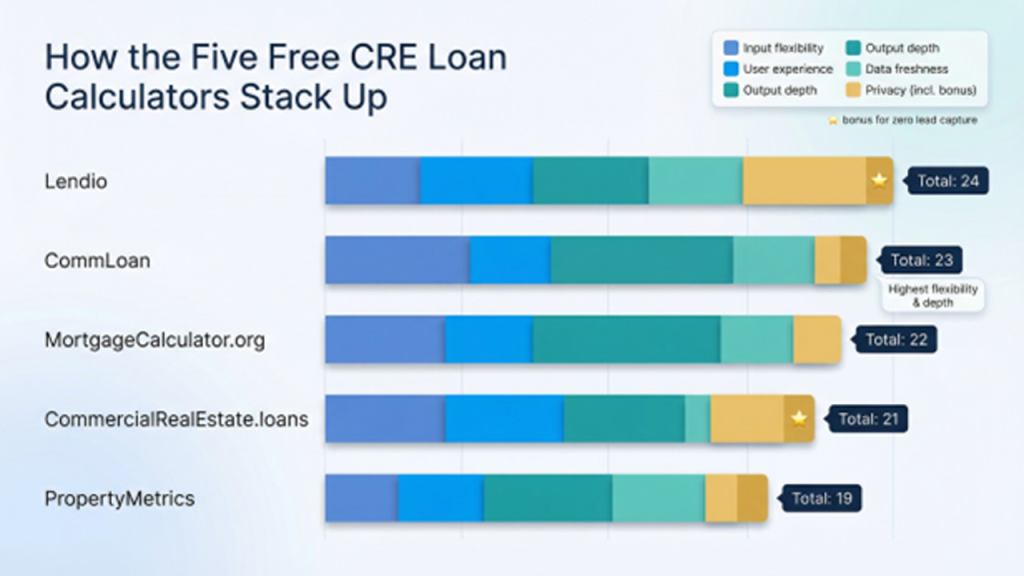
| Calculator | Input flexibility | UX |
| Output depth | Data freshness | Privacy |
| ------------ | ------------------ | ---- |
| -------------- | ---------------- | --------- |
| Lendio | 4 | 5 |
| 3 | 5 | 7 |
| CommLoan | 5 | 4 |
| 5 | 4 | 5 |
| MortgageCalculator.org | 4 | 3 |
| 5 | 5 | 5 |
| CommercialRealEstate.loans | 3 | 4 |
| 3 | 5 | 6 |
| PropertyMetrics | 3 | 3 |
| 4 | 4 | 5 |
(Each pillar scores 1–5; higher is better. Two bonus points were added under Privacy for zero lead capture.)
Two themes stand out.
First, no single tool tops every category. Lendio wins on ease of use, while CommLoan offers surgical precision. Seasoned investors often keep two calculators open: one for sizing, another for payment analysis.
Second, cash-flow coverage matters more than ever. Four of five calculators highlight DSCR or debt yield. Lenders look for at least a 1.25 buffer today, and the better tools surface that requirement early. Treat calculators as a toolkit—start with a quick qualifier, move to a deep dive, and finish with a max-loan check.
Conclusion
Commercial mortgage calculators have evolved from simple payment widgets to nuanced underwriting aids. Use them in sequence—start with a quick eligibility check, progress to scenario modeling, and finish with maximum-loan sizing—to approach lenders with numbers that already clear every major hurdle.
Frequently asked questions
Q1. How accurate are free commercial mortgage calculators?
A1. Highly accurate for basic math. For straight calculations—payment, balloon, DSCR—these tools use the same formulas lenders rely on, so results often match within pennies. Gaps appear when you enter estimates for rate or fees. Treat the output as a first-pass filter, then confirm with a live term sheet.
Q2. Which numbers do lenders weigh the heaviest?
A2. Debt service coverage tops the list, with LTV and debt yield close behind. Most banks will not fund a deal unless DSCR lands at, or above, about 1.25 times the annual payment. According to the StatementsReady DSCR calculator, many commercial lenders still label 1.25 as the minimum threshold.
Q3. Do modern calculators handle the switch from LIBOR to SOFR?
A3. Most do, provided they let you choose SOFR, Prime, or Treasury. Regulators ended U.S. dollar LIBOR in 2023, and industry guidance from PrecisionLender now tells banks to price floating loans off SOFR instead. If a calculator still defaults to LIBOR, back out and pick one of the five options reviewed above.
Respond to this article with emojis