

Why Software Developers Should Understand the Hardware Behind Their Code
Discover why hardware for software developers matters. Learn how CPU, RAM, cache, and storage affect application performance and optimization.
A newly developed application may work seamlessly on a developer’s laptop. The interface responds and it passes all your tests. But then, someone runs it against a customer’s full database on a smaller machine, and opening the same report calls for a coffee break.
Developers can begin optimizing their code immediately or take a different approach.: finding out what exactly the machine in question is struggling to do.
This is where hardware for software developers becomes important. Understanding the electronic components behind a computer helps developers recognize the limitations of the machines running their applications. Software developers do not need to design circuit boards, but understanding how processors, memory, storage, and other hardware components work together can make software performance problems less mysterious.
What Does Hardware for Software Developers Actually Mean?
Hardware software developers does not involve learning how to build computers or design electronic circuits. Instead, it focuses on understanding the physical components that influence how applications execute, store information, and communicate with other systems.
Some of the most important hardware components software developers should understand include:
- CPU (Central Processing Unit): Executes instructions and handles application logic.
- RAM (Random Access Memory): Temporarily stores the data and instructions required by applications.
- Cache Memory: Keeps frequently accessed data close to the processor, reducing data access delays.
- Storage: Determines how quickly applications can read and write persistent data.
- Network Hardware: Influences on how information travels between applications, servers, and databases.
A basic understanding of these components enables software developers to make informed decisions about application architecture, resource utilization, and performance optimization.
A Shorter Function Isn’t Necessarily a Faster One
When developers review code, they naturally tend to focus on the instructions. Could simplify a loop or shorten a function to improve performance? And these questions absolutely matter, but the processor’s access to the data those instructions use is a factor as well.
A processor has small, fast caches that hold copies of data it may need, but if the required data isn’t there, fetching it from another cache level or main memory can introduce delays. How you arrange and access data can therefore affect performance even when the amount of calculation stays the same.
A worked example from Intel makes this easier to picture. Its matrix calculation accesses data in a pattern that uses the processor’s cache poorly, so simply changing the order of the loops improves cache use. The program still performs the calculation at the same rate, but it gets to the data more efficiently.
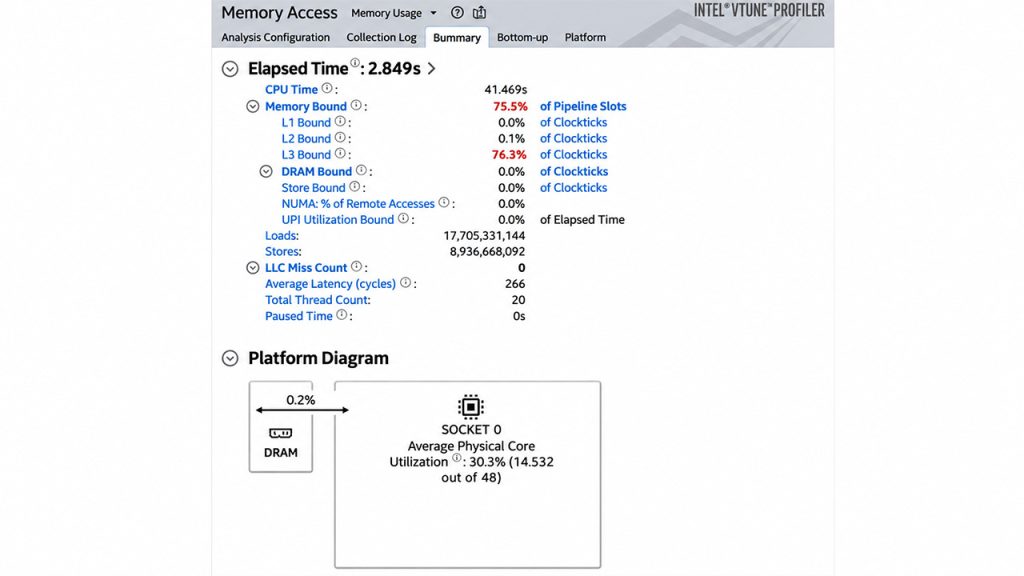
However, this does not mean developers should immediately start rearranging every loop in a project. For an ordinary web page, a slow database query may matter far more. But if you’re analyzing datasets or writing a game, data layout could become important. Hardware knowledge gives you a reason to investigate this, and profiling tells you whether that reason holds up in your application.
The Cloud Still Runs on Machines
Related walkthrough
10 Linux Commands Every Developer Must Know

Consider an application that loads every invoice into memory before adding up the totals for a customer report, and your laptop has plenty of spare RAM to make the approach look reasonable. That doesn’t mean a production instance with less available memory, serving other requests too, will perform seamlessly as well.
Adding RAM might help, but so might asking the database to calculate the totals and return a much smaller result. This way, you’re simply changing how much data moves and where the work happens.
This is why understanding server infrastructure matters, even when developers do not directly manage physical servers. A cloud service can make capacity easier to rent, but your application still consumes processing time, memory, storage, and network bandwidth, and moving the deployment doesn’t remove those demands.
An application may request customer details separately for every invoice. This would mean that each request takes a trip to the database, and no matter how fast you make the arithmetic, those repeated waits won’t go away. Fetching the needed records together is the more likely solution.
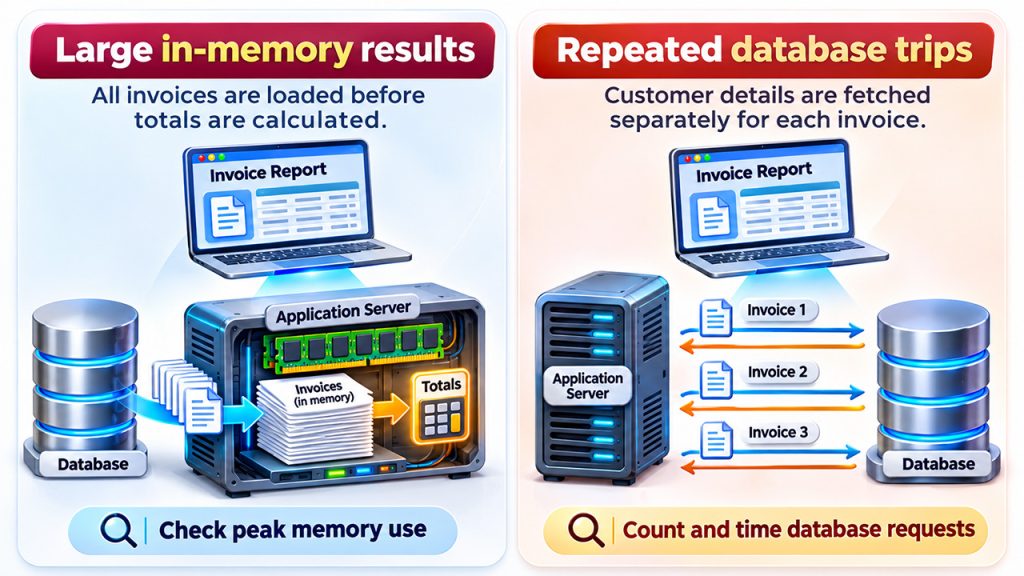
The problem is that these symptoms look pretty much identical to a user, but they have very different solutions. One involves memory, another involves repeated requests, and either could be mistaken for an underpowered processor. Before choosing a larger server, developers need to identify the underlying problem and determine which resource requires additional capacity.
To distinguish between these cases, developers can run the report against a representative dataset and inspect peak memory use alongside the number and duration of database requests. Change one thing, then compare the response time again. This helps developers determine whether the changes improve the user experience rather than just moving the work to another part of the system.
Real Devices Make Assumptions Visible
The same habit of looking beyond your code matters when you work with connected equipment.
Consider software designed to switch on a fan when a temperature crosses a threshold. If the reading keeps moving just above and below that threshold, the fan may repeatedly switch on and off, so separate thresholds for switching on and switching off can help prevent that behavior. Whether they’re appropriate, and how far apart they should be, depends on the equipment and its purpose, of course.
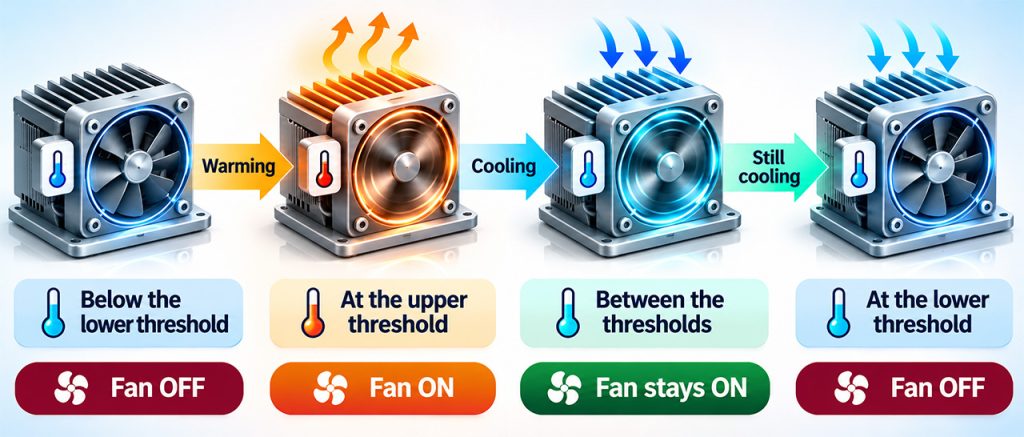
Power matters too. A battery-powered device that wakes up and transmits constantly may run your code correctly while exhausting its battery sooner than intended. Sending readings less often could help, but only if the application can tolerate the delay.
Those constraints affect the product’s behavior and how you’ll test it, so they should be involved in the software discussion early.
Learn Enough to Follow the Problem
Software developers are not expected to become electrical engineers as part of their development careers. Developers should become familiar with the hardware on which their software runs. For a backend service, learn what its CPU and memory measurements mean, how storage affects requests, and where data travels. For a connected device, add the relevant sensor interfaces and power requirements.
Developers should then connect these fundamentals to evidence gathered from their applications. A memory trace or a test on the target device will tell you more than guessing from the source code alone. It is also important to keep test workloads realistic, since a tiny sample may hide the very limitation you’re trying to understand.
The payoff is being able to explain why something is slow or unreliable and choose a fix that addresses the cause. Developers can leave specialized hardware tasks to relevant experts while still having a much more useful conversation with them.