





Refunds rarely come from one big mistake. They usually start as tiny slips that stack up, like a missing passcode note, a part that does not match the model, or
Refunds rarely come from one big mistake. They usually start as tiny slips that stack up, like a missing passcode note, a part that does not match the model, or a promised pickup time that quietly turns into tomorrow. Customers remember the friction more than the fix, and that is how a small error becomes a refund request. This is where the process wins. When your counter, bench, and pickup flow are consistent, you catch the little stuff before it leaves the shop. The right repair shop software turns good habits into a default, so the team does not rely on memory when the day gets busy.
Why Refunds Start with Handoffs
Small errors turn into refunds when the shop relies on memory instead of a repeatable flow. The fix is to tighten the handoffs between intake, diagnosis, repair, and pickup so nothing gets lost in translation. Start with one clean loop that everyone follows, then use the following ways to remove the most common slip-ups.
1. Intake Notes that Prevent Disputes
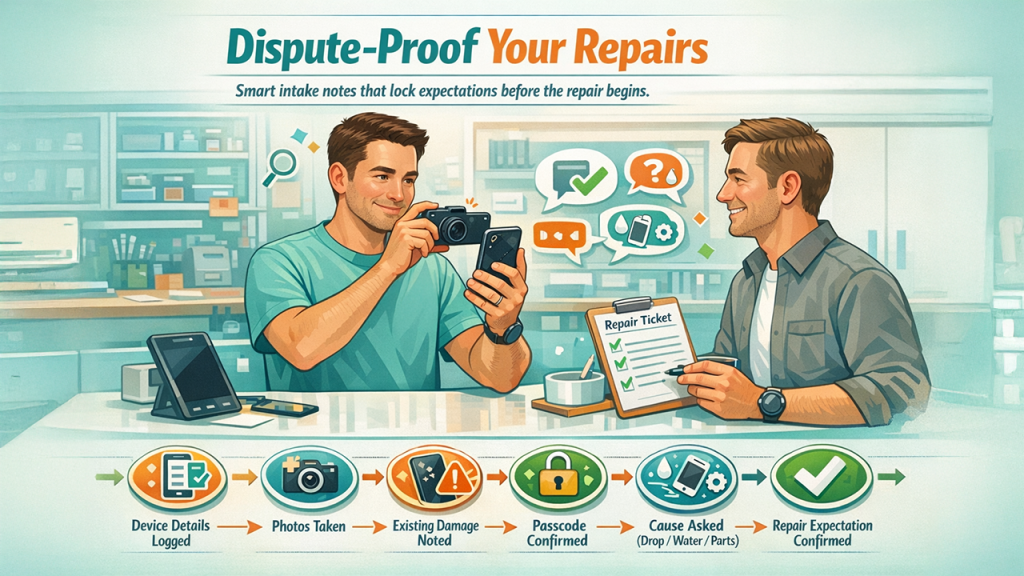
Treat intake like a checklist, not a conversation. Start by logging the device details, how it looks right now, and what the customer says is wrong using plain language. Take a couple of quick photos at the counter and write down anything that might come up later, such as old cracks, dents, or missing screws. If you need a passcode or backup access, get that confirmed before the ticket moves forward. End by clarifying what “fixed” means to the customer. Ask one quick question about recent drops, water exposure, or third party parts, because those change expectations. Then repeat the summary back in one sentence before you take the device. This prevents the classic refund moment where the repair is done, but not what the customer believed they requested.
2. Approvals that Eliminate Surprise Charges
Make approvals explicit and easy to track. Send the estimate with parts, labor, warranty terms, and a clear decision request. If the repair changes when you open the device, pause the job right away and re-confirm approval before doing anything further. Many refunds start when a customer feels surprised, even if the final price is fair. Lock the approval with a simple message confirmation and store it with the ticket. Set a realistic turnaround range instead of quoting your fastest possible day, and clearly mention what factors could push the timeline out. When people know what is happening and what you need from them, they are far less likely to turn frustration into a refund demand.
3. Part Verification that Stops Wrong Part Installs
Prevent the wrong part problem by creating a part verification moment. Match the model, variant, and part revision before you install, then double check connector alignment, frame fit, and any adhesive or seal requirements. If you sell multiple grades, record the grade and expected performance so there is no confusion later. Tie the part to the ticket so you can trace it back quickly if something fails. Log the supplier and batch if you have it, because patterns matter when a batch is weak. A POS system for repair shop operations makes this easier by keeping parts visible at the counter, so the right item is pulled, priced, and linked to the ticket before anything reaches the bench. Using repair shop software to connect the part, vendor, and device details to the same ticket reduces mix ups when the counter is busy, and the bench is moving fast.
4. A Quick Quality Check that Catches the Silent Failures
Build a short quality check that happens every time, even on simple jobs. Test the specific function you fixed, then run a quick baseline of the other functions customers notice immediately. Charging, touch response, sound, camera, and buttons are common refund triggers when they are missed. Clean the device, remove fingerprints, and confirm screws and seals are secure. If you replaced a screen, check brightness, color consistency, and dead zones. If you opened the device, listen for loose parts and confirm no cables are pinched. This takes minutes, but it prevents the worst moment in the shop, handing a device back and watching a problem appear on the spot.
5. Proactive Updates that Reduce Refund Pressure

Communicate before the customer has to chase you. A simple update at key moments builds confidence, even when the news is not perfect. Tell them when you start, when you are waiting on parts, and when it is ready. If pickup is delayed, say it early and offer options. One bad experience can be enough to lose someone. PwC found that 32% of customers would stop doing business with a brand they loved after just one bad experience. When you reduce uncertainty, you reduce the emotional energy that often drives refunds, even when the repair itself was fine.
6. Pickup Handoff that Makes the Repair Feel Complete
Close the loop at pickup so the repair feels complete. Walk the customer through the fix and demo the key function in front of them. Re-confirm any limitations, like reduced water resistance after an opening, and restate the warranty in plain language. Ask one simple question before they leave, is everything working the way you expected. If the answer is not a clear yes, solve it immediately while the device is still in your hands. Offer a quick aftercare tip, like charging habits or a case suggestion, to show you are on their side. That last two-minute check is one of the cheapest ways to stop small issues from becoming refunds later.
Conclusion
Refund prevention is not about arguing with customers. It is about removing the moments where doubt enters the experience. When intake is consistent, diagnosis is backed by evidence, approvals are clear, parts are verified, and quality checks happen every time, the small mistakes don’t sneak in. Add proactive updates and a solid pickup walkthrough, and refunds stop feeling normal. Then, once a month, look at your top refund reasons and turn each one into one clear step in the workflow. If you want to tighten this without adding extra admin work, repair shop software can keep tickets, approvals, photos, parts, and customer updates in one place, so the team follows the same play every time.
Respond to this article with emojis