



This probably sounds familiar. You open your presentation tool and the first thing you see is a blank slide. The meeting is not too far away, and suddenly the task feels bigger
This probably sounds familiar. You open your presentation tool and the first thing you see is a blank slide. The meeting is not too far away, and suddenly the task feels bigger than expected. What seemed like a simple update turns into a bit of back-and-forth with the slides - editing text, shifting things around, and trying to make everything look presentable.
For years, creating presentations has involved a lot of repetitive work - structuring slides, choosing layouts, moving elements around, and making everything look consistent. It’s not difficult work, but it is time-consuming.
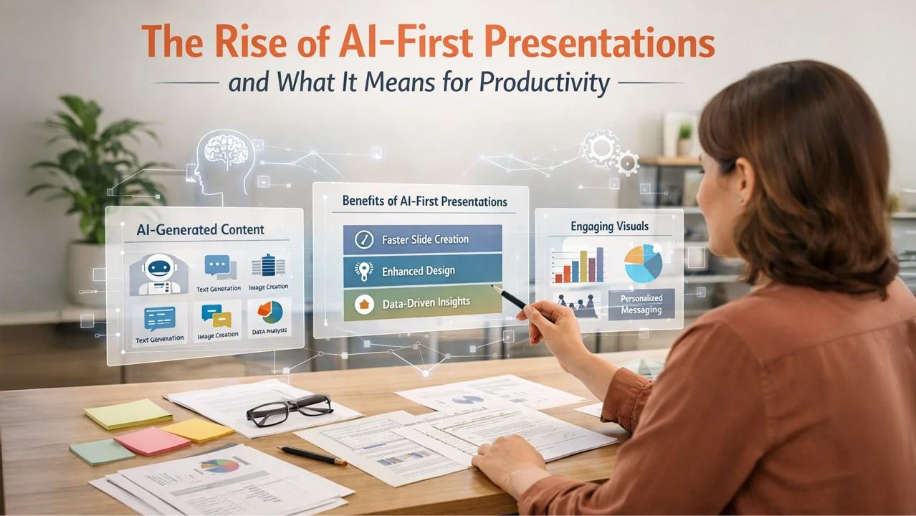
Lately, though, a different way of creating presentations has started to take shape. Instead of building slides one by one, many people now begin with AI-generated drafts. The idea is simple: you give the tool a topic or a bit of input, and it creates an initial set of slides within minutes. You still go in and refine things, of course, but at least you’re not starting from a completely blank slide.
It’s a small shift in workflow, yet it’s quietly changing how people prepare presentations - and how much time they spend doing it.
What AI-First Presentations Actually Mean
The phrase “AI-first presentations” sounds technical, but the concept is fairly simple.
Traditionally, creating a presentation looked something like this:
- Open a slide editor
- Create an outline manually
- Build slides one by one
- Format text and visuals
- Adjust the design repeatedly
An AI-first workflow changes where things start. Instead of opening a presentation and building slides from scratch, you usually begin with a short prompt or some existing material.
Someone might type something simple like:
“Create a presentation about remote work trends in 2026.”
From there, the tool quickly puts together a rough draft of slides. It’s not meant to be perfect, but it gives you a solid starting point. Typically you’ll see things like:
- a basic outline for the topic
- possible slide titles
- a few key points for each slide
- simple layouts already arranged
- visuals or icons added where they make sense
The slides aren’t final, but they give you something to work with immediately.
And that changes the experience quite a bit. Instead of building slides from scratch, you’re editing and refining an existing structure.
Why AI-First Presentations Are Becoming Popular
Several trends have pushed presentations in this direction.
Work Is More Presentation-Heavy Than Ever
Presentations used to be reserved for major meetings or conferences. Now they’re everywhere.
Teams use slides for:
- internal updates
- strategy discussions
- training materials
- sales pitches
- product roadmaps
In many organizations, presentations have become the default way to communicate ideas.
The downside is that preparing them takes time - sometimes more time than the ideas themselves.
AI tools help shorten that preparation phase.
The Blank Slide Problem
Anyone who creates presentations regularly knows the feeling of staring at a blank slide and wondering where to begin.
Even experienced presenters spend a surprising amount of time just structuring their thoughts.
AI tools help remove that friction. By generating an outline first, they give users a framework to react to. It’s often easier to edit something than to start from nothing.
That alone can save a lot of time.
Productivity Tools Are Becoming AI-Integrated
Another reason AI-first presentations are gaining traction is that artificial intelligence is being integrated across productivity software.
Many people already use AI to:
- draft emails
- summarize documents
- write reports
- generate ideas
Presentations are simply the next step in that evolution.
Instead of writing slides manually, professionals can now generate a first draft and focus their attention on refining the message.
How AI-First Presentations Improve Productivity

One of the first things people notice when using AI for presentations is simply how much faster the process becomes. Many professionals are already using AI productivity tools to streamline workflows. Speed isn’t the only benefit, but it’s definitely the most obvious one.
Faster idea-to-slide workflow
Ideas can turn into slides much more quickly than before. Something that might have taken an hour of building slides and arranging layouts can now reach the same starting point in ten minutes or so.
Think about a product manager putting together a quick update for leadership. Instead of creating slides one by one, they could paste their notes into an AI tool and let it generate a basic presentation structure.
The slides won’t be perfect, of course, but they give you something to work with right away. From there it’s mostly a matter of refining the wording, adjusting the visuals, and shaping the message.
Over time, those small time savings start to add up across the week.
Less Time Spent on Formatting
Slide formatting often takes longer than expected.
Adjusting layouts, aligning elements, choosing icons, resizing images - none of these tasks are difficult, but they require attention.
AI presentation tools can handle many of those details automatically.
Layouts adjust themselves. Text fits the slide better. Visual elements are placed more intelligently.
That means less time spent nudging things into place.
Easier Conversion of Existing Content
Another productivity benefit is the ability to turn existing material into slides quickly.
For example:
- turning a blog post into a presentation
- summarizing a report into key slides
- converting meeting notes into a presentation outline
Instead of rewriting everything manually, AI tools can extract key points and structure them into slides.
This is particularly useful for teams that regularly transform documents into presentations.
[link to how to convert documents into presentations]
Better Collaboration Between Teams
Presentations rarely belong to one person anymore. Most are collaborative.
AI tools can help teams move faster during that process.
Instead of sharing early drafts that require heavy editing, someone can generate a structured presentation first. The team then reviews and improves it together.
That creates a more efficient starting point for collaboration.
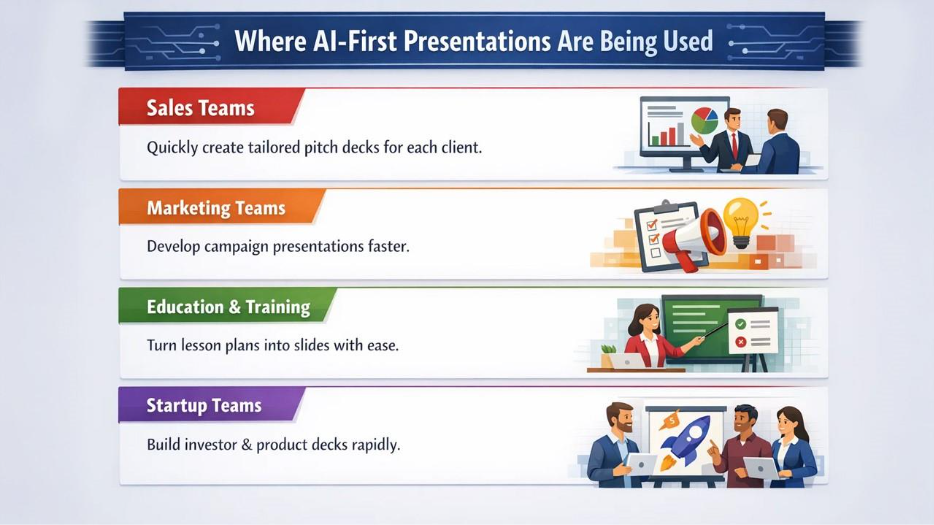
Where AI-First Presentations Are Being Used
Different industries are adopting this workflow for slightly different reasons.
Sales Teams
Sales teams often create customized presentations for different prospects.
AI tools allow them to generate a basic pitch deck quickly and tailor it to each client.
That makes it easier to prepare presentations without spending hours redesigning slides.
Marketing Teams
Marketing teams frequently produce presentations for campaigns, reports, and strategy discussions.
Using AI to generate the first draft helps them move from idea to presentation faster.
The time saved can be spent refining the message rather than formatting slides.
Education and Training
Teachers and trainers often create large numbers of presentation slides.
AI tools can help turn lesson plans, documents, or course outlines into slide decks quickly.
The instructor still shapes the content, but the initial structure appears much faster.
Startup Teams
Startup founders are constantly preparing presentations - investor decks, product updates, and internal strategy slides.
AI tools help them build those presentations quickly, which is helpful when time and resources are limited.
The Limits of AI-Generated Presentations
AI-first presentations are helpful, but they’re not perfect.
One issue is that AI sometimes produces slides that feel generic. The structure may be solid, but the content often needs editing to match the specific audience or context.
Another limitation is that AI doesn’t always understand nuance. A generated slide might summarize information correctly but miss the most important insight.
That’s why human review remains essential.
Think of AI as a drafting assistant, not a replacement for the presenter.
What This Shift Means for Knowledge Workers
The rise of AI-first presentations suggests a subtle shift in how professionals spend their time.
Instead of focusing on slide mechanics - design, formatting, structure - people are spending more time thinking about:
- the story they want to tell
- the key message for the audience
- the insights behind the data
In other words, the work moves slightly away from slide creation and closer to communication strategy.
In many ways, that’s where the real value of presentations has always been.
Conclusion
Presentations have always been a central part of how ideas are shared in organizations. What’s changing is the amount of time required to create them.
With AI-first presentations, the process begins with a generated draft instead of a blank slide. That shift reduces repetitive work and allows professionals to focus more on the message behind the slides.
AI won’t eliminate the need for thoughtful presentations. If anything, it highlights their importance. When the mechanics of slide creation become faster, the real challenge becomes crafting a clear and compelling story.
And that’s a skill no tool can automate entirely.
Frequently Asked Questions
Q1. Are AI-generated presentations ready to use right away?
Not usually. They’re helpful as a starting point, but most people still review the slides, tweak the wording, and sometimes adjust the visuals before presenting. Think of the AI output as a draft rather than a finished deck.
Q2. Do AI presentation tools replace traditional slide software?
Not really. In most cases, they work alongside the presentation tools people already use. The AI helps generate the first version of the slides, and then users edit or refine them the same way they would in any normal presentation editor.
Q3. Can AI create presentations from documents?
Yes. Many tools can summarize reports, articles, or notes and convert them into structured slide decks.
Q4. Will AI replace presentation design work?
Probably not completely. While AI can handle basic layouts and formatting, human creativity and storytelling remain important.
Respond to this article with emojis