
Paperless approach simplifies the document management process across your organization. There’s no more shifting paper around the office and no time wasted searching for printouts that contain basic information. Instead,
Paperless approach simplifies the document management process across your organization. There’s no more shifting paper around the office and no time wasted searching for printouts that contain basic information. Instead, you and your team can have easy, real-time access to documents and edit files from anywhere.
This guide will walk you through the practical steps small businesses can take to transition to a paperless workflow without disrupting daily operations or compromising security.
The Benefits of the Paperless Office
Switching to a paperless office comes with clear advantages. For instance:
- The paperless office allows each employee to see the same version of a document.
- Modern compliance often requires digital audit trails that paper-based processes cannot provide.
- It reduces the costs of printing, ink, paper, office supplies, and the wear and tear on hardware such as photocopiers, scanners, and printers.
- Digital files also eliminate the need for cabinets and help you make the most of your space.
- Using software that enables automation for routine admin tasks such as filing, retrieval, and mailing results in efficiency gains and cost savings.
- Going paperless in the office increases productivity because you can access digital documents immediately.
- Teams can work on the same files without worrying about version confusion. They are simple to search and share.
The cloud-based tools integrate everything your teams need for clear communication and help reduce misinterpretations and confusion. This makes work less stressful, easier, and more productive overall.
How to Design Your Paperless Office Strategy
The aim of a practical paperless office strategy is to keep the transition from paper to digital as stress-free as possible. It should begin with clear goals.
Set Clear Goals for Your Paperless Transition
Clear goals begin with identifying which departments or workflows are best suited for the transition. This might be HR development or Finance, but whatever the starting point, it is important to establish how documents are actually processed and who is responsible for what. All stakeholders should understand their role in a paperless workflow.
Audit Current Paper Usage and Digital Files
To create a paperless office, you need to account for every touchpoint with documents, such as invoices, forms, client information, reports, and related documents. An audit also includes reviewing current digital documents to identify redundant information, poor naming, or formatting. Begin the transition with a bit of digital housekeeping to make future document management more efficient.
Choose the Right Paperless Business Solutions for Your Team
Not all paperless business solutions are created equal. It is important to know the difference between basic cloud storage with Google Drive and a Document Management System (DMS). Basic cloud storage platforms like Google Drive are useful for file sharing and basic collaboration. A dedicated Document Management System (DMS) typically offers more advanced features such as structured metadata, granular permissions, automated retention policies, and stronger compliance controls. Pairing the right DMS with the tools to simply business operations ensure your paperless transition supports every function across your organization.
Steps to Follow for Small Businesses to Go Paperless
Small businesses often need to transition as quickly and efficiently as possible. Rushing it, however, usually creates more problems than it solves. Let’s discover small, well-thought-out steps to avoid confusion during the switch.
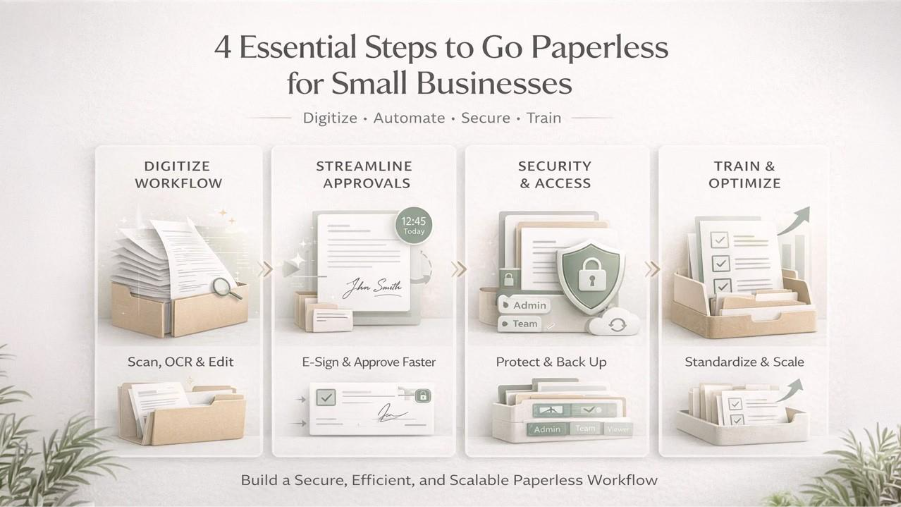
Step 1: Digitize Your Workflow with the Right PDF Editor
The most practical step you can take to create a paperless office is to scan your paper documents. Here’s how.
Convert PDF Files from Physical Scans
You can’t just snap a picture of a document and expect that to be digital. For scanning documents, you need to use Optical Character Recognition (OCR). OCR converts image-based scans into searchable and selectable text within a PDF. After OCR processing, the document becomes searchable instead of remaining a static image.
Use a PDF Editor to Manage Your Daily Digital Documents
To use and convert PDF files, a decent PDF editor is a must. It allows you to redact sensitive information, leave comments during review, and rearrange or combine pages when documents grow messy.
To keep everything neat and clean, you can regularly merge your digital files. For instance, you can keep the project history sorted by merging a contract, its signed addendum, and the first invoice together. Most professional PDF editors, like PDFAid, include merge and combine features that help keep client records structured and easy to manage.
Step 2: Streamline Document Approval and Signing
Approvals seem to be the biggest bottleneck in a paperless business. Digital signatures remove most of that friction.
The benefits of including routine electronic signature use in your go paperless strategy mean PDF documents can be approved and signed anytime, from any device, cutting approval cycles from days to hours. As well as not having to work through the whole “print, sign, scan” process, you save on printing costs and the hassle of rescanning different versions and emailing them, sometimes as large attachments.
Electronic signatures make it possible to connect each signer to a single, timestamped record, so you have a full audit trail. Also, many new paperless business solutions now offer encryption, access control, and link-based signing, so only the right people can open and sign a document.
Just keep in mind that digital signatures are legal almost everywhere, but must be used in accordance with data protection laws such as GDPR, CCPA, and ESIGN.
Step 3: Accessibility and Security
Security and accessibility require extra attention in a paperless office transition. Here are the important things to remember.
Focus on Proper Access Control
Access control is one of the most important parts of a paperless setup. Here’s how to proceed:
- Always start with strict access control and ensure that only specific roles can access, edit, or share a particular digital document.
- Consider multi-level protection that combines strong passwords and least-privilege permissions.
- Use proper encryption for compliance with GDPR regulations.
Prevent Data Loss by Backing Up Your Files
You should always be able to recover critical digital files, whether after a system outage or accidental deletion. This can be achieved with automated backups with versions in different locations or clouds. Additional measures like encryption and role-based access control, combined with disaster recovery playbooks, help restore PDF editor workflows and repositories quickly in case of outages, cyberattacks, or accidental deletions.
Take Advantage of Cloud Platforms
Cloud-based platforms allow users to open, search, edit, and sign PDF files from any location. These platforms also act as a central library. Most cloud platforms offer scalable storage and allow businesses to expand capacity as needed. Centralized storage and access increases work efficiency and maintains appropriate security and administrative control.
Step 4: Paperless Workflow Training
Onboarding and training speed up learning how to create a paperless office. New hires should be given a proper walkthrough of your paperless workspace, and be shown where and how to store documents, how to sign PDF files electronically, and clarify when related documents should be merged into a single record. Consider outlining your best practices for paperless work by creating your own internal training manual. Use it to set out the conventions your business uses for naming documents, the procedure for controlling versions, the dos and don'ts for security, and what to do if things go wrong.
Conclusion
Learning how to have a paperless office takes research. A paperless transition affects how your team works and how your business operates, so it requires thoughtful planning. Taking the transition department by department keeps everything organized and accessible. Reliable tools help achieve established goals.
FAQ
What are the first steps for going paperless at work?
Begin with an audit of your current paper use. For example, you might establish the number of contracts printed, invoices sent, or meeting notes stored. Next, determine the file naming conventions everyone will follow and structure them logically. Finally, invest in reliable cloud storage and a good PDF editor.
Is a paperless business more secure than one that uses paper files?
Generally, yes. This is because a paperless business can take advantage of the security offered by encryption, password protection, and logging, unlike paper files that can be misplaced or viewed by anyone passing by.
How can I sign PDF documents legally without using a printer?
A good PDF editor will allow you to sign files without printing them out. Uploading a PDF and adding a signature field before sending the document out with a please sign request via email also keeps a record of timestamps, IP addresses, and consents that can be used to comply with laws like ESIGN, eIDAS, and many others.
How can I merge PDF files?
Simply use a PDF editor with a ‘combine’ or ‘merge’ feature and save the combined file. The process is quite straightforward.
Do I need a professional PDF editor to manage my digital files?
You don’t need enterprise software, but you want more than a simple reader. A good editor should allow you to redact information, insert comments, rearrange pages, and correct typos without needing to recreate your document.
Respond to this article with emojis