

How WireGuard Helps Reduce VPN Lag and Buffering
Explore how WireGuard helps in improving VPN performance, along with reducing latency, buffering, and protocol overhead.
People who already usage VPN often face the same issue, i.e. their local internet speed test might look normal, but once the VPN is connected, the games feel laggy, videos buffers, and calls become choppy. As a result, users keep switching servers or keep upgrading their plan, but the improvement is often limited.
In reality, the VPN-related speed drops and a higher latency are not only caused by server distance or bandwidth, but the major factor is efficient of the VPN protocol itself. If the user is using traditional VPN protocols, the way the data is encrypted, packaged, and transmitted may act as a bottleneck, even if the user switches between multiple servers.
In this case, you may not need to change your VPN provider. Instead, you may simply need to switch to a more efficient protocol: WireGuard.
Why VPNs Get Slower: The Protocol Overhead
When an individual uses a VPN to access a game sever or watch an oversea video, the data does not travel directly to the destination, instead it goes thorugh several extra steps, which include encryption, packaging, tunnel transmission, decryption by the remote VPN server, and then delivery to the target website or service. This process adds extra processing delay, which is also known as protocol overhead.
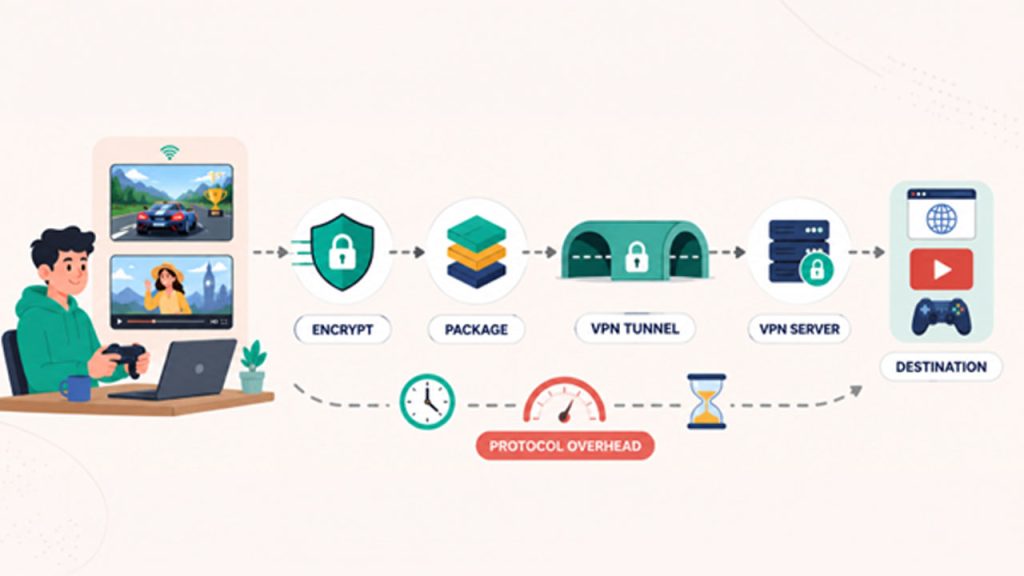
All the Virtual Private Networks protocols do not create the same amount of overhead. Each protocol is designed with different principles and technical structure, differentiating their performance, especially in comparison to speed, stability, compatibility, and resource usage. This is why many VPN services, such as X-VPN, support multiple VPN protocols for different performance needs. Among these options, WireGuard is designed for high-speed, lightweight VPN performance, making it a strong choice for reducing VPN-related lag, buffering, or slow loading.
Why WireGuard Improves Speed
Related walkthrough
10 Must-Have WordPress Plugins: Every Site Needs These

The core reason WireGuard can improve speed lies in its streamlined design. As a modern VPN protocol, WireGuard was built with simplicity in mind, using a much smaller and cleaner codebase than many traditional VPN protocols.This lightweight design helps reduce the extra work required to maintain the VPN tunnel in several ways:
- Lower CPU usage – WireGuard uses encryption that is specially designed to run quickly on modern devices. Instead of heavy, old‑style ciphers, it chooses lightweight algorithms that need fewer computing steps per packet. This means your device’s processor stays cooler, uses less battery, and leaves more power for your other apps.
- Faster connection recovery – Unlike traditional VPN protocols, this one doesn’t keep a complicated “memory” of every handshake step. When your network changes – say, from Wi‑Fi to mobile data – it simply sends a tiny “hello” packet to the other side. The tunnel re‑establishes with minimal delay, without re‑doing all the security negotiations from scratch.
- Less protocol overhead – By adding very few extra bytes to your data packets, WireGuard skips unnecessary checks and flow control that your network already handles. So more of your bandwidth goes to your actual browsing, streaming, or downloads – giving you better speed and lower delay, especially on slower connections.
Simply put, WireGuard helps data move more lightly and efficiently through the VPN tunnel, reducing the speed loss caused by the VPN itself as much as possible.
How WireGuard Helps in Everyday Network Scenarios

WireGuard is not only useful in one specific network situation. It can support a smoother experience across many everyday scenarios.
- Streaming overseas video platforms: WireGuard ensures that the data move efficiently through the VPN funnel, which allows videos to start quickly, reduce buffering, and makes playback feel smoother.
- Online gaming and video calls: With the platform, the real-time activities, such as online gaming or video calls are highly sensitive to speed. WireGuard can help reduce extra latency and jitter caused by VPN protocol processing, making game controls feel more responsive and helping video and audio calls stay more stable.
- Public Wi-Fi or mobile networks: These network environments are often less stable. WireGuard’s lightweight design allows the connection to recover more quickly. Even with the signal fluctuations, the platform can rebuild the tunnel quickly and can also reduce disconnections or interruptions.
- Long-distance international access: While using VPN, physical cannot be removed, but WireGuard helps in reducing the internal overhead of the VPN protocol. It helps each data packet move efficiently through the tunnel, along with improving consistency for remote work, oversea browsing, and other major cross-border online activities.
- Switching between Wi-Fi and mobile data: When the user moves around with their device, their network environment changes. In this, WireGuard helps in adapting to new networks seamlessly and quickly. It also helps avoid temporary lag or disconnections, that may be caused by network switching.
Other Practical Ways to Reduce Network Latency
Of course, the VPN protocol is only one part of overall network performance. Even when using WireGuard, your experience can also be affected by device conditions, Wi-Fi signal strength, background apps, and network congestion.
To improve stability, you can close apps that are using bandwidth in the background, restart your router or modem when the connection feels unstable, and stay closer to the Wi-Fi source when possible. For more demanding activities such as gaming or video calls, using a wired connection can also help reduce interruptions.
These simple adjustments are not the main solution, but they can work together with WireGuard to make your VPN connection smoother and more reliable.
Conclusion
When your VPN experience is poor, the problem is often not simply that your internet speed is too low or that the server is too far away. It may also come from the efficiency of data packaging, encryption, and transmission. WireGuard uses simple and efficient encryption, which is especially designed to help preserve more of the original bandwidth, while significantly reducing latency and lag caused by the protocol.
If the user is using a VPN but the speed is not ideal, the user can check whether the VPN client supports WireGuard and set it as the preferred protocol. It’s also worth ensuring you’re using a trusted VPN provider, as risk of free VPNs, such as performance, privacy, and security trade-offs that can affect your overall experience. It is one of the low-cost and faster ways of improving performance. With WireGuard, users can enjoy good everyday network habits, along with smoother browsing, entertainment, and communication, without upgrading their internet plan.

