



We have had our share of it, you take a good shot and then after some time you find out that the shot is either blurry, of poor light or
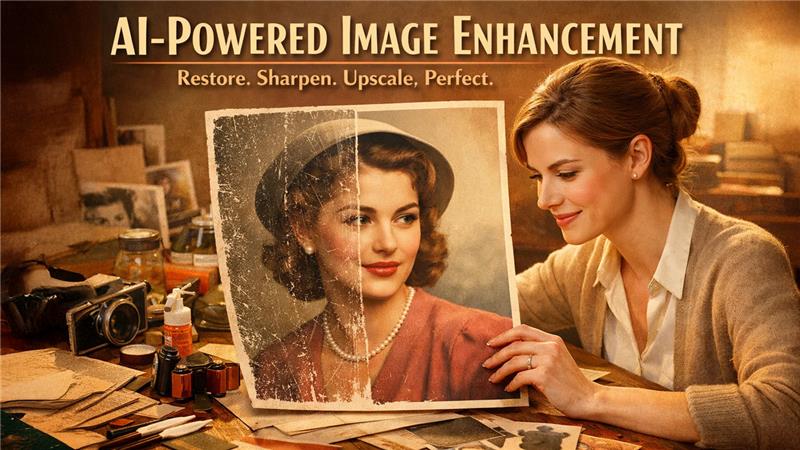
We have had our share of it, you take a good shot and then after some time you find out that the shot is either blurry, of poor light or of low quality. Be it a valuable product picture, a beautiful picture of an old photo or even a social media picture that is dull and pixelated, poor pictures can destroy the effect of otherwise excellent material. Conventional photo editing programs can be difficult, time-consuming and demand expert skills to rectify such matters.
This is where Fotor AI Image Enhancer comes in because Fotor Image Enhancer with its powerful AI technology brings the image quality to the next level in a single click. It enhances clarity, eliminates noise, corrects lighting and sharpens details, and improves the visual quality of the ordinary or defective image within a few seconds to high-quality and clear images. Fotor enables every user to easily and instantly fix images and create the appearance of a professional photographer without the use of technical skills. The outcome is more natural-looking and clearer, the photo retains all the details.
Key Features of Fotor’s AI Image Enhancer
Best AI Image Enhancer provided by Fotor is powered by advanced vision algorithms that handle complex corrections automatically. Key features include:
- Brightness and Exposure Optimization: The AI Image Enhancer by Fotor automatically can adjust brightness and exposure based on a global analysis of the light in an image. There is clever brightening of dark photos without turning highlights into grey and overexposed areas are adjusted to bring back the lost details. Fotor uses an AI to make local corrections instead of uniformly changing the whole image, which has the benefit of keeping shadows, midtones, and highlights balanced.
- Denoising: Fotor uses AI to create a denoising effect, which means that the noise patterns that are undesirable are detected and removed without affecting the crucial details. The AI will separate the real image textures (skin, fabric, or fine lines) and the visual noise and keep sharpness intact, cleaning the image. This happens to be especially handy with night shots, indoor shots, and those with high ISO values.
- Image Sharpening: Images that are slightly out of focus or soft may lose their effect, particularly when they are seen on a bigger screen. The sharpening technology used by Fotor improves edges and fine details by making sense and clarity to the highest point. Instead of using aggressive sharpening, which creates halos or artifacts, the AI is selective in terms of sharpening key elements like facially rendered features, text and object lines.
- Color and Contrast Enhancement: The AI Image Enhancer of Fotor is used to enhance the general image color saturation and contrast. The bland or dull images are given new life with richer color and better depth although the color balance remains intact. The AI is selective in its application of contrast to provide depth and definition without loss of shadow or highlights.
- De-Pixelation/De-Blurring: When the image is of low quality, or the movement is being blurred, the details might be hard to identify, especially in faces, written text, or small patterns. The AI de-pixelation and de-blurring of Fotor are the solutions to such problems since they are used to restore the goldratt details and smooth out the jagged lines.
- Image Upscaling: Image upscaling in Fotor also enables people to magnify the image to HD or even 4K without compromising the quality of the image. When upscaling is performed traditionally, the image can be blurred or distorted, but Fotor AI is capable of preserving the image sharp and detailed due to smart detail reconstruction. The enhancer uses the patterns of the images learned to fill in the missing pixels so that the upscaled image is clear and accurate to the eye.
- Photo Restoration: Photoshop: The AI Image Enhancer Fotor also has photo restoration features that can restore old or damaged photos as well as make them look like they used to be. The AI is capable of correcting scratches, stains and discoloration and fading that appear on scanned or old images.
All of these improvements are automatically made by the AI: one just has to put a photo up and leave the rest to Fotor. The tool will give a high-resolution image with no watermark that can be downloaded and used.
How to Enhance an Image Using Fotor’s AI Image Enhancer
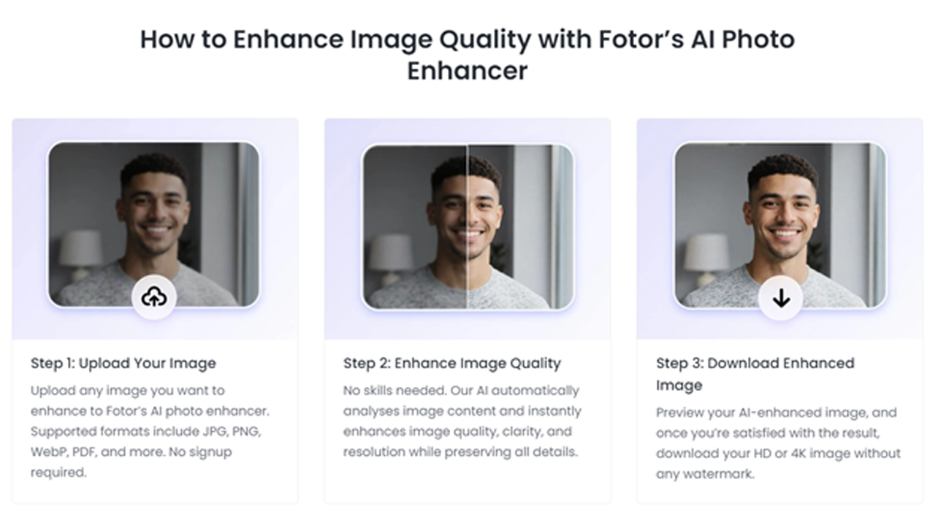
Enhancing images with Fotor is quick and beginner-friendly. Just follow these 5 simple steps:
1. Upload Your Image
Go to Fotor’s AI Image Enhancer and upload a photo from your device. Common formats like JPG and PNG are supported.
2. Let the AI Work Automatically
After uploading, the AI immediately recognizes your photo and finds problems, including blur, noise, dim light, or low resolution (Fotor).
3. Apply One-Click Enhancement
You can just press the enhance button and the AI will automatically boost the brightness and sharpness, color, and clarity and eliminate noise and blur.
4. Preview the Result
You can see the difference by comparing pre- and post-intervention. The image is better as it is clearer, sharper and more vivid.
5. Download the Enhanced Image
As soon as you are pleased, download your image. The pro users are allowed to save high-resolution and watermark-free images.
More Powerful AI Tools from Fotor
Fotor exemplifies the evolution of AI-powered graphic design tools in 2026, offering far more than basic image enhancement. The platform has expanded into a comprehensive creative suite with multiple intelligent features:
- AI Image Editor - A full online photo editing workspace with intuitive tools for cropping, color adjustment, filters, text, stickers, and more. Easy to use with simple software or to touch up and edit.
- AI Image Generator- Zero to One in seconds. You need illustrations, concept art, social media graphics or stylized imagery, this tool makes your idea a reality with customizable styles of artistic conduct.
- AI Background Remover - One-Click Isolation One-Click subject and background separation. Perfect in product photography, portraits, collages and graphic designs where white background is strictly needed.
- AI Video Generation - Generate brief AI-generated videos or animated images with text or image prompts. This new feature adds to the Fotor creative toolkit dynamic content to social media and narratives.
Collectively, the tools constitute a total AI-enhanced creative platform allowing users to edit, design, and create content in a single location.
Pricing and Subscription Plans
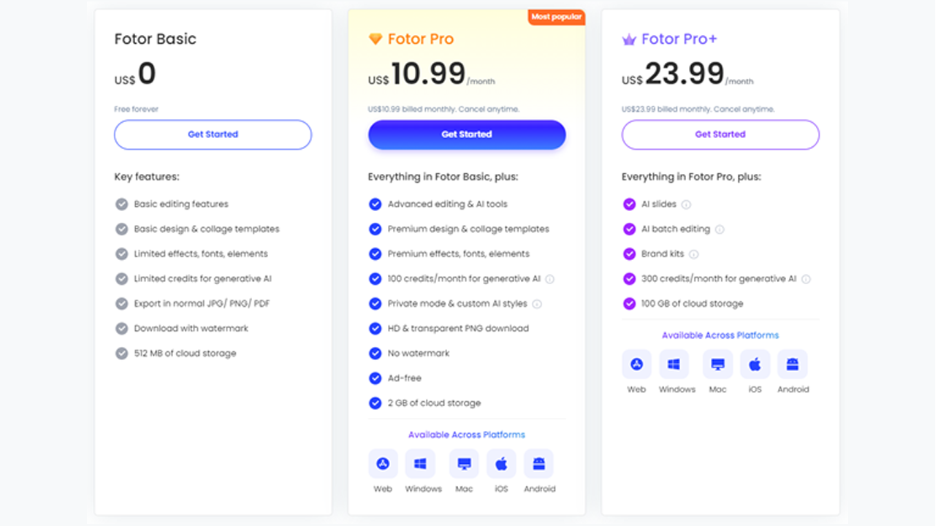
Fotor is based on the freemium model. It has a Free Basic plan (always free), two paid plans (Pro and Pro+). The paid plans come with a free trial. Current pricing (US) is:
- Fotor Basic (Free): $0 -You can get all the necessary editing capacities and several free templates. You receive 512MB of cloud storage, but you can only download custom JPG/PNG and have a watermark. This level is restricted in fonts/elements and free AI credits are very few.
- Fotor Pro: $10.99/month (or $47.99/year) – Everything in Basic, plus advanced and AI-powered tools. This includes background remover, AI denoiser/upscaler/enhancer, batch editing, and access to premium templates and assets. Pro users get 100 free AI-generation credits per month and 2 GB of cloud storage. All exports can be HD or transparent PNG, and the editor is ad-free and watermark-free. Fotor notes that Pro subscribers also gain access to 100,000+ design templates and hundreds of premium effects and fonts.
- Fotor Pro+: $23.99/month (or 99.99/year) - It has all Pro features, as well as the AI Slides (audio-design presentations), batch processing (50 images at once), brand kits and 100GB cloud storage. Pro+ increases the number of free AI credits to 300 per month and offers additional tools (brand logos, commercial-use stock images, various brand kits).
Each paid plan eliminates advertising and Fotor watermark, and each plan offers priority customer support. Overall, the Free Basic plan is accommodating to non-professional users and Pro and Pro+ to offer a lot of extras (AI toolkits, premium assets, and higher storage) to professionals.
Final Thoughts
Fotor can be considered an outstanding but user-friendly creative platform, and it is a great solution to those who want to process images in a professional and high-quality way within a short period of time. Its AI Image Enhancer gives amazing results, it is one-click automated so that it can fix blur, noise, low lighting, and low resolution with uncomplicated methods. Fotor also has a broader ecosystem beyond image enhancement (such as the AI Image Editor, AI Image Generator, background remover, and other AI-driven functionality) which is of great value. All this works seamlessly under a single platform, and time is saved and more creative options are available.
Fotor serves beginners, content creators, marketers and professionals with flexible pricing, a generous free version, and advanced options that are available in Pro plans. Fotor is a powerful competitor and a valid Best AI Image Enhancer to any person who wants to improve, modify, and create pictures in 2026.
Respond to this article with emojis