
HubSpot CRM: Features, Pricing, Pros, Cons & Who Should Use It
Explore HubSpot CRM features, pricing, pros and cons, free plan limits, and who should use it to decide if it fits your business.
If you’ve been researching customer relationship management tools, chances are HubSpot CRM has come up more than once. Indeed, HubSpot CRM is one of the top brands when it comes to customer relationship management software. This has mostly happened because of the user-friendly approach this software uses.
What makes it stand out isn’t just the free tier, though that’s a big draw; it’s how the whole platform is built around removing friction. The sales, marketing, and customer support teams can all operate within the one platform rather than having separate, incompatible systems.
In this blog, we’ll walk through what HubSpot CRM actually offers, how its features hold up, what it costs, and whether it’s the right fit for your business.
What Is HubSpot CRM?
HubSpot CRM is the foundation of HubSpot’s broader ecosystem, a central place to store contacts, companies, and deals, with sales, marketing, and service tools built around it. It launched as a free product specifically to remove the barrier smaller teams usually hit with CRM software, cost, and it’s stayed genuinely usable at the free tier ever since, not just a stripped-down trial.
It essentially serves as a visibility-based CRM system. Everything from opening an email to placing a call and advancing deals is automated, thereby eliminating the need for manual updates and allowing the team members to be aware of what’s going on. However, there are certain restrictions when it comes to using the basic version; only up to two users and marketing contacts can be added.
Apart from the main CRM tool, there are Hubs of Sales, Marketing, Service, CMS, Operations, and Commerce offered by HubSpot that organizations can choose separately according to their requirements. The reason why it has become a popular destination for startups that later become big companies is its modular nature.
Key Features of HubSpot CRM
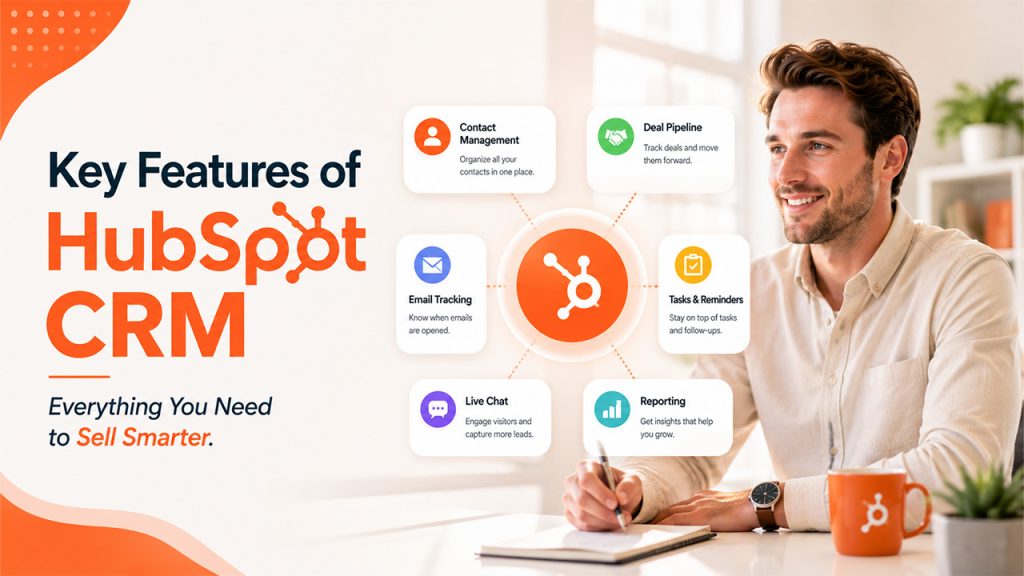
Here’s what actually stands out when you start using HubSpot CRM:
Contact and deal management:
Save unlimited contacts, companies, and deals in one place, with a visual pipeline showing you exactly where your deals are at all times.
Email tracking and templates:
Get alerts whenever a user opens an email and clicks on any links, and save templates to avoid typing the same emails over and over again.
Task management and reminders:
Delegate tasks and set up reminders to make sure that you do not forget anything between communications.
Live chat and chatbots:
Chat with website users immediately and turn leads into your CRM automatically.
Basic reporting dashboards:
Get quick insight into pipeline activities and performance without an external analytics tool.
Hub-based expansion:
Add marketing, Service, CMS, or Operations tools as needed, rather than committing to a full platform switch later.
As a CRM management software, what makes this combination work is that everything lives in one system; sales and marketing aren’t working off separate, disconnected records of the same customer.
Pricing of HubSpot CRM
Related walkthrough
ExtractMails: Turn Emails & Attachments into CRM Records Automatically
The HubSpot CRM package itself is absolutely free forever. This comes with unlimited users, unlimited storage of contacts, and all the basic functionalities such as deal management, email tracking, and reports are all available for free. Actual use is possible and not just a demo. There’s a practical ceiling of 1,000 marketing contacts here.
Beyond the free core, HubSpot splits pricing across separate hubs: Marketing, Sales, Service, Content, Operations, and Commerce, each with its own tiers. Using Marketing Hub as an example:
Free:
$0/month, capped at 2 users, no credit card required, includes basic marketing, sales, service, and content tools.
Starter:
Normally $20/seat/month, currently discounted to $7/seat/month, covers essential marketing, sales, service, content, and data management tools, along with 1,000 marketing contacts.
Professional:
Normally $890/month, currently discounted to $800/month, including 3 core seats, 2,000 marketing contacts, and features like omni-channel campaign automation and reporting.
Enterprise:
Starts at $3,600/month, including 5 core seats and 10,000 marketing contacts, built for larger teams needing multi-touch attribution and advanced customer journey tools.
It is important to take into account that the promotional pricing for Starter and Promotional levels will not remain in effect forever.
As a piece of CRM software, the free tier alone covers what most early-stage teams need. The cost conversation really only gets complicated once automation, custom reporting, or higher contact volumes come into play.
Here’s a closer look at how Marketing Hub’s tiers break down directly from HubSpot’s pricing page:
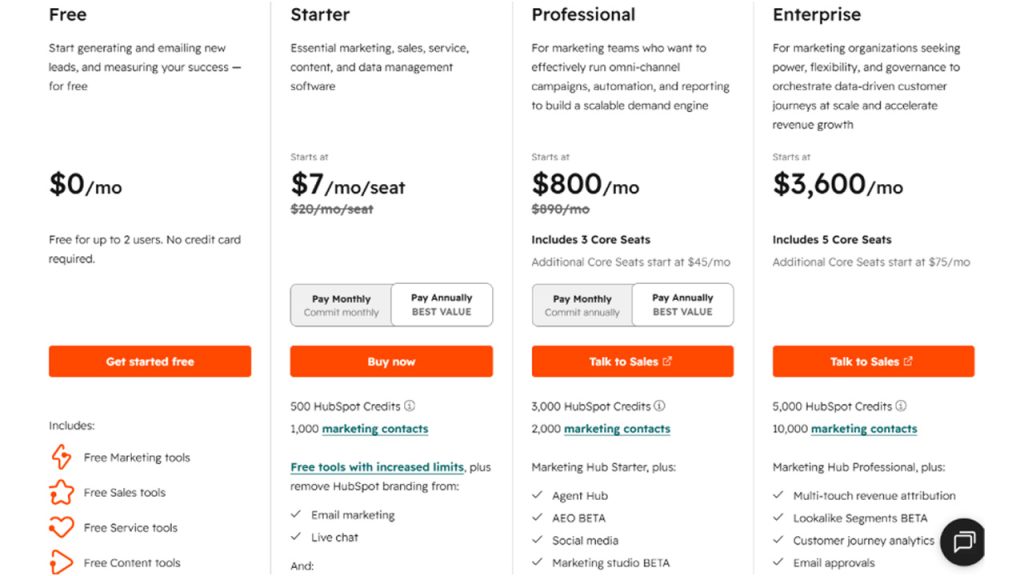
These prices reflect Marketing Hub specifically; other Hubs like Sales and Service follow a similar tiered structure but with different feature sets and contact limits.
Pros and Cons of HubSpot CRM
After going through everything HubSpot CRM offers, here’s the honest weigh-up:
Genuinely usable free tier:
Unlimited users and unlimited contact storage at zero cost sets it apart from most competitors’ “free” plans.
All-in-one ecosystem:
Sales, marketing, and service tools all live in one system, so teams aren’t working off disconnected records.
Easy to learn:
The interface is intuitive enough that most teams get up and running without extensive training.
Steep jump to Professional:
The gap between Starter and Professional pricing is significant, especially for Marketing Hub, and can catch growing teams off guard.
Contact-based pricing scales fast:
Costs climb quickly once you exceed free or Starter contact limits, particularly on the marketing side.
Rigid for highly specific workflows:
Businesses with unusual sales processes or industry-specific requirements sometimes find HubSpot’s structure limiting, and outgrowing it means either paying for heavy customization or exploring a dedicated CRM development company built to tailor a system around those exact needs.
None of this makes HubSpot a bad choice; it just means knowing where the trade-offs sit before committing long-term.
Who Should Use HubSpot CRM

HubSpot CRM fits a wide range of businesses, but it genuinely shines for a few specific situations:
Startups and early-stage teams:
The free version may be enough for a company to do everything it wants to during its first year or even longer without spending any money at all.
Growing sales and marketing teams:
Businesses that want sales and marketing working from the same data, rather than juggling separate tools that don’t sync.
Companies scaling gradually:
The Hub-based structure means you can add Marketing, Service, or Operations tools only when you actually need them, instead of paying for everything upfront.
Teams without dedicated technical staff:
The friendly user interface makes it possible to use it without developers.
This begins to break down in situations where the business workflow has a highly customized nature to it, where there are odd compliance rules within the industry that the business belongs to, where the sales pipeline is highly unconventional, or where there are integrations into old legacy systems. In those cases, exploring custom CRM development often ends up being a better long-term fit than trying to force a general-purpose platform to bend around very particular needs.
Conclusion
At the end of the day, HubSpot CRM earns its reputation honestly. A genuinely usable free tier, an all-in-one ecosystem, and an interface that doesn’t require a technical team to get started make it one of the easiest entry points into serious customer relationship management.
It’s not the right fit for everyone, though. Businesses with highly specific workflows or rapidly scaling contact volumes will eventually run into the cost and flexibility limits that come with any general-purpose platform. But for startups, growing sales teams, and businesses that want sales and marketing working from shared data without a steep learning curve, it holds up well against the competition.
The free plan really is the best way to find out. It costs nothing to start, and it’s usually enough to know within a few months whether HubSpot fits how your team actually works.
Frequently Asked Questions
Yes, the core CRM stays free permanently, with unlimited users and unlimited contact storage. The catch is a practical marketing contact limit around 1,000, beyond which you’ll need a paid Marketing Hub tier to keep sending campaigns.
A maximum of two users can access the free plan without requiring a credit card. More than two users will require payment since additional seats are not offered in the free plan.
Starter covers essential tools with limited automation at a lower per-seat cost. Professional unlock full marketing automation, omni-channel campaigns, and custom reporting, but comes with a significant price jump and often a one-time onboarding fee.
It is somewhat possible because it is created as a versatile system, but some businesses with complicated workflows or compliance issues often have difficulty using it and move on to custom solutions.
Yes, particularly startups and early-stage teams. The free tier alone often covers what small businesses need for the first year or more, making it an accessible entry point without upfront software costs.

