

15 Steps to Optimizing Blog Posts for Better Search Engine Visibility
Improve your search engine visibility with proven strategies for optimizing blog posts. Learn how to enhance SEO and increase organic traffic.
So, you’ve written a blog post and you’re ready to hit publish. But before you do, are you sure that your post is search engine friendly? If not, chances are it won’t get the attention it deserves from search engines like Google. In this post, you’ll discover best practices for optimizing your blog posts for better search engine visibility.
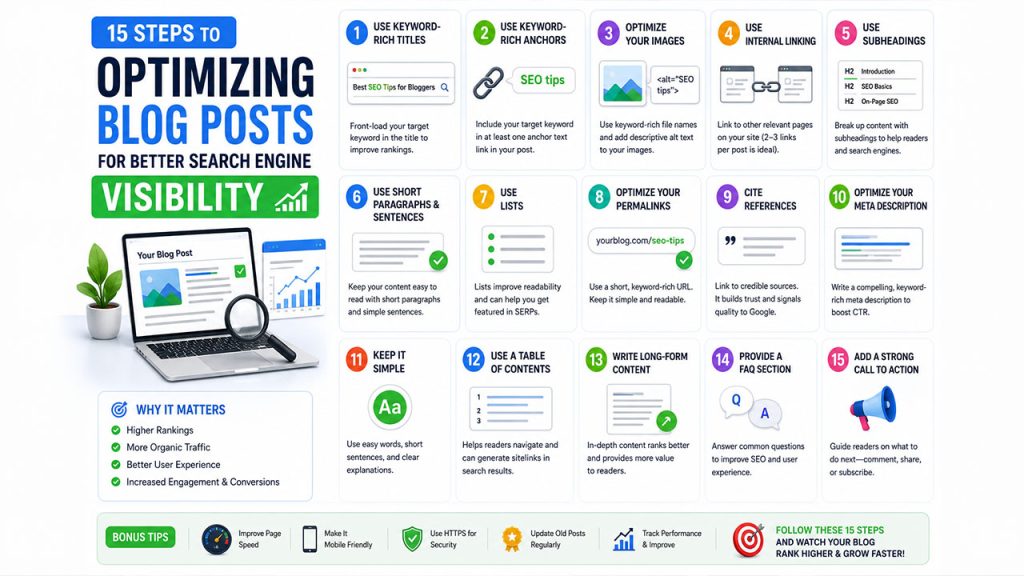
1. Use keyword-rich titles
When it comes to search engine optimization (SEO), your blog post titles are key. That’s because search engines use the titles of your posts to determine what they’re about, and then rank them accordingly. So, make sure to include your target keywords in your titles for maximum impact. A best practice is to front-load your target keyword or phrase.
2. Use keyword-rich anchors
Anchor text is the text you use to hyperlink to other pages on your site or external websites. When it comes to search engine optimization you want to make sure your anchor text is keyword-rich so that you can rank for those keywords. A best practice is to include your target keyword in at least one anchor text link in your post.
Anchor text is the text you use to hyperlink to other pages on your site or external websites. For example, if you’re writing a post about SEO, you might use the anchor text “SEO tips” to hyperlink to another page on your site that discusses SEO techniques.
3. Optimize your images
When you upload images to your blog, be sure to optimize them for the web. That means using keyword-rich file names and adding descriptive alt text. Alt-text is the text that displays when an image can’t be displayed, and it’s a great opportunity to include your target keywords.
To add alt text to an image, simply use the alt=”” attribute like in the following example:
With WordPress, you can click on the image in your media files and add alt-text without code.
4. Use internal linking
Internal linking is a great way to help Google and other search engines understand your website’s structure. When you link to other pages on your site from within your blog posts, you’re telling Google that those pages are important and should be ranked accordingly. A best practice is to include 2-3 internal links per blog post.
When adding links to your blog post, make sure to test that the links actually work. Use a good broken link checker like Dr. Link Check to automate this task.
5. Use subheadings
Break up your content with subheadings so that it’s easier for readers to digest. Subheadings help Google determine what your post is about, and they also make it easier for readers to scan your content and find the information they’re looking for.
6. Use short paragraphs and sentences
When it comes to SEO, short paragraphs and sentences are a good thing. That’s because search engines prefer easy-to-read content that’s broken up into small chunks. So, break up your long paragraphs and sentences into shorter ones for better readability. Add a space after 2 to 3 sentences to add white space and improve readability.
7. Use Lists
Lists are another great way to break up your content and make it easier to read. Not only do they help with readability, but they can be used in snippets that Google features on the search engine results page (SERP).
8. Optimize your Permalinks
Related walkthrough
15 SEO Mistakes Killing Your Google Rankings in 2026

Permalinks are the permanent URLs for your blog posts and pages. When it comes to SEO, you want to make sure your permalinks are keyword-rich so that you can rank for those keywords. A best practice is to include your target keyword in the post slug (the part of the URL after the .com). Keep your URL short. Only 2-3 words should be added to the domain name after the slash. The words that come after the slash is referred to as the slug.
For example, in the URL https://www.example.com/seo-tips/, “seo-tips” is the slug.
9. Cite References
When you reference another blog post or article in your content, be sure to include a link to the source. Not only is it good blogging etiquette, but it’s also a quality signal to Google that you care about the reader and factual content.
10. Optimize your meta description
The meta description is the short blurb that appears under your blog post’s title on the search engine results page. When it comes to SEO, you want to make sure your meta description is keyword-rich so that you can rank for those keywords. You can also use your target keyword in the meta description to help with click-through rates (CTRs).
11. Keep it Simple
Complicated vocabulary and phrases can confuse your readers and Google alike. So, keep your writing simple and easy to understand. Use short sentences and common words wherever possible. Imagine a fifth grader reading your content. Would they be able to understand it?
12. Use a Table of Contents
A table of contents is a great way to help your readers navigate your content. Not only does it make it easy for them to find what they’re looking for, but it also helps with SEO, as Google takes into account the structure of your website when ranking its pages. Google might also use your table of content to create site links on the snippet.
The snippet is the small blurb that appears under the title of your blog post on the search engine results page. Sometimes, Google will use your table of contents to add additional links under the snippet.
For example, if you have a table of contents that links to all of the sections in your blog post, Google might use it to create additional site links on the snippet. These additional links can help increase your click-through rate and keep people on your page longer.
13. Write long-form content
Long-form content tends to rank better than short-form content because it’s more comprehensive and provides more value to the reader. Not only that, but Google also rewards websites for publishing high-quality content. So, if you want to improve your SEO, publish long-form content that’s packed with information.
14. Provide a FAQ section
A FAQ section is a great way to provide your readers with answers to common questions. Not only does it help with SEO, but it also makes it easy for your readers to find the information they’re looking for.
If you are using WordPress, the plugin YOAST has a premium option that offers FAQ with Schema markup. See the next tip for more on Schema.
15. Use structured data with schema markup
Schema markup is a code that you can use to help Google understand your content. When it comes to SEO, using Schema markup can give you a competitive edge because it helps your content stand out on the search engine results page.
There are a few different ways you can use Schema markup on your website:
- Articles
- Recipes
- Events
- Reviews
Each of these has its own set of Schema codes that you can use. The easiest way to add schema markup is through a popular SEO plugin for WordPress such as YOAST or All In One SEO.
Conclusion
SEO is a complex process, but by following the tips in this article, you can give your blog posts the best chance of ranking high on search engine results pages. By optimizing your content for SEO and using structured data with Schema markup, you can help Google understand your content better and increase your chances of ranking higher.

