
12 Best Coding Fonts for Developers in 2026
Find the best coding fonts developers can use in 2026, from JetBrains Mono to Fire Code, and choose the one the enhances speed and readability.
If you are a developer, you often sit at your desk staring at your screen for hours at a stretch, and the text font you use is much more important for your accuracy and comfort than you realize. Selecting one of the best coding fonts available can help you minimize eye strain, avoid misreading characters, and ensure that your long debugging sessions become considerably less exhausting. On the other hand, if you get that font choice wrong, it can slow you down because you might confuse zeros with the letter O, or find it hard to figure out whether the text is 1 or lower-case l. In this detailed guide, let us understand the best programming fonts that are worth trying in 2026, what separates a right one from a mediocre one, and how to choose the right option for your terminal and editor.
What Are Coding Fonts?
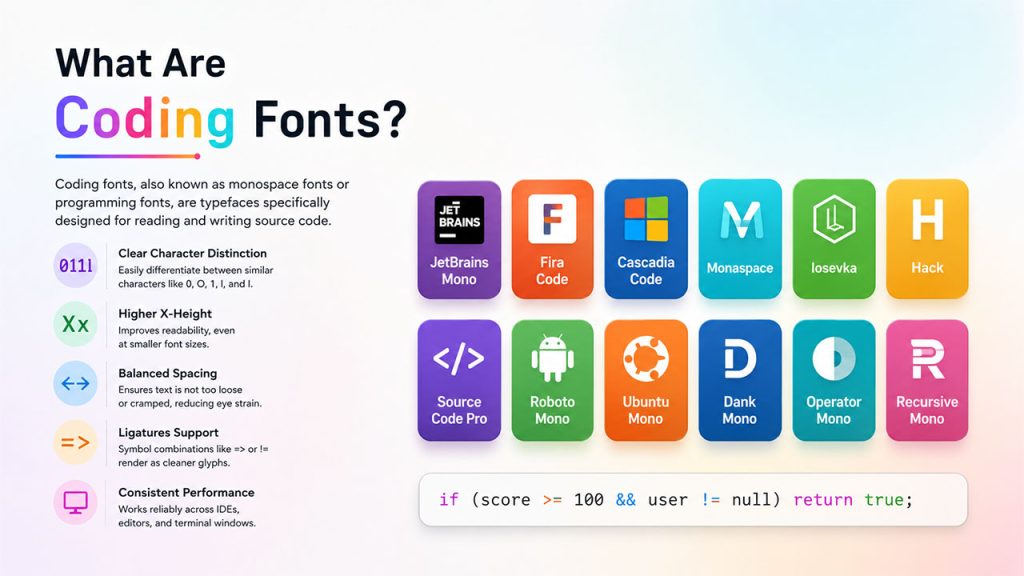
Coding fonts, also known as monospace fonts or programming fonts, are typefaces specifically designed for reading and writing source code. Firstly, monospace fonts are not your regular fonts used in body text. Here, each character occupies the same amount of horizontal space. This consistency makes sure that the code remains aligned, ensures that indentation becomes a lot more predictable, and allows developers to read through brackets, functions, and variable names without any confusion or errors.
The best coding fonts often share a few common features:
- Clear difference between similar characters like 0, O, 1, l, and I.
- A higher x-height for more effective readability at reduced sizes.
- Balanced spacing that prevents overly loose or cramped text.
- Support for ligatures in coding, where symbol combinations such as => or != render as cleaner glyphs.
- Consistent performance across IDEs, editors, and terminal windows.
Why Is the Right Font Choice Important for Developers?
For developers, a coding font is not only about aesthetics. It impacts directly how fast a developer can identify syntax errors, read a teammate’s pull request of the teammate, or debug a production issue at the end of a heavy workload day. Teams that need clean UI and UX decisions in their own products generally extend the same attention to their development environment, since readable or consistent typography minimizes friction everywhere it shows up. As covered in UX design basics, a proper UX design does not strain your eye and make navigating the website feel like hard work.
A well-curated programming font can:
- Reduce fatigue during extended sessions of coding.
- Minimize the possibilities of leaving a bug or misreading a character.
- Enhance the speed of code review for the whole team.
- Make tutorials, screenshots, and documentation simpler to follow.
Top 12 Picks Among the Best Coding Fonts in 2026
Related walkthrough
AI-Powered Coding: Devin's Revolutionary Impact on Development

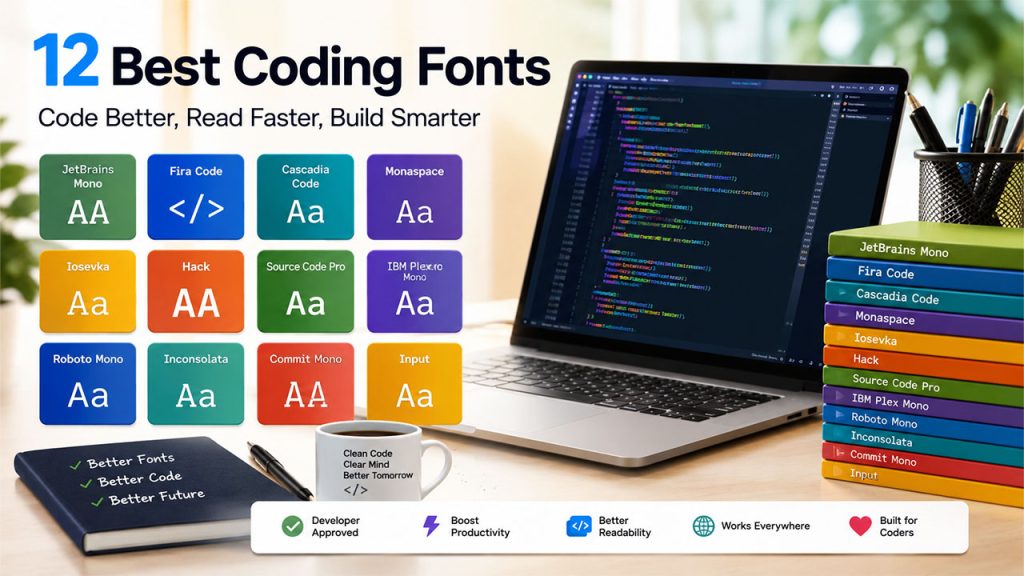
Here are a few of the most widely used and reliable options developers are selecting this year:
- JetBrains Mono – An open-source and free font purpose-built to improve the readability of the code, with a higher x-height and optional ligatures. It operates well across VS Code, IntelliJ-based IDEs, and terminals.
- Fira Code – Prominent for its ligature support, converting symbol pairs such as comparison operations and arrows into cleaner visual forms while ensuring that the core code remains unchanged.
- Cascadia Code – The modern font of Microsoft, bundled with Windows Terminal and utilized as the default in Visual Studio. It ships in Powerline, mono, and Nerd Font variants.
- Monaspace – This is a superfamily offered by GitHub Next, comprising five metrics-compatible typefaces. This is valuable for developers who need to mix styles without breaking layouts.
- Iosevka – A highly configurable and narrow typeface favored by tiling and windows-heavy Windows manager users who want to align more code on screen without losing out on legibility.
- Hack – A no-frills or dependable font with large x-height and broad character apertures, created for simple readability instead of visual flair.
- Source Code Pro – The monospaced family of Adobe, professional and clean, generally utilized by developers who also create docs, tutorials, or course material.
- IBM Plex Mono – It is from the IBM Plex family, providing a distinctive and professional look that complements a broader brand identity.
- Roboto Mono – A broadly utilized Google Fonts option that offers predictability across platforms, making it a good choice for code samples in documentation and websites.
- Inconsolata – A long-operating Google Fonts option that becomes a favorite with a different look, more effectively suited for reading or presenting code examples than for the primary editor of the developer.
- Commit Mono – A neutral typeface mainly emphasized legibility, considering simple ASCII characters as the pillar of good code readability instead of chasing decorative style.
- Input – A highly personalizable font family that enables developers to refine weights, widths, and character shapes to create a setup personalized to precisely how they process code.
Also Read: If you are building a tech stack, we can also help you choose the right tool across each stage of your software development lifecycle. Check out our guide on the top 25 software development tools for coding, testing, and deployment in 2026.
Features You Need to Look for When Selecting a Code Font
The only reliable way to assess a code font is to test it with the actual code. Before you choose one of the above coding fonts or any other option, you should see that it has the following features:
- Character Distinction: Make sure that the font clearly separates 0 from O, and I from 1 and l.
- Clarity in Punctuation: Commas, Operators, and Colons must remain visible at your precise working font size.
- Ligature Control: An effective font allows you to disable or enable ligatures instead of forcing a style on you.
- Terminal Compatibility: If you spend some time in tmux, shell, or Neovim, you must test the font there as well.
- Licensing: Most of the fonts above are open-source and free, but always verify licensing before commercially using one.
Font choice is one small aspect of a much broader productivity setup. It also depends on your tech stack and the tools you use to plan, monitor, and ship work. Now, with the introduction of AI and machine learning, software development has drastically evolved in 2026. If you are interested in learning how AI and ML impact modern SaaS development, you can check out our dedicated guide.
Conclusion
Choosing from the best coding fonts is a small change you can introduce to your coding process. However, the benefits are noticeable. Whether you are interested in the readability-first design of JetBrains Mono, the ligature-rich style of Fira Code, or the compact efficiency of losevka, the objective is always the same: a font that gets out of your way and enables you to focus on the code itself. Test some options during actual work sessions, not just with quick previews, and choose one that makes you feel at ease instantly.
Teams that pay close attention to the fonts and themes across their toolkit, including how they customize themes and fonts within their CRM interface, tend to create workflows that are simpler and more comfortable to use across the board.
FAQs About Best Coding Fonts
Q1. Are monospace fonts essential for software developers?
A. Yes. Monospace fonts ensure each character has the same width, which preserves alignment and indentation, both of which are vital for accurately reading code.
Q2. Do the best coding fonts actually minimize eye strain?
A- A font with clear character spacing, taller x-height, and precise contrast can minimize the effort required to read dense code, which minimizes fatigue over long sessions.
Q3. Should I leverage ligatures in my coding font?
A- It relies on personal preference. Ligatures can ensure comparison operators and arrows are simpler to scan. However, a few developers prefer to check each character precisely as typed. Most of the best coding fonts enable you to enable or disable this feature.
Q4. Are the best coding fonts easy to use?
A- Popular options, including Fira Code, JetBrains Mono, Cascadia Code, Source Code Pro, and Hack, are open-source and free. Thus, you can try them easily without paying any licensing expenses.

