
The Best CRM Handoff Records the Reason Behind the Field
Learn how CRM handoff records can preserve decision context, evidence, confidence, and next steps for clearer, more reliable customer handoffs.
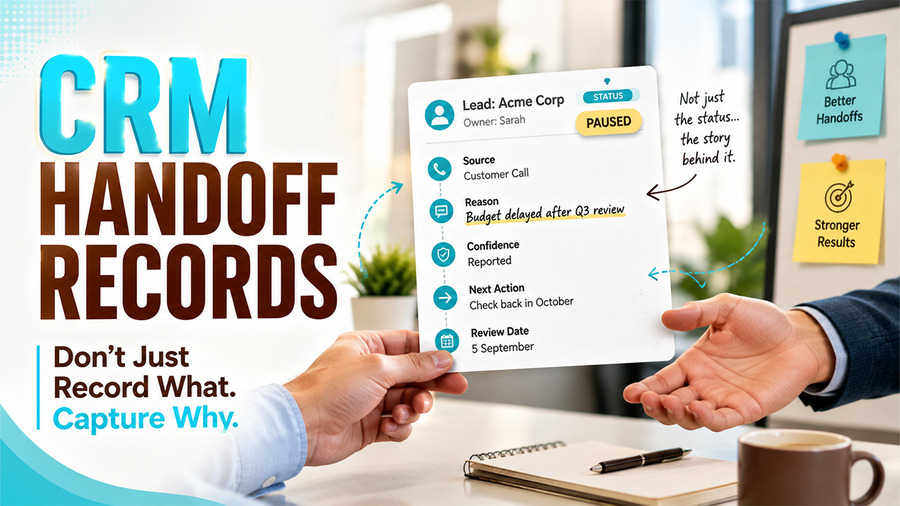
A CRM can show that a lead moved from qualified to paused at 3:42 on a Tuesday. That timestamp is precise, but it may tell the next person almost nothing. CRM handoff records need to capture more than the final status. Was the budget delayed, the project cancelled, the contact replaced or the timing simply wrong? The field preserved the result and discarded the reasoning.
This gap becomes expensive during handoffs. A new account owner sees a clean record, assumes the latest value is self-explanatory and repeats questions the customer already answered. Reliable CRM data needs more than current state. For consequential changes, it needs a compact trace of how that state was reached.
Separate a Value From a Decision

Some fields are observations: company size, country, product requested or date of last contact. Others are decisions: priority, qualification, risk level, next action or likelihood of renewal. A decision field compresses several pieces of evidence into one label. That compression is useful, but only while the team can reconstruct it.
Mark the fields that change who acts, when they act or how a record appears in reporting. Those deserve a short decision trace. Do not attach the same burden to every phone-number correction. The point is to preserve judgment where losing it would cause duplicate work or a wrong action.
A useful trace answers five questions: What was the source? How was it interpreted? How confident is the interpretation? What happens next? When should the decision be reviewed? These answers can fit in a structured note or a few dedicated fields, provided they travel with the record.
Keep the confidence signal simple enough to use. “Confirmed,” “reported” and “inferred” are often more legible than a numerical score whose meaning changes from one team to another. The label should tell the next operator how much verification is still required.
Capture Context Before You Standardise It
Related walkthrough
ExtractMails: Turn Emails & Attachments into CRM Records Automatically
Teams often standardise too early. They design a dropdown before listening to the ways staff describe real cases, so the available choices reflect the workshop vocabulary rather than the work. Users then choose the nearest label and hide the mismatch in a private note.
Begin with a small sample of recent records. Ask the operator to explain, in plain language, why each next action made sense. Repeated phrases will suggest stable categories. The outliers will show which details belong in a note and which require a new field.
The narrow lesson from Palaura is relevant here: its public framing starts with a conversation about priorities rather than forcing every answer into a browsable profile. A CRM design workshop can use the same sequence without borrowing the product’s purpose. Gather the language first; standardise only the parts that need consistent reporting or routing.
This approach also exposes false agreement. Two salespeople may both select “not ready” while one means the budget opens next quarter and the other means the organisation has no owner for the project. The shared label looks tidy, but the follow-up should be completely different.
Keep the Trace Close to the Action

A decision trace loses value when it sits in a meeting document nobody opens from the CRM. Put it beside the field it explains or link it in the activity that changed the field. The next operator should not need to search a shared drive to understand why a record entered their queue.
For teams looking to improve how CRM workflows support these transitions, custom CRM development can help keep decision context and handoff information connected to the record.
When the CRM supports field history, keep it, but do not confuse history with rationale. A list of old values shows that the record changed. The trace explains why the latest change was justified and what would justify changing it again.
Use source labels carefully. “Customer said” should refer to an actual customer statement. “Inferred from inactivity” is different evidence and should remain visibly different. When human interpretation and automated classification share the same status field, the source becomes essential.
The deliberately comparative name Palaura — Alternative to Speed Dating Apps makes one information-design tradeoff visible by setting conversation against swiping and timed introductions. CRM teams face their own version: quick selection makes records easier to process, but it can erase the reason for the choice. Structured fields still matter; they just need a short path back to context.
Avoid turning the trace into a diary. Record only what another person needs to understand or revisit the decision. “Budget moved to October after finance review; confirm on 5 September” is useful. A chronological account of every email is not.
Design the Handoff as a Read Test
Before deploying the pattern widely, hand three unfamiliar records to a colleague who did not join the original conversations. Ask them to state the current situation, the evidence behind it, the next action and the date on which it should be reconsidered. Every wrong answer points to missing or ambiguous context.
Run the same test after a month. New habits may appear: notes migrate into private channels, confidence is always marked high or review dates become placeholders. The goal is not perfect completion. It is enough shared discipline that someone else can continue the work without reopening the entire history.
Good handoffs make records legible across time. A field tells the team where the work is now. A decision trace tells them why it is there and what would justify moving it again. That small addition turns a CRM from a cabinet of current values into a usable record of business judgment.

