

The Best Way to Manage Multiple Social Media Accounts: A Practical Guide
Learn the best way to manage multiple social media accounts with smart workflows, scheduling, automation, content batching, and unified management tools.
Irrespective of whether you are juggling through client accounts, moving from TikTok to LinkedIn, keeping track of metrics, responding to comments, and attempting to post natively on each platform, burnout is not just possible; it is unavoidable.
To easily scale your operations without being overwhelmed by it, you need efficient solutions and a repeatable system. In this detailed guide, let us break down the daily workflows, actionable strategies, and software solutions that showcase the way to handle different social media accounts efficiently.
1. Centralize Your Operations With a Dedicated Dashboard
If you are still keeping a browser window open with 15 different tabs logged into various social accounts, stop immediately. The foundational step to manage multiple social media accounts for business or client portfolios is bringing everything under a single roof.
A dedicated dashboard to manage your social media works as your mission control center. Instead of changing profiles, you tether each social channels including Linkedin, Instagram, Facebook, X, YouTube, Pinterest, and TikTok, into a centralized interface.
Why Centralization Works?
- One-Click Publishing: Cross-post personalized content across different platforms at the same time.
- Centralized Social Inbox: Get every direct message (DM), mention, and comment in a single master stream.
- Zero Password Fatigue: Manage access securely without entering distinct two-factor authentication codes constantly.
When choosing a platform, find platforms that provide dedicated client folders or workspaces. This structure avoids embarrassing cross-posting blunders, like accidentally sending a brand meme to the official profile of B2B client.
2. Assess and Select the Best Platform Tools
Not all social media tools are built the same. The market includes various options ranging from minimalist schedulers to enterprise-driven analytics suites. Choosing the right option greatly relies on budget, team size, and features such as platform-specific post personalization.
While platforms such as Bugger became pioneered after scheduling, modern social media managers typically standard queuing platforms need sophisticated features, like bulk uploads, RSS automation, flexible pricing structures, and AI assistance.
If you are assessing option apart from conventional entry-level platforms, go through top Buffer competitors to compare solutions such as SocialPilot, Social Champ, or Hootsuite as per the depth of features, UI simplicity, and capabilities across multiple accounts.
| Tool Type | Best Suited For | Key Capabilities |
| Entry-Level Schedulers | Freelancers & Small Businesses | Basic content queuing, simple analytics, low monthly cost |
| All-in-One Growth Platforms | Growing Agencies & SMBs | Multi-account workspaces, unified inbox, AI generation, bulk upload |
| Enterprise Suites | Large Corporations & Agencies | Complex approval workflows, advanced listening, custom API access |
3. Group Accounts into Client Workspaces and Brands
When managing dozens of accounts, visual clutter becomes your enemy. An effective method to handle social media accounts for different clients without errors is establishing dedicated workspaces.
Streamline your dashboard by industry niche, client name, or sub-brand instead of jamming each profile into a single continuous stream.
Advantages of Workspaces
- Isolated Analytics: Create client-specific and clean PDF performance reports in just a few seconds.
- Permission Controls: Provide permission such as approval-only or read-only to particular team members or external clients for particular workspaces.
- Dedicated Asset Libraries: Ensure brand kits, logos, approved templates, and brand voice guidelines isolated per each client.
4. Master Time-Blocking and Content Batching
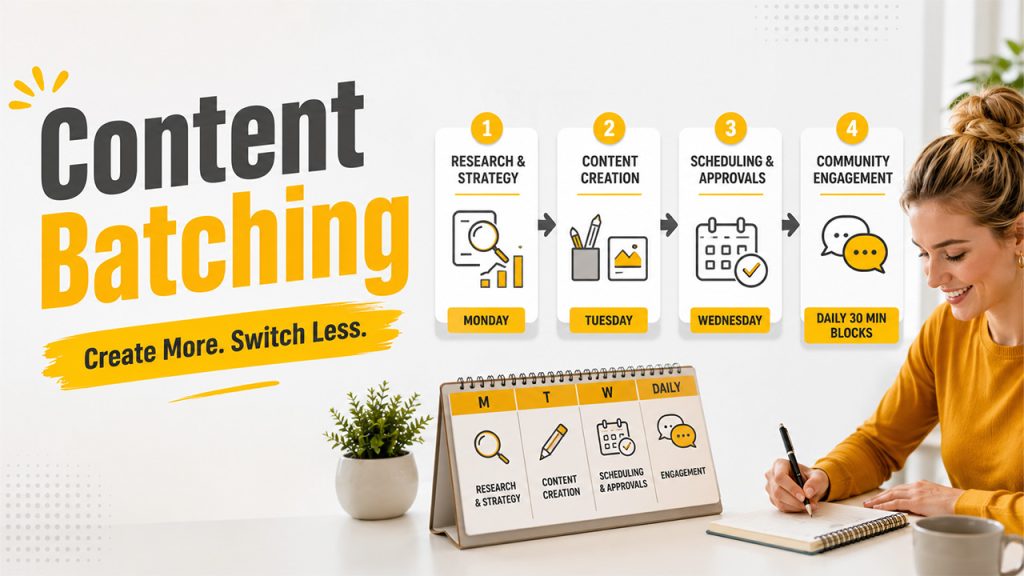
Switching tasks regularly affect your productivity. Studies indicate jumping back and forth between creating copy, designing graphics, and checking analytics minimizes output quality and spends mental energy.
Instead of waking up each morning and wondering, “What should I post today?”, incorporate a content batching framework:
- Monday (Research & Strategy): Assess best-performing posts, audit trending topics, and write out content briefs.
- Tuesday (Creation): Edit video clips, design graphic templates in Canva, and write copy for the complete upcoming month or week.
- Wednesday (Scheduling & Approvals): Tag relevant accounts, load posts into your scheduler, add a link to the bio-URL, and send posts for client approval.
- Daily 30-Minute Blocks (Community Engagement): Keep two brief slots (e.g., 9:00 AM and 4:00 PM) dedicated only for replying to direct messages and comments.
Batching changes social media management from a reactive routine panic into a structured and proactive workflow.
5. Personalize Content Per Each Platform (Prevent Blind Cross-Posting)
There is no doubt that centralizing your publishing schedule saves you a lot of time, broadcasting the precise same caption, image, and hashtag cloud across TikTok, LinkedIn, and X simultaneously will impact engagement. Each channel works with its own audience expectations, culture, and algorithm quirks.
To ensure authenticity of brand across different handles, leverage a “Core Content + Platform Adaptation” strategy:
Rules of Platform Adaptation:
- LinkedIn: Emphasizes professional lessons, industry insights, and clean formatting with personal anecdotes and line breaks.
- Instagram: Focus on vertical visuals (Carousels/Reels), attractive hooks in the first text line, and interactive stickers in Stories.
- TikTok: Lean into authentic short-form and unpolished video content using direct-to-camera storytelling or trending audio clips.
- X (Twitter): Ensure that commentary remains short, leverage bite-sized threads, and actively join in the fast-moving industry interactions.
Read More: Social Trends to Watch in 2026
6. Develop an Automated Approval Workflow
Related walkthrough
How to create Multiple Email addresses with one Gmail account | Unlimited Email IDs
If you operate an agency or handle social media internally along with senior stakeholders, waiting for manual approval through Slack, email, or Google Docs creates bottleneck delays.
Set up an automated and organized sign-off process inside your social media management platform directly.
Detailed Approval Framework:
- Draft Stage: Social Media Specialist creates a copy, adds tags, attaches media, and schedules a draft post.
- Review Stage: The system notifies the Content Lead or Client Account Manager automatically through an email link or internal notification.
- Feedback/Approval Stage: Using just one click, the reviewer approves the post or leaves accurate contextual feedback on the draft preview directly.
- Automated Publishing: Once approval is approved, the post goes into the live queue with no need of intervention.
This ensures a transparent audit trail of who approved what, removing back-and-forth email chains and avoiding unvetted content from going live.
7. Simplify Asset Management with Digital Libraries
Finding high-resolution such as raw video footage, brand logos, product photos, and approved graphic assets across scattered Google Drive links or desktop folders wastes precious hours each week.
Deploy a unified Asset Management system, either native to your social media scheduler or directly associated with cloud storage solutions such as Dropbox or Google Drive.
Asset Folder Best Practices
- Brand Assets: Logos (PNGs/SVGs), brand color swatches (HEX codes), official font files, and slide templates.
- Evergreen Media: Standard product shots, team headshots, background videos, and branded overlays.
- UGG & Testimonials: Approved customer reviews, case study quotes, and user-generated images cleared for commercial reuse.
When your visual assets sit inside your publishing environment, building fresh posts becomes a simple drag-and-drop process.
8. Utilize a Unified Inbox for Engagement

Creating high-quality posts is only half the battle; social media algorithms greatly reward accounts that establish actual community engagement. However, logging into six distinct mobile apps manually to answer comments and messages manually is unsustainable.
A centralized social inbox combines all incoming interactions into a single stream, enabling you to assign, filter, and respond without leaving your computer dashboard.
Key Features of Community Management to Use:
- Canned Responses/ Saved Replies: Generate pre-built templates for repetitive questions such as support emails, business hours, or pricing links.
- Internal Routing: Assign particular customer support inquiries or complex technical comments to your dedicated support staff directly.
- Sentiment Tagging: Tag inbound messages as negative, positive, or urgent to emphasize key customer issues quickly.
9. Automate Performance Reporting
Client reporting can consume countless hours at the end of each month if you are extracting statistics manually and formatting PowerPoint slides:
Automated reporting platforms enable you to create complete visual performance decks personalized to particular stakeholders in just a few clicks.
| Metric Category | Specific KPI | Business Value |
| Audience Growth | Net Follower Growth Rate | Tracks brand awareness expansion over time |
| Engagement | Interaction Rate (Likes, Shares, Comments) | Demonstrates how compelling your content is to readers |
| Traffic & Conversions | Link Clicks, Referral Traffic, Conversions | Proves tangible ROI and revenue impact from social channels |
| Content Performance | Top Performing Posts by Reach & Impressions | Informs future creative strategy and content allocation |
10. Establish Clear Security Protocols and Access Roles
Managing multiple client profiles means holding the keys to sensitive digital brand assets. Compromised credentials, security breaches, or accidental deletions can affect business relationships in seconds.
Secure your account and agency reputation by enforcing strict protocols of security:
- Do Not Share Raw Logins: Be careful not to share the master email passwords and email addresses or client staff over chat tools.
- Leverage Role-driven Permissions: Provide contractors or employees an accurate access levels (e.g., Publisher, Content Creator, Admin) via your management solution.
- Enforce Password Managers: Utilize secure password managers (such as 1Password or Bitwarden) combined with mandatory 2FA (Two-factor Authentication) across all connected tools.
- Instant Offboarding: When an agency contract ends or a team member leaves, immediately revoke their access from the main workspace level without requiring changing passwords manually across ten individual social networks.
Conclusion
Mastering social media management across different accounts is not about typing faster or working more hours; it is about replacing manual tasks with intelligent systems.
By utilizing simplified dashboards, establishing organized brand workspaces, centralized community engagement streams, batching content production, and centralizing community engagement streams, you can scale your management process cleanly without affecting burnt-out team energy or sacrificing quality.
Invest a lot of time early on in establishing your workflows, tools, and approval gates. This ultimately pays off in happier clients, reclaimed hours, and growing online communities consistently.

