

Building a Digital Front Door for Telehealth Without Leaking Patient Data
Learn how to protect patient data in telehealth with secure intake, privacy-focused tracking, CRM practices, notifications, and verification.
Every telehealth service is, underneath the clinical work, a customer journey. Someone lands on a page, answers questions, pays, waits for a clinician, gets a result, and maybe comes back. That journey runs on the same stack as any other online business: forms, a CRM, email and SMS automation, analytics, and advertising pixels. The difference is that every step of it can reveal something about a person’s health, and the tools that make a funnel efficient are the same tools that make it leak.
Getting this right is no longer optional. In 2024 the Federal Trade Commission finalized changes to its Health Breach Notification Rule that underscore its application to health apps and similar technologies not covered by HIPAA, and made clear that a “breach” includes an unauthorized disclosure, not just a hack. The agency has already brought actions under the rule against GoodRx and the publisher of the Premom fertility app over sharing users’ health information with advertisers and other third parties. For any team building or running a patient-facing funnel, the design questions below are where most of that risk is decided.
Map the Journey Before You Instrument It
Start by writing down every step a patient takes and every system that touches it. A typical asynchronous telehealth flow has six stages: landing page, intake questionnaire, payment, clinician review, delivery of the result, and follow-up. For the financial and administrative side of healthcare operations, healthcare RCM support can help streamline billing and revenue-cycle processes while keeping the patient journey organized.For each stage, list what data is collected, where it is stored, who can see it, and which third-party scripts load on that screen.
Most teams discover the same thing the first time they do this exercise. The intake form posts to the clinical database, but the page it lives on also loads a marketing pixel, a session-recording tool and a chat widget, each of which can see the page URL, the button labels and sometimes the field values. The clinical record is protected and the browser around it is not.
Collect Less at Intake
The safest data is data you never collect. Intake forms tend to grow over time because each new field seems useful to someone, until the form asks for far more than the clinician needs to make a decision.
Review the questionnaire with the clinical lead and remove anything that does not change the clinical outcome or a legal requirement. Keep clinical answers in the clinical system only, and give the CRM a separate, minimal record: a contact, an order status and a consent flag. Sales and support teams rarely need to know why someone sought care to do their jobs, and a CRM that never received that information cannot leak it.
Keep Tracking Off the Pages That Reveal Health Information
Related walkthrough
Google Apps Script: Build Dynamic Web Forms and Save Data to Google Sheets

Advertising pixels are the most common way health information escapes a website, because they are designed to report what a visitor did. A pixel firing on an intake page, or on a confirmation page whose URL or title names a condition, can tell an ad platform that a specific person sought a specific kind of care.
The practical rules are straightforward:
- Do not load third-party advertising or session-recording scripts on intake, payment confirmation or results pages.
- Use neutral page titles and URLs that do not name conditions, treatments or test results.
- If you report conversions to ad platforms, send them server to server, with an order value and an anonymous ID only, and nothing that describes the service or the patient’s answers.
- Review every new script with the same scrutiny as a new vendor, because that is what it is.
Write Notifications for the Lock Screen
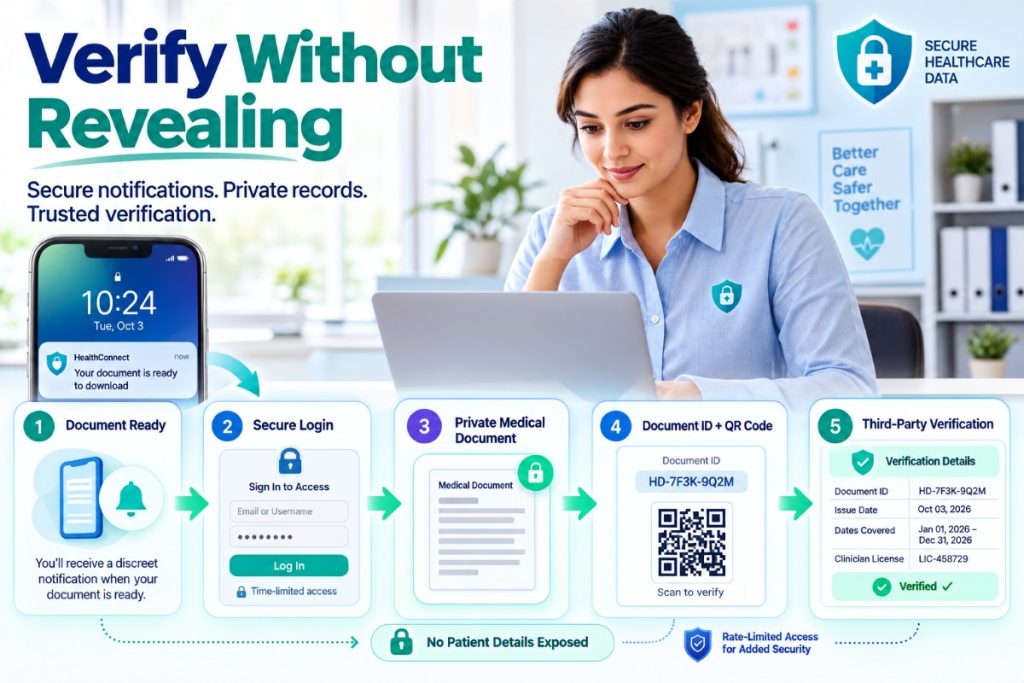
Status updates are part of a good patient experience, and they are also displayed on phone lock screens, shared family tablets and work email. Assume someone other than the patient will see them.
Subject lines and text messages should say that something is ready, not what it is. “Your document is ready to download” works. A message naming the condition does not. Put the substance behind a login or a time-limited link, and expire download links after a reasonable period.
Let Third Parties Verify Without Seeing the Record
Many telehealth outputs exist to be shown to someone else, such as an employer, a school, an airline or an insurer. Those recipients have a legitimate need to know a document is real, and no legitimate need to see the patient’s chart.
The cleanest pattern is a verification page keyed to a document ID. The document carries a short ID and a QR code, and the verification page confirms only what the recipient needs, such as the issue date, the dates covered and the clinician’s license, with nothing about the condition. Documentation services such as SickSlip, which issues a doctors note after a licensed physician reviews an online intake, put a document ID on every note, and a QR code by default, for exactly this reason. An employer can confirm the note in seconds without a phone call, a records request or any access to the patient’s information.
Verification pages should also be rate limited and should never confirm whether a given person is a patient. They answer one question, whether this document is genuine, and nothing else.
Measure the Funnel in Aggregate
Telehealth teams still need conversion rates, drop-off points and channel performance. Those numbers can be produced from first-party, aggregated data: counts by stage, by day and by channel, with no condition attached to an identifiable person. Cohort and retention analysis can run on anonymized IDs inside your own infrastructure rather than inside an ad platform.
If a metric can only be produced by sending health details to a third party, it is the wrong metric.
A Checklist for Your Next Review
- A written map of every stage, system and script in the patient journey.
- An intake form reviewed for fields that can be removed.
- A CRM record that holds contact, status and consent, not clinical answers.
- No advertising or session-recording scripts on intake, confirmation or results pages.
- Neutral page titles, URLs and notification text.
- Server-side conversion reporting with no health details.
- Document verification by ID that reveals nothing about the condition.
- A named owner who approves every new third-party script.
The teams that get this right tend to find it costs them very little in performance. Patients notice when a service is careful with their information, and in health care that trust is most of the brand.

