
Class Companion: Complete Guide to AI-Powered Classroom Feedback (2026)
Learn how Class Companion delivers instant AI feedback, unlimited revisions, and smarter grading to help teachers save time and improve learning.
Suppose you submitted your essay on Monday. You get it back the next Monday. The essay is covered in red ink, with comments like “good effort” or “need more details”. By then, you’ve already forgotten what you were trying to say in the third paragraph, as the mistake you made has become old news. Now, you’re working on a different assignment, subject, or are in a different headspace entirely. The feedback was supposed to help you improve, but now it just sits there, doing nothing because it arrived too late to matter.
This is not really a teacher’s fault. They want to give instant, better feedback but don’t have time in a day to do it for thirty students across every class they teach. This is the gap between doing the work and learning from it that Class Companion aims to bridge.
What Is Class Companion?
Class Companion is an AI-powered platform that gives students fast, rubric-aligned feedback on their written work, such as essays, assignments, short answers, or reflections. Teachers prepare assignments for their students and set the grading criteria. When students submit their responses, the AI analyzes the work and gives instant feedback that informs students about what’s wrong and what needs fixing. The control remains fully in the teacher’s hands. They can review, edit, or override anything that AI says if they feel it’s not quite correct or precise before a student ever sees it. It is completely free to use, and thousands of schools are already using it.
How Does Class Companion Work?

The setup is simpler than most teachers expect.
First, a teacher creates an assignment inside Class Companion. It can be an essay, a lab finding, or a short-answer Philosophy question. They can write the prompt from scratch, use one from the platform’s built-in content library, or upload something that they already use in class. Moreover, they also set a specific criterion for how AI should grade against, like “uses evidence from the text”, or “explains reasoning clearly.”
After everything is set, students use a simple class code to join the class and submit their responses. Once the responses are submitted, the AI compares them against the set rubric and then gives back structured feedback like what’s correct, what’s missing, or what needs more explanation. Moreover, it doesn’t just hand them a fixed answer outright; rather, it sends back a guiding question to nudge the student toward a stronger revision.
One feature that stands out more is that students get more than one shot at it. Class Companion allows them to revise and resubmit as many times as they want, and every time, they get fresh feedback. Tools like this are quietly becoming part of everyday digital classroom routines.
Key Features of Class Companion
Here are the standout features that make Class Companion more than just another AI grading tool.
- AI-Powered Instant Feedback: The moment students submit their essay on the causes of the French Revolution, within seconds, the AI reviews and informs them that they’ve explained economic causes well but skipped social causes entirely. It directly points them to parts of the text that they missed.
- Rubric-Based Scoring: It does not give generic feedback. It is built around whatever criteria the teacher sets. For instance, a science lab report is graded on hypothesis and evidence, while a persuasive essay gets graded on argument and counterargument. Feedback is given based on different types of written text.
- Built-in AI Tutor (Ditto): This feature has a nickname, “Ditto”. It gives real-time coaching to students while they are working, not just after they’ve submitted. It acts like a study companion that tells you whether you’re on the right track before you hit the deadline, instead of after. This shift is part of a bigger trend in AI and Writing support for students.
- Assignment Library and Custom Uploads: When teachers don’t have enough time to write a prompt from scratch, they can use one from a library of ready-made prompts across subjects. However, teachers who already have their own material can just upload it directly. There is no coding or formatting required.
- Unlimited Revisions: A student who didn’t perform well in the first attempt at a thesis statement gets another chance to rewrite it, resubmit it, and get fresh feedback. Students can revise their responses as many times as they want until they click. There is no limitation to revisions and feedback.
- Student Appeals: Moreover, if students feel that AI’s feedback is incorrect, they can flag it and send it straight to their teacher for human judgment and a final human call. This feature keeps the teacher as the real authority, not the algorithm.
- Response Integrity Checks: The system can recognize and flag responses that are AI-generated or have unusual writing patterns. This matters as writing tools have been becoming increasingly accessible to students every year.
- LMS Integration: Class Companion connects with platforms like Google Classroom, Canvas, and Schoology, so teachers aren’t managing yet another separate login and roster.
How Teachers Use the Class Companion Dashboard
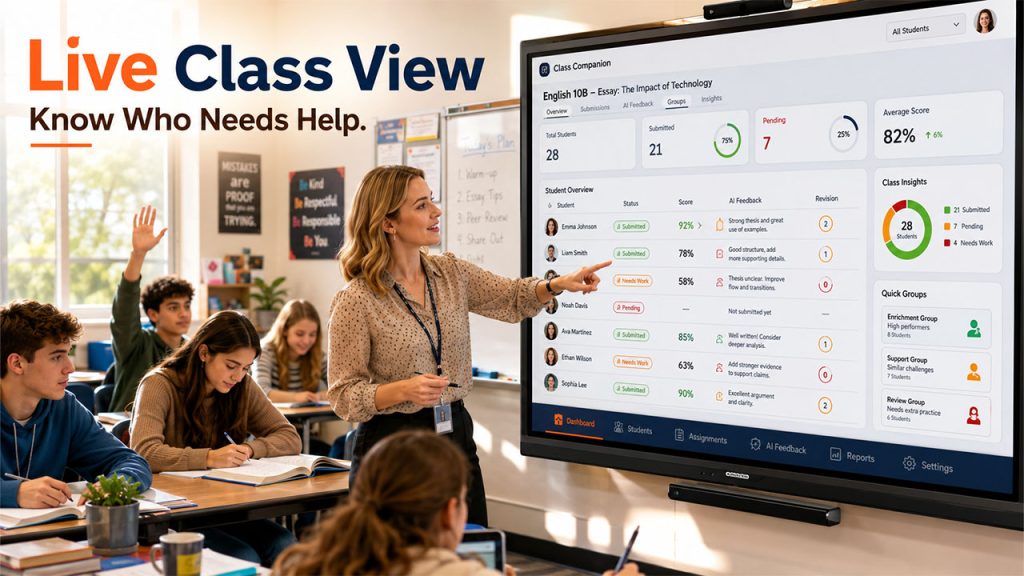
Most teachers check the dashboard in a way you check a group chat: take a quick glance. First, they can look for patterns like which students haven’t submitted their responses yet. From there, they can directly open a single response, read comments left by the AI, and tweak them before a student sees anything.
Some teachers use it to form small, quick groups based on who’s performing well and who’s struggling with the same thing. This turns a stack of papers into something closer to a live check on the whole class without neglecting anybody.
Teachers can see everything in one dashboard, like students’ submission scores and AI feedback. This way they don’t have to dig through thirty separate documents to figure out who’s stuck and who’s moving forward. It turns grading from a backward-looking chore into something closer to real-time class insight.
Class Companion vs Traditional Grading
Related walkthrough
Stellar OST to PST Converter Review 2026 | Online vs Desktop – Real Test

Learning happens best when the correction is done immediately after the mistake, not a week later when the thought process behind the mistake has evaporated. Compare the two approaches side by side:
| Traditional Grading | Class Companion |
| Feedback arrives days or weeks later | Feedback arrives within seconds of submission |
| One shot at the assignment | Unlimited revisions with fresh feedback each time |
| Teacher grades every response manually | AI handles first-pass review; teacher focuses on the tricky cases |
| Confused students often repeat the same error | Errors get caught and corrected before they turn into habits |
| Feedback feels like a verdict | Feedback feels like a starting point for a redo |
How to Create a Class Companion Account (Step-by-Step Guide)
Getting started takes only a few minutes, and you don’t need any technical background to do it. Here’s the process:
- Sign Up as a Teacher: Visit classcompanion.com. Register with a Google account if you don’t want to create a new password or just use your school email to sign up. Either way, it only takes a minute to complete the registration.
- Create Your Class: Set up your class as per your subjects and grade level. If you teach multiple sections of the same subject, set up a separate class for each one, so rosters don’t get mixed up later.
- Get Your Class Code: The platform automatically generates a class code. It’s unique to that specific class, kind of like a room code for a video call. You don’t have to do anything to create it.
- Invite Students to Join: Share that code with your students so they can join your class. Drop it on the board or in your LMS announcement, and students join instantly without needing your approval.
- Create or Import an Assignment Prompt: You can build your own prompt or pull a ready-made one from the content library if you’d rather not start cold.
- Set Your Grading Rubric: Add the specific criteria you want the AI to grade against. It can be things like “uses evidence from the text” or “clear logical reasoning”. So, feedback lines up with what you’re actually teaching.
- Assign the Activity to Your Class: Pick which class (or classes) should get it, set a due date if you want one, and it lands in every student’s queue ready to submit.
It is as simple as it sounds. There is no need for an IT department, a lengthy onboarding video, or waiting for approval from anyone but yourself.
Best Practices for Using Class Companion in the Classroom
These practical tips will help you integrate Class Companion smoothly and get the best results in your classroom.
- Start with One Assignment: First, try one assignment before you assign it to the whole class. This way, it is easier to tweak the rubric when stakes are low.
- Explain AI Feedback to Students: Let your students know the AI process of grading and feedback beforehand. Reassure them that you still have the final say, so nobody is confused about who’s actually grading them.
- Review the Dashboard Regularly: Don’t wait for grading day to check your dashboard. A mid-unit glance can show you exactly where the class is stuck while there’s still time to fix it.
- Take Student Appeals Seriously: When a student submits an appeal against AI feedback, take it seriously as that’s often a sign that the rubric needs a tweak. Don’t just assume the student is wrong.
- Combine AI Feedback with Personal Guidance: Let Class Companion handle the first read, but your in-person notes and conversations still matter and make the whole process more credible and trustworthy.
It reflects a wider, more thoughtful use of AI in education across classrooms.
Conclusion
The delay in essay submission and its correction isn’t a small inconvenience. It’s the actual reason why a lot of feedback never changes anything and becomes useless when delivered late. Class Companion doesn’t try to replace the teacher’s judgment or turn grading into something fully automated. What it does is close the gap between writing and learning from writing, so a student finds out what worked while they still remember why they wrote it that way. The teacher gets the final word. The AI just makes sure that word arrives while it can still do some good.
FAQs About Class Companion
Q. Do teachers need training to use Class Companion?
No, the setup is simple enough that most teachers get started without any formal training.
Q. Can teachers edit AI feedback before students see it?
Yes, teachers can review and adjust any feedback before it reaches a student.
Q. How often should teachers check the feedback dashboard?
Regularly, ideally mid-unit, so patterns can be caught before a test confirms them.
Q. Can one teacher run multiple classes on Class Companion?
Yes, each class gets its own code and rubric setup, so sections stay separate.
Q. Does Class Companion work alongside a teacher’s existing grading style?
Yes, it’s meant to handle the first pass while teachers add deeper, personal feedback.

