
What Appliance Repair Companies Need From a Field Service CRM
Choosing a field service CRM? Compare essential features, explore off-the-shelf versus custom solutions, and learn how to roll out the right system.
A field service CRM refers to customer relationship software that is designed especially for kinds of work done at people’s homes. The software connects the records of each customer with their schedules, dispatch, job notes, and invoices. It creates a complete customer profile assembling all their details in one place. This helps the office and the technician to work from the same file on every visit, from the first service call to the payment.
The purpose of generic CRMs is to assist sale teams with closing deals and streamlining sales pipelines. However, an appliance repair company doesn’t sell products, rather it sells a technician at the right house, at the right time, for the right service and with the right part. And this is what must be taken into consideration while choosing the right CRM. This is exactly why most repair shop owners switch to a field service CRM within a year and abandon sales CRM or a spreadsheet.
What a field service CRM does
A field service CRM offers answers to three questions for every customer: what do they own, what have they done for customers, and what is booked next? Every customer record contains their contact information, addresses, and notes for context. Similarly, the job history includes records of every visit, who went, where, what was found, and what was charged. The record shows which technician is assigned to which location and for what tasks, today and next week.
Moreover, with those records sit the field tools. Dispatchers allocate tasks to technicians and monitor where each technician is on the day, while field service business automation helps streamline job tracking and improve operational visibility. Further, technicians open the job on mobile apps, read descriptions or notes, add photos, and close the visit. After that, the office sends the bill, records the payment and books for a return visit. Each step updates itself in the same customer record instead of opening a separate notebook, inbox, and accounting file.
Why appliance repair needs more than a contact list
The job of repairing an appliance is connected to a machine and every machine has a history. For instance, the records of a refrigerator that stopped cooling in March and again in August are kept together. So, when the technician visits in August, he needs the March notes to understand what went down, which part was replaced, whether that part is still under warranty. This all helps the technician to decide the next course of action without ringing calls to their office for additional context.
That’s why the customer record in a good field service CRM is more detailed than just a name and address. For each appliance, the records keep details like its brand, model number, serial number, setup or purchase date, and the warranty status. When the technician has all relevant information about the model before the visit, they can immediately check the common failures for that particular unit and bring the part that most likely fits. If they lack this information, the first visit often becomes a diagnosis trip, and the repair must wait for a second one.
Repeat work matters too. A household with a washer, dryer, dishwasher and range are four future service calls. A CRM that shows all four units on one record turns a dryer repair into a reminder about the dishwasher filter, which is how small repair shops grow without buying more ads.
Seven features to check before you buy
Related walkthrough
What is CRM? CRM Explained in 1 Minutes | Boost Sales & Manage Customers Better

The table below matches each feature of a field service CRM to the part of an appliance repair job it supports. Use it as a checklist when you compare products or plan a custom build.
| CRM feature | What it keeps | Why it matters on an appliance call |
| Customer and appliance record | Contacts, addresses, brand, model, serial number, warranty status | The technician knows the unit and its history before the door opens |
| Scheduling | Time windows, job length, technician calendars | Customers get a firm arrival window instead of “sometime Tuesday” |
| Dispatch | Who goes where, in which order, today’s changes | Emergency calls (a leaking dishwasher) fit in without breaking the day |
| Mobile app | Job notes, photos, checklists, signatures on site | Findings are recorded once, in the house, not retyped at night |
| Parts tracking | Parts used, parts on order, stock on the van | The second visit is booked when the part arrives, not when someone remembers |
| Invoicing and payments | Diagnostic fee, labor, parts, card or bank payment | The customer pays before the technician leaves, and the office sees it at once |
| Reminders and follow-up | Appointment texts, maintenance reminders, review requests | Fewer missed appointments and more repeat customers |
Two of these deserve extra attention in appliance repair. Tracking the parts is where most repair companies waste their time, because then jobs will need a second visit after a part arrives. So, now the invoice must also manage the diagnostic fee separately, whether it is credited when the customer approves the repair. If the software fails to do either of those, then the office will have to work around it in a spreadsheet, and we are back to square one, managing multiple spreadsheets.
Tools that are built for the trade usually cover these out of the box. Industry-specific appliance repair software keeps the appliance details on the customer record and ties each visit, part and invoice back to it, which is the part generic CRMs leave to custom fields.
How the office and technicians use it day to day
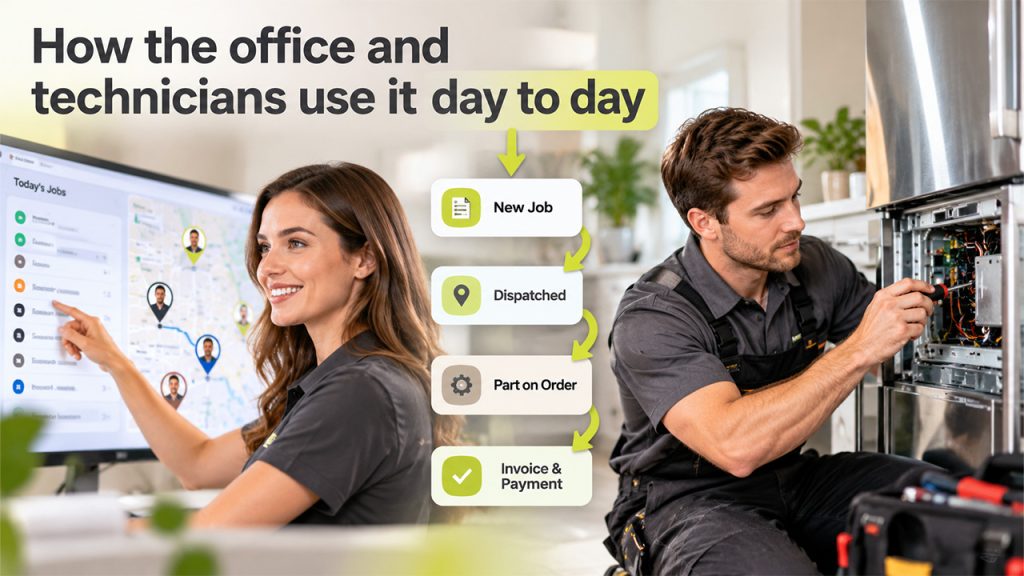
A typical morning starts on the dispatch board. Overnight requests from the website and phone are already in the system as new jobs with the appliance details the customer entered. The dispatcher groups them by area, checks which technician carries the right skills (gas ranges, built-in refrigerators, commercial units) and sends each tech an ordered route.
When the technician reaches the field, they open their phone to see the job, read the notes from the last visit, and confirm the model number on the unit’s rating place. Whatever the technician finds, he records them in the form of photos and notes. If a part is required, the technician places the order, gives the customer a quote, and a tentative date for when they come back. Then, this job moves to a “waiting for part” status the office can see.
When the part arrives, the office books the return visit from that status list instead of hunting through notes. After the repair, the invoice goes out from the same record, the payment is logged, and the customer gets a short message asking for a review. Nothing about the visit lives only in someone’s head.
Field service CRM or a custom build
Off-the-shelf industry software fits most repair companies with one to twenty technicians. It is ready the same week, it comes with scheduling, dispatch and payments already connected, and the vendor keeps it working on new phones and browsers.
A custom CRM or a custom extension works well for those businesses that have a process that none of the product supports. For instance, a manufacturer warranty program that comes with its own format for claims, a parts supplier that needs a direct order integration, or an enterprise that already uses an enterprise CRM and wants to incorporate field service features inside it. In such cases, a developer can build the piece that is missing or integrate the field service tool to the existing system through its API, without making the whole team use new software.
How to choose and roll it out
Start with two or three products, then test each one on real jobs rather than a demo account for a thorough result. A short rollout plan keeps the switch from disrupting the schedule.
- Import your customer list with addresses and, where you have them, the appliance model and serial numbers.
- Run one week of real jobs through the new system for one technician before moving the whole team.
- Set up your diagnostic fee, labor rates and common parts so invoices are right from day one.
- Turn on appointment reminders and the review request after paid invoices.
- Record where each new call came from, so you can see which channels bring paying jobs.
That last step matters more than it looks. Most new appliance repair calls start with a search for a repair company nearby, so the CRM’s lead source report is the first place to check whether your website and listings are pulling their weight. If they are not, SEO for appliance repair companies is usually where growth starts, and the CRM will show the result in booked jobs rather than clicks

