
What is cloud-based software? Benefits, Security & More
Cloud-based software explained: definition, how it works, main advantages, security features, and its comparison with on-premises systems for organizations.
Selecting the right technology for your business can either lay the path for future progress or disrupt your existing workflows and cause losses. One of the key choices you have to make is whether to choose cloud-driven software or on-premises software. Cloud-based software has revolutionized how organizations manage businesses, store data, and collaborate across different locations. Contrary to conventional on-premises platforms, it provides flexibility, minimizes costs, and ensures built-in security. In this guide, let us explain what cloud-driven software is and how it operates.
What is cloud-based software?
Cloud-based software is utilized when you store and access data and programs over the internet instead of on a server at your location or on the hard drive of your computer. In simple terms, you can say that cloud means storing data on the internet. Instead of buying a one-off software that you install and maintain, cloud-based software is generally sold as a subscription. You can access it via a mobile app or web browser, and it will be backed up by the provider in a secure data center.
Instead of purchasing a one-off software license and installing it on a machine that you own and maintain, cloud software is typically sold as a subscription. The provider takes care of security patches, updates, hardware, and infrastructure. You just have to sign up and start using the software.
What Are the Common Examples of Cloud-based Software?
The common examples of cloud-based software that you will find in your daily life are as follows:
- Google Workspace: Sheets, Docs, and Gmail, all operating in your browser.
- Salesforce: A CRM (Customer Relationship Management) platform with no requirement for software installation.
- Xero: Cloud-based accounting software that is utilized by SMEs (Small-and-medium-sized businesses).
- Itemit: A cloud-driven asset tracking solution that enables teams to handle physical assets, maintenance, and inventory from any device.
How Does Cloud-based Software Work?
The way cloud-based software works is much simpler than it sounds. When you utilize cloud-based software, your inputs, which include scanning a barcode, typing, or uploading a document, are all sent to the server to the providers. Such servers process your request, update the database, and send the results back to your screen. All of these occur in a matter of milliseconds.
The architecture has three main components:
- Frontend: The interface you interact with and see, delivered via the app or browser.
- Backend Servers: The providers’ computers that store your data and run the application logic.
- Database: Where all the records are replicated, stored, and backed up across distinct data centers for redundancy.
Since data exists in the cloud, any authorized user can easily access it with the help of a network-connected device. If a field engineer examines an asset using a mobile application, the update is instantly visible to the finance team in the office working on the same dashboard.
What Are the Six Main Advantages of Cloud-based Software?
Cloud-based software comes with its own advantages, and that is why modern businesses are moving to the cloud. The key advantages of cloud-based software are as follows:
1. Minimum Upfront Costs:
On-premises software needs substantial capital expenditure: licenses, server hardware, IT installation, and continuous maintenance contracts. Cloud software can replace that with a predictable annual or monthly subscription. For SMEs (small- and medium-sized enterprises), this ensures that enterprise-level platforms become accessible without significant initial investment.
2. Automatic Updates:
When the provider releases a new security update or patch, it is simultaneously applied to all users without any action required from your side. You always work with the latest version. There is no need to internally manage version upgrades or schedule downtime.
3. Access from Any Location:
Cloud software exists in apps or browsers, not on a particular machine. Your team can access it at home, from the office, on-site at a client location, or from a mobile phone in a warehouse. This is greatly valuable for field teams and multi-site businesses.
4. Real-time Collaboration:
Since all users access the same real-time database, all teams can notice the changes in real-time. As far as asset tracking is concerned, this implies that a technician checking out a component in Manchester can immediately update the live register, instantly visible to the operational managers in London.
5. Scalability:
Scaling cloud software generally requires nothing more than adding a user’s seat to your subscription. Scaling on-premises software might need new hardware, IT project planning, and additional licenses. Cloud solutions evolve with your business without any infrastructure overhead.
6. In-built Backup and Disaster Recovery:
Reputable cloud providers store your data across numerous geographically distributed data centers. If one data center fails, another one takes over automatically. For most businesses, this level of redundancy is impossible to replicate on-premises without great investment.
Is Cloud-based Software Secure?
Security is one of the most common concerns raised by businesses assessing cloud software. This includes specifically those migrating from on-premises systems where “everything remains on our server.” The reality is much more subtle.
Reputable cloud providers ensure a great investment in security that the majority of individual organizations cannot match:
- Data Encryption at Rest (AES-256 or equivalent) or in transit (HTTPS/TLS).
- Multi-factor authentication (MFA) to secure login credentials.
- Role-driven access controls so users can only see data that they are authorized to access.
- Consistent tracking for anomalous intrusion attempts and access patterns.
- Compliance certifications like SOC Type II, ISO 27001, and GDPR compliance frameworks.
The risk that most organizations often underestimate is not that the cloud provider will be breached. It is your local server operating an outdated software, an unpatched vulnerability, or a hardware failure with no offsite backup. Cloud infrastructure is generally a lot more secure than an average on-premises setup at a similar cost.
Read More- Best Cloud Security Tools: 10 Essential Platforms for Enterprise Protection
How Does Cloud-based Software Solve Security-related Challenges?
Related walkthrough
SuiteCRM Email to Anything with Gmail API and Cloud Pub/Sub | Real-time Email Parsing

Data security is a major worry when it comes down to cloud-based software. Transmitting data over the internet exposes it to possible threats that can compromise privacy. The potential security breaches and their related solutions are given in the table below:
| Challenges | Solutions |
|---|---|
| Weak credentials and unauthorized access | Single sign-on, multi-factor authentication |
| Data breaches by hackers making the most of vulnerabilities | End-to-end encryption |
| Internal Leaks and Misuse by Employees | Role-driven restrictions and access |
| Accidental data loss and corruption | Automated backups for recovery |
| Weak and unsecured APIs can lead to denial of service and cyberattacks | Verified authentication and testing |
| System downtime or slowdown triggered by overloaded servers | Tracking traffic and firewalls |
| Non-compliance or negligence in adhering to GDPR, HIPAA, or ISO regulations | Reputed cloud-based software is totally compliant with data and privacy regulations |
Why Is Cloud-based Software Significant for Asset Tracking?
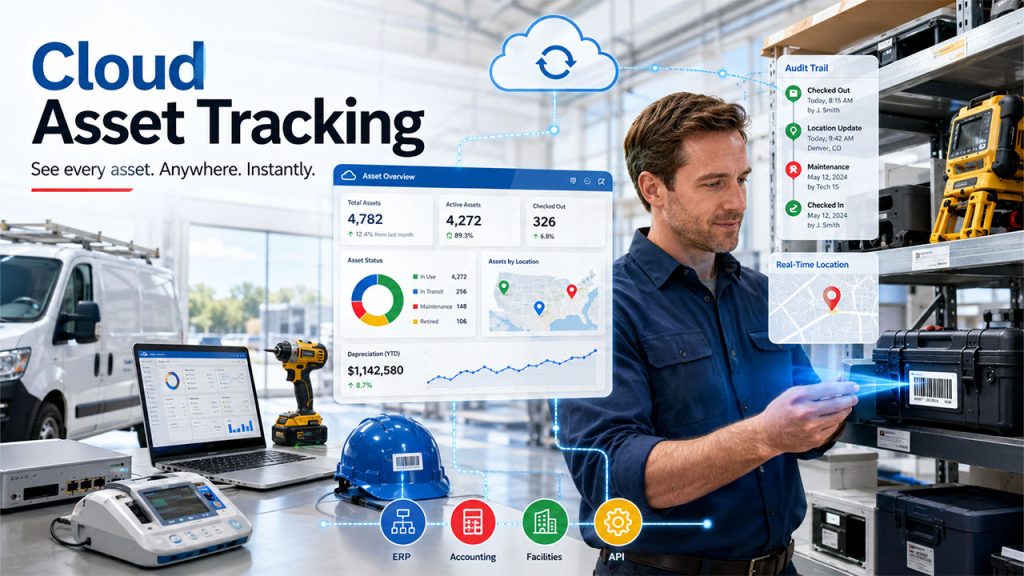
For businesses handling physical assets like equipment, tools, IT hardware, vehicles, medical devices, etc. The choice between on-premises and cloud software has a direct consequence.
A powerful cloud-based asset tracking platform gives you the following capabilities:
- Real-time Location and Status Updates from field staffing scanning barcodes and RFID tags through a mobile app.
- Central Visibility across depots, multiple websites, or office locations, all from a single dashboard.
- Instant Audit Trails that provide details on who checked out what assets, when it was checked, and where it was seen.
- Automatic Depreciation Tracking, which is associated with the usage history of each asset.
- Integration with Present Platforms (ERP, accounting, facilities management) through API.
In contrast, an on-premises asset management tool generally requires users to be on the same VPN or local network to access records. Field staff cannot update real-time asset status unless they are connected to the internal systems of the organization. This can create gaps such as ghost records, lost assets, and outdated registers that cloud software removes.
What Is SaaS and How Is It Related to Cloud Software?
The full-form of SaaS is Software-as-a-Service. It is a prevalent delivery model for cloud-driven software, and the terms are used often interchangeably. However, they are not the same. All SaaS software is cloud-based. However, not all cloud software can be considered a SaaS solution. A few cloud solutions might still need local client installation. For practical use cases, whenever a business says that it is assessing “cloud software,” it almost always implies SaaS.
Under SaaS:
- You pay a recurring subscription (annually or monthly) per seat or per user.
- The provider secures, hosts, updates, and maintains everything.
- You can generally scale up or down without substantial procurement decisions.
- No specialist IT infrastructure is required on your side.
Cloud-based Vs On-Premises Software: Key Differences
One of the key choices that most businesses must take when choosing enterprise software is whether to go for a cloud-based SaaS solution or an on-premises system. Let us see a direct comparison across the factors that are most significant:
What Are the Major Differences Between Cloud-based and On-Premises Software?
| Factor | Cloud-based Software (SaaS) | On-Premises Software |
|---|---|---|
| Upfront Cost | Low; pricing is subscription-based (monthly or annual) | High; needs servers, licenses, and hardware purchase |
| Installation | None; access through app or browser | Need IT installation or setup on local machines/servers |
| Maintenance | Entirely managed by the provider. | Internally managed by your own IT team. |
| Updates | Automatic, simultaneously rolled out to all users. | Manual; needs IT coordination and scheduled downtime. |
| Accessibility | Entirely the responsibility of the business | Limited to VPN-connected devices or local networks. |
| Scalability | Easy; add user seats as required | Difficult; generally, needs new licensing or hardware |
| Data Storage | Entirely the responsibility of the business | Stored on local servers owned by the business |
| Backup & Disaster Recovery | Automated, in-built, automated, and geographically redundant | Must be managed and set up independently |
| Security Responsibility | Shared with provider (MFA, encryption, and compliance certifications) | Entirely responsibility of the business |
| Internet Dependency | Needed for access | Not needed for main functionality once installation is done |
| Customization | Restricted to what the provider enables | Greatly personalizable to internal workflows |
| Best Suited For | Distributed teams, SMEs, field operations, and businesses looking for low overhead | Organizations with high data control requirements, present IT infrastructure, or regulatory limitations on off-site storage of data |
For the majority of businesses, specifically the ones with field teams, numerous locations, or limited IT resources, cloud-based software provides a lower-cost or faster path to enterprise capability. On-premises platforms still have an edge for businesses with extremely particular compliance needs or those that require complete control over where their data resides physically.
Conclusion
Cloud-based software provides unmatched security, flexibility, and scalability compared to on-premises tools, making it a good choice for modern-day businesses. From real-time collaboration and automatic updates to in-built disaster recovery, the advantages address core demerits that on-premises setups generally struggle to solve.
For asset-heavy businesses, specifically the capability to monitor equipment, update records, and collaborate across different locations in real-time to ensure a clear operational edge. As remote work, multi-site operations, and distributed teams become the standard rather than the exception, executing cloud-based software is not just convenient; it is becoming a baseline need for remaining secure and competitive.

