

7 Annoying Tech Hiccups That Ruin Your Morning Routine (and How to Beat Them)
Discover 7 common tech problems that can ruin your morning routine and learn simple fixes to avoid Wi-Fi issues, email glitches, updates, and more.
When we wake up in the morning, we wake up with motivation and energy that I am going to make it this day. But sometimes, some tech issues just ruin our mornings.
Studies say that if the first 3-4 hours of morning go well, there are high chances of having a productive day. But for that, we need to ensure that we don’t face any technical issues in the morning.
In this blog, we have listed the 7 most annoying and common tech problems that can ruin your morning. We have also provided solutions and tips to avoid them. So, let’s start.
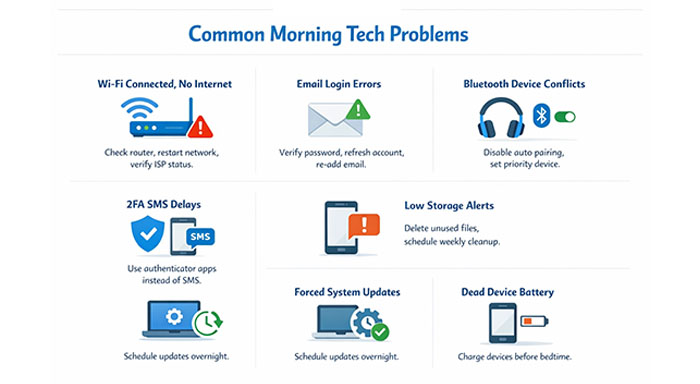
1: The “Connected, No Internet” Wi-Fi Illusion
Your laptop is connected to Wifi, but there is no internet. You might think, ‘My laptop is old now,’ or ‘There is some issue with my laptop.’ But you know what? In most of the cases, the problem is with the DNS or your router, especially when using Public Wi-Fi networks.
This is one of the common tech problems many people experience while starting their day.
In 2026, we will use the internet for almost everything. Without Wi-Fi, we can’t check emails or open Google. In short, we can do nothing without the internet.
So, rather than restarting your laptop or repeatedly disconnecting and reconnecting with Wifi, you must fix the router.
First, check whether you have an active Wifi plan or not. If you do, try fixing the issue yourself. If the problem still persists, contact your router support team.
2: The Email Glitch
Assume, it’s 9 AM in the morning and you head to your Mac to check the previous day’s customer emails. When you try to open the Apple mail, it says “Unable to verify account name or password on Mac”. Yes, even after entering the correct password sometimes we face this and we wonder how to fix the error but the solutions are pretty simple.
First of all, check your internet connection. If it is working properly then turn the account off and on again inside Mail. If it still does not work then delete the email account and add it again. In all cases, ensure you are entering the correct password.
3: Bluetooth Headphones Connected with the Wrong Device
Your meeting has started. You join Google Meet with your headphones on, but suddenly you notice they are connected to another device. This is not only annoying but also feels unprofessional when you are in an important meeting.
To avoid this, you can turn off auto-pairing for secondary devices. Check bluetooth settings on your system and set your Mac as the priority device for your headphones.
4: Two-Factor Authentication (2FA) SMS Delays
Related walkthrough
Meet Adam: The Robot That Just Broke Reality
You are trying to log in into an important portal and you suddenly notice it has two-factor authentication enabled. It means, the system will verify twice. Once with a password which you must have entered correctly and second time with an SMS text code.
Everything is fine, but the problem arises when SMS text does not arrive even after 10 minutes of waiting. This delay is becoming one of the common tech problems users face when accessing secure platforms.
To avoid this, what I did is, I switched from SMS-based 2FA to a dedicated authenticator app (like Google Authenticator or Authy). They generate codes instantly offline. No more waiting for SMS texts.
5: The “Disk Almost Full” Problem
Imagine you are trying to download a morning report or saving a new product video but you suddenly notice an “out of storage” pop-up.
This is really annoying. Mornings are not the best time to delete unwanted files. You should do these low effort tasks at the end of the day.
So, every week, set aside 10-15 minutes to free up storage, delete downloaded files that are not useful. This will solve the problem.
If needed, you can also upgrade the SSD storage if your laptop allows for it. Some laptops come with upgradable hard disk features but some don’t.
6: The Unscheduled, Forced OS Update
You opened your laptop at 8:55 AM for a 9:00 AM meeting and your screen says “Updating… 45 minutes remaining.” This is super frustrating.
To fix this, you can turn off automatic updates so whenever the OS needs an update, it will ask you for permission and only update if you give permission.
You can also schedule updates at night 1 or 2 AM. By the time you wake up, the update has been completed.
7: The Dead Battery
You have an urgent meeting in the morning but suddenly the electricity in your area goes out and your laptop has 5% battery. How frustrating is this situation?
That’s why it is recommended to keep at least 70-80% battery if something important is coming up.
If your laptop takes 6-7 hrs to charge then keep your laptop on charging the night before. So that you are always ready even if something unwanted happens.
And not just laptop, but also keep your headphones and other devices charged in advance.
Conclusion
These morning tech hiccups are usually the result of poor digital habits from the night before. If you keep your laptop and other devices charged and schedule updates on time, most of your problems will be solved.
Many of these common tech problems can easily be avoided with a little preparation the night before.
Today, do one thing — check for updates, storage space, and email sync issues. If you find any problem, try solving it a day before or at night. Don’t wait for the perfect time, because if it is not fixed earlier, it might ruin your morning.

