
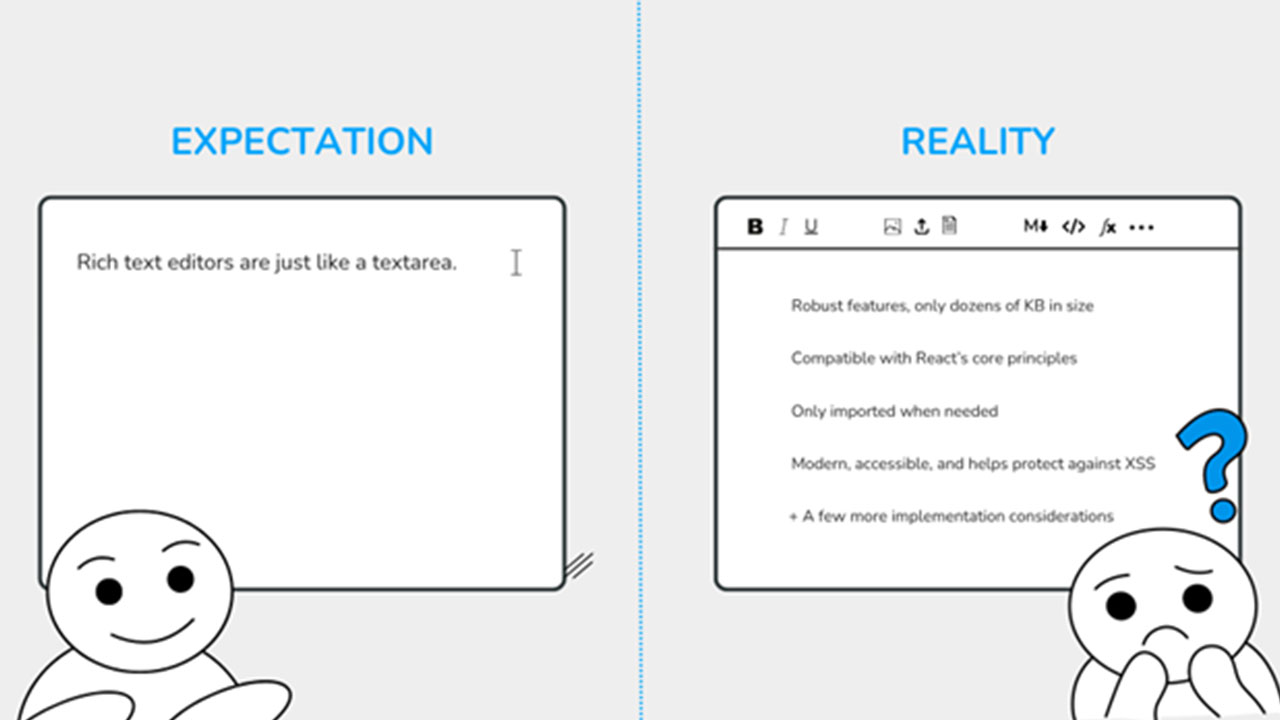
The Deceptive Simplicity of React Rich Text Editor Integration
Common mistakes developers make when adding WYSIWYG editors to React apps and how to avoid performance, accessibility, and maintenance issues.
It all starts with a very familiar scenario. “Hey, I need you to add a ‘basic’ React rich text editor to our app.” The developer works on that, thinking it’s a one-afternoon task, just like the other requirements from before.
Then, weeks after deployment, the problems start to emerge. The app is slowing down, the editor feels lackluster and outdated, and the clients suddenly need accessibility features, including screen reader support. It then dawned on the developer that the initially simple requirement had turned into something more frustrating.
What makes this tricky is that rich text editors don’t behave like most UI components. Instead of being mere inputs, they’re more similar to miniature applications embedded within your main application. They manage their own state, manipulate the DOM in non-trivial ways, and often carry years of accumulated complexity to handle even unfamiliar edge cases.
In this article, we’ll unpack the hidden costs behind this seemingly simple requirement. Additionally, we’ll explore the key considerations for integrating a React rich text editor with performance, scalability, and maintainability in mind.
How React Rich Text Editors Quietly Hurt Performance
What often goes unnoticed is that rich text editors introduce a quiet but significant performance cost. Unlike simple form inputs (e.g., textarea), they usually bring complex rendering logic, large dependencies, and continuous state updates. Over time, these hidden costs can slow load times, reduce responsiveness, and affect overall user experience.
Bundle Bloat
Bundle bloat is one of the most immediate contributors to this cost. Importing a rich text editor can add hundreds of KB (or even > 1 MB) to your bundle, especially with plugins. It might seem negligible at first, but it directly impacts your Core Web Vitals.
Note: Currently, Core Web Vitals comprise the loading (LCP), interactivity (INP), and visual stability (CLS) aspects of UX. Larger bundles increase the time it takes to render meaningful content, negatively affecting LCP (largest contentful paint).
Hydration Overhead
Beyond bundle size, hydration introduces another layer of complexity, especially in React applications with server-side rendering. Rich text editors often generate deeply nested and highly dynamic DOM structures.
Thus, hydrating such editors on the client can increase both time and CPU usage costs. In some cases, mismatches between server- and client-rendered content can even lead to warnings or forced re-renders. When this happens, performance suffers even more.
State Management Surprises
When it comes to state management, many editors maintain their own internal state while also exposing change events to React. Consequently, when this state is lifted or synchronized with parent components, it can trigger frequent re-renders. As a result, simple handlers like “onChange” can quickly turn into bottlenecks, especially in forms or dashboards with interactive elements.
Lazy Loading Strategies
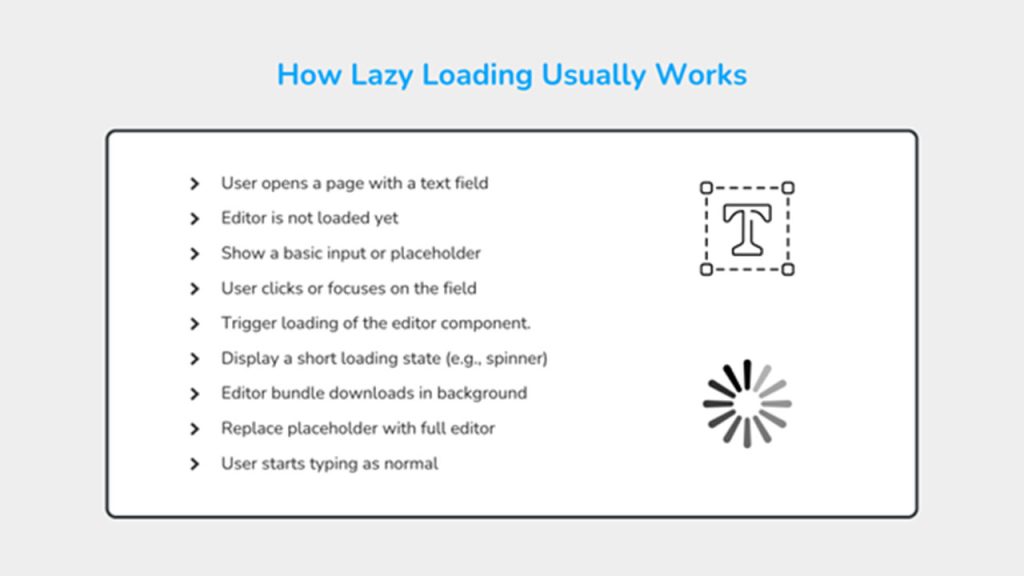
To mitigate these costs, teams often turn to lazy loading strategies, that is, dynamically importing components only when they’re needed. Below is an image that shows how lazy loading rich text editor bundles typically works.
This approach helps reduce initial bundle size and improves perceived performance. However, it also comes with tradeoffs in terms of loading states and user experience.
Ultimately, these factors make it clear that the performance impact of React rich text editors isn’t tied to a single issue. Instead, it’s tied to a combination of architectural decisions that compound over time.
The Integration Landscape: Build, Buy, or Customize?
Once you recognize the hidden performance costs, the next question is how to approach integration. Most teams choose between building from scratch, adopting a library, or customizing an existing solution.
The DIY approach seems appealing at first, and it’s probably one of the first solutions that will come to mind. Of course, with this method, you’ll have full control and minimal dependencies. However, in practice, even a “basic” editor involves more than expected, shown by the following “checklist” of common editor headaches:
- Handling inconsistent contenteditable behavior across browsers
- Managing cursor position, formatting logic, and edge cases like pasted content (from MS Word, Notepad, etc.)
- Supporting accessibility features (keyboard navigation, screen reader support)
Unless you’re dedicated to creating and maintaining your own rich text editor, you’ll most likely look for another solution. In this case, integrating framework-specific libraries offers a more structured path.
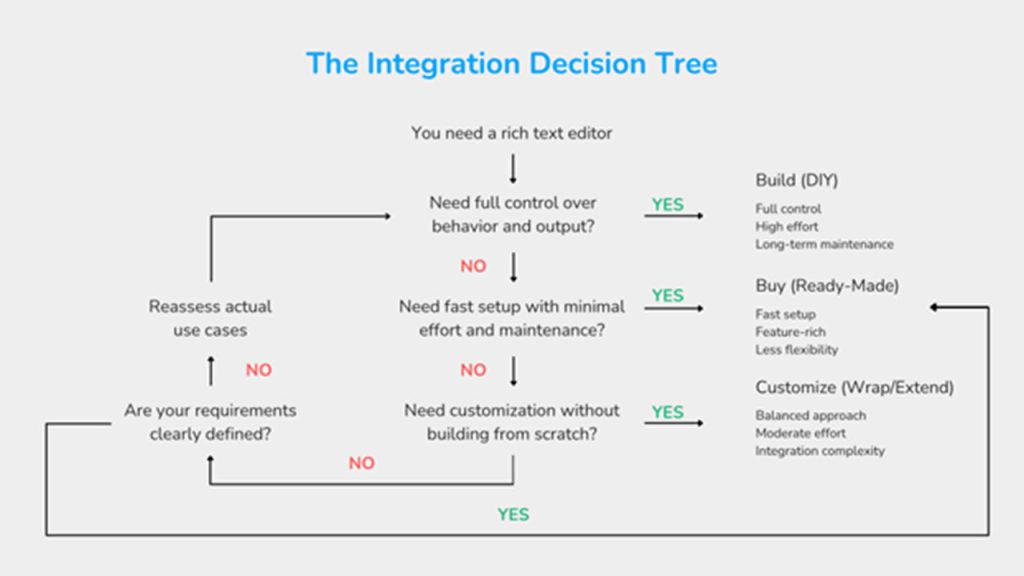
These tools integrate directly with React’s lifecycle and state model. This alignment makes them easier to work with during development. However, they still introduce trade-offs, such as abstractions limiting flexibility and complex configuration.
For applications that need to connect multiple systems and services, application integration can also play an important role in maintaining consistent data flows and functionality.
Developers sometimes wrap non-React editors inside React components. This approach creates a boundary between React and the editor’s internal logic. While effective, this pattern can lead to synchronization issues, and React state and editor state may drift without careful coordination.
Across these options, editors fall along a spectrum between headless and opinionated designs.
Headless editors provide low-level building blocks and full control over behavior. They adapt well to custom requirements but require a more taxing setup.
Opinionated editors offer ready-made features and faster setup. They reduce initial effort but might limit customization later.
Each approach solves a different problem, and no approach is absolutely better than another. The challenge lies in matching the tool and approach to your actual requirements, not just the immediate task. Proper integration testing is also important when introducing an editor into an existing application.
Critical Evaluation Criteria for React Rich Text Editors
Related walkthrough
Mastering API Integration: HTTP Methods Explained with OpenAI Examples

At some point, the question shifts from “Can this editor do what we need?” to “Will this hold up in production?” That’s where deeper evaluation criteria start to matter.
Accessibility Compliance
Accessibility’s importance in modern applications is steadily increasing, as it directly affects how many people can use your product comfortably. For example, users with visual impairments rely on screen readers to interpret content. On the other hand, others depend on keyboard navigation for speed or necessity.
Because of this, React rich text editors should support keyboard interactions and screen readers.
Moreover, editors should also generate semantic HTML, not just styled text. This is because screen readers rely on proper structure, like headings and lists, to make meaning. Without this, assistive technologies will have a tougher time navigating and understanding the content.
All these make accessibility a key evaluation factor. If the editor produces inaccessible output, you might inherit long-term usability and compliance issues.
Content Sanitization and Security
Rich text editors typically accept content from outside your system. Users paste from documents, websites, or emails. This can introduce unpredictable HTML into your application.
Without proper sanitization, content can carry security risks. For instance, malicious scripts or unsafe attributes can lead to XSS (cross-site scripting) vulnerabilities. Even harmless-looking markup can break layouts or introduce inconsistencies.
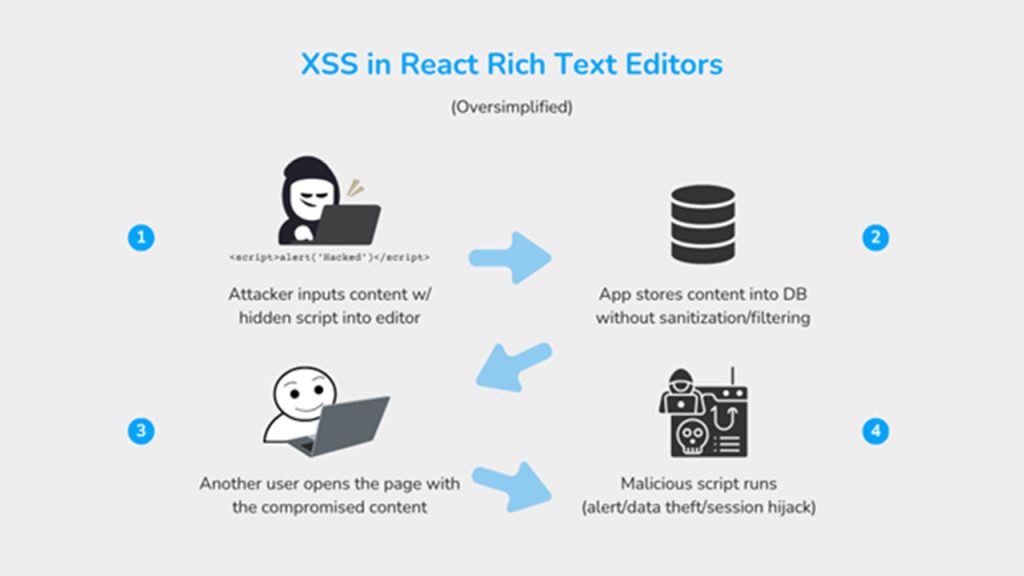
For this reason, React rich text editors must allow control over allowed HTML elements and attributes. You need clear rules for what your app preserves, modifies, or removes.
Since security isn’t something you can patch later, content sanitization becomes a critical evaluation point for editors. To mitigate this, your editor should enforce sanitization at the point of content entry.
Output Consistency
What users see while editing should match what others see when content renders. This sounds simple, but it often breaks in practice.
Different browsers handle formatting differently. Furthermore, mobile and desktop inputs can also produce inconsistent markup. Over time, this could lead to unpredictable HTML (i.e., users see different-looking content from what the publisher saw).
Consistent output matters because content usually lives beyond the editor. It may appear in emails, dashboards, or public pages like blogs. Clean and predictable HTML ensures that formatting holds across contexts.
Framework Compatibility
Rich text editors should work within React’s rendering and state model. If an editor conflicts with React’s lifecycle, issues like unnecessary re-renders, delayed updates, or state mismatches can emerge. Unfortunately, these problems become harder to debug as the application grows.
Compatibility also affects server-side rendering and performance strategies. Some editors rely heavily on the browser environment, which may complicate SSR or SSG (static site generation) setups. A well-aligned editor behaves more predictably within your app, reducing integration friction over time.
Real-World Integration Patterns
After choosing an editor, the next challenge is making it behave well inside your application.
Controlled Component Pattern
Many teams treat the editor as a controlled component. This means that React manages the content while the editor reflects that state.
This approach improves visibility and control. With it, you can validate input, trigger side effects, and keep data consistent across components. However, in this setup, frequent updates can trigger re-renders, especially with large content.
This pattern works best when you need tight control, but it does require you to be extra careful when it comes to performance.
Event Handling
Editors generate a high volume of internal events, as every keystroke, selection change, or formatting action can trigger callbacks.
Developers often intercept these events to add logic, such as validation or analytics. However, they must do so without disrupting the editor’s native behavior.
Improper handling can introduce lag or break expected interactions. For example, blocking default behavior may interfere with typing or selection.
This makes event handling less about adding logic and more about respecting the editor’s internal flow.
Custom Plugin Architecture
As requirements grow, teams need to extend editor functionality. Plugins provide a structured way to do this.
With plugins, you can add isolated features to your application instead of modifying core editor code. Think of these as toppings on a finished cake. You don’t need to open and redo the entire cake just to add a bit of flavor.
This keeps upgrades manageable and reduces maintenance risk. Furthermore, plugins also encourage modular architecture. This means that each feature stays contained, making it easier to test and evolve.
Theme Integration
An editor that looks out of place creates friction for users. Visual consistency helps the editor feel like it’s part of the application.
However, styling editors can prove challenging. Many come with their own styles and DOM structures. And overriding these requires careful handling to avoid breaking layout or functionality.
So, whether you’re building or adopting an editor, you should consider how good it looks in your application.
Case Study: Streamlining Integration
So far, we’ve looked at performance costs, evaluation criteria, and integration patterns in isolation. In practice, these decisions rarely happen separately. Instead, they come together when a team needs to ship a real feature under real constraints.
Consider a development team working on a React-based admin dashboard. They need to introduce rich text editing across several parts of the project, not just a single form field.
Users of the admin dashboard should be able to:
- Create an announcement (text formatting, headings, links, lists, images, file attachments)
- Fill out a “Product Description” field when adding or updating products (sections, bullet points, embedded images)
- Update the terms and conditions (long-form structured content in a document view)
Performance Testing
Now, the team knows that they need one React rich text editor for multiple purposes. The next step in evaluating their editor is to test out its performance across real dashboard workflows, including:
- Checking how much the editor increases the initial bundle size
- If the editors load only when needed (e.g., announcement creation) or all at once
- Simulating using slower devices or internet connections while typing long content (including media) in “Product Description”
- Observing delays when switching between pages with editors
Accessibility Audit
Afterwards, the team tests accessibility using actual admin tasks:
- Filling in all fields in “Announcement” using only the keyboard
- Formatting text without using a mouse
- Running a screen reader on the terms and conditions
- Checking if the saved HTML content remains semantic
Integration Complexity Assessment
Most importantly, the team evaluates how the editor behaves across all fields:
- Can the same component work for announcements and product descriptions?
- Do they need separate configurations for each use case?
- How difficult is it to reuse toolbars while allowing slight variations?
- Does syncing content with React state behave consistently across pages?
- Do issues in one editor instance affect others on the same page?
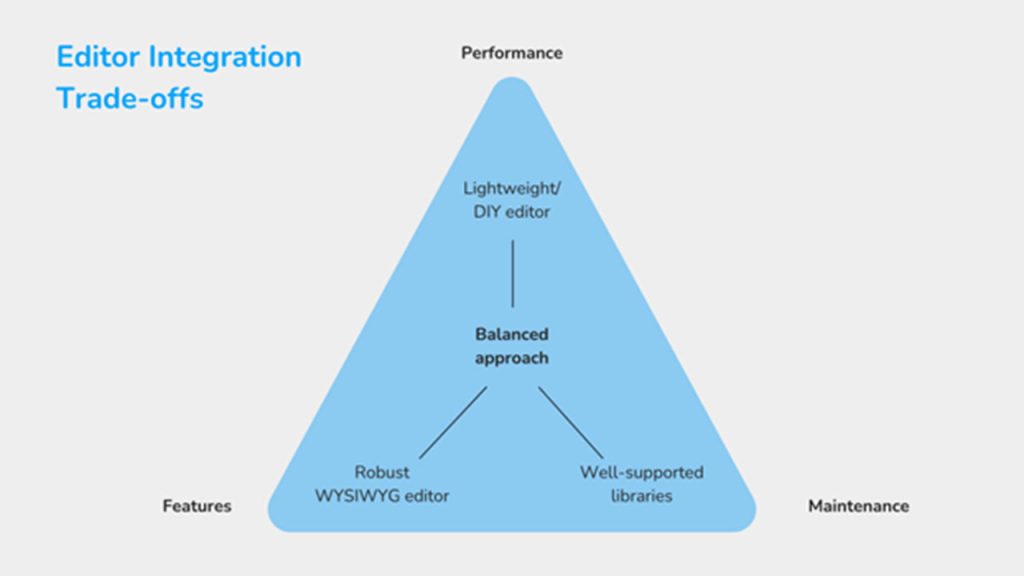
During evaluation, some teams might find better performance in DIY editors, while others may opt for dedicated WYSIWYG solutions like Froala Editor.
Building your own, depending on feature scope and developer effort, might lead to a small bundle size. Dedicated solutions, on the other hand, often provide React components like Smart Text Editor that minimize integration friction while maintaining customization options..
Both are solid options, and the key here is not to find the fastest or most robust editor. Aim to choose a solution that balances developer velocity with the flexibility to adapt to your specific architecture.
Conclusion: Making an Informed Choice
Choosing a React rich text editor goes beyond the UI. It’s an architectural choice that affects performance, integration complexity, and long-term maintenance.
This is why it helps to step back before committing to a solution. Audit your actual use cases across the application. Prototype with lightweight options to understand trade-offs early. Then test performance in realistic scenarios, especially in areas where editors frequently appear.
Do note that these steps don’t eliminate complexity. They just make it more predictable, letting you have a clearer understanding of how the editor should fit into your system, rather than adapting your system around it.
In the end, the best editor is one that fades into the background. It supports content creation without drawing attention to itself. All while meeting the technical and product needs of your application.

