
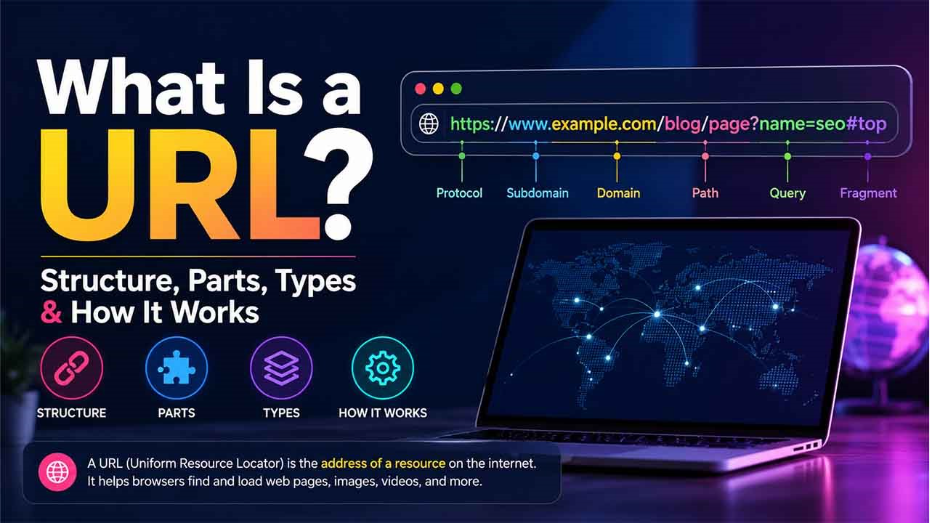
What Is a URL? Structure, Parts, Types & How It Works
A URL is a unique identifier that works as the web address for a specific page, website, or a file on the website. It is used to find a particular resource on the internet.
A URL (Uniform Resource Locator), also known as the web address, is a unique identifier utilized to locate a resource on the web. URLs comprise numerous parts, including a domain name and a protocol. They tell web browsers how and where to retrieve a resource. End users use URLs by typing them directly into the address bar or by selecting a hyperlink in the bookmark list, on a webpage, in an email, or in another application.
What Is the Structure of the URL?
The URL comprises a protocol required to access a resource as well as the name of the resource. The first bit of a URL recognizes what protocol to use as the main access medium. The second part recognizes the domain name or IP address and subdomain, where the resource is located.
URL protocols involve HTTP (Hypertext Transfer Protocol) and HTTPS (HTTP Secure) for web resources, FTP for files on a File Transfer Protocol Server, telnet for a session to access remote computers, and “mailto” for email addresses. Two forward slashes and a colon follow the majority of protocols, but only a colon comes after the mailto protocol.
URLs can also specify the below-mentioned optional information after the domain:
- A network port used to establish the connection.
- A path to a particular file or page within a domain.
- A particular reference point within a file, like the named anchor in an HTML file.
- A search parameter or query is often found in the Uniform Resource Locator for search results.
A Short Note on URL Design
URLs can only be sent over the internet via the ASCII character set. Since URLs generally contain non-ASCII characters, the URL has to convert into a valid ASCII format. The encoding of URL replaces unsafe ASCII characters with a percentage (%) sign and two hexadecimal digits after that. URLs do not have any space.
URL Examples
When you are designing URLs, there are distinct theories about how you can make the syntax most usable for archivists and readers. For instance, the path of the URL can involve authors, dates, and topics in a section that is known as the slug. Take the example of the following URL:
https://www.outrightsystems.org/blog/link-building-service-provider/
Look past the HTTPS protocol and permalink (www.outrightsystem.org). URL also includes a path (blog) and the page title (link-building-service-provider). Though it is not there in this example, a few URL designers can also add the date of the post. This is generally given as YYYY/MM/DD.
What Are the Different Parts in the URL?
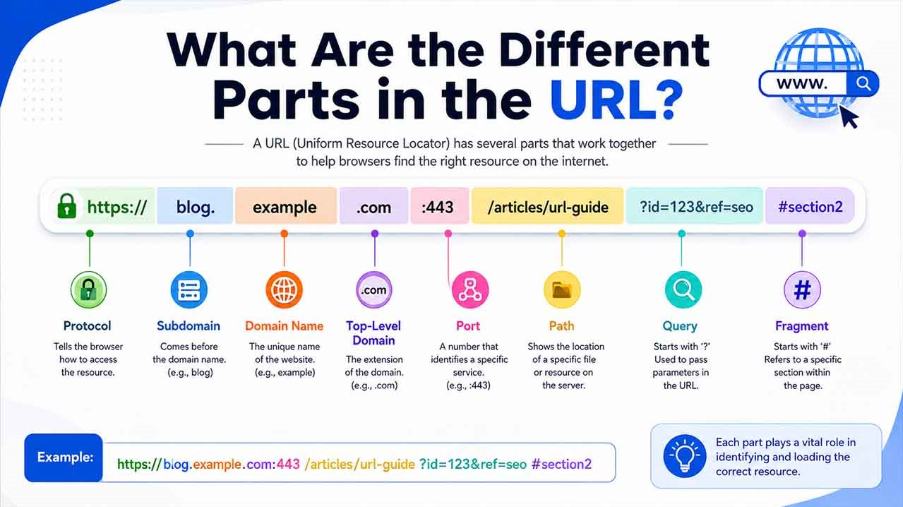
A typical URL can include the following components:
- The Protocol or Scheme: This is utilized to access a resource on the web. Protocols involve HTTPS, HTTP, ftps, mailto, and files. The DNS (Domain Name System) connects with the resource. For instance, in the above example, the protocol used is HTTPS.
- Domain Name or Host Name: This includes the unique reference that represents the website. The domain name comprises two parts: website name (outrightsystems) and an extension (.org).
- Subdomain: This comes before the domain name. For example, store.outrightcrm.com is a subdomain of outrightcrm.com. Other examples of subdomains include blog.example.com.
- Port Name: Generally, they are not visible in the URLs, but they are important. Ports 443 and 80 are the default ports for web browsers, but there are other options as well. In a URL, a colon always precedes the port. For instance, the port name can be included as follows: https://abcdefgh.com:443/.
- Path: A path refers to a location or file on the web server. For instance, in the URL, https://www.outrightsystems.org/blog/crm-basics-modules-fields-layouts/, the path is blog.
- Query: Present in the URL of the dynamic pages, the query comprises a question mark, followed by the query string or the parameters. In this example, “?” marks the start of the query.
- Parameters: These are information pieces in a URL or a query string. Numerous parameters can be separated by ampersands (&). A good example of a URL with a parameter is a search query. Parameters (also known as query strings) follow a question mark (?) and comprise a key and value separated by an “=” sign. For example, google.com/search?q=URL.
- Fragments: This is an internal page reference. This refers to a section on a single webpage. It is visible at the end of a URL and starts with a pound sign (#). A good example of the fragments is as follows: https://en.wikipedia.org/wiki/Internet_of_things#History. Here, #History references a specific section within a page.
Other examples of URL parts can involve the following:
- The URL mailto:sales@outrightcrm.com initiates a new mail addressed to OutrightCRM.
- The URL ftp://www.companyname.com/whitepapers/CRM specifies FTP use in order to download a file.
HTTP Vs HTTPs
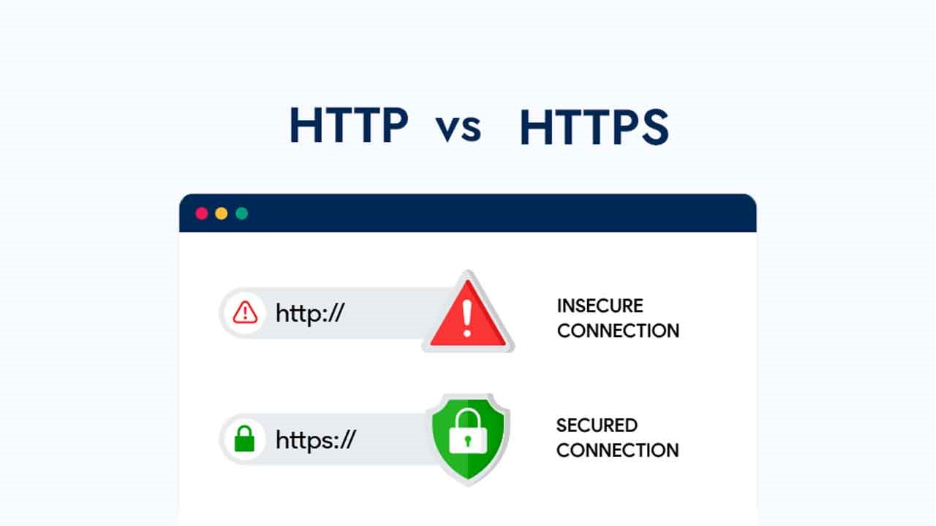
Computers utilize both HTTP and HTTPS to fetch data from web servers to check content in a browser. One key difference between them is that HTTPS utilizes a Secure Sockets Layer certificate to encrypt the server and end-user connection. Another difference is that HTTPs utilize TCP/IP port number 443 by default, whereas HTTP utilizes 80 by default.
HTTPS is recommended as it helps secure confidential information like credit cards, passwords, and identity information from unauthorized access.
URL vs URI:
Related walkthrough
Introducing SuiteCRM 8 Invalid Domain Detector – Smart URL Validation for a Cleaner CRM
While the terms URI and URL are often used interchangeably, they are not the same thing. Comprehending the distinction is significant for web architects, SEOs, developers, and anyone who professionally works with web technologies.
A URI (Uniform Resource Identifier) is an umbrella term that pertains to any character string utilized to recognize a resource, be it a local system, a network, or an abstract concept. A URI can recognize a resource by its name, location, or both. On the other hand, a URL (Uniform Resource Locator) is a particular type of URL that only recognizes a resource that ensures that accurate means of accessing, including the protocols (like FTP or HTTP and the network location like the IP address or domain name.
Consider it this way: every URL is a URL, but not every URI can be considered a URL. For instance, a URN (Uniform Resource Name) is also a type of URL that recognizes a resource by name without specifying how to fetch, such as the ISBN number for a book. On the other hand, a URL gives you an actionable and complete address to retrieve and locate the resource directly. In your daily browsing, the most common type of URI that you encounter is a URL.
URL Shorteners
URL shortening is a technique to make a URL reduced in length and still direct to the specific page. Shorteners utilize a redirect on a domain name that is short to achieve this. There are different URL shorteners services are available on the internet. While a lot of them are free, those that provide additional capabilities like web analytics are costly. Businesses providing URL shorteners include Bitly, Rebrandly, TinyURL, Short.io, and Bl.ink.
A few website hosts, like GoDaddy.com, provide URL shorteners. Other service providers, including search engines, might not provide URL shorteners. This is due to the fact that they are subject to abuse by spammers hiding malware inside shortened URL.
How Do Search Engines Interpret URLs?
One of the aspects of URLs that is most overlooked is the major role they play in search engine optimization (SEO) and how search engines crawl, index, and rank your web content. Search engines such as Google parse URLs to interpret the structure as well as the hierarchy of a website, making URL design a crucial factor in overall visibility.
A URL that is well-structured ensures both human readers and search engine crawlers get a clear signal about the content of the page. For example, a URL such as https://www.outrightsystems.org/blog/signs-agency-needs-white-label-seo-services/ tells the search engine crawler that the page exists in the blog section of the Outright Systems website and covers the topic of “why an agency needs white label SEO services” before a single line of content is even read. This ensures contextual clarity and can positively impact the ranking of the page for the exact and related search queries.
Search engines also assess URL length, placement of keyword, use of hyphens versus underscores, and the presence of redundant parameters. Short, keyword-rich, and descriptive URLs perform better in the search rankings than parameter-heavy, long, and dynamically generated ones. In addition, canonical URLs, which are the preferred versions of a declared page using the rel=canonical tag aid in avoiding issues such as duplicate content that can dilute the ranking authority of the website.
HTTPS is yet another factor related to the URL that search engines consider. Google has officially confirmed that HTTPS is a ranking signal. This means that websites that use secure URLs may get a slight edge in search engines that still work with HTTP. This intersection of security, URL structure, and SEO makes it clear that understanding URLs goes well beyond straightforward navigation. It is a fundamental element of how the modern web is discovered, organized, and ranked.
Conclusion
If you think URLs are just the web address typed into the address bar, then you are slightly underinformed. They are the structural backbone of how the web sorts, recognizes, and delivers information. From the protocol that starts with the connection to the fragment that signals a particular section on the page, each component of URL serves an exact purpose. Being informed about the difference between URL and URI is vital knowledge for marketers, developers, and digital professionals alike. As the web evolves continuously, well-crafted URLs remain an important pillar of security, usability, and discoverability online.
FAQs About What is a URL
Q. What is a URL and an example?
A- It is the web address you use every day to access resources on the internet. Example, www.google.com.
Q. How do I find my URL?
A- The complete URL including slugs and parameters shows up in the address bar when you open a page.
Q. Where is the URL on my phone?
A- To access the URL on your phone, you can simply visit a website and find the URL in the top address bar.
Q. What are the parts of a URL?
A- The parts of a URL are as follows: Protocol, Subdomain, Domain Name, and Path.
Q. How do I create a URL link?
A- You can create a URL link by copying and pasting the link, selecting an anchor text, using short keys Ctrl+K, and then pasting the link into the designated field.

