
Top 5 Cloud Storage Services for Photographers: Security, Pricing & Storage Compared
Compare the top 5 market-leading cloud storage for photographers including Sync.com, NordLocker, SmugMug, and Internxt by pricing, security, and storage capacity.
One of the nightmares that any photographer has is to lose their priceless photographs and never recover them again. Irrespective of whether you are an amateur, casual, or professional photographer, using online photo storage is important. This will make sure that your previous memories are kept safe. The best way to do that is to back up your photographs with the help of a cloud storage provider. Now, the question arises, “Which Cloud Storage for Photographers Should You Use?” In this blog, let us see the top 5 cloud storage photographers can use. We will also see the security characteristics used to secure the security and privacy of the photos that you upload. We will also take into account the cost-efficiency and the overall availability of storage space. This is specifically significant for photographers.
Why Should You Use Cloud Storage for Photographers?
In 2026, there are still some people who do not fully trust cloud photo storage. However, as experts suggest, it is one of the most effective ways to back up your photographs. If you are storing photographs in local storage, then they can fail, get stolen, get lost, or get damaged beyond repair. If you do not back up multiple drives, then you risk losing your photographs forever.
If you have cloud storage, you do not have to worry too much if you lose your laptop or if your computer fails. Once you get a new device, you can just access all the photographs by signing into the cloud storage service that you are using. It is also much simpler to share your work with clients, providing them with access to see and approve images. With industry-level encryption, such as AES 256-bit encryption, and a range of features like password protection. Cloud storage prevents any kind of cyberattack from accessing your images. When you pair your storage with the right cloud security tools, it adds another layer of control over who can access your files and how they are protected.
It is true that there are a few cloud platforms that are more private than others, which can raise doubts among photographers. However, the anxiety surrounding cloud storage in general has calmed down because of a decade-long history of positive experience across a wide range of platforms.
What is the Best Cloud Storage for Photographers?
Related walkthrough
Google Workspace vs Microsoft 365 in 2026 | Full Comparison: Features, AI Tools & Pricing

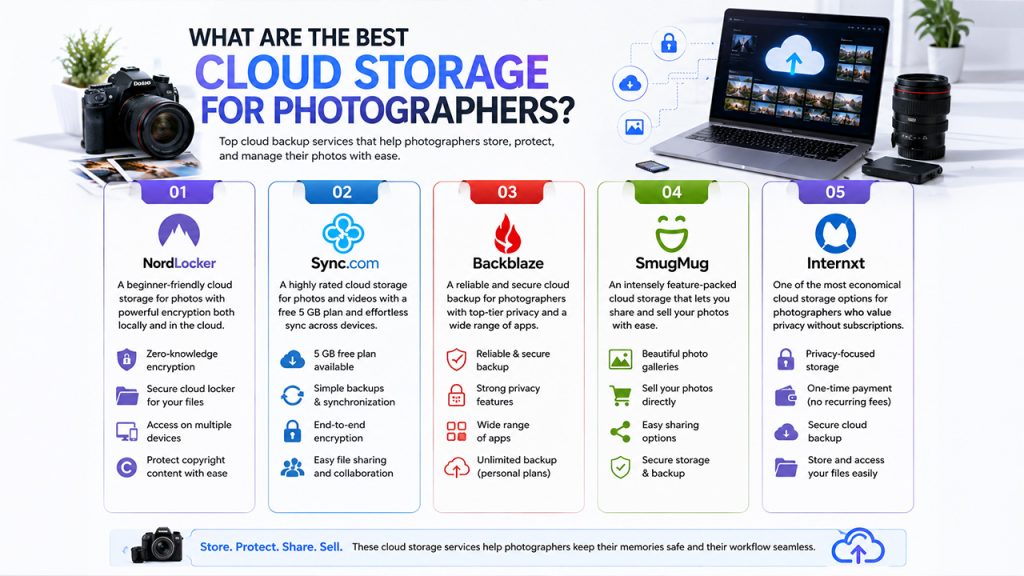
Let us list the best cloud backups for photographers below. If you want more information related to any of the services on the list, you need to keep scrolling and find a detailed analysis of every service.
- NordLocker: It is a beginner-friendly cloud storage for photos. You can manage your content protected by copyright with the help of encryption locally and in the cloud.
- Sync.com: It is one of the highly rated cloud storage services for videos and photos. It provides you with an exceptional service with a free 5 GB plan with simple backups and synchronization across devices.
- Backblaze: It is a reliable and secure cloud backup for photographers. It is a top-level class service with robust privacy features and a great range of apps.
- SmugMug: SmugMug is an intensely feature-packed cloud backup service that is recommended by users. It even enables you to share as well as sell your photos.
- Internxt: It is one of the most economical cloud storage options for photographers who want serious privacy without a recurring subscription.
1. NordLocker:
NordLocker is a user-friendly service that enables you to store personal photographs online in a completely secure way. NordLocker 2.0 is an encryption tool created by the reliable VPN company, NordVPN, and enables users to encrypt folders and files on the local hard drive. Apart from giving you a local encryption of your data, NordLocker also provides you with a “cloud locker” folder that allows you to choose which folders and files you would want backed up. This means that you can quite easily load your photograph projects into the locker to make sure that they are backed up securely to the cloud.
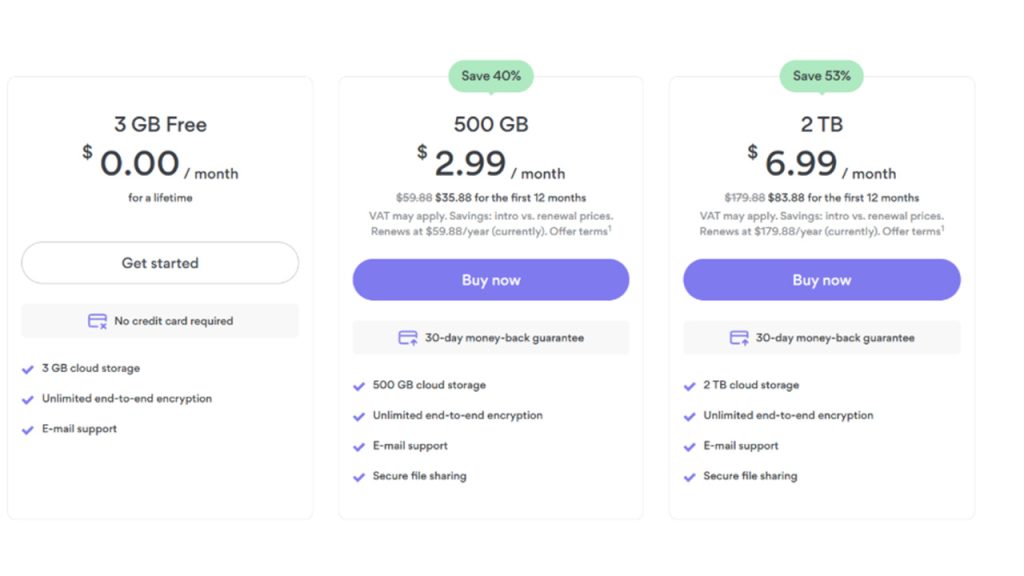
Users can get 3GB of free storage, but you only need to pay $3.99/month to upgrade to 500 GB. The main benefit is that it allows you to use NordLocker on as many Mac and Windows computers as you like with just a single subscription. Thus, the service will work on numerous user accounts on a single PC.
End-to-end encryption is an added advantage in NordLocker. This simply means that NordLocker cannot access any of your information, and your photos remain private.
NordLocker Pricing Plans: Choose among the three pricing plans. Discounts are regularly given. For more details, visit the NordLocker website.
2. Sync.com:
Sync.com is a widely preferred cloud storage for photographers who want an adequate level of privacy for their images. The client-side end-to-end encryption is there, but you do not need to pay any extra amount. It is also included across all plans, which also includes the free one. When it comes to design, Sync.com has made a lot of improvements. Recent updates have made it more aligned with modern standards. Its dark mode is also highly rated, and in terms of tabs, it is extremely minimalistic. Users prefer it because it is easy to use, and you can easily discover images when you need to.
Since it prioritizes privacy, the platform chooses not to add “file previews” as a feature. Instead, there is a photo symbol. Unless you know the name of the file, this can make it quite difficult for you to know which you image you want to search for. However, there is a small price to pay for optimal privacy.
Free users can also secure their images with a password. Paid users can also do that, but they can also additionally send upload requests, set expiry dates, and restrict the number of times users can download a file.
Sync.com Pricing Plan:
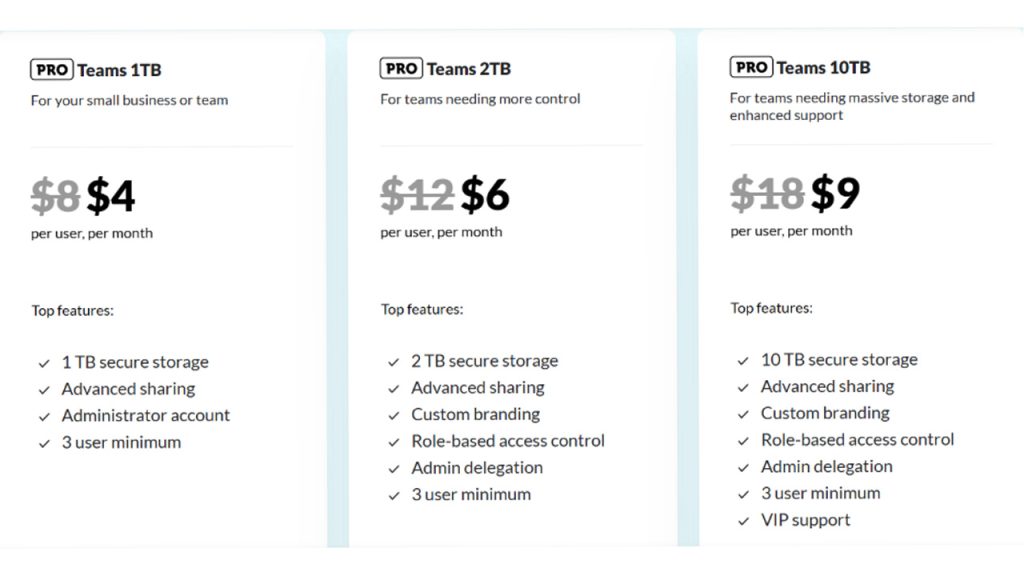
The monthly pricing plan of Sync.com varies by storage size. Small businesses can go for 1TB plan, teams that need better control can go for 2 TB plan, and teams that need enhanced support and massive storage can go for 10 TB plan.
3. Backblaze:
Backblaze is a fully featured, top-class, and secure cloud backup service that delivers exceptional privacy features and excellent functionality for photographers. Backblaze can make your image secure like no other, making files secure with SSL during transit, utilizing AES subscription at rest on company servers, and utilizing a native PC and Mac, and does not utilize Java. Backblaze even gives you a private key when you sign up first. This makes it impossible for all unauthorized parties to access the photos you upload without the private key. You can also set a passphrase to secure and encrypt the private key to add an additional security layer.
Other features of security provided by Backblaze can involve two-factor authentication, a feature known as “Locate My Computer,” the functionality to directly share photos, schedule backups for convenience, and get notifications of backup status.
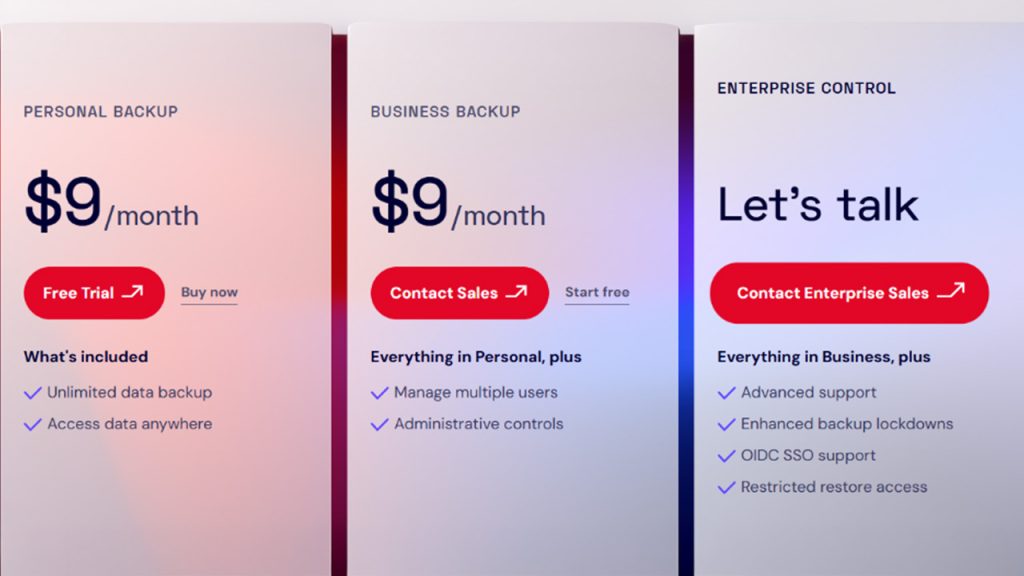
Backblaze Pricing: The monthly pricing plan for Backblaze is shown below in the screenshot.
4. SmugMug
SmugMug is a feature-packed and dependable cloud storage platform for storing photos. This is the right option for professionals who are looking to sell and share content. It is a US-based tool that makes it easy for photographers to sell their content through printed and digital means. Irrespective of whether you are an amateur looking to branch out, want to sell your stuff, or a photographer searching for creative ways to sell content, this is a platform you can take a closer look at.
A monthly subscription begins at $8.40. Once you go for this subscription, you can get customizable galleries, unlimited uploads, photo uploading with drag and drop features, better organization, strong password protection of galleries, and the capability to order real prints online.
SmugMug Pricing-
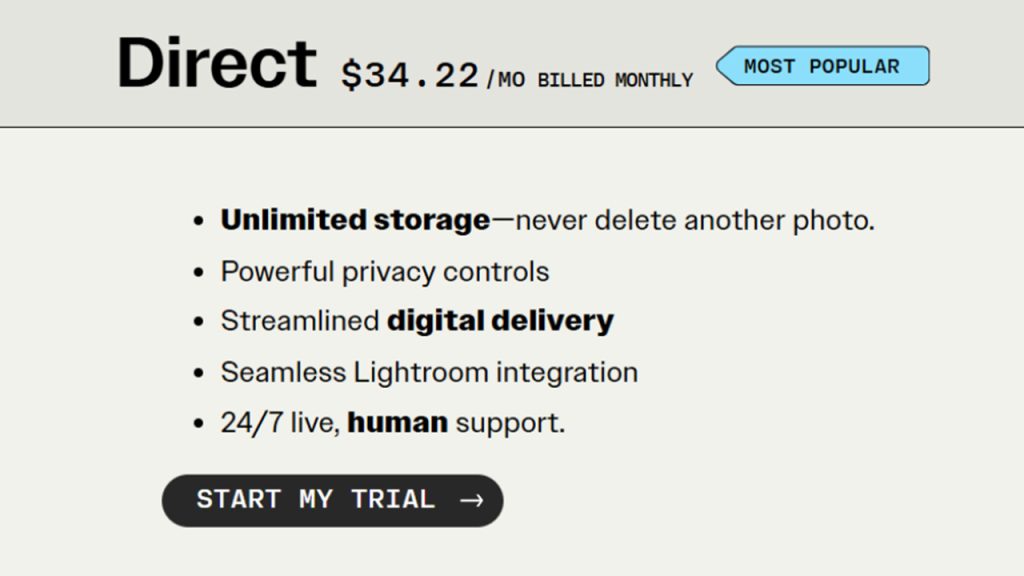
Direct Plan- The direct plan is the most popular plan, billed at $34.22/month.
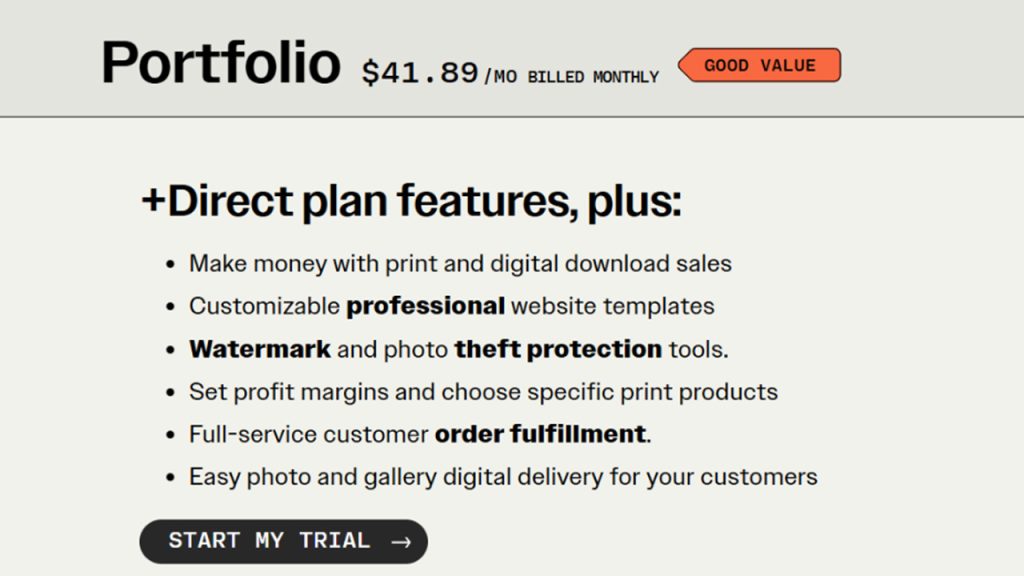
Portfolio Plan- It provides you with good value with billing at $41.89/month.
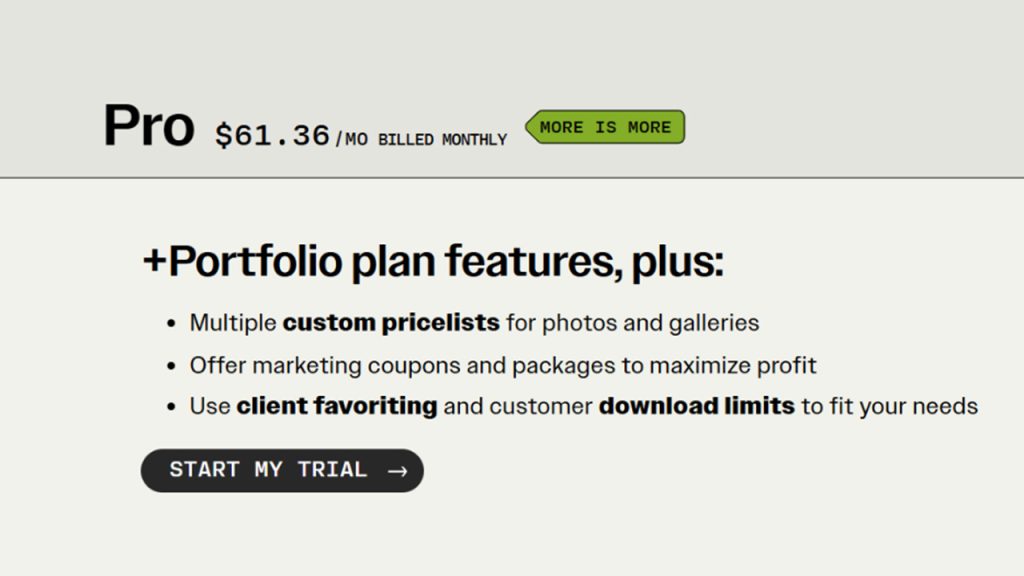
Pro Plan- It gives all the portfolio features and a few additional features, as listed in the screenshot.
Enterprise Plan- You can also go for the Enterprise Plan tailored to your requirements and volume. This is the right option for large teams, studios, and institutions. You can reach out to SmugMug directly to get a tailored quotation.
5. . Internxt:
Internxt is a privacy-based cloud storage service that integrates cutting-edge security with a photographer-friendly, clean, and some of the most cost-effective lifetime plans that are available today. The design is simple and clean, without a huge stack of tabs to explore through, making it simple for you to quickly organize and access image folders. Web app photos are not surrounded or compressed by thick borders. They fill the majority of the screen so you can work without any issues, which is also good as far as client delivery is concerned. Sharing folders with clients is also simple, as you can set up a unique password for each one, and even clients who do not have a technical background will find it easy to use.
As far as security is concerned, Internxt utilizes zero-knowledge encryption along with post-quantum cryptography. This implies that your files always remain secure and fortified against future threats. You can encrypt your files on your device before uploading. A2S-256 is used for data when it remains at rest, and TLS 1.3 protects data in transit. The encryption is strong, which disallows even Internxt to access the photos that you are storing. The service has HIPAA, ISO 27001:2022, and GDPR, and operates on European servers. For backup, you can connect Internxt to your system, select the folders you want, and allow it to automatically run in the background. The mobile app also provides support for automatic camera roll backup on Android and iOS.
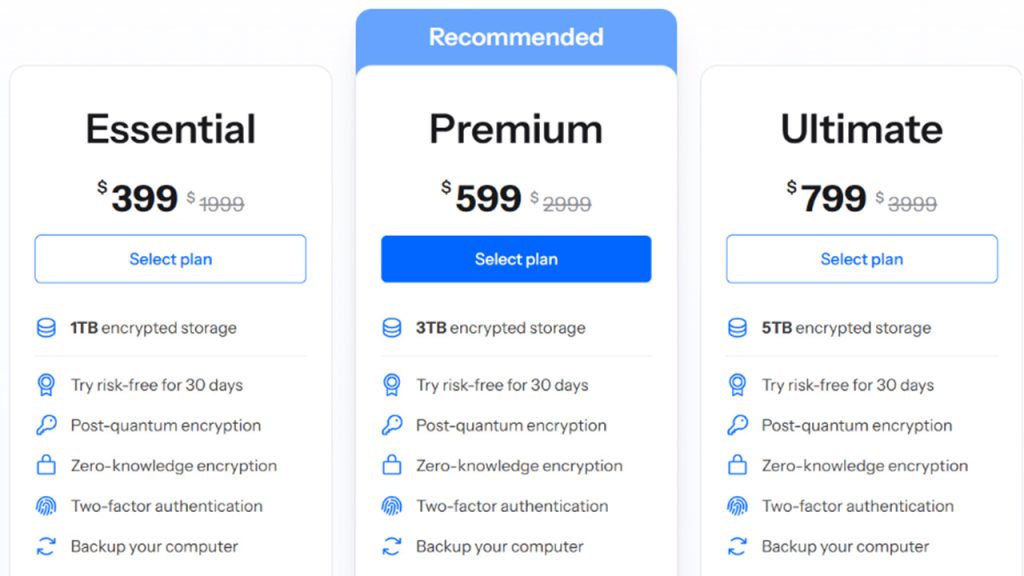
Internxt Pricing: You can choose between three pricing tiers: Essential, Premium, and Ultimate.
In recent years, the market has expanded significantly, and cloud storage alternatives now cover a much wider range of use cases, storage needs, and pricing models than most photographers realize.
Conclusion
Selecting the best cloud storage for your photographs is a critical decision that relies on your priorities. You need to define what you are looking for: better privacy, cost-effectiveness, the ability to sell and share your work, or storage capacity. Sync.com, NordLocker, BackBlaze, SmugMug, and Internxt each bring something very unique to the table. Assess your budget, workflow, and security requirements before committing to a place. A reliable cloud backup is not your optional plan anymore. It has become a core necessity to secure the work that you simply cannot lose.
Read also: Claude Skills: What They Are and How to Use Them Effectively

