
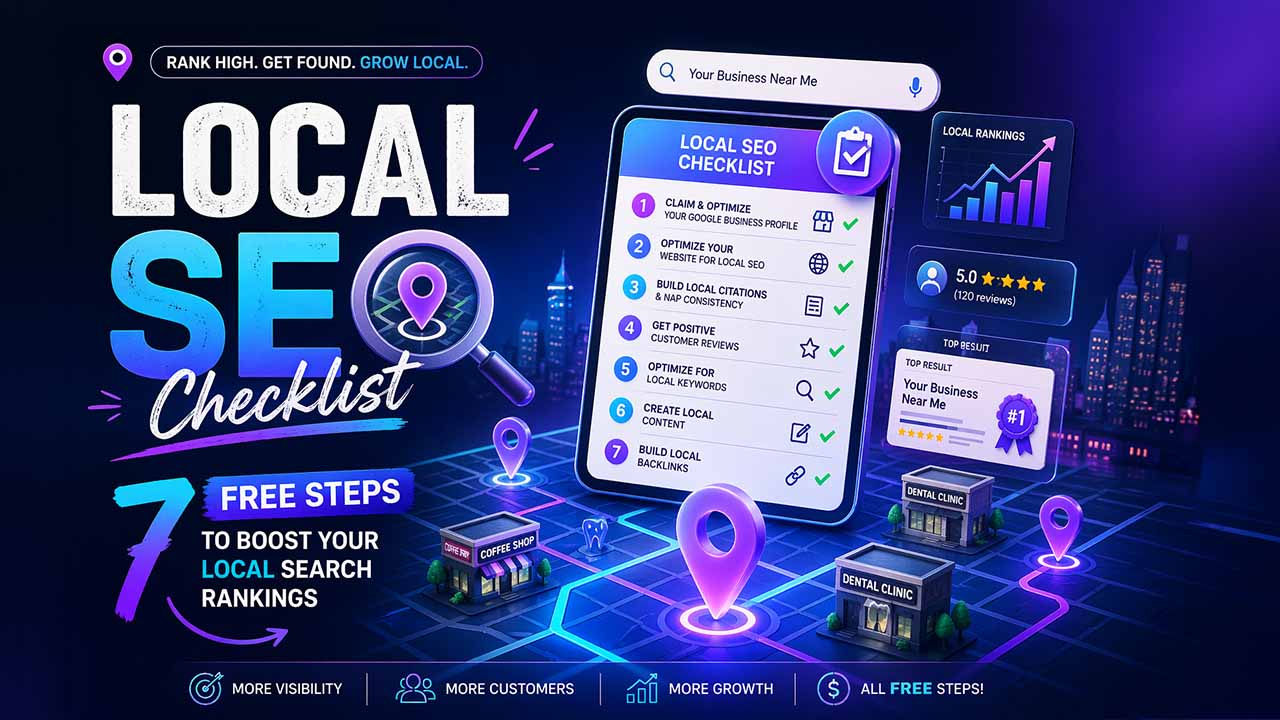
Local SEO Checklist: 7 Free Steps to Boost Your Local Search Rankings
Boost your local search rankings with this 7-step local SEO checklist — covering Google Business Profile, NAP citations, schema markups, and backlinks.
Don’t dwell too much on your marketing budget worries. Even if your marketing budget is less than that of your competitors, you can still grab the attention of locals who appreciate your offerings. In this blog, we offer you a local SEO checklist containing 7 free and easy actions that enable your website to stand apart in popular searches related to the market. You do not even have to be an expert to enhance your online visibility. Apart from giving you a checklist, we will also explain the local SEO in detail. First, let us understand the basics-
What Is Local SEO?
Local SEO is a low-cost and ongoing strategy that enhances your visibility for search queries regarding your offerings in particular locations. As it is true with each type of Search Engine Optimization, local SEO helps you attract organic traffic from local demographics. You do not have to pay any fees when people visit your website via organic listings on popular search engines such as Google, Bing, Yahoo, etc.
What Is the Difference Between Local SEO and Traditional SEO?
Traditional SEO does not confine you within geographical boundaries. Businesses utilize it to connect with a wide audience looking for general data, such as “health advantages of braces,” in the organic search listing.
Local SEO targets particular geographic locations such as “dentist in Washington, DC” or “CRM developer in Indianapolis.” You might have noticed that Google lists relevant websites at the top of the page for every local search result.
Why Is Local SEO Important?
Related walkthrough
15 SEO Mistakes Killing Your Google Rankings in 2026

As per Google, approximately 88% of locals are likely to visit a store within seven days of looking for a product or service on their desktop or phone. Local searchers understand what they want and generally do not click beyond the first page of Google to search for an offering. This is precisely why big enterprises invest substantially to appear on the 1st page. However, you do not need to do that. Local SEO for small businesses is effective and far more economical than paid advertisement strategies that require a fee for every click.
When it is done effectively, local SEO is one of the most successful strategies you can ever adopt. It gets you noticed online while also saving you considerable money.
How Does Local SEO Work?
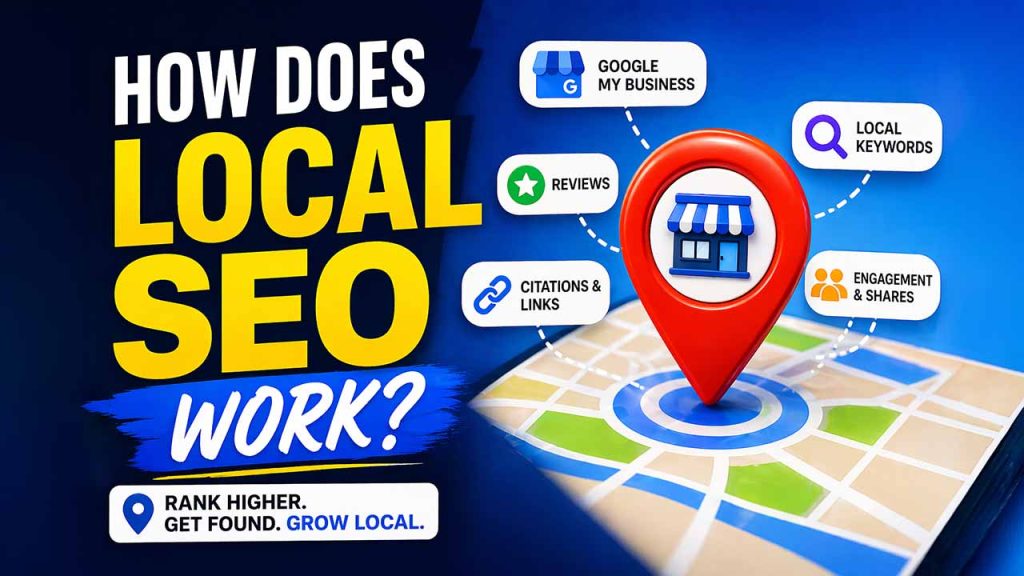
1. Appeal to Algorithms and Bots That Define Ranking Position:
Take particular actions that indicate that your website is user-friendly, helpful, and catering to the targeted location. This encourages computational mechanisms to make your website appear on the first page of search engines for all related local queries.
Getting a higher rank on Google depends on multiple technical factors and content elements. Nevertheless, important factors that define the local SEO checklist are as follows:
- Location data
- NAP citations
- Google My Business profile listing
- Social media shares
- Online reviews
- Keywords in page titles, content, and meta information, and headings
- Link signals
- Engagement signals
2. Connect to Humans Who Always See Your Website Appearing in Search Results:
You no longer see yourself buried on the tenth page of SERP results. It is time to share valuable content and reviews to attract people to your website and check out your products or services. Now, let us see a local Business SEO checklist and what you can do to enhance your visibility in local SEO results.
Local SEO Checklist: Step-by-Step Guide
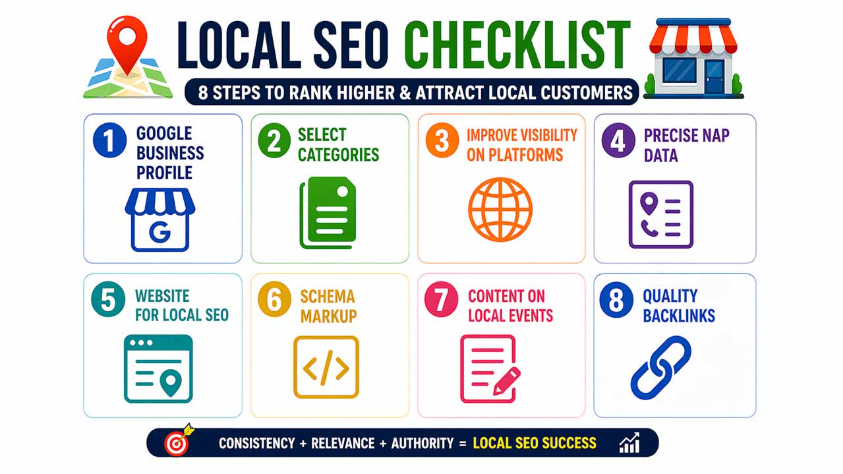
Step 1: Google Business Profile (Set Up and Update)
Your Google Business Profile aids in defining whether Google adds your website to the map section at the start of page one. An optimized Google Business Profile becomes an asset for attracting high website visits.
Ranking factors for Local SEO for Google Maps:
- Is your website relevant to the user’s query?
- What is the location of the business store or office, and how close is it to the user’s location?
- Is your business popular?
Create Your Google Business Profile:
Creating a Google Business Profile is free. You must update it with accurate data, which includes services, contact details, hours, business name, and testimonials. It involves top-quality images for your team and workplace.
Verify Your Profile:
Follow the steps of Google to claim and verify the Google Business Profile. You will receive a postcard or a phone call with a unique verification code. Ensure that the address, business name, phone number, operating hours, and website URL are correct.
Create a Business Description:
Describe your important offerings and unique selling points briefly. Mention why you are trustworthy and highlight key qualities that differentiate your business from the competition. Use location-specific keywords such as “Custom CRM Developer in Indianapolis” or “A2P verification specialist in New York.” If there is room to spare, you can even mention the true motivation behind your business. Keep in mind that the character limit is 750. Make sure that there are no grammatical mistakes, as it can make your profile look unprofessional. You can even put your business description in the free version of Grammarly to remove errors.
Add and Update Photos
Photos make your business highly relatable to customers. Upload top-quality images of the interior, storefront, team, and products. Update them! Google reveals that businesses with photos on their profile get 42% more direction requests and 35% better clicks to the website.
Read More: Add Me to Search- Complete Guide to Creating and Handling Your Google People Card
Step 2: Select Particular Categories for Google My Business
Selecting particular categories allows Google to interact with the right audience. You can choose from among 4,000 categories to select from. You can also look at your competitors and see what categories they are choosing from. Keep in mind that no local SEO checklist is ever complete without an effective selection of categories.
- Set Your Main Category: Describe your main service clearly to find out how your business shows up in search results. For example, an automotive business in Texas must choose a “Electric Vehicle Repair Service” instead of the wider “Auto Repair Shop.”
- Add Secondary Categories: Leverage additional categories to encompass your complete service range, but you should not overdo it. For example, a florist can add “Flower Delivery Service” or “Wedding Florist” as secondary categories.
- Regularly Update Your Categories: Check and adjust your categories regularly to make it aligned with modifications in your business focus or any new services. Ensure that your profile is visible and relevant.
Step 3: Improve Your Visibility on More Platforms
Do not add your data to Google My Business and think it is sufficient. Improving your visibility on more platforms is an important factor in the local SEO checklist. You must add your information to other digital directories as well. Keep in mind that a lot of these directories provide free basic listings, which is sufficient for a lot of businesses. There is nothing to lose, so you can create as many local citations as you want for your industry.
What are local citations?
Web references to your NAP data (business name, address, phone number) on apps, websites, social media, and local business directories. Make your citations quality, consistent, and accurate across all platforms.
Join an industry-specific directory:
Such a directory gives targeted exposure to customers who are already interested in your offering category. For instance, healthcare providers must focus on platforms such as HealthEngine, while lawyers can look for lawyer-related categories.
SavvySME is a well-known platform for small and medium businesses.
Just like your Google My Business profile, all directories must have:
- Address, accurate name, phone details (NAP data)
- Top-quality images
- Your brand offering’s clear description
Step 4: Precise NAP Data for Local Citations on Each Platform
68% of customers can ditch an online business with false listings. Your business data must be consistent and uniform across all platforms, such as Google Business Profile, website, social media, and all online directories. Search engines use data such as Name, Address, and Phone Number to verify as well as rank your business. Now, any errors in this data can send the user to neglected pages.
Inconsistent or inaccurate listings can create an invisible cloak around your website. Even if you get rankings despite errors, people can lose trust in your brand. A lot of customers can sever all relationships with the brand if they see that they have posted false information in their online directories. This is evident from an online study that found that nearly half of 73,000 businesses were found to be business location listings across mid-market, SMBs, and enterprise.
An ideal NAP details include the following:
- The business name is registered as it is.
- Full street address, including suite or unit numbers.
- Phone number has the correct area code.
- If your business is in the United States, you must have an EIN (Employee Identification Number)
Common Problems found in NAP are as follows:
- Variations in your business address or name, such as “Smith Cafe,” “Smith’s Cafe,” or “Street” vs “St.”
- Numerous phone numbers without a clear primary contact.
- Outdated details from a relocation or move.
- Regional differences in formatting, such as “New South Wales” or “NSW.”
Tools That Can Simplify NAP Management
| Tool Name | What It Does? | Why Use It? |
| Moz Local | Monitor citations | Finds and flags errors |
| Bright Local | Audits NAP data | Explores numerous directories |
| SEMrush | Handles local listing | Ensures updates in real-time |
Tips for Handling NAP Data:
Create a single master document that includes all your NAP details to avoid errors. Utilize this as your reference to consistently update listings. Check and update your information regularly across:
- Google Business Profile
- Your Website (including footer and contact pages)
- Social media accounts
- Australian business directories
- Industry-specific directories
Update your Google Business Profile first, and your website when you are making changes
- You can also utilize tools such as BrightLocal or Moz Local to track your citations, automate updates, and resolve any inconsistencies.
- Finally, do not forget to complete verification processes like mail or phone confirmations to make sure listings are credible.
Now, you can switch to refining your website for more effective local SEO results. Let us learn step 5 in our local SEO checklist.
Step 5: Streamline Your Website for Local SEO Results
Optimization of keywords is one of the effective ways to show search engines that your content is relevant to the query and deserves visibility.
Finding the Exact Keywords:
Find popular phrases or keywords associated with your offering (e.g., dental clinic) that also involve the location you are targeting.
Free platforms such as Google Keyword Planner can help you to look for phrases such as “PHP development company in New Jersey,” which is more specific than a “dental clinic.” Note: You must create a Google Ads account to access Google Planner, but this incurs no costs if you are not making advertisements.
Another option is to install a browser extension such as Keywords Everywhere, which costs close to $10 for every 100,000 keyword searches. When you activate the extension, it indicates how many people look for a specific phrase each month.
Adding Keywords to Your Website:
Now, it is time for you to integrate keywords into your website’s content, URL, titles, and meta preview data. However, make the placement of the keywords natural. You should not include the keywords where they look unnatural or spammy.
| Website Element | Example | Why It Matters? |
| Page Title | “Custom App developer in Minnesota” | Major ranking factor |
| Meta Description | “Professional App development services in Minnesota” | Enhances click-through rates |
| H1 Heading | “Reputed App development services in Minnesota” | Accentuates local relevance |
| Content | Naturally mention keywords at a few places in the content | Enhances search visibility |
Create Location Pages:
Does your business cater to numerous areas? Consider having dedicated pages for every location in order to attract local traffic. Include relevant keywords strategically in the content without any black hat SEO techniques such as keyword stuffing.
- In location pages, you should include:
- Unique service descriptions provided in the area.
- Case studies and testimonials from local customers.
- Pricing or service details specific to the area.
- Embedded maps that signal coverage.
- Mentions of community references or nearby landmarks.
Display contact details in the location pages and other content:
Ensure that your NAP (Name, Address, and Phone Number) becomes easy to find on your website. You can place them in the dedicated contact page:
- A dedicated contact page
- The footer, which is visible across all contact pages
- Service pages specific to a location
Here are a few tips to establish trust with your audience:
- Include EIN (Employee Identification Number)
- List the working hours of every location
- Provide emergency contact details if it is applicable
- Embed Google Maps for each location to enhance search rankings and usability
Once you streamline your website for targeted locations, you will be able to incorporate more sophisticated strategies, such as developing locally focused content and schema markup.
Read More: What Is Search Engine Positioning SEO and How to Get Started?
Step 6: Include Schema Markup
Adding a schema markup code to your website aids search engines in understanding your business better. You can show your technical algorithms how to display and interpret your business when people look for relevant terms. This strategy ensures rich snippets with eye-catching details such as star ratings, so you can easily attract more clicks in search engines.
Important types of Schema for Local SEO:
| Schema Type | Purpose and Important Details |
| Local Business | Includes EIN, service areas, and trading areas |
| Organization | Covers logo, business name, and contact details |
| Review | Displays ratings, customer feedback, and reviews |
| Place | Gives you service radius details and physical address |
How Can You Execute Schema Markup?
When you are adding schema markup, you need to emphasize vital details:
- Include the Employee Identification Number in the schema of the organization
- For trading hours, utilize a 24-hour format
- Add details of the service area for every location if you have numerous branches
- Update your schema markup consistently whenever there is a change in business data
As per Google, you need to use JSON-LD to execute schema markup. For in-depth instructions, you can refer to the structured data documentation of Google:
Maintenance and Validation Tips:
To make sure that the schema is working correctly, you need to utilize tools such as:
- Rich Results Test of Google
- Schema Markup Validator
- Google Search Console
For businesses that have multiple locations, you need to create individual schema entries for every branch while ensuring a parent schema for the overall business.
Special considerations for US-based businesses:
- Ensure that EIN details are accurate
- Define trading for every location clearly
- Specify service areas for more clarity
- Your schema should be promptly updated if there is a change in business data
Step 7: Create Content on Local Events to Interact with Your Audience
We addressed the significance of location pages for each service or product. However, this is very different. You should actively engage your audience by writing about wider topics related to your business values and community, such as news, politics, local events, or other interesting portions of data.
Examples:
- A Trenton-based automobile company can create a blog post about the recent Auto Expo in New Jersey with in-depth insights that can attract target audiences
- A tech company in London can write content on events happening in the upcoming tech trade shows in London
Share contributions within your community:
Showcase participation within your community to establish trust with your audience, which supports your local SEO performance ultimately. Authentic engagement is also an important factor that defines the local SEO checklist. You need to focus on meaningful interactions.
How Can You Highlight Engagement Within Your Community?
- Share stories about the participation of your team in local events.
- Highlight partnerships with local businesses or customer success stories
- Post regarding your involvement in neighborhood projects or charities
What Are the Tips for Developing Local Content?
- Include keywords specific to a location and top-quality visuals
- Tag local businesses and keep your content updated
- Add details about the event and related keywords to attract local searches
Step 8: Develop Quality Backlinks
Backlinks are an effective way to enhance your search engine authority and boost your local SEO. Linking your business with credible websites such as GuestPostCRM shows that your brand is relevant and credible in the local market.
Target Websites with Local Authority:
Emphasize getting your backlinks from trusted websites and improving your backlink profile. If you are a local business, target websites with local domain names such as .ae, .au, .in, etc. These can involve industry groups, chambers of commerce, regional news platforms, and industries. If you are a tech company, connect with websites with detailed technology write for us pages. Such websites are selective about the content they want to publish on their website and hold a good reputation in the market.
Publish Content That Others Wish to Share:
Create engaging and well-researched content that can attract backlinks naturally. Consider producing regional guides, industry studies, or expert interviews. Anything that can give authentic value to your audience.
Develop Real Relationships Within Your Local Business Network:
- Join sponsorships and community events
- Create guest posts to publish on local business websites
- Find unlinked mentions of your requesting links and brand
Track Your Backlink Success:
Utilize your SEO tools to track the performance of your backlinks. Go for a reliable tool such as Backlink Checker, Ahrefs. Pay attention to metrics such as:
- The domain authority of the websites that link to you.
- Are backlinks from reputable sources?
- How relevant are links to your industry?
Quality is more significant than quantity. A single backlink from a credible website is more important than hundreds of backlinks from irrelevant or low-quality websites. Be sure to avoid spammy or unrelated sources; they will hurt you more than they can help you.
check a site’s DA before acquiring links by da pa checker
Conclusion
Executing this local SEO checklist can position your business at the forefront of local markets, attracting local customers who actively look for your offering. From streamlining your Google Business Profile to developing quality backlinks, every step boosts your online presence without incurring heavy advertising expenses. Strategic keywords, consistent NAP data, schema markup, and community-focused content collectively send good signals to search engines. Begin with one step, remain consistent, and your local rankings can steadily improve. This can bring in higher foot traffic and genuine customers straight to your door.

